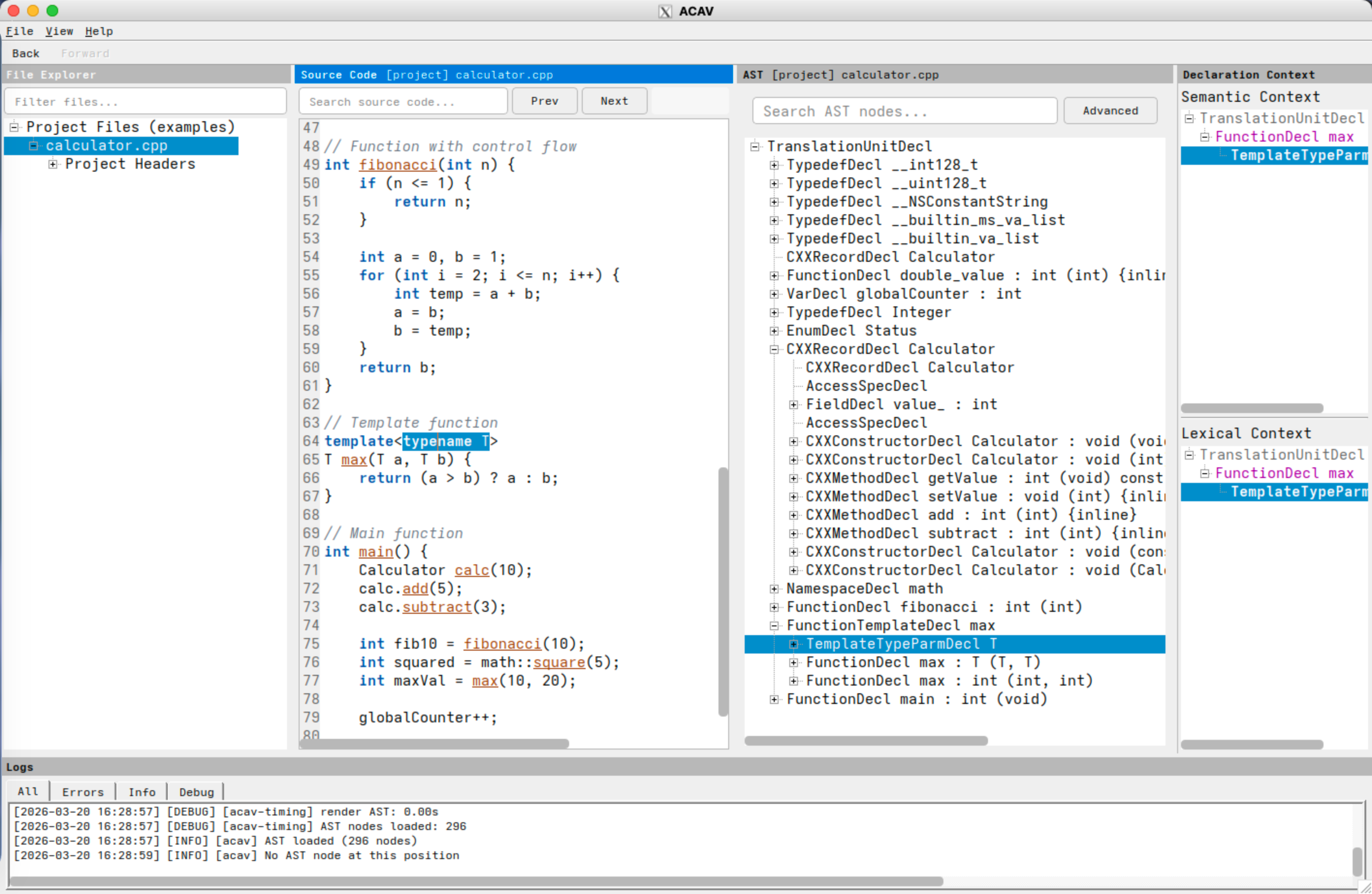
ACAV (Aurora Clang AST Viewer) is an interactive Abstract Syntax Tree (AST) visualization tool for C, C++, and Objective-C, built with Clang and Qt. Given a JSON compilation database such as compile_commands.json, ACAV lets you open a real project, inspect the AST for a translation unit, and move directly between source code and AST nodes.

Screenshot: ACAV displaying the file explorer, source-code panel, AST tree view, declaration-context panels, and log panel.
With a valid compilation database, ACAV lets you:
- inspect the AST for a translation unit in a navigable tree,
- move in both directions between source locations and AST nodes,
- view declaration context while exploring program structure,
- search both source text and AST nodes, and
- reuse dependency and AST-cache artifacts across sessions.
ACAV follows a three-program architecture:
- acav is the interactive GUI application.
- query-dependencies extracts dependency information from a compilation database.
- make-ast builds and caches serialized AST files for individual source files.
ACAV addresses the gap between Clang's powerful front-end infrastructure and the practical difficulty of exploring Clang ASTs interactively. It is designed for real codebases rather than toy examples: it reads a JSON compilation database, applies the recorded build settings for each source file, and keeps the interface responsive through background processing and AST caching.
ACAV is useful for students learning compiler internals, researchers studying program structure, and developers building or debugging Clang-based tools. Its current scope is intentionally limited to read-only AST exploration. ACAV does not modify source code, perform refactoring, or act as a general-purpose editor, and it displays the AST of one translation unit at a time.
The typical workflow is:
- Generate or locate a compilation database for the target project.
- Build or install ACAV by following Installation.
Launch ACAV:
acav -c /path/to/compile_commands.json
- Browse files in the file explorer, then double-click a file or press F5 to generate or load its AST.
- Use the source view, AST view, and declaration context view to navigate the program structure.
- License points to the authoritative license file.
- Installation covers prerequisites, native builds, and the containerized workflow.
- Docker/Podman Demo Image provides detailed OCI demo image instructions.
- User Manual describes the GUI, common workflows, the command-line programs, keyboard shortcuts, and configuration.
- References lists related technologies and resources.
- Classes provides the generated class reference.
- Files provides the generated file reference.
- Changelog provides public release notes for ACAV.
- Notice provides project attribution, authorship, and licensing context.
If you are new to ACAV, start with this overview, then Installation, and then User Manual. If you want to inspect the API surface, use Classes and Files. If you want to review public release notes, see the Changelog.