
LangChain Integration for Vector Support for Azure SQL and SQL database in Microsoft Fabric
Microsoft SQL now supports native vector search capabilities in Azure SQL and SQL database in Microsoft Fabric. We also released the langchain-sqlserver package, enabling the management of SQL Server as a Vectorstore in LangChain. In this step-by-step tutorial, we will show you how to add generative AI features to your own applications with just a few lines of code using Azure SQL DB, LangChain, and LLMs.
Our Example Dataset
The Harry Potter series, written by J.K. Rowling, is a globally beloved collection of seven books that follow the journey of a young wizard, Harry Potter, and his friends as they battle the dark forces led by the evil Voldemort. Its captivating plot, rich characters, and imaginative world have made it one of the most famous and cherished series in literary history
By using a well-known dataset, we can create engaging and relatable examples that resonate with a wide audience
This Sample dataset from Kaggle contains 7 .txt files of 7 books of Harry Potter. For this demo we will only be using the first book – Harry Potter and the Sorcerer’s Stone.
Use cases:
Whether you’re a tech enthusiast or a Potterhead, we have two exciting use cases to explore:
- A Q&A system that leverages the power of SQL Vector Store & LangChain to provide accurate and context-rich answers from the Harry Potter Book.
- Next, we will push the creative limits of the application by teaching it to generate new AI-driven Harry Potter fan fiction based on our existing dataset of Harry Potter books. This feature is sure to delight Potterheads, allowing them to explore new adventures and create their own magical stories.
Building the sample application
Step 1: Install the new langchain-sqlserver python package.
The code lives in an integration package langchain-sqlserver
!pip install langchain-sqlserver==0.1.1Step 2: Loading Dataset from Azure Blob storage & Chunking it
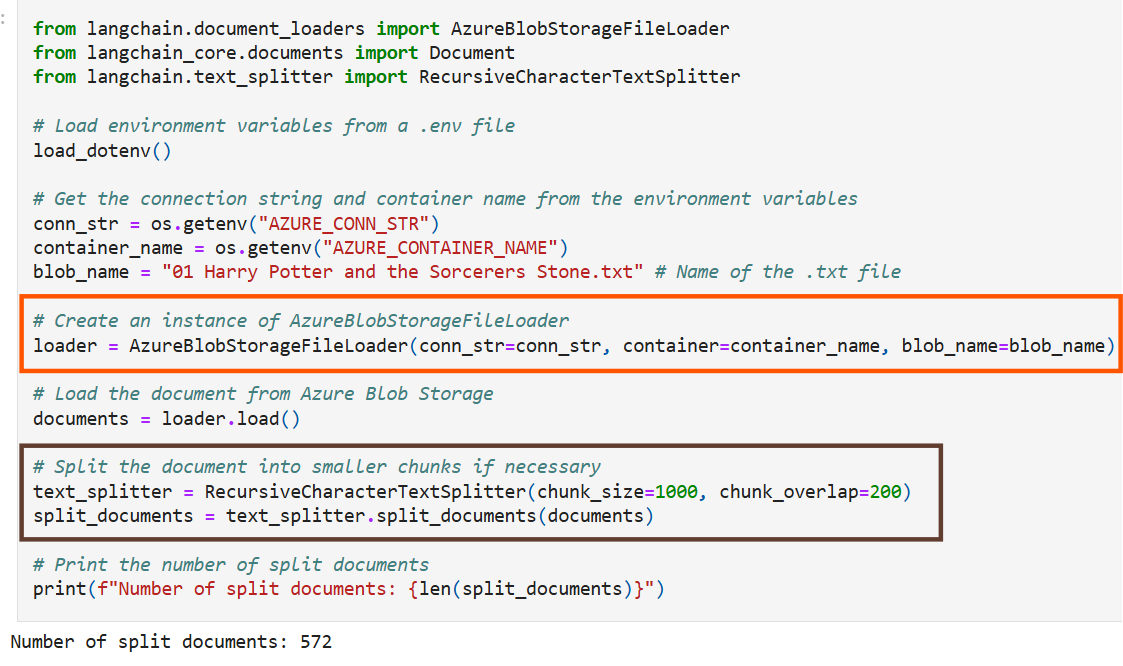
In this example, we will use a dataset consisting of text files from the Harry Potter books, which are stored in Azure Blob Storage
LangChain has a seamless integration with AzureBlobStorage, making it easy to load documents directly from Azure Blob Storage.
Additionally, LangChain provides a method to split long text into smaller chunks, using langchain-text-splitter which is essential since Azure OpenAI embeddings have an input token limit.
Step 3: Define function for Embedding Generation & Chat Completion
In this example we use Azure OpenAI to generate embeddings of the split documents, however you can use any of the different embeddings provided in LangChain.
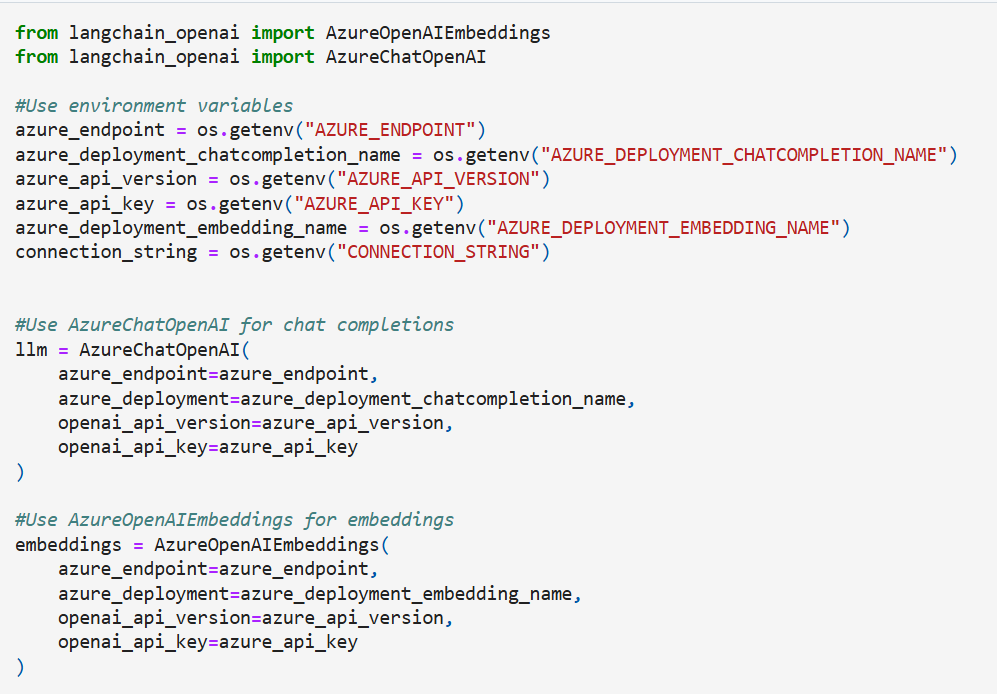
Step 4: Initialize the Vector Store & insert the documents into Azure SQL with their embeddings
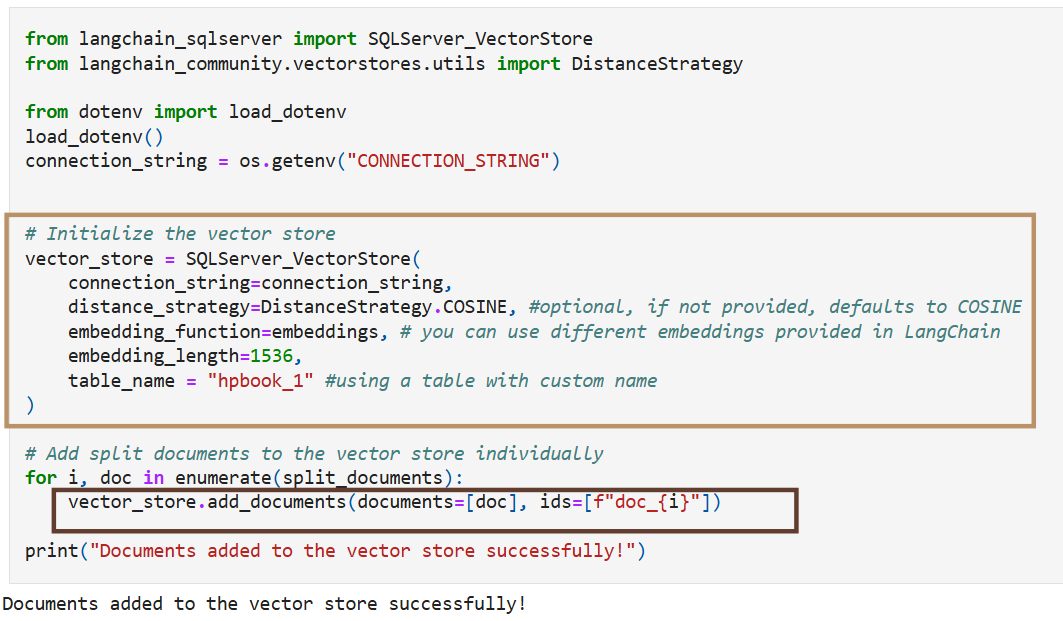
After splitting the long text files of Harry Potter books into smaller chunks, you can generate vector embeddings for each chunk using the Text Embedding Model available through AzureOpenAI. Notice how we can accomplish this in just a few lines of code!
- First, initialize the vector store and set up the embeddings using AzureOpenAI
- Once we have our Vector Store we can add items to our vector store by using the add_documents function
Step 5: Querying Data – Similarity Search
Once your vector store has been created and the relevant documents have been added you can now perform similarity search.
The vectorstore also supports a set of filters that can be applied against the metadata fields of the documents. By applying filters based on specific metadata attributes, users can limit the scope of their searches, concentrating only on the most relevant data subsets.
Performing a simple similarity search can be done as follows with the similarity_search_with_score

Use Case 1: Q&A System based on the Story Book
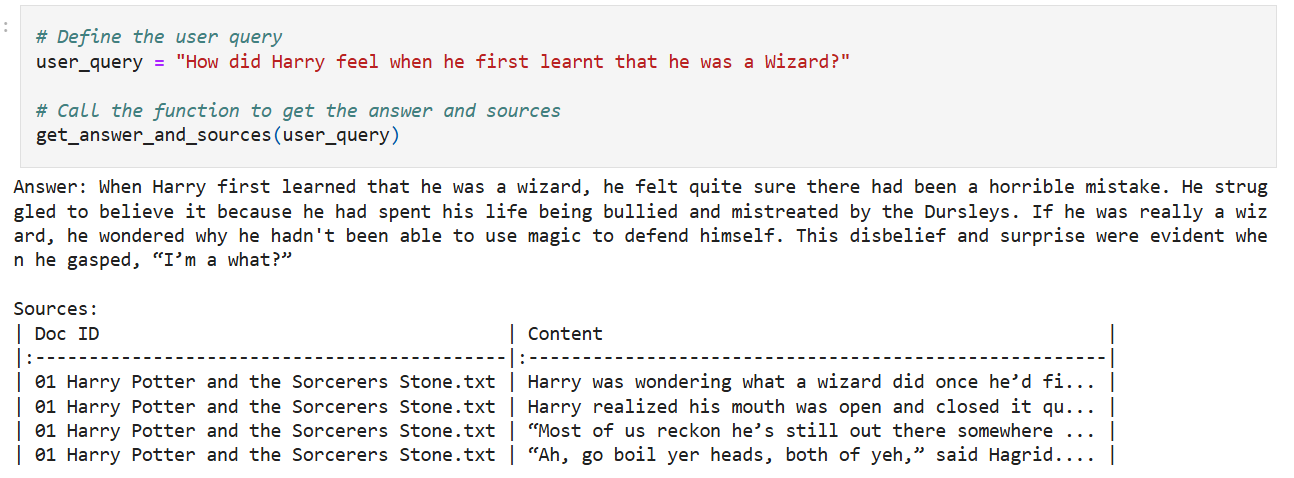
The Q&A function allows users to ask specific questions about the story, characters, and events, and get concise, context-rich answers. This not only enhances their understanding of the books but also makes them feel like they’re part of the magical universe.
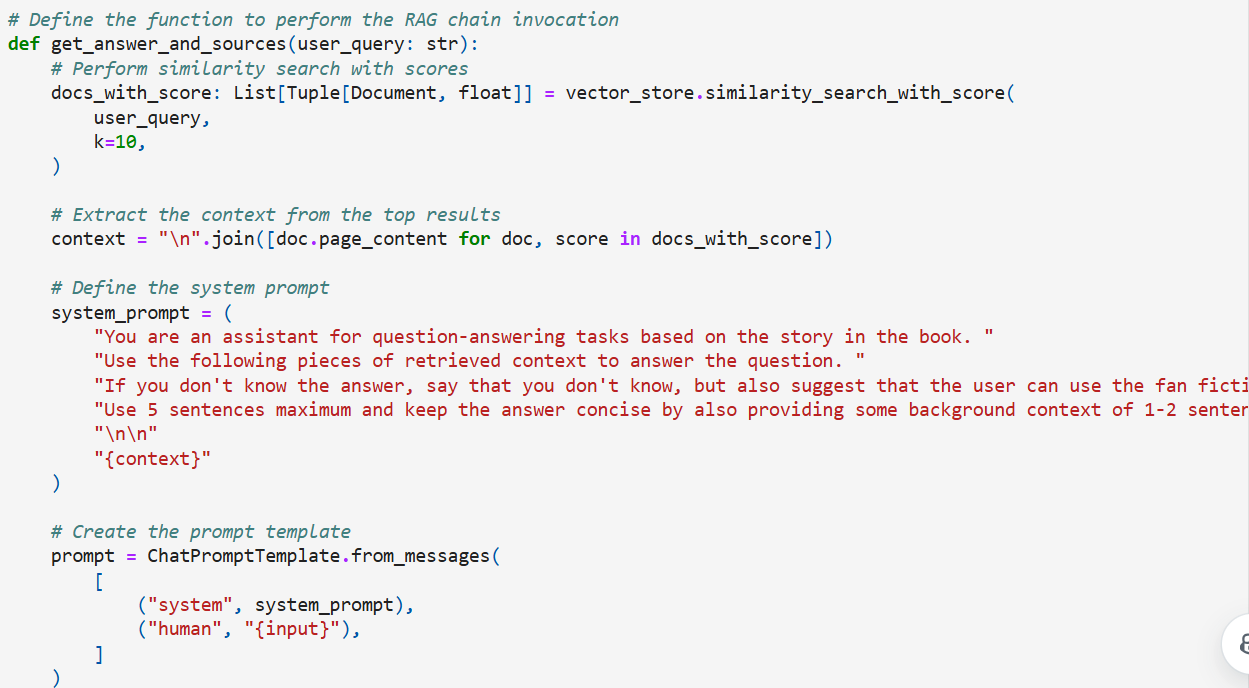
The LangChain Vector store simplifies building sophisticated Q&A systems by enabling efficient similarity searches to find the top 10 relevant documents based on the user’s query.
- The retriever is created from the vector_store, and the question-answer chain is built using the create_stuff_documents_chain function.
- A prompt template is crafted using the ChatPromptTemplate class, ensuring structured and context-rich responses.
- Often in Q&A applications it’s important to show users the sources that were used to generate the answer. LangChain’s built-in create_retrieval_chain will propagate retrieved source documents to the output under the “context” key:
Read more about Langchain RAG tutorials & the terminologies mentioned above here
 We can now ask the user question and receive responses from the Q&A System:
Use Case 2: Generate fan fiction base
Potterheads are known for their creativity and passion for the series. With this they can craft their own stories based on user prompt given , explore new adventures, and even create alternate endings. Whether it’s imagining a new duel between Harry and Voldemort or crafting a personalized Hogwarts bedtime story for you kiddo, the possibilities are endless.
The fan fiction function uses the embeddings in the vector store to generate new stories
- Retrieving Relevant Passages: When a user provides a prompt for a fan fiction story, the function first retrieves relevant passages from the SQL vector store. The vector store contains embeddings of the text from the Harry Potter books, which allows it to find passages that are contextually similar to the user’s prompt.
- Formatting the Retrieved Passages: The retrieved passages are then formatted into a coherent context. This involves combining the text from the retrieved passages into a single string that can be used as input for the language model.
- Generating the Story: The formatted context, along with the user’s prompt, is fed into a language model GPT4o to generate the fan fiction story. The language model uses the context to ensure that the generated story is relevant and coherent, incorporating elements from the retrieved passages.
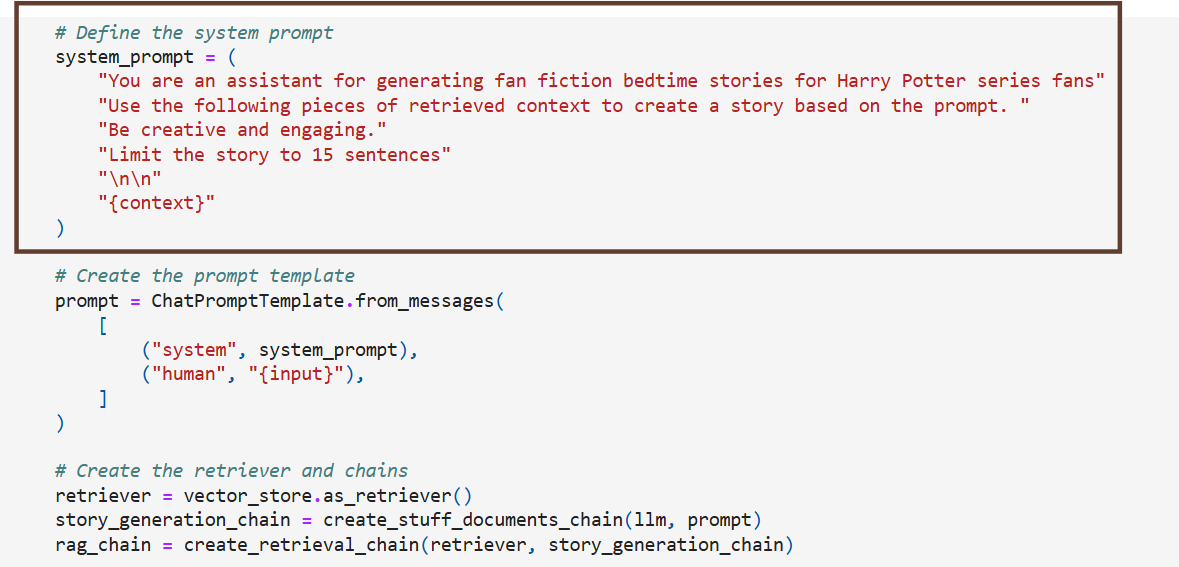
Let’s imagine we prompt with this
Don’t miss the discussion around the “Vector Support in SQL – Public Preview” by young Davide on the Hogwarts Express! Even the Wizards are excited!
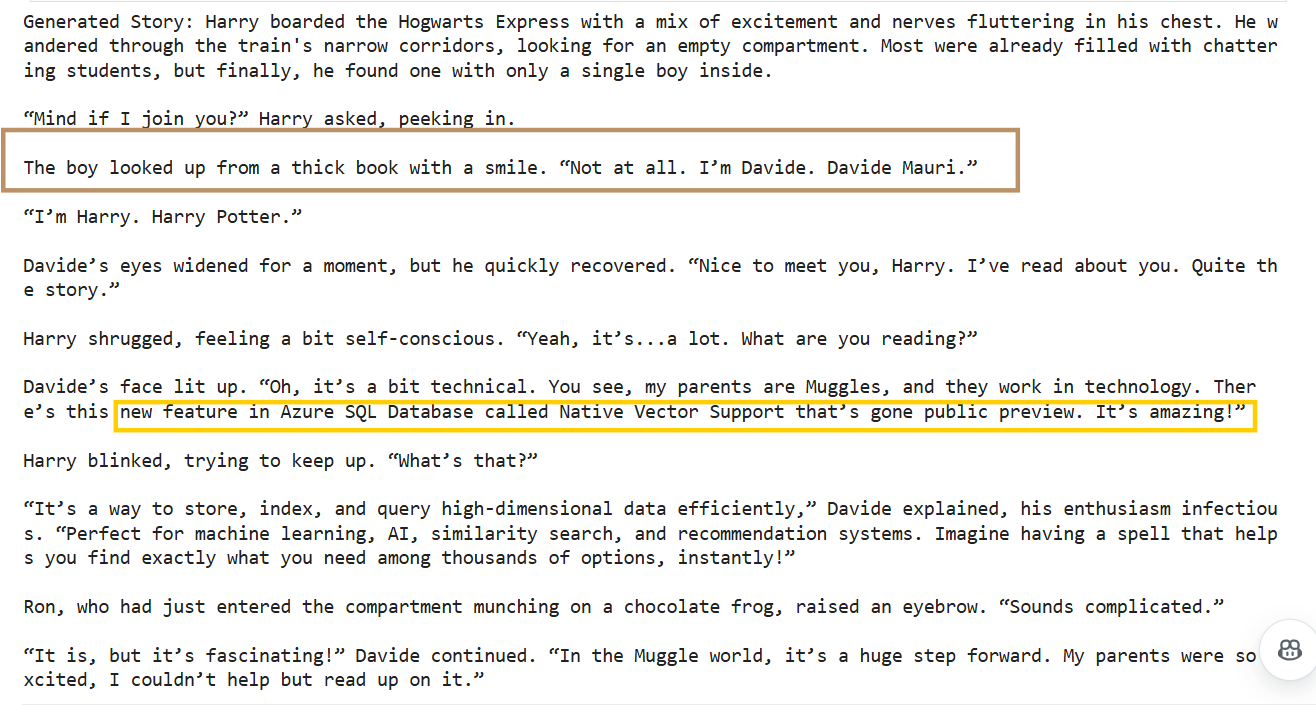

As you can see along with generating the story it also mentions the sources of inspiration from the Vector Store above
 Hence, by combining the Q&A system with the fan fiction generator offers a unique and immersive reading experience.
If users come across a puzzling moment in the books, they can ask the Q&A system for clarification. If they’re inspired by a particular scene, they can use the fan fiction generator to expand on it and create their own version of events. This interactive approach makes reading more engaging and enjoyable.
Hence, by combining the Q&A system with the fan fiction generator offers a unique and immersive reading experience.
If users come across a puzzling moment in the books, they can ask the Q&A system for clarification. If they’re inspired by a particular scene, they can use the fan fiction generator to expand on it and create their own version of events. This interactive approach makes reading more engaging and enjoyable.
Code Samples
You can find this notebook in the GitHub Repo along with other samples: https://github.com/Azure-Samples/azure-sql-db-vector-search.
We’d love to hear your thoughts on this feature! Please share how you’re using it in the comments below and let us know any feedback or suggestions for future improvements. If you have specific requests, don’t forget to submit them through the Azure SQL and SQL Server feedback portal, where other users can also contribute and help us prioritize future developments. We look forward to hearing your ideas!