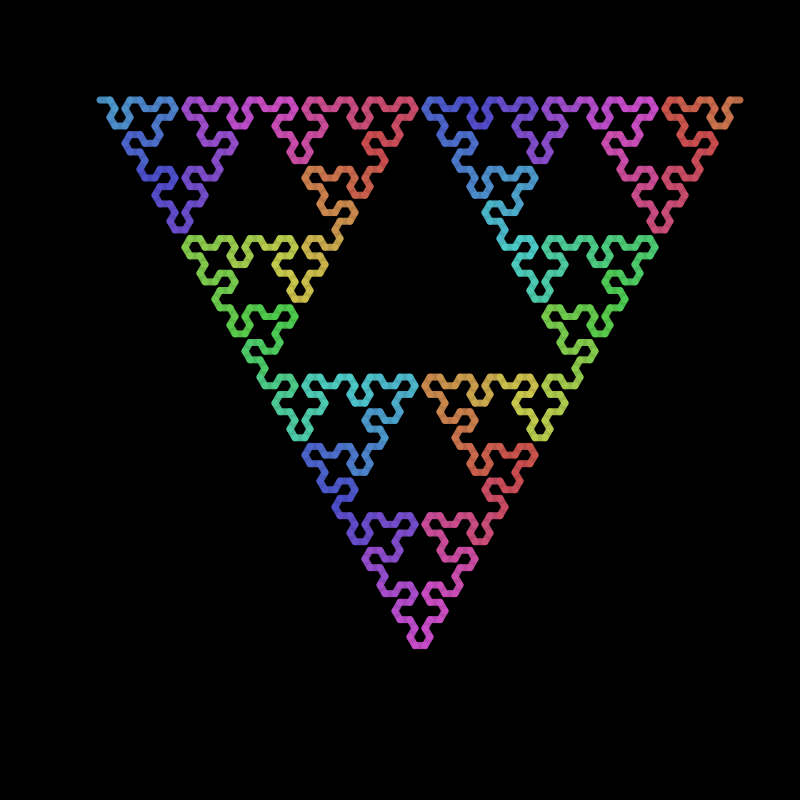
This is a simple package that can make LSystems. It uses Luxor.jl to draw them.
An LSystem, or Lindenmayer system, is a set of rules that can define recursive patterns.
These were introduced and developed in 1968 by Aristid Lindenmayer, a Hungarian theoretical biologist and botanist at the University of Utrecht. Lindenmayer used LSystems to describe the behaviour of plant cells and to model the growth processes of plant development. LSystems have also been used to model the morphology of a variety of organisms and can be used to generate self-similar fractals such as iterated function systems.
In Lindenmayer.jl you can define an LSystem like this:
sierpinski_triangle = LSystem([
        "F" => "G+F+Gt",
        "G" => "F-G-F"],
    "G")
This one has two rules, and an initial state. You can draw it using the drawLSystem() function.
For example:
using Lindenmayer
sierpinski_triangle  = LSystem([
        "F" => "G+F+Gt",
        "G" => "7F-G-F"
    ],
    "G")

drawLSystem(sierpinski_triangle,
    forward     = 10,
    turn        = 60,
    iterations  = 6,
    startingx   = -300,
    startingy   = -300,
    filename    = :svg)
In Lindenmayer.jl, an LSystem consists of:
Rules: one or more search and replace rules in a
Vector. Each rule replaces a single-character string with a string of one or more charactersInitial state: the initial seed state for the system (sometimes called "the Axiom")
State: the current evolved state (initially empty, added when the system is evaluated)
The sierpinski_triangle LSystem has two rules. The first rule says replace "F" with "G+F+Gt" at every iteration. Rule 2 says replace "G" with "F-G-F" at every iteration. We start off with an initial state consisting of just a single "G".
So the system State grows like this:
1: G
2: (F-G-F) # after applying rule 2
3: (G+F+G)-(F-G-F)-(G+F+G) # after applying rule 1
4: (F-G-F)+(G+F+G)+(F-G-F)-(G+F+G)-(F-G-F)-(G+F+G)-(F-G-F)+(G+F+G)+(F-G-F)
5: (G+F+G)-(F-G-F)-(G+F+G)+(F-G-F)+(G+F+G)+(F-G-F)+(G+F+G)-(F-G-F)-(G+F+G)-(F-G-F)+(G+F+G)+(F-G-F)-(G+F+G)-(F-G-F)-(G+F+G)-(F-G-F)+(G+F+G)+(F-G-F)-(G+F+G)-(F-G-F)-(G+F+G)+(F-G-F)+(G+F+G)+(F-G-F)+(G+F+G)-(F-G-F)-(G+F+G)
6: (F-G-F)+(G+F+G)+(F-G-F)-(G+F+G)-(F-G-F)-(G+F+G)-(F-G-F)+(G+F+G)+(F-G-F)+(G+F+G)-(F-G-F)-(G+F+G)+(F-G-F)+(G+F+G)+(F-G-F)+(G+F+G)-(F-G-F)-(G+F+G)+(F-G-F)+(G+F+G)+(F-G-F)-(G+F+G)-(F-G-F)-(G+F+G)-(F-G-F)+(G+F+G)+(F-G-F)-(G+F+G)-(F-G-F)-(G+F+G)+(F-G-F)+(G+F+G)+(F-G-F)+(G+F+G)-(F-G-F)-(G+F+G)-(F-G-F)+(G+F+G)+(F-G-F)-(G+F+G)-(F-G-F)-(G+F+G)-(F-G-F)+(G+F+G)+(F-G-F)-(G+F+G)-(F-G-F)-(G+F+G)+(F-G-F)+(G+F+G)+(F-G-F)+(G+F+G)-(F-G-F)-(G+F+G)-(F-G-F)+(G+F+G)+(F-G-F)-(G+F+G)-(F-G-F)-(G+F+G)-(F-G-F)+(G+F+G)+(F-G-F)+(G+F+G)-(F-G-F)-(G+F+G)+(F-G-F)+(G+F+G)+(F-G-F)+(G+F+G)-F-G-F-(G+F+G)+F-G-F+(G+F+G)+F-G-F-(G+F+G)-F-G-F-(G+F+G)-F-G-F+(G+F+G)+F-G-F... etc.
and, afer only a few iterations, the state consists of thousands of instructions.
Use drawLSystem() to evaluate and draw the LSystem. The characters in the rule are interpreted as instructions to control a Luxor.jl turtle.
"F" and "G" both convert to
Luxor.Forward()"+" rotates the turtle clockwise
"-" rotates the turtle counterclockwise
"5" specifies a 5 pt thick line
"t" shifts the pen's hue color by 5°
The actual distance moved by "F" and "G" instructions, the angle of the turn, and other starting parameters, are specified when you evaluate the LSystem.
The following characters are turtle-ese, referring to existing instructions:
& * + - 1 2 3 4 5 6 7 8 9 @
B D F G O T U V [ ]
b c f l n o q r s t
You can use the remaining letters as placeholders or variables as you like. For example, the following Hilbert LSystem uses L and R, which don't do anything on their own - but they do expand to use plenty of "F", "+", and "-" rules.
hilbert_curve = LSystem([
   "L" => "+RF-LFL-FR+",
   "R" => "-LF+RFR+FL-"
   ],
   "3L") # 90°
To evaluate and draw the LSystem, use drawLSystem().
drawLSystem(LSystem(["F" => "5F+F--F+Ftt"], "F"),
    startingx = -400,
    forward = 4,
    turn = 80,
    iterations = 6)
Keyword options and defaults for drawLSystem are:
forward              = 15,
turn                 = 45,
iterations           = 10,
filename             = "/tmp/lsystem.png",
width                = 800,
height               = 800,
startingpen          = (0.3, 0.6, 0.8), # starting color in RGB
startingx            = 0,
startingy            = 0,
startingorientation  = 0,
backgroundcolor      = colorant"black",
asteriskfunction     = (t::Turtle) -> (),
showpreview          = true
The following characters are recognized in LSystem rules.
| Character in rule | Function |
|---|---|
| - | turn backwards by angle |
| [ | push the current state on the stack |
| ] | pop the current state off the stack |
| @ | turn 5° |
| * | execute the supplied function |
| & | turn -5° |
| + | turn by angle (degrees!) |
| 1 | set line width to 1 |
| 2 | set line width to 2 |
| 3 | set line width to 3 |
| 4 | set line width to 4 |
| 5 | set line width to 5 |
| 6 | set line width to 6 |
| 7 | set line width to 7 |
| 8 | set line width to 8 |
| 9 | set line width to 9 |
| B | step backwards |
| b | turn 180° and take half a step forward |
| c | randomize the saturation |
| D | pen down (start drawing) |
| f | half a step forward |
| F | step Forward |
| G | same as F |
| l | increase the step size by 1 |
| n | set line width to 0.5 |
| O | choose a random opacity value |
| o | draw a circle with radius step/4 |
| q | draw a square with side length step/4 |
| r | turn randomly by 10° 15° 30° 45° or 60° |
| s | decrease the step size by 1 |
| T | change the hue at random |
| t | shift the hue by 5° |
| U | lift the pen (stop drawing) |
| V | same as B |
You can define one external function in an LSystem. Whenever you include the * character in a rule, a function passed to drawLSystem() using the keyword option asteriskfunction will be called. This function accesses the Luxor turtle that's currently busy drawing the LSystem.
In the next example, a circle is drawn whenever the evaluation encounters a *. The advantage of using this (rather than the o) is that the radius of the circle can be made to vary with the distance from the center.
phyllotax = LSystem(["A" => "A+[UFD*]ll"], "A")

counter = 0
f(t::Turtle) = begin
   global counter
   fontsize(22)
   d = distance(O, Point(t.xpos, t.ypos))
   sethue(HSL(mod(counter, 360), 0.8, 0.5))
   circle(Point(t.xpos, t.ypos), rescale(d, 1, 200, 3, 15), :fill)
   counter += 1
end

drawLSystem(phyllotax,
   forward=65,
   turn=137.5,
   iterations=200,
   startingx=0,
   startingy=0,
   width=1000,
   height=1000,
   filename=:png,
   asteriskfunction=f
)
In the next example, the asterisk function f(t::Turtle) passed to drawLSystem() is a bit disruptive. It changes the line width, sets the color, and then draws a group of rescaled pentagons at the turtle's current location and other rotationally symmetrical places. Then, it sets the opacity to 0. The turtle never realises this and never resets it (the t hue-shifting rule uses Luxor.sethue() which doesn't change the current opacity). So all the lines drawn by the turtle are completely transparent, leaving just the pentagons visible.
using Lindenmayer, Luxor, Colors

recursive = LSystem([
   "F" => "G+F+G6t",
   "G" => "F*-G-F"
    ],
   "G2")

f(t::Turtle) = begin
    p = Point(t.xpos, t.ypos)
    setline(3)
    setopacity(1)
    setcolor(HSB(rand(0:359), 0.7, 0.7))
    for i in 0:4
        @layer begin
            rotate(i * deg2rad(72))
            ngon(p, rescale(distance(p, O), 1, 1000, 3, 20), 5, 0, :stroke)
        end
    end
    setopacity(0.0)
end

drawLSystem(recursive,
    forward=10,
    turn=72,
    iterations= 7,
    startingx = 0,
    startingy = 0,
    width=800,
    height=1000,
    backgroundcolor = colorant"black",
    filename=:png,
    asteriskfunction = f)
drawLSystem() has plenty of options, but you might prefer to use an LSystem in a regular Luxor workflow. To do this, use the Lindenmayer.evaluate() and Lindenmayer.render() functions separately.
After Lindenmayer.evaluate() has run, the LSystem struct has all the turtle operations stored (as UInt16 integers) in the .state field. Lindenmayer.render() can convert these to Luxor turtle instructions.
using Lindenmayer
using Luxor
using Colors

@drawsvg begin
   background("black")
   setlinecap("round")
   penrose = LSystem(Dict("X" => "PM++QM----YM[-PM----XM]++t",
         "Y" => "+PM--QM[---XM--YM]+t",
         "P" => "-XM++YM[+++PM++QM]-t",
         "Q" => "--PM++++XM[+QM++++YM]--YMt",
         "M" => "F",
         "F" => ""),
      "[Y]++[Y]++[Y]++[Y]++[Y]")

   # evaluate the LSystem
   Lindenmayer.evaluate(penrose, 5)

   # create a turtle
   🐢 = Turtle()
   Penwidth(🐢, 5)
   Pencolor(🐢, "cyan")

   # render the LSystem's evaluation to the drawing;
   # forward step is 45
   # turn angle is 36°
   Lindenmayer.render(penrose, 🐢, 45, 36)
end 800 800
To debug:
ENV["JULIA_DEBUG"] = LindenmayerTo stop debugging:
ENV["JULIA_DEBUG"] = nothingDocumentation built 2025-07-08T14:20:35.201 with Julia 1.11.5 on Linux