Introduction
Browser-based and computer-use agents are becoming increasingly popular for automating consumer workflows that involve interacting with web applications through clicks, typing, and navigation. Many of these workflows mirror how humans use personal assistant tools today—by coordinating information across multiple applications such as email, calendars, and booking platforms.
However, it remains unclear whether current frontier computer-use agents are capable of reliably completing such workflows. Most existing benchmarks for web or computer-use agents focus on isolated, single-application tasks. Typical examples include actions such as adding a product to an online cart or creating a single calendar event. While these benchmarks are useful for evaluating atomic interaction capabilities, they do not reflect how humans actually use personal assistant agents (or human personal assistants) in practice.
Real-world personal assistant tasks are inherently multi-step and multi-application. They require agents to understand context, switch between applications, reason over information distributed across different interfaces, and take coordinated actions to achieve a meaningful goal. Evaluating agents solely on isolated tasks fails to capture these requirements.
To address this gap, we introduce PA Bench, a benchmark designed to evaluate the ability of frontier computer-use agents to complete realistic, long-horizon personal assistant workflows involving multiple web applications. PA Bench focuses on tasks that require agents to interact, reason, and act across applications under deterministic and verifiable conditions, enabling reliable comparisons between models.
Experiment Setup
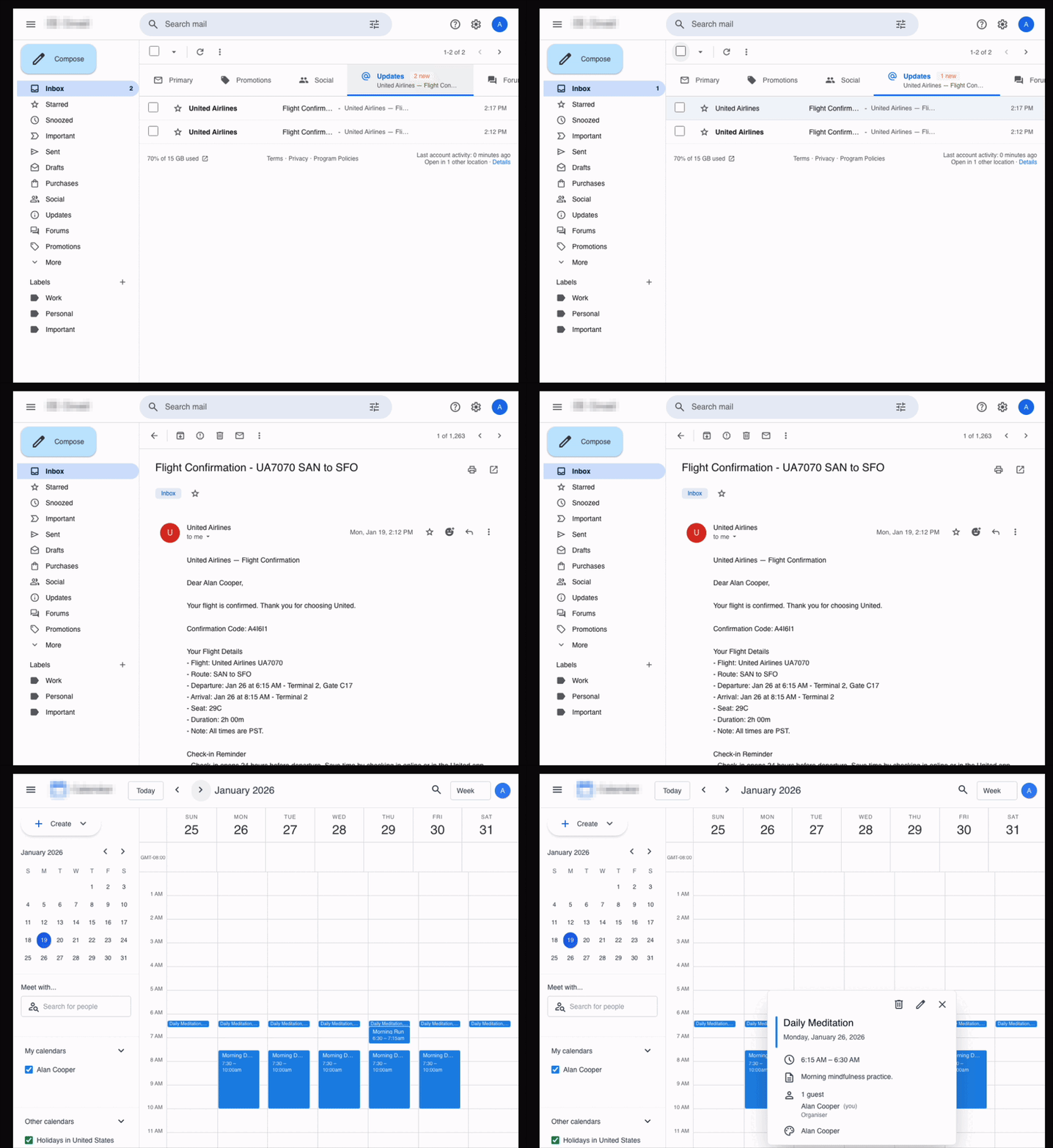
The above image shows an example task from PA Bench: the agent needs to open the user's email application, find the airline confirmation emails, read them, understand the pertinent information, and block the same slots in the calendar with the required details.
Simulations
We designed the benchmark such that each task requires the agent to interact with both email and calendar applications in order to complete it successfully. To support this, we built realistic, high-fidelity simulated replicas of email and calendar web applications within controlled simulation boundaries. We took a task-centric simulation design, where we determine the features to be implemented based on the tasks we have in the dataset.
Since all tasks involve write operations, running them in simulations rather than real applications enables more reproducible and verifiable evaluations. Because we fully control the simulation environment, the verifier can directly access the backend state at the end of each run, stored as a structured JSON file, and determine whether the agent completed the task correctly.
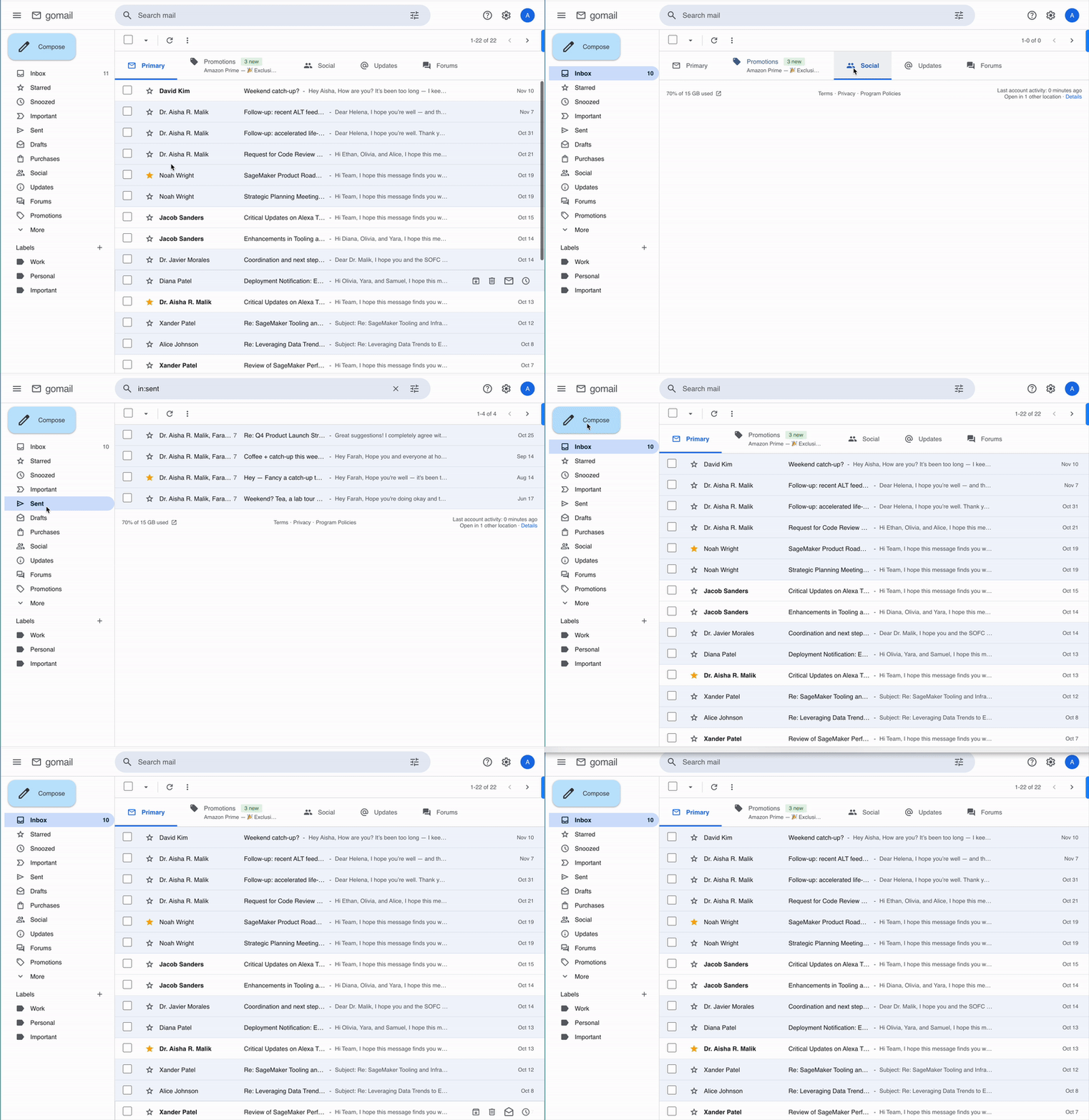
The above recording shows our email simulation environment.
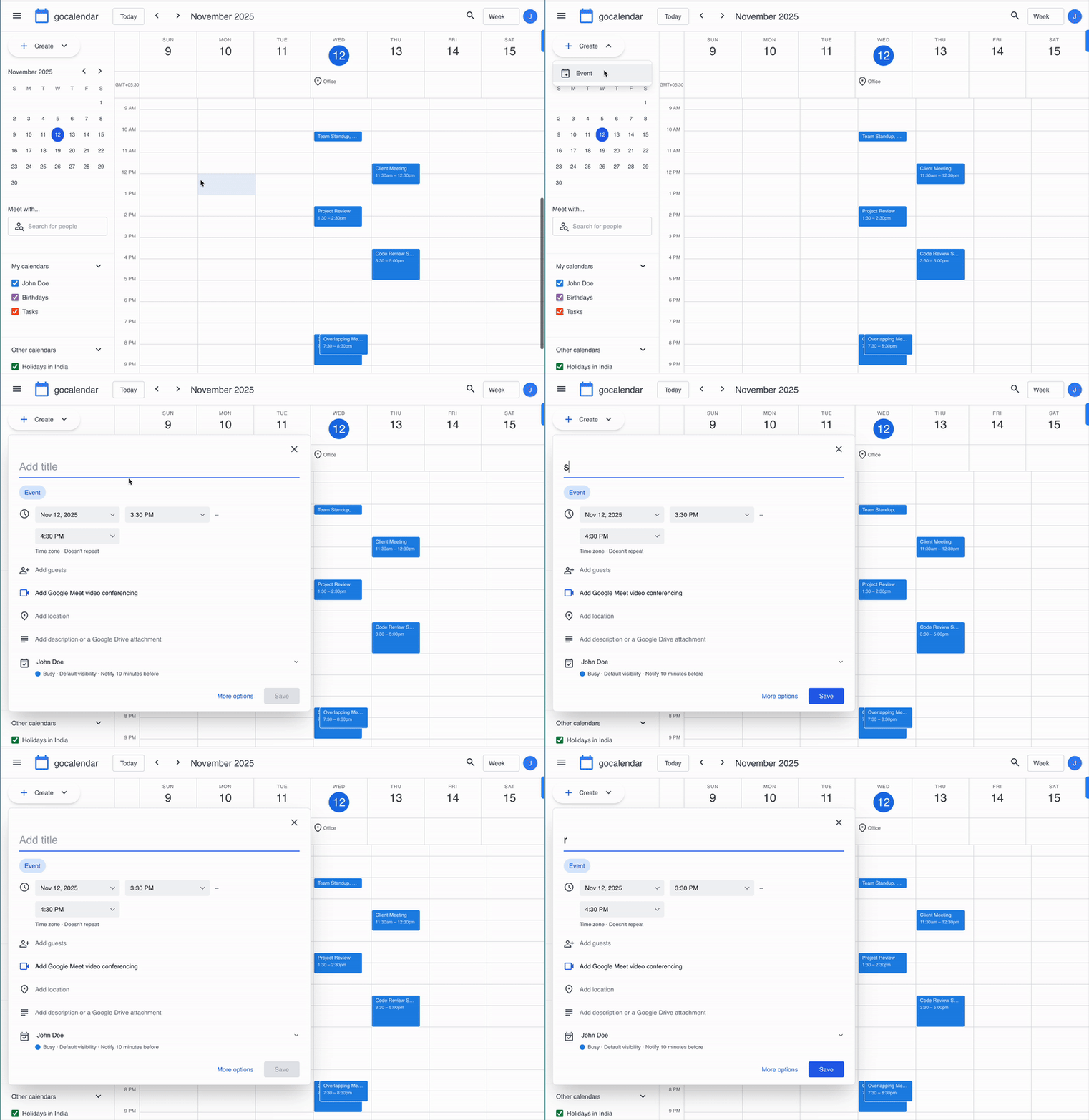
The above recording shows our calendar simulation environment.
Data, tasks, and verifiers
Designing long-horizon workflows that require agents to interact with multiple applications introduces a key challenge. The data across all applications must be coherent and consistent for a task to be solvable.
For example, consider a task where the agent must identify overlapping meetings in the calendar and notify participants that the user cannot attend one of them. For this task to be feasible, the calendar must contain conflicting events, and the email inbox must include the corresponding meeting notifications or invitation threads associated with those events. Ensuring this level of cross-application consistency is difficult to achieve through manual annotation alone and does not scale.
To handle this, we break the process into two main steps:
Generating coherent base world states : We first generate a coherent base world that represents a user’s digital environment. Each world defines a user persona along with contacts, relationships, and a timeline of activities. Emails and calendar events are then derived from this shared context and used to populate all applications. Because every application is generated from the same source, information referenced in one interface naturally exists in the others.
Creating task scenarios and generating task variants: Tasks are not written individually. Instead, we define reusable scenario templates such as meeting rescheduling, conflict resolution, participant coordination, and travel planning. A scenario augments the base world with additional data and creates a concrete situation the agent must resolve. For example, a travel scenario may introduce flight confirmation emails that require the agent to block the corresponding time in the calendar. From each scenario we automatically produce a natural language task and a programmatic verifier.
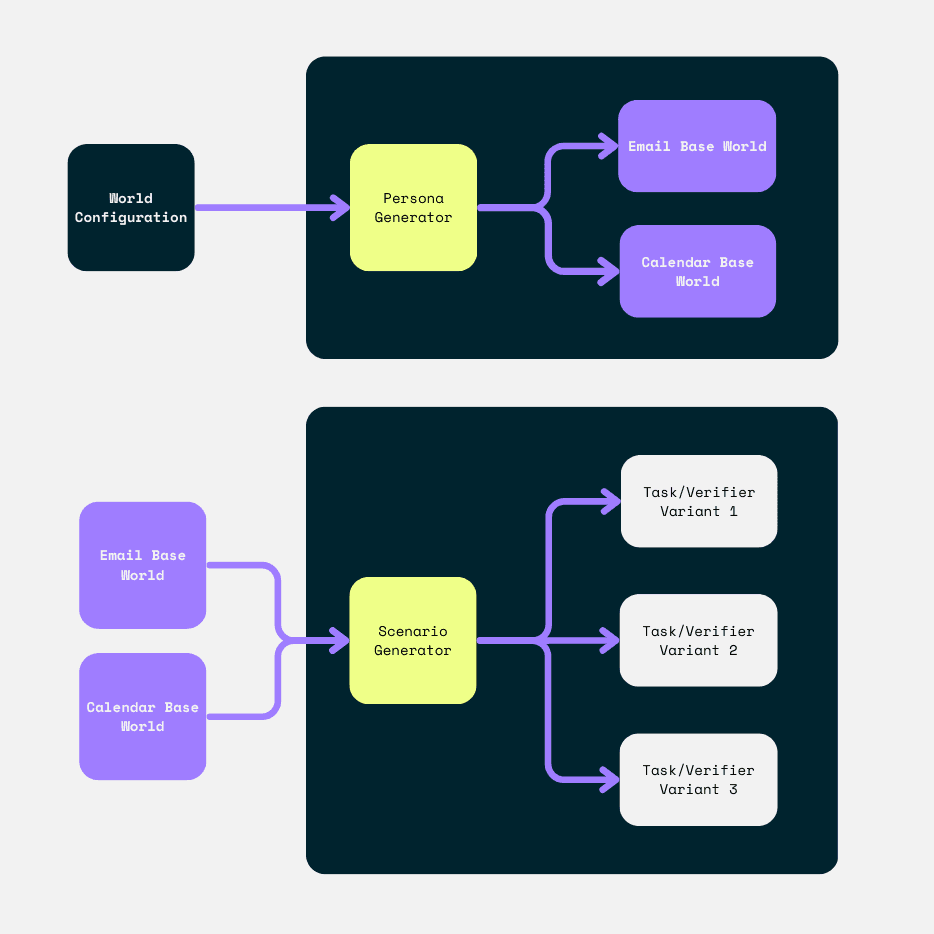
Diagrams (top to bottom): 1) The process we use to generate the base data for both the calendar and email worlds; 2) Each scenario generator (such as the travel confirmation scenario) takes the base world and several other configurations as inputs and generates task/verifier pair variants.
All generated tasks and verifiers are manually validated by completing them inside the simulations. We iterate on the generation process until tasks are solvable and verifiers consistently reflect true success or failure.
Benchmark SDK
The benchmark SDK provides the infrastructure required to run and evaluate agents consistently across models. It consists of three main components:
Simulation management: this handles the spawning of simulation instances, resetting them to a known state, retrieving the backend state, and shutting them down after execution.
Model adapters: this implements standardized tool interfaces for different computer use models so that all agents interact with the environment through the same action schema.
Experiment orchestration: this runs evaluations at scale, records execution traces, and logs results for later analysis.
Results
We evaluated PA Bench on major frontier computer use models, including Claude Opus 4.6, Gemini 3 Pro, Gemini 3 Flash, and OpenAI Computer Use. We selected these four models because they natively support computer-use actions, whereas other frontier models such as GPT-5.2 currently do not. All agents used a shared canonical action space, with screen resolution set to the provider recommended configuration for each model. We additionally exposed a standardized tab-switching action to support cross application workflows. We capped each episode at 75 steps.
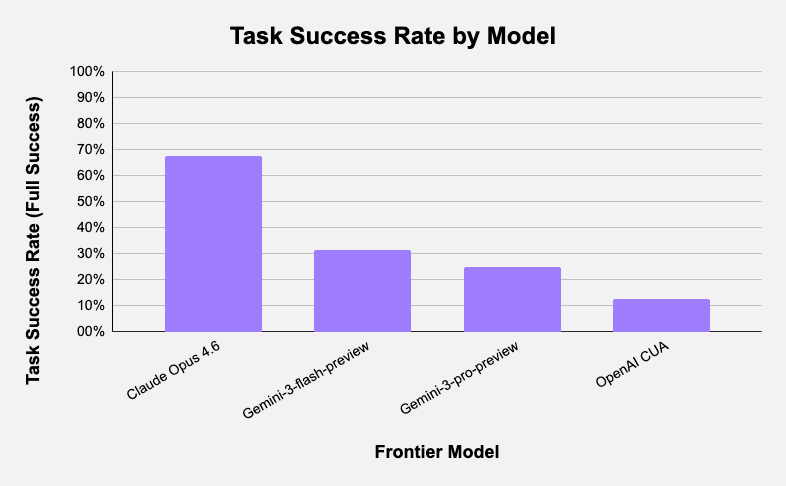
The above image shows the pass rate for each model tested on PA Bench.
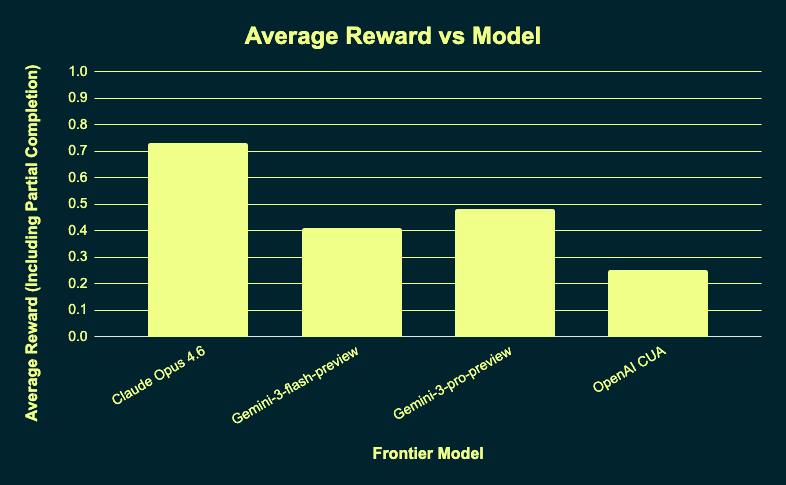
The above image shows the average reward for each model tested on PA Bench.
Model | Task Success Rate (Full Success) | Average Reward (Including Partial Completion) |
|---|---|---|
Claude Opus 4.6 | 68.8% | 0.73 |
Gemini-3-flash-preview | 31.3% | 0.41 |
Gemini-3-pro-preview | 25.0% | 0.48 |
OpenAI CUA | 12.5% | 0.25 |
Task Success Rate: A task is considered successful only if all verifier checks pass ( each task verifier can have more than one multiple checks that contributes to total success).
Average Reward: The mean reward across tasks, computed as the total reward obtained divided by the number of tasks.
Error Analysis
Claude Opus 4.6
Claude Opus consistently demonstrates recovery-driven behavior rather than single-trajectory execution. When an attempted action does not change the environment, the agent actively searches for an alternative interaction path instead of repeating the same command.
For example, our simulations do not support application-specific keyboard shortcuts like Ctrl+C for opening the compose window within the email application, since this is typically specified in the system prompt. The model still tried some of these application-specific keyboard shortcuts using a keypress action, but when a shortcut failed, the agent abandoned the approach and switched to a UI interaction such as double-clicking or selecting elements directly. In the same scenario, other models repeatedly attempted the same shortcut until the step limit was reached.
When keyboard shortcuts such as Ctrl+A are disabled, the agent recovers and uses double-click to select and edit the required text to modify the location.
Claude also performs explicit post action verification. In meeting cancellation workflows, after deleting the calendar event and sending the notification email, the agent navigates to the outbox to confirm the email was actually sent before terminating the task. This behavior appears in a majority of successful runs and correlates strongly with completion.
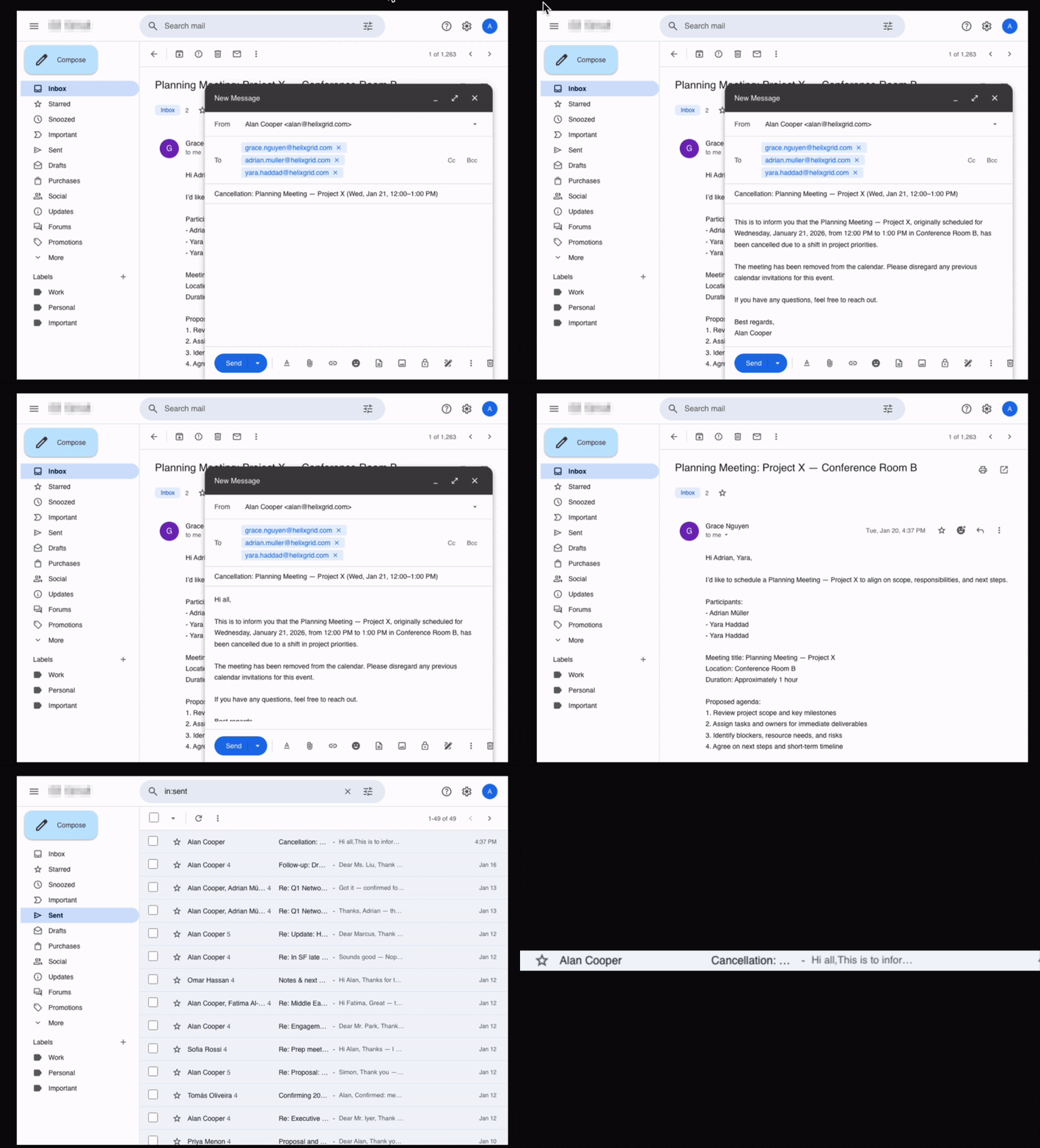
Claude Opus 4.6 performing a task that requires it to also send a cancellation email: after clicking Send, the agent goes to the Sent section to verify if the email was actually sent.
Most Claude failures occur earlier in the reasoning stage rather than the execution stage. In several failed scenarios, the agent could not correctly identify the relevant entities such as overlapping meetings. The agent then explored multiple valid interaction paths but operated on the wrong target until the maximum step limit was reached.
Gemini 3 Pro
Gemini 3 Pro generally understands the intent of the task and navigates across applications correctly, but frequently makes small execution errors that lead to failure.
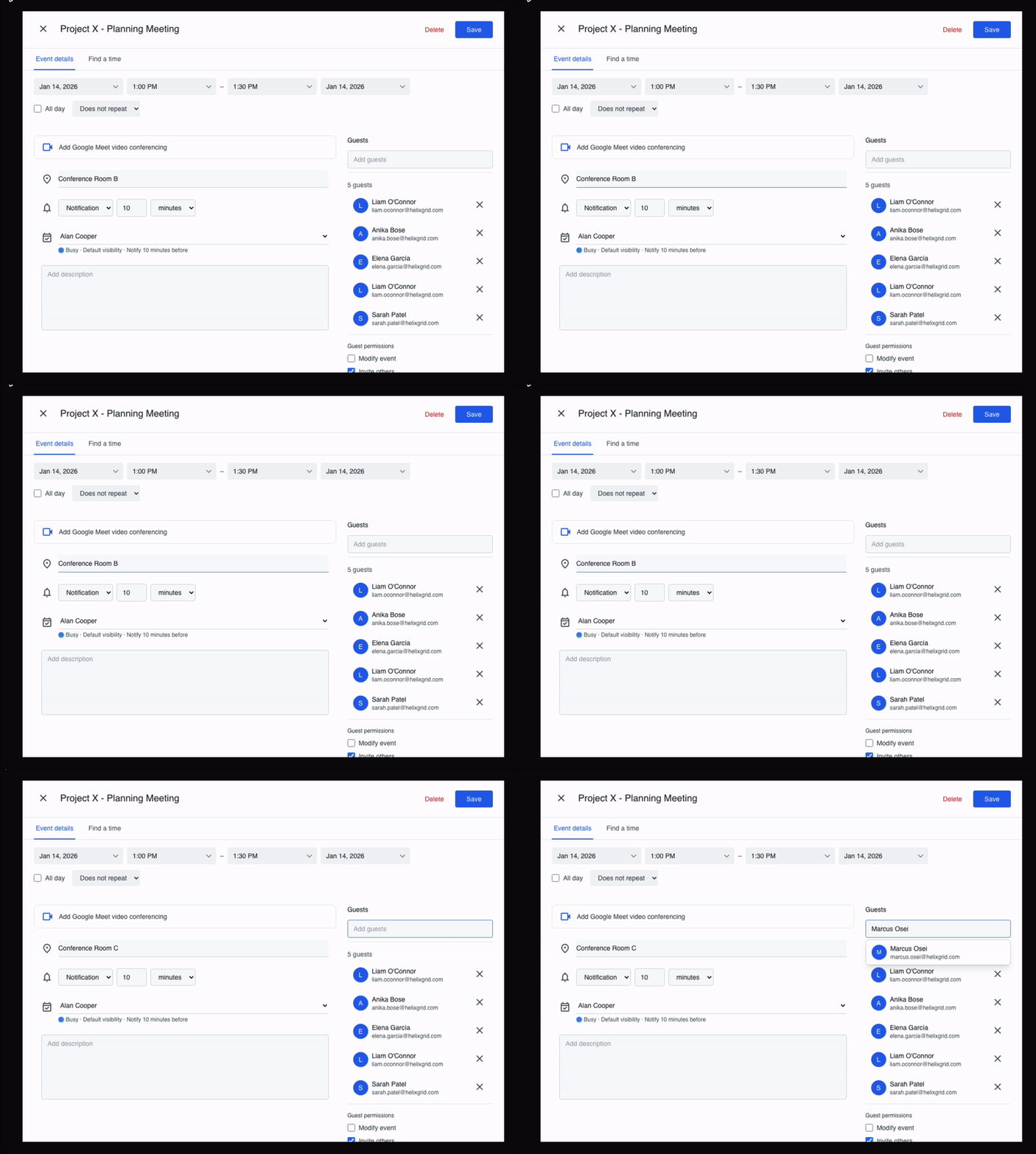
A common pattern is modifying the correct entity but applying the wrong operation. For example, in a meeting modification scenario, the agent attempted to change the meeting location to “Conference Room C” but appended the new location instead of replacing the existing value. The agent then declared the task complete without checking whether the final state matched the requirement.
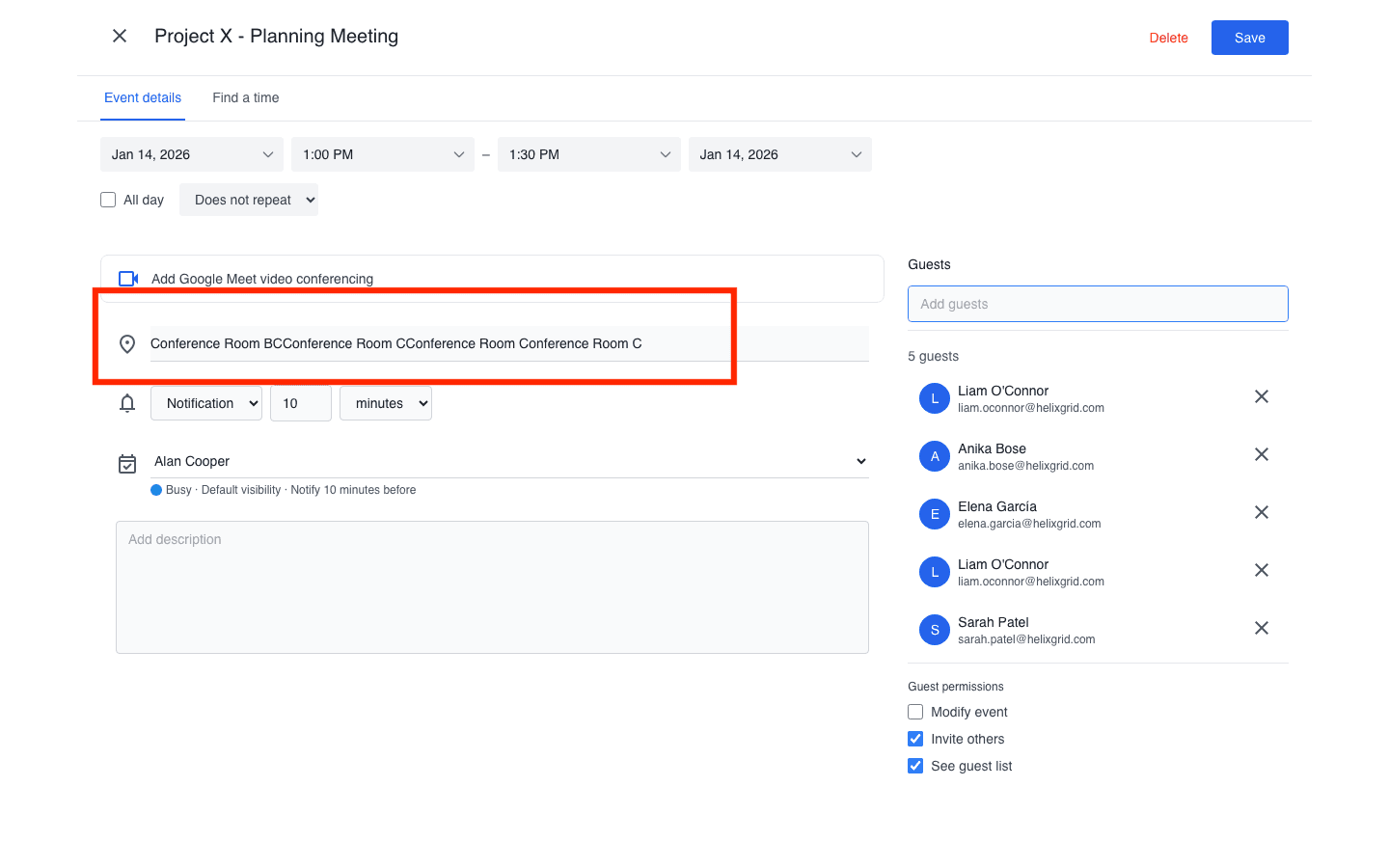
The above screenshot shows Gemini 3 Pro typing an incorrect location. Instead of deleting and replacing the text in the location field, it incorrectly tries to append text into the location field.
Most Gemini 3 Pro failures follow this pattern. The plan is correct and the agent reaches the appropriate interface, but one step in the execution is slightly incorrect.
In a travel booking workflow, the agent correctly extracted flight details and created a calendar event with the right departure time, but set an incorrect arrival time. Because PA Bench requires the final state to be fully correct, this counted as a failure despite the workflow being mostly completed.
Similarly, in a scheduling scenario, the agent identified a valid time slot and added the correct participants, but forgot to include a meeting link. The workflow was logically solved but not fully executed.
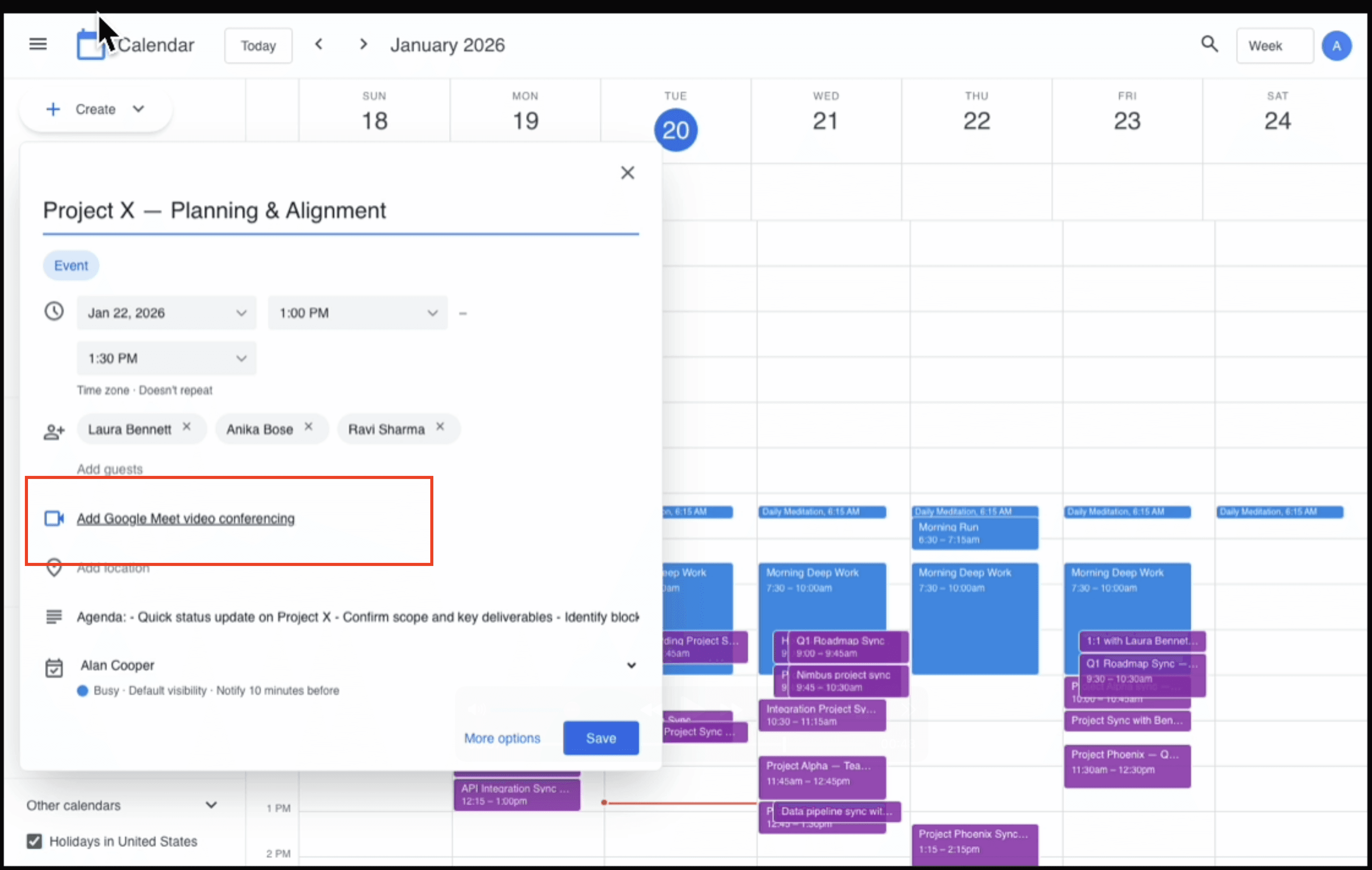
The example above shows one of the scenarios that requires the agent to find a new slot for an existing event. Gemini 3 Pro does everything else correctly but forgets to add the Google Meet link in the invite.
Unlike Claude, Gemini rarely performs post action verification. After completing the intended actions, it often terminates immediately instead of checking whether the resulting state matches the task requirements. As a result, many failures are near correct solutions that lack final validation rather than navigation or reasoning mistakes.
Overall, Gemini 3 Pro demonstrates strong planning ability but weak completion reliability. Errors typically arise from imperfect execution and lack of verification rather than misunderstanding the task.
Gemini 3 Flash
Gemini 3 Flash behaves differently from the other models due to its speed oriented behavior. It performs well on tasks that require limited reasoning and a small number of decisions, but struggles when the workflow requires understanding context across multiple events.
For example, the model can successfully handle a simple meeting modification request received over email and completes it faster than any other model evaluated in this benchmark. However, in more complex scenarios such as multi-meeting coordination, where the agent must interpret an email thread, identify the relevant events in the calendar, and schedule updates accordingly, the model often fails to construct the correct context.
In these cases, the agent executes a sequence of actions without converging on the correct target and eventually reaches the maximum step limit. The failures are therefore not due to navigation errors but due to insufficient reasoning over interconnected information.
Overall, Gemini 3 Flash is efficient for straightforward workflows but unreliable for tasks that require sustained reasoning across multiple related entities.
OpenAI Computer Use
The OpenAI computer-use-preview model primarily fails due to control and exploration issues rather than misunderstanding the task. The agent often identifies the correct objective but cannot reliably progress through the workflow.
A frequent failure pattern is inability to switch application context. Many tasks require moving between email and calendar, but the agent remains stuck in a single tab after attempting to use the tab-switching tool. This prevents it from accessing required information and causes early termination.
In runs where the agent successfully switches context and understands the task, it often gets stuck repeating actions that do not change the environment. Instead of attempting alternative interaction strategies, it retries the same step until the maximum step limit is reached.
Another recurring behavior is unnecessary permission seeking. Even when explicitly instructed not to ask for confirmation, the agent sometimes pauses execution to request approval before performing the required action. For example, in a meeting cancellation workflow the agent asks whether it should cancel the event and notify participants, and then waits without proceeding, leading to failure.
Overall, failures are dominated by lack of recovery and control flow management. The agent struggles to adapt when an action does not produce the expected result, which prevents it from completing otherwise understandable tasks.
Future Work
We plan to integrate workflows that involve 3+ web applications and 100+ steps to complete in meaningful personal assistant scenarios and workflows in the next iteration of PA Bench. For this, we are also doing research and experimentation on improving our task/verifier generation paradigms for automatic task/verifier synthesis for long-horizon tasks for web/computer use agents.
If you wish to partner with us on our research/benchmarks, please contact us at [email protected].