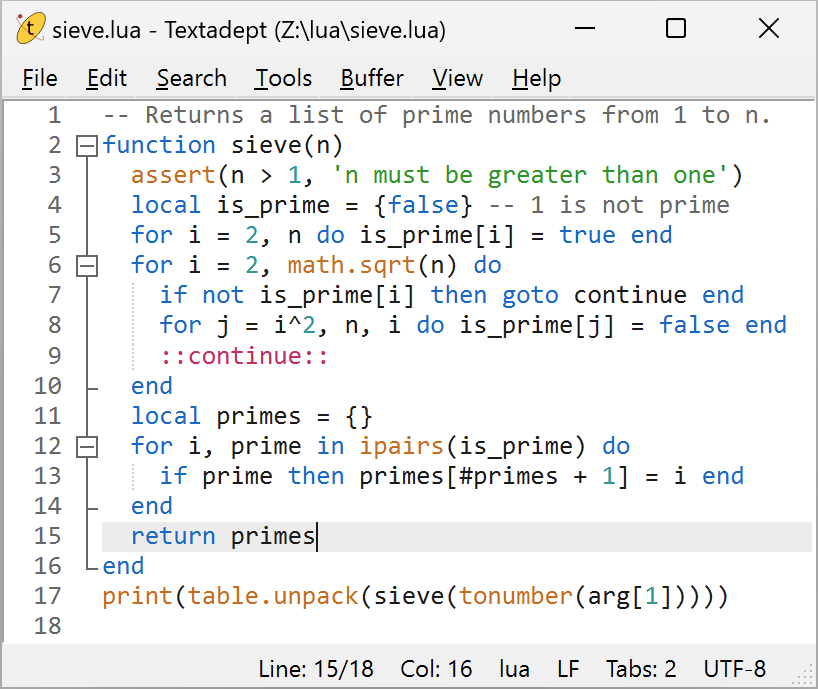
Textadept is a fast, minimalist, and remarkably extensible cross-platform text editor for programmers.
Quick links: Download | Manual | Lua API Docs | Project Page


Features
- Traditional desktop application written in a combination of C, C++, and Lua.
- Runs on Windows, macOS, Linux, and BSD.
- Self-contained executables – no installation necessary.
- User-friendly graphical and terminal interfaces with sensible defaults.
- Support for over 100 programming languages.
- Multiple carets and selections.
- Unlimited split views.
- Configurable key bindings, including language-specific keys, key chains, and key modes.
- Snippets, both generic and language-specific, and support for nested snippets.
- Invoke shell commands for running code, building projects, and executing tests.
- Almost every aspect of the editor can be scripted, extended, and customized with Lua.
- Does not connect to the internet – it’s just a text editor!

Requirements
Textadept’s pre-built binaries require the following:
- Windows 10+ (64-bit or ARM)
- macOS 13+
- Linux: Qt 5 or GTK 3 for the GUI version, and ncurses for the terminal version.
You can compile Textadept from source for use with different UI library versions, such as Qt 6 and GTK 2.24.
Note: Lua and other third-party dependencies are compiled into the application itself, and a Qt runtime is distributed with Windows and macOS builds.
Download
You can download pre-built binaries for various platforms, as well as source code from the links below.
A list of all released versions is here along with their release notes.
Note: while Textadept contains plenty of built-in productivity tools, some extra features and functionality are available as optional modules in the “Extra modules” links above. This includes:


Install and Use
Simply unpack the pre-built binary archive anywhere you have permission to and run one of the following executables:
| Platform | GUI version | Terminal version |
|---|---|---|
| Windows | textadept.exe | textadept-curses.exe |
| macOS | Textadept.app ta (shell script) |
Textadept.app/Contents/MacOS/textadept-curses |
| Linux | textadept (Qt version) textadept-gtk (GTK version) |
textadept-curses |
The “Help > Show Manual” menu item, or the F1 keyboard shortcut opens Textadept’s comprehensive
user manual. There is also an online version. The manual covers all of Textadept’s
main features, including installation, usage, configuration, theming, scripting, and compiling
from source.
The “Help > Show LuaDoc” menu item, or the Shift+F1 keyboard shortcut opens Textadept’s extensive
API reference for users interested in scripting the editor. There is also an online version.
If you downloaded the optional set of modules, unpack it into the .textadept/ directory in your home folder (keeping the top-level modules/ directory intact). You could instead unpack it into Textadept’s directory (thus merging the two modules/ directories), but this is not recommended, as it may make upgrading more difficult.
Note: Textadept generally does not auto-load modules. To use any of modules from the optional
set, select the “Edit > Preferences”, use Lua’s require() function for each module to load,
save the file, and restart Textadept. For example:
require('lsp')
require('file_diff')
require('spellcheck')

Compile
Compiling Textadept from source requires the following:
- CMake 3.22+
- A C and C++ compiler, such as:
- A UI toolkit (at least one of the following):
- Unix
patchcommand
Basic procedure:
- Configure CMake by pointing it to Textadept’s source directory (where CMakeLists.txt is),
specify a directory to build in, and optionally specify a directory to install to. CMake will
determine what UI toolkits are available and fetch third-party build dependencies.

- Build Textadept.
- Either copy the built binaries to Textadept’s source directory or use CMake to install it.
For example:
cmake -S . -B build_dir -D CMAKE_BUILD_TYPE=RelWithDebInfo \
	-D CMAKE_INSTALL_PREFIX=build_dir/install
cmake --build build_dir -j # compiled binaries are in build_dir/
cmake --install build_dir # self-contained installation is in build_dir/install/
Note: if you would like to build the nightly development version of Textadept, enable the
NIGHTLY option during the configuration phase (e.g. -D NIGHTLY=1).
The “Compiling” section of the manual contains more information about this process.
Support
Textadept is an open-source project, released under the MIT License.
You can contact me personally at code att foicica.com.
