For 226 episodes of my Call Kent podcast, I recorded audio, combined it with my response audio, and ran the whole thing through FFmpeg directly on the same Fly.io machine that serves kentcdodds.com. It was a simple pipeline and it worked fine. But in the back of my mind I knew I should probably give this some proper treatment (queues etc).
On March 6, 2026, I finished an extra long recording a Call Kent episode and hit publish. My app runs FFmpeg during the publish flow: it stitches the caller's audio with my response, applies silence trimming, normalizes loudness, adds intro and outro bumpers, and produces the final episode MP3. That job used to block the HTTP request and run inline on the app server.
It wasn't a big deal because I'm the only person who kicks that off so I don't mind waiting for it to finish.
But this one was kinda big relative to others I've done and that publish made production fall over.
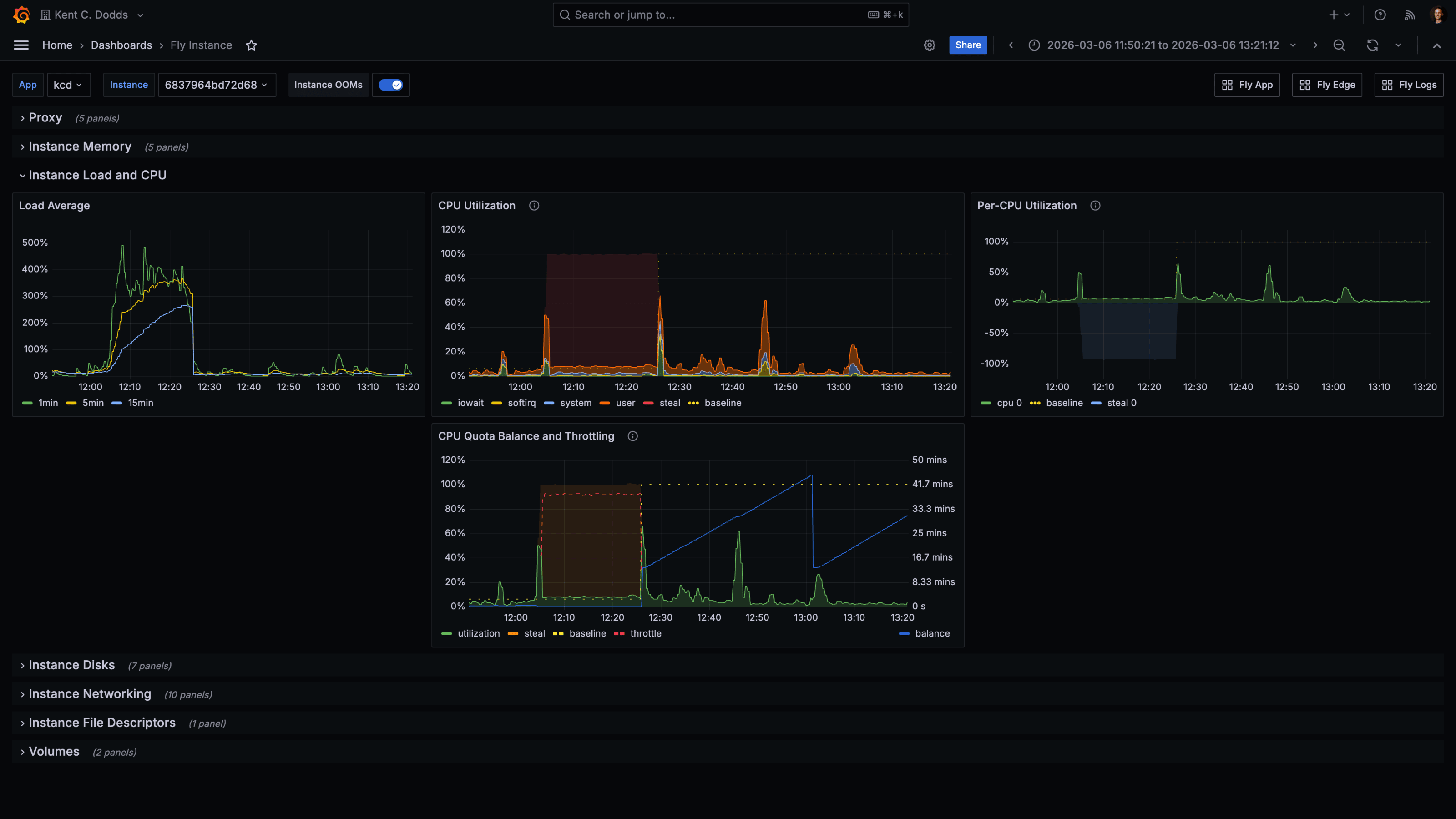
The Fly.io instance running kentcdodds.com hit extreme CPU saturation. The metrics tell the story clearly:
Load average climbed to 400–500% and stayed there for the entire FFmpeg run. The CPU quota balance graph showed the machine being throttled, having consumed its allocated CPU budget so the scheduler was pulling it back. The site was degraded until the job finished, and I had to emergency-upgrade the machine from a shared CPU to a performance CPU to stabilize it.
That was the moment I decided to stop doing FFmpeg on the primary machine.
I want to be clear: running FFmpeg inline was not a foolish decision. It was a reasonable simple-first choice that served 226 episodes with minimal incident.
Only I can trigger that code path. It runs exactly once per episode. When I started building the Call Kent feature, I could have designed a proper job queue with a dedicated worker pool. But that would have been solving a scalability problem I did not yet have. "Start simple and iterate when reality tells you to" is still how I think about this. Reality finally told me.
The old design also had a characteristic that made it deceptively safe for a long time: it ran on the same machine that handled everything else, which meant the machine was already sized for general web traffic. FFmpeg just piggybaacked on that capacity. The problem only surfaced when the audio was long enough and the shared CPU quota tight enough to cause a collision.
Another nice benefit of me waiting is that now we have Cloudflare Queues and Containers to use (had I solved this earlier, I would have had to build my own queues and containers or found another solution that I don't like as much).
kentcdodds.com runs on Fly.io with a primary instance and read replicas. The primary machine handles all write operations. The replicas handle reads. That asymmetry matters here.
When FFmpeg ran on the primary machine, it competed with the one machine that could not afford to be slow. If the primary stalls or throttles, writes stall. Users trying to submit forms, save data, or do anything stateful hit that bottleneck. The replicas were fine. The one machine that needed to be responsive was the one eating all the CPU.
The tricky thing is, I can't run this on replicas because they are read-only and I need to write to the primary machine to update the draft status etc. So yeah, it's the worst place, but it's also the only place... Unless I move the whole process somewhere else.
The fix was to move the FFmpeg work entirely off the primary app server and onto Cloudflare. Here is what the flow looks like now:
When a Call Kent episode is submitted, the app enqueues a job to a Cloudflare Queue with the draft ID and the R2 object keys for the caller audio and my response audio. The app then returns immediately. No more blocking on FFmpeg.
A Cloudflare Worker consumes the queue message and forwards the job to a
Cloudflare Container. The container pulls the audio files from R2, runs the
FFmpeg stitching pipeline, uploads the outputs back to R2, and POSTs a
signed callback to the app. The app verifies the signature and advances the
draft through its processing steps: GENERATING_AUDIO → TRANSCRIBING →
GENERATING_METADATA → DONE.
The admin UI now shows incremental progress labels like "Generating episode audio…" and "Transcribing audio…" instead of hanging on a single blocking request. From my perspective as the only person using this flow, it feels much nicer.
The transcription and metadata generation steps still run on the primary app server after the callback comes in. There's an argument for moving those into the queue/worker pipeline too (they're also compute-heavy and could benefit from the same isolation), but that's a future refactor. The immediate problem was FFmpeg, and solving the immediate problem first is the right call.
Here is the core enqueue call from the app side:
// app/utils/call-kent-audio-processor.server.ts
const res = await fetch(
	`${env.CALL_KENT_AUDIO_CF_API_BASE_URL}/accounts/${env.CLOUDFLARE_ACCOUNT_ID}/queues/${queueId}/messages`,
	{
		method: 'POST',
		headers: {
			Authorization: `Bearer ${env.CLOUDFLARE_API_TOKEN}`,
			'Content-Type': 'application/json',
		},
		body: JSON.stringify({
			content_type: 'json',
			body: { draftId, callAudioKey, responseAudioKey },
		}),
		signal: AbortSignal.timeout(10_000),
	},
)
And the signed callback route on the app side:
// app/routes/resources/calls/episode-audio-callback.ts
const signature = request.headers.get('X-Signature')
if (!verifyCallKentAudioProcessorCallbackSignature(signature, rawBody)) {
	return new Response('Invalid signature', { status: 401 })
}
const event = parseCallKentAudioProcessorEvent(rawBody)
await handleCallKentAudioProcessorEvent(event)
return Response.json({ ok: true })
The signature uses HMAC-SHA256 with a shared secret, verified with a timing-safe comparison to avoid leaking information through response time.
Here is what today's run looked like on the same primary Fly.io machine, after the offload was in place:

Load average peaked around 60–80% during the episode processing window. There was no CPU throttling event. Memory was stable. The primary machine stayed healthy for the entire duration of the job.
That is roughly an 85% reduction in peak load for the app server during episode processing. The FFmpeg job itself takes about the same amount of time. It is just happening somewhere else now.
March 6 (400–500% load, throttled) versus March 9 (60–80% load, stable). Same machine, same app. The only difference is whether FFmpeg ran on it.
Worth noting: the March 9 episode was also considerably shorter than the March
6 one, and it ran on the default lite container instance (1/16 vCPU, 256 MiB
memory), which I have since upgraded to standard-1 (1/2 vCPU, 4 GiB memory)
to give longer episodes more headroom. So the primary machine metrics would
likely look even cleaner on a longer episode now.
If you want to help me test that out, go ahead and make a call. I genuinely listen to and respond to all of them (you can even type your question and choose an AI voice if you don't want to record yourself).
I want to be honest about the cost story rather than just saying "Cloudflare is cheaper."
The real question is what the alternative looks like. If I wanted to isolate
FFmpeg on Fly.io, I would need a dedicated machine. A Fly.io performance-1x
machine is about
$31/month if it stays running all the
time, plus storage and egress. If I aggressively auto-stop the machine when no
jobs are pending, the cost drops significantly, but now I am managing machine
lifecycle myself, and cold start time becomes a concern for a job that blocks a
publish flow.
With Cloudflare, the cost shape is different. You mostly pay when the container is actually running:
- Cloudflare Queues charges per operation. Three operations per message (write, read, delete). At the scale of a personal podcast, queue costs are essentially zero. The included 1 million ops/month covers thousands of episodes. Basically free.
- Cloudflare Containers
bills CPU time, memory, and disk while active. The current configuration uses
a
standard-1instance (½ vCPU, 4 GiB memory). There is also a fronting Worker and a Durable Object per container that each add some cost. - Cloudflare Workers and Durable Objects are worth understanding before assuming the container is the only meter.
For a podcast publishing a few episodes a month with lots of idle time between runs, Cloudflare scales to zero cleanly. The container does not cost anything when it is asleep. For a steady high-volume transcoding workload, the calculation would be different and a dedicated Fly machine might win on simplicity and predictability.
The larger benefit here was not the dollar amount. It was operational isolation. The primary app server is no longer in the blast radius of a long FFmpeg job.
The architecture direction was right. The first implementation had a few things that needed to be cleaned up after the PR shipped.
The local fallback. The original PR included a fallback path that would run FFmpeg locally on the primary machine if the Cloudflare container path failed. This was a classic GPT 5.3-generated "safety net" that was actually counterproductive. If the container fails and the fallback runs FFmpeg on the primary machine, you have not reduced your outage risk. You've just hidden it behind a code path that runs less often. I ripped it out. The app now throws on enqueue failure and the episode stays in its current state for retry. That is the correct behavior.
The container lifecycle. The first version relied on Cloudflare's built-in
sleepAfter timeout to shut the container down after jobs finished. This had
two problems:
- If an FFmpeg job runs longer than
sleepAfter, the container gets reaped mid-job. - If the job finishes in 30 seconds but
sleepAfteris 5 minutes, the container sits idle for the rest of that window, racking up billing on provisioned memory and disk.
The cleaner design, which I am currently implementing, is:
- Keep
sleepAftershort as a last-resort backstop (around 1 minute). - Have the container process send periodic heartbeat pings to the container controller endpoint while FFmpeg is running, renewing the activity lease and preventing premature shutdown.
- On job completion (in a
finallyblock), send a "finished" signal to a controller endpoint that checks whether any other jobs are active. If none are, it callscontainer.stop()immediately instead of waiting out the sleep timeout.
The key insight here is that the container process itself cannot directly tell Cloudflare "stay alive" or "shut down now." That control lives in the Cloudflare Worker and Durable Object wrapper (the container supervisor layer). Heartbeats and stop-if-idle signals need to go through that boundary. I just wanted to avoid wasting resources if the container doesn't have anything more useful to do.
The worker held open too long. The first container version still had the
queue worker wait for the entire FFmpeg transcode before returning to the queue.
That meant the queue worker was blocked for the full processing duration, which
defeats part of the purpose of using a queue. The fix was to have the container
endpoint return 202 Accepted immediately and run the job in the background.
The worker then acks the message and moves on; the container handles the rest
asynchronously and sends the callback when done.
For me, yes. Partly because the operational improvement is real, and partly because Cloudflare Queues and Containers were genuinely interesting to build with.
I really wish I didn't have to do the heartbeat dance. That would be a nice feature to just have built-in Cloudflare friends!
The broader lesson I keep coming back to is that simple first was still the right call. 226 episodes with minimal incidents is a strong record. The original design held up until I hit some unlucky timing. When reality finally demanded the iteration, the right path was reasonably clear, and the tooling to execute it was available.
The thing I want to avoid is reading this story as "you should always use a job queue for compute-heavy tasks." Sometimes you should. Sometimes the complexity is not worth it until you actually feel the pain.
If you want to see the full implementation, the PR is Ffmpeg processing offload #720 in the public kentcdodds.com repo.
Got any questions? Give me a call and I'll chat with you about it!