字体走私者 – 将隐藏的品牌字体复制到Google文档
Font Smuggler – Copy hidden brand fonts into Google Docs

原始链接: https://brianmoore.com/fontsmuggler/

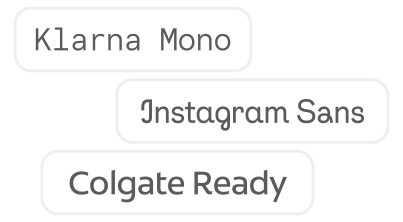
将受保护的品牌字体复制粘贴到Google文档中,无需授权。Google Workspace允许付费的品牌将自定义公司字体嵌入到文档和幻灯片中。通常,这些字体仅限于购买自定义字体的品牌使用,但有一个漏洞:复制/粘贴。以下是一些你可以这样做的品牌字体。享受吧。(但这在Google移动应用上不起作用) 找到你想要“走私”到Google文档中的字体 点击字体将其复制到剪贴板 打开Google文档或幻灯片文档并粘贴。

一篇最近的 Hacker News 帖子强调了一种在 Google Docs 和 Slides 中使用品牌字体的解决方法。通常,访问这些自定义字体仅限于为 Google Workspace 品牌功能付费的公司。然而,“Font Smuggler”网站详细介绍了一个简单的漏洞:直接将字体复制并粘贴到文档中。 这解决了公司从 PowerPoint 迁移到 Google Docs 时面临的一个常见问题——通过一致的字体使用来保持品牌形象。许多公司依赖于演示文稿中的特定字体,如果没有此解决方法,Google Docs 将不适用。虽然大型公司可以负担 Workspace 品牌包,但这种复制/粘贴方法提供了一种免费的替代方案,尽管有点隐蔽。用户对官方字体嵌入所需的费用表示惊讶和失望。
相关文章

原文

Copy and paste locked brand fonts into Google Docs, sans permission.

Google Workspace lets brands who pay enough embed custom corporate fonts into their docs and slides. Normally, these are locked to just those brands shelling out for custom typefaces, but there's one loophole: the ol' copy/paste. Below are a selection of brand fonts with which you can do exactly that. Enjoy. (but it doesn't work on Google mobile apps)

Step 1

Find a font you want to smuggle into a Google Doc

Step 2

Click the font to copy it to your clipboard

Step 3

Open a Google Docs or Slides document and paste within

联系我们 contact @ memedata.com