TL;DR: Built a Git-like CLI backed by PostgreSQL with automatic delta compression. Import any git repo, query its entire history with SQL. Benchmarked on 20 real repositories (273,703 commits): pgit outcompresses git gc --aggressive on 12 out of 20 repositories, while giving you full SQL access to every commit, file version, and change pattern. Then I gave an AI agent a single prompt and it produced a full codebase health report on Neon's own repo in under 10 minutes.
What is pgit?
pgit is a Git-like version control CLI where everything lives in PostgreSQL instead of the filesystem. You get the familiar workflow (init, add, commit, push, pull, diff, blame), but your repository is a database. And that means your entire commit history is queryable.
pgit init
pgit import /path/to/your/repo --branch main
pgit analyze coupling
file_a                    file_b                    commits_together
────────────────────────  ────────────────────────  ────────────────
src/parser.rs             src/lexer.rs              127
src/db/schema.go          src/db/migrations.go      84
README.md                 CHANGELOG.md              63
No scripts. No parsing git log output. No piping things through awk. Just answers.
The most common analyses are built in as single commands: churn, coupling, hotspots, authors, activity, and bus-factor. All support --json for programmatic consumption, --raw for piping, and display results in an interactive table with search and clipboard copy.
But everything is PostgreSQL underneath. When the built-in analyses aren't enough, drop down to raw SQL:
The coupling analysis above, as raw SQL
SELECT pa.path, pb.path, COUNT(*) as times_together
FROM pgit_file_refs a
JOIN pgit_paths pa ON pa.path_id = a.path_id
JOIN pgit_file_refs b ON a.commit_id = b.commit_id
  AND a.path_id < b.path_id
JOIN pgit_paths pb ON pb.path_id = b.path_id
GROUP BY pa.path, pb.path
ORDER BY times_together DESC;
This finds every pair of files changed in the same commit, counts co-occurrences, and ranks by frequency. The a.path_id < b.path_id condition avoids counting the same pair twice. pgit analyze coupling optimizes this further: it computes pairs in memory and filters out bulk reformats (commits touching 100+ files) that produce noise, not signal.
Want to know your maintenance hotspots? That's pgit analyze churn. Or as SQL:
Churn analysis as raw SQL
SELECT p.path, COUNT(*) as versions
FROM pgit_file_refs r
JOIN pgit_paths p ON p.path_id = r.path_id
GROUP BY p.path
ORDER BY versions DESC;
Counts how many versions (commits) exist per file and returns the most-modified files. This is exactly what pgit analyze churn runs under the hood.
Under the hood, pgit uses pg-xpatch, a PostgreSQL Table Access Method (basically a custom storage engine) that I built on top of my xpatch delta compression library (I wrote about building xpatch here). When you insert file versions, pg-xpatch automatically stores only the deltas between consecutive versions. When you SELECT, it reconstructs the full content transparently. You just write normal SQL.
Why Did I Build It?
After building xpatch, a delta compression library that hits 2-byte medians on real code repositories, I kept asking myself: "Where could delta compression be useful where it isn't used yet?"
Databases were the obvious answer. Every application that stores versioned data (document editors, audit logs, config history) is keeping full copies of content that's 99% identical to the previous version. Delta compression could save massive amounts of storage, but nobody builds it into the database layer itself.
So I started building pg-xpatch: a proper PostgreSQL Table Access Method that does delta compression transparently. I tried SQLite first, but its extension API is limited and write performance with custom storage was painfully slow. PostgreSQL was a completely different story: the extension API is powerful, and the results were immediately promising.
But I needed to benchmark it. And from my xpatch work, I already knew that git history is the perfect test corpus: millions of incremental text changes across thousands of files, easy to obtain, representative of real-world editing patterns. So I started importing git repositories into PostgreSQL to stress-test the compression.
And at some point the benchmark tool became the actual project. That became pgit. It turned out to be the best decision I could have made, not just as a product, but as dogfood. Running pgit against real repositories surfaced bugs, edge cases, and performance problems in pg-xpatch that no synthetic benchmark would have caught. Things like: what happens when a single file has 79,000 versions in one delta chain? What about repositories with 30,000+ files per commit? pg-xpatch now has 570+ tests and handles all of it without issues.
Benchmarks: git vs pgit
Here's where it gets interesting. I benchmarked pgit against git on 20 real repositories across 6 languages (Rust, Go, Python, JavaScript, TypeScript, C), totaling 273,703 commits. The comparison is pgit's actual compressed data size versus git gc --aggressive packfile size, the best git can do.
The scorecard: pgit 12 wins, git 8 wins.
| Repository | Commits | Raw Size | git --aggressive | pgit | Winner |
|---|---|---|---|---|---|
| serde | 4,353 | 203.5 MB | 5.6 MB | 3.9 MB | pgit (30%) |
| ripgrep | 2,208 | 111.8 MB | 3.0 MB | 2.7 MB | pgit (10%) |
| tokio | 4,403 | 195.7 MB | 8.3 MB | 7.7 MB | pgit (7%) |
| cargo | 21,850 | 1.2 GB | 29.9 MB | 29.8 MB | pgit (0%) |
| fzf | 3,499 | 213.3 MB | 3.5 MB | 3.0 MB | pgit (14%) |
| gin | 1,967 | 51.7 MB | 1.9 MB | 1.7 MB | pgit (11%) |
| cli (GitHub) | 10,820 | 288.6 MB | 41.8 MB | 41.3 MB | pgit (1%) |
| flask | 5,516 | 167.3 MB | 6.1 MB | 5.5 MB | pgit (10%) |
| requests | 6,405 | 112.4 MB | 9.3 MB | 9.1 MB | pgit (2%) |
| express | 6,128 | 150.0 MB | 5.8 MB | 5.7 MB | pgit (2%) |
| core (Vue) | 6,930 | 598.9 MB | 11.6 MB | 11.2 MB | pgit (3%) |
| svelte | 10,982 | 782.7 MB | 96.5 MB | 96.0 MB | pgit (1%) |
| ruff | 14,206 | 2.8 GB | 51.3 MB | 51.4 MB | git (0%) |
| hugo | 9,538 | 570.6 MB | 108.8 MB | 111.0 MB | git (2%) |
| prettier | 11,084 | 2.0 GB | 66.1 MB | 91.1 MB | git (38%) |
| react | 21,378 | 2.2 GB | 105.0 MB | 112.3 MB | git (7%) |
| jq | 1,871 | 121.2 MB | 3.9 MB | 4.2 MB | git (8%) |
| redis | 12,940 | 2.0 GB | 71.6 MB | 76.9 MB | git (7%) |
| curl | 37,860 | 3.3 GB | 48.4 MB | 49.3 MB | git (2%) |
| git | 79,765 | 7.3 GB | 90.6 MB | 111.3 MB | git (23%) |
Let me put this in perspective. git gc --aggressive is git's best compression mode. It's significantly slower than normal git gc and is designed to squeeze out every byte. pgit outcompresses it on the majority of repositories while making the entire history SQL-queryable. Against normal git gc (the numbers are in the full benchmark), pgit wins on nearly every repository.
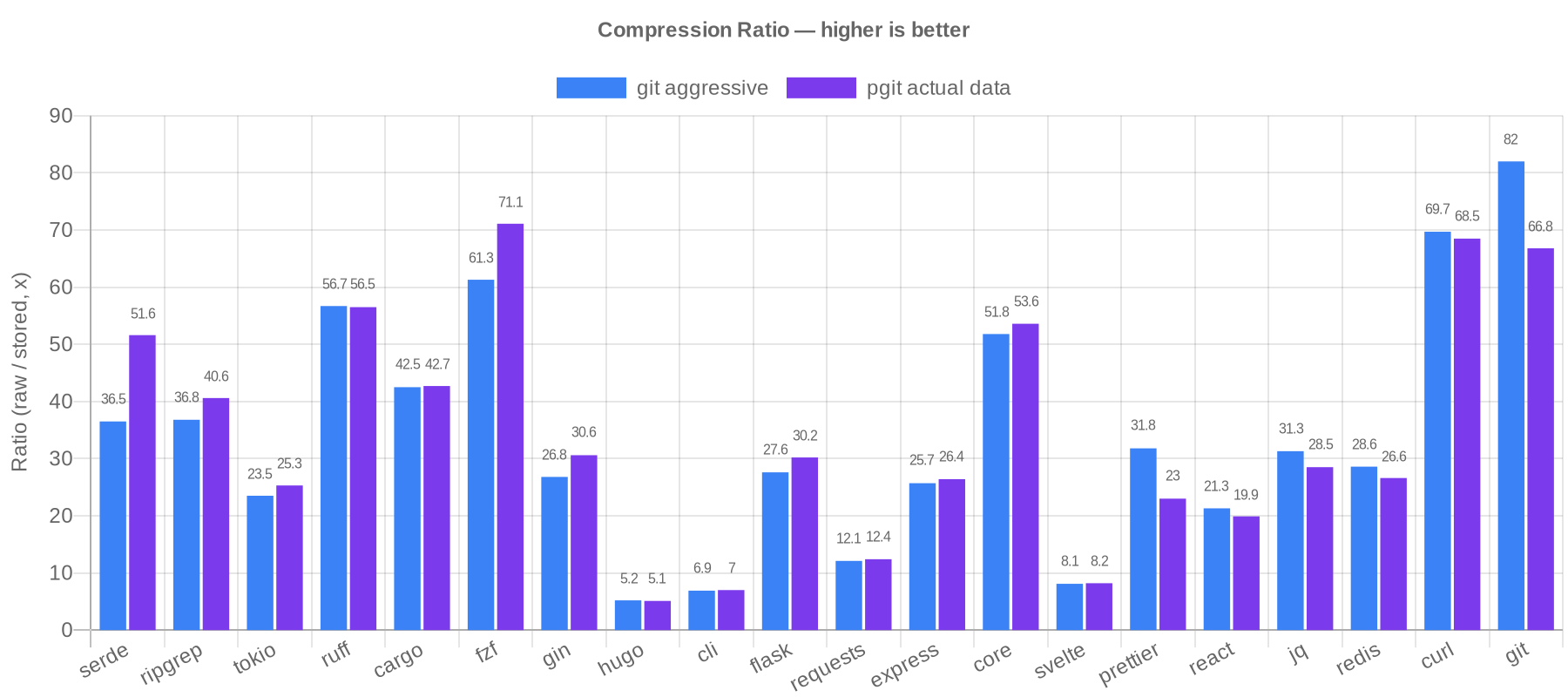
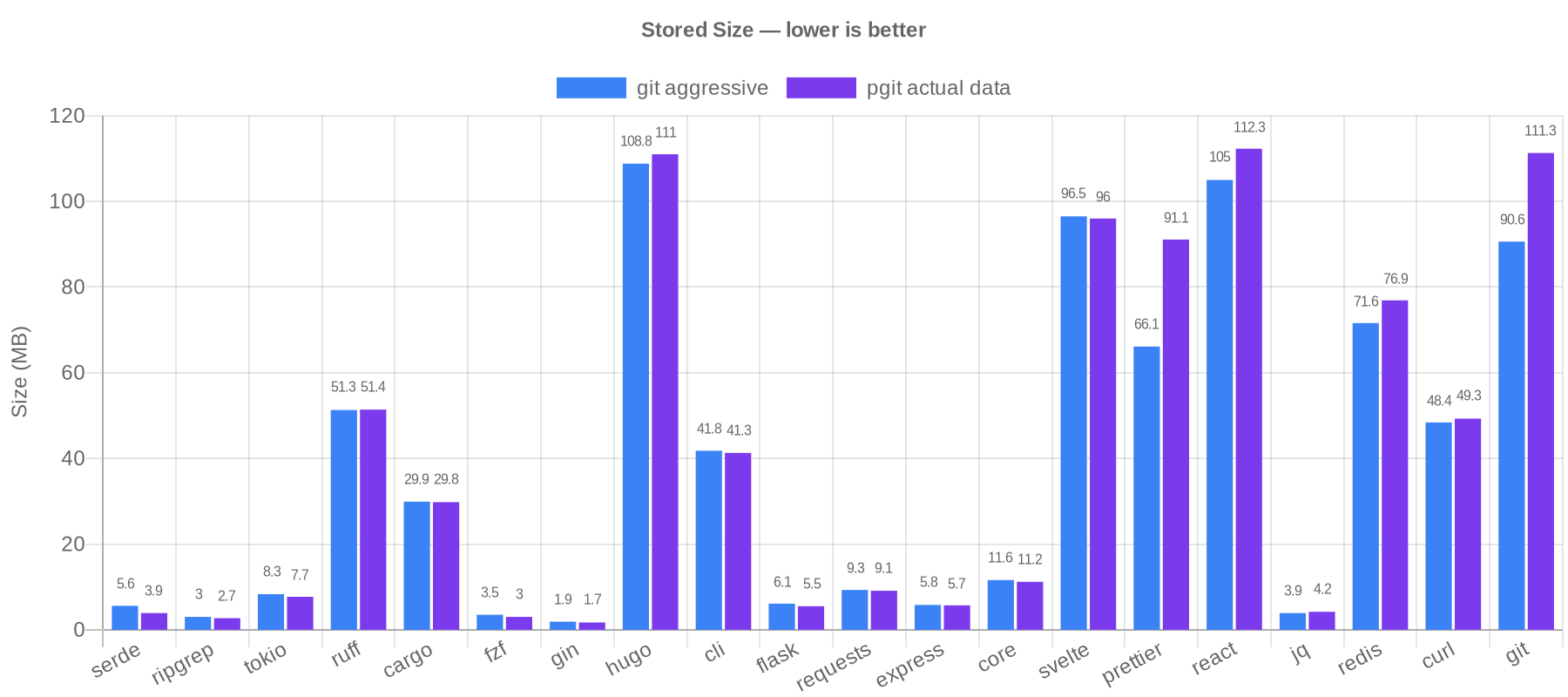
The results split along a clear line. pgit wins on repositories where most changes are incremental edits to source code, which is the majority of the benchmark suite. Delta compression within each file's version chain captures most of the redundancy, and pgit's path-to-group mapping deduplicates content from renames, copies, and reverts automatically by grouping related files into shared delta chains.
Git pulls ahead on repositories with heavy cross-file similarity between unrelated files: prettier (38%), git/git (23%). Git's packfile format can delta-compress any object against any other object in the entire repository, regardless of file path. pgit deduplicates renamed and copied files, but unrelated files with similar content are compressed independently.
What surprised me is how far targeted deduplication gets you. Grouping related files into shared delta chains, without git's arbitrary cross-object matching, beats git's best mode on 12 out of 20 repositories. And you get SQL queryability on top.
It's Not Just About Storage
You might expect that storing everything in delta-compressed PostgreSQL tables would kill query performance. It doesn't. Here are real numbers on the git/git repository (79,765 commits, 7,291 files):
| Command | Time |
|---|---|
| show | 0.23s |
| diff | 0.18s |
| blame | 0.7s (warm cache), 7.3s (cold) |
| log | 1.5s |
| stats | 0.13s |
That's sub-second for most operations on a repository with 79k commits. The trick is working with pg-xpatch's storage model: use normal heap tables for metadata lookups (paths, refs, file hashes) and only touch delta-compressed tables when you need actual file content. Primary key lookups and front-to-back sequential scans are fast; JOINs onto compressed tables and COUNT(*) on delta chains are not.
This is documented in the xpatch query patterns guide, which is worth reading if you work with any kind of columnar or compressed storage, since the principles apply broadly.
Use Cases
pgit isn't trying to replace git for your daily development workflow. Git's ecosystem (GitHub, CI/CD, IDE integrations, merge tooling) is unmatched, and pgit doesn't compete with any of that.
What pgit does well is let you understand a codebase's history programmatically. Things like:
- Coupling analysis: which files always change together? (reveals hidden dependencies)
- Churn detection: which files have the most versions? (identifies maintenance hotspots)
- Size trends: how has the codebase grown over time? (tracks architectural health)
- Bus factor: which files have only one contributor? (knowledge silos)
- Full-text search across history:
pgit search "TODO" --path "*.rs" --allsearches every version of every file - Custom analytics: any question you can express in SQL, you can answer
The most common analyses are built in, no SQL needed:
pgit analyze churn

pgit analyze coupling

pgit analyze hotspots --depth 2

pgit analyze bus-factor

pgit analyze activity --period month
All of these support --json for programmatic consumption, --path for glob filtering, and display results in an interactive table. For anything beyond the built-ins, drop down to raw SQL with pgit sql.
These are the kinds of analyses that engineering teams either build custom tooling for, pay for expensive third-party services, or (most commonly) just don't do at all because the barrier is too high. With pgit, the barrier is a single command, or a SQL query if you need something custom.
pgit for Agents
Here's what I think is the most interesting use case, and the one I'm most excited about.
AI coding agents are getting good. Really good. They can read code, write code, run tests, fix bugs. But there's one thing they're still bad at: understanding the history of a codebase. When an agent modifies a file, it doesn't know that this file has been reverted 5 times in the last month. It doesn't know that every time someone touches tenant.rs, they also need to update timeline.rs. It doesn't know that the function it's about to refactor has been growing by 20 lines per quarter for two years.
Agents already speak SQL, or at least the models powering them can write it trivially. What they're missing is a SQL-queryable interface to git history.
To test this, I gave Claude Opus 4.6 a short prompt:
Analyze the Neon database repository (https://github.com/neondatabase/neon) using pgit, a git-like CLI backed by PostgreSQL that makes git history SQL-queryable. It is globally installed. Import the repo and produce a short codebase health report covering: most frequently modified files, file pairs most often changed together, codebase size trends over time, and the largest current files. Refer to https://github.com/ImGajeed76/pgit/blob/main/docs/xpatch-query-patterns.md for SQL performance guidelines.
No step-by-step instructions. No hand-holding. Just a description of what I wanted.
In 9 minutes and 36 seconds, it produced a full codebase health report. It figured out pgit --help on its own, imported the repository (8,471 commits), wrote optimized SQL queries following the performance guidelines, and delivered actionable findings:
Most frequently modified files:
| File | Versions |
|---|---|
| Cargo.lock | 743 |
| pageserver/src/tenant/timeline.rs | 676 |
| test_runner/fixtures/neon_fixtures.py | 579 |
| pageserver/src/tenant.rs | 562 |
| pageserver/src/http/routes.rs | 434 |
Strongest file coupling:
| File A | File B | Co-changes |
|---|---|---|
| tenant.rs | timeline.rs | 289 |
| Cargo.lock | Cargo.toml | 257 |
| tenant.rs | http/routes.rs | 174 |
| image_layer.rs | delta_layer.rs | 104 |
Largest files at HEAD:
| File | Size |
|---|---|
| pageserver/src/tenant.rs | 476 KB |
| storage_controller/src/service.rs | 434 KB |
| pageserver/src/tenant/timeline.rs | 329 KB |
The agent's summary was genuinely insightful: "tenant.rs at 476 KB with 562 versions is the top candidate for decomposition." It spotted that the pageserver subsystem dominates every metric (churn, coupling, file size) and that development velocity has been accelerating, with Q1 2025 as the peak quarter (746 commits).
This isn't a hypothetical use case. This is a real agent, analyzing a real repository, producing real insights, with a 4-sentence prompt. And with pgit analyze, an agent doesn't even need to write SQL for the common cases. pgit analyze churn --json and pgit analyze coupling --json give it structured data directly. SQL is there when the agent needs to go deeper, but the built-in analyses lower the floor even further.
The combination of pgit's command-line interface, SQL escape hatch, and an agent's ability to reason over structured data makes codebase analysis something you can just ask for.
What's Next
I'm happy with where pgit is. The compression holds up against git, the SQL interface works, and it's useful for real analysis, from manual queries to fully autonomous agent workflows. It does what I set out to make it do.
If you run into bugs or have a compelling feature idea, issues and PRs are welcome. The underlying pg-xpatch extension is the piece I'm most excited about long-term. It works for any versioned data (document editors, audit logs, config snapshots, CMS content history), and pgit is just one application of what a delta-compressed storage engine can do.
If you want to try pgit:
go install github.com/imgajeed76/pgit/v4/cmd/pgit@latest