There are multiple scenarios where you want to turn on a computer from a remote location. For example, a system administrator needs to upgrade and backup every client computer on a network after work hours and power-saving mode is turned on to save power or you have a power-hungry rendering server that is not in use 24/7.
This post will focus on the technical implementation of how Wake-on-LAN works while a later post will feature how to activate it in BIOS and the operating system.
What is Wake on Lan
Wake-On-Lan is a network protocol that wakes the computer or server up when the network interface receives a Magic Packet. An ethernet interface with the Wake-on-LAN feature activated constantly listens to all broadcast frames sent to the network and if it detects a Magic Packet a boot signal will be sent to the BIOS to wake up the computer.
How does Wake on Lan work
A Magic Packet is built up by a specific data sequence. The sequence has first a synchronization stream that is used to indicate to the network interface that this is the start of a new frame. This synchronization stream is built up of 6 FFs.
After the synchronization stream, the target’s MAC address is sent 16 times without any breaks or other symbols, which is the format of the IEEE standard for mac addresses.
Some versions of the Magic Packet also contain a password field at the end of the packet, which is optional but will protect the computer from being woken up by anyone with access to the network. However, not every BIOS supports this feature. You can read more about the password part here.
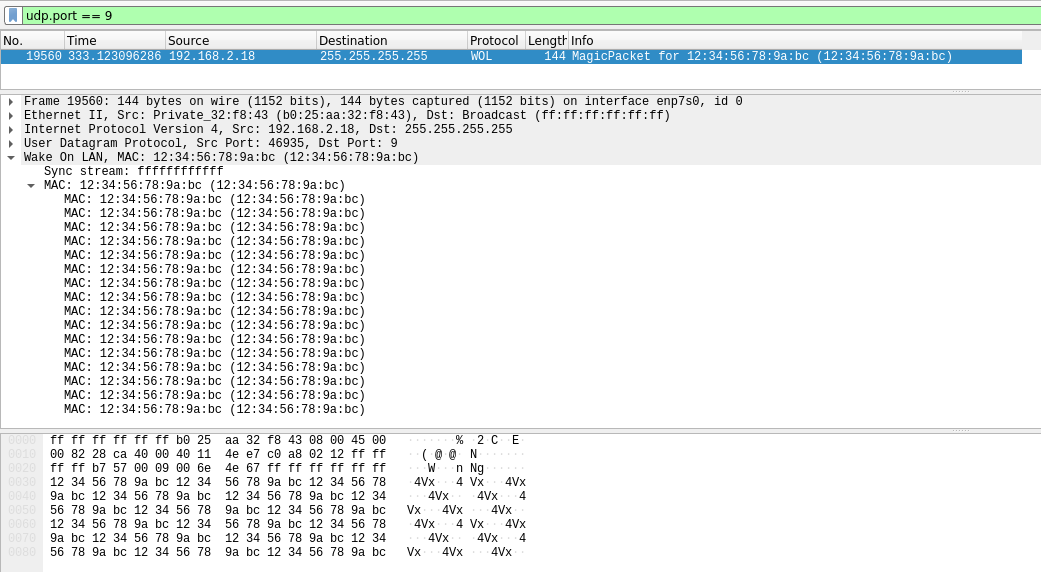
With the use of Wireshark, we can have a look at an example of how the Magic Packet looks like. Under the Wake-on-LAN tab in the packet that we captured we can see the packet structure. Here we can see that it first starts with 6 FF’s and then the target MAC Address is repeated 16 times.

Under is a code block that has the raw data of the Magic Packet that was sent out on the network. Each repeated MAC address does not have a separator and there is no separator between the synchronization stream and the MAC address.
ff ff ff ff ff ff 12 34 56 78 9a bc 12 34 56 78
9a bc 12 34 56 78 9a bc 12 34 56 78 9a bc 12 34
56 78 9a bc 12 34 56 78 9a bc 12 34 56 78 9a bc
12 34 56 78 9a bc 12 34 56 78 9a bc 12 34 56 78
9a bc 12 34 56 78 9a bc 12 34 56 78 9a bc 12 34
56 78 9a bc 12 34 56 78 9a bc 12 34 56 78 9a bc
12 34 56 78 9a bc
How to Send a Magic packet
The magic packet does not need the whole network stack to work as the ethernet interface only scan after the magic packet. The magic packet can therefore be sent out to the network using any network or transport protocol, however, the easiest way is to send the packet as a UDP datagram.
When using UDP, the magic packet is usually sent out to the broadcast address. The broadcast address is a special address that is used for broadcasting a packet to the entire network or a segment of the network. 255.255.255.255 is the address used for IPv4 networks.
IPv6 networks do not have a broadcast address but use multicast instead. Port 9 is the most used port to send it to, but it varies between port 0, 7, and 9
Wake On Lan Limitations
Wake-On-Lan have some limitations, the biggest limitations is that it can not wake up computers that is not on the same network or the same VLAN as the device that sends the magic packet.
Wake on LAN can not wake up a computer if you do not already know the MAC address, so you are not able to send a magic packet to an IP address to wake up a computer. The computer that you are trying to wake up also needs to be connect with an ethernet cable as it is not possible to send a magic packet over wifi.
If you send a magic packet to the computer there is not any guaranteed that the computer actually will receive the packet and wake up and you will not now if the computer wakes up as there is no confirmation that it have received the correct magic packet.
How to make your own implementation in Golang
Now that we know how a magic packet is constructed, we can implement our own version in Golang to make a tool to wake up our computers or servers for when we do not want to go over to them to turn them on or have a remote computer with a raspberry pi connected to the network.
Create a Magic Packet
To create a magic packet, we will need to create a string with 6 FF’s and then repeat the MAC address 16 times without any breaks or any other separators. To start, we create a function that creates the magic packet, this function will be called CreateMagicPacket().
The function will take in a string as an argument, this argument gets the name MACaddress, the function will also need to return a slice of bytes and an Error. The first thing the function needs to do is to check if the MAC address that was provided is valid, this can be done with the regexp library Golang provides.
|
|
The slice of string variable delimiter is used later to search for different delimiters that can be used in a MAC address.
reMAC is then declared with the regex that is used to determine if the MACaddress is a valid MAC address. Next, the MACvariable is the result that is found with the use of reMAC.find from the MACAddress argument. If the MAC variable is nil the program will return a magic packet with a nil value and an error stating that the MAC address provided was invalid.
|
|
When we know that the MACaddress is valid, it is time to remove the delimiters that exist in the MAC address. We will loop over the MAC address with the use of the slice declared earlier named delimiter and removes every delimiter that it finds.
|
|
Now that we have a valid MAC address to use in the magic packet it is time to repeat it 16 times, this is done with the strings packet and the Repeat function
|
|
The last step to create a magic packet is to insert the sync stream to the front and decode it from a string to a slice of bytes.
Send the Magic Packet
We now should have created a magic packet, it is time to send it out on the network to the computer that you want to wake up. To send the packet, the net library in Golang will be used. The net packet will first validate the IP address given and then open a UDP connection to send the packet.
A new function is will be used to send the packet, this function will be called SendMagicPacket and takes three arguments. The first argument we need is the magicPacket that was generated in the last function with the type of []byte, the second argument is a string for the IP address that the packet will be sent too. Lastly, an int is needed for the destination port for the destination port.
The addr input needs to be checked to see if it is a valid IP address, and then combined with the port into a connection string.
|
|
The net packet has a handy function for checking if an IP is valid, net.ParseIP. net.ParseIP will be used for the check instead of using a regex. This will set the IP variable to nil if it is not a valid IP address.
At the end of the code snippet, the valid IP and port are combined to create a connection string. The connection string will be used to create a connection to the network.
|
|
With the net library, we can create a connection to the network with the Dial function. This function first takes the network it is connecting to and then the address of the network that you want to connect to. Since Wake-on-LAN is connectionless, the easiest is to use UDP as it does not need to establish a connection to the host before sending the packet.
After the network that it is going to use, the address that it will connect to must be provided. This address was created earlier in the script by combining the address with the port number.
Golang has a special keyword called defer, and it runs the code here when the function is done. defer conn.close() closes the connection to the network when it is done.
|
|
The connection is not opened yet, to open the connection the conn variable created earlier will be used to send the magic packet to the network. The conn variable has the sub-function Write which will be called to send the packet to the network. If the Write function does not return an error then a magic packet has been sent to the network.
However, this does not mean that the magic packet has woken up the computer or server
The full code for both functions and working software is located over on Github: GitHub - xaner4/Gowakeup: Golang Wake on LAN packet