
I’m currently working on the next edition of my Windows Server book for Cengage, updating everything from Windows Server 2022 to 2025. As you’d expect, my primary lab machine is a high-end 14th Gen Intel Core i9 system running Windows 11, hosting multiple Hyper-V virtual machines (VMs) for roles like Active Directory, IIS, DNS, DHCP, and more.
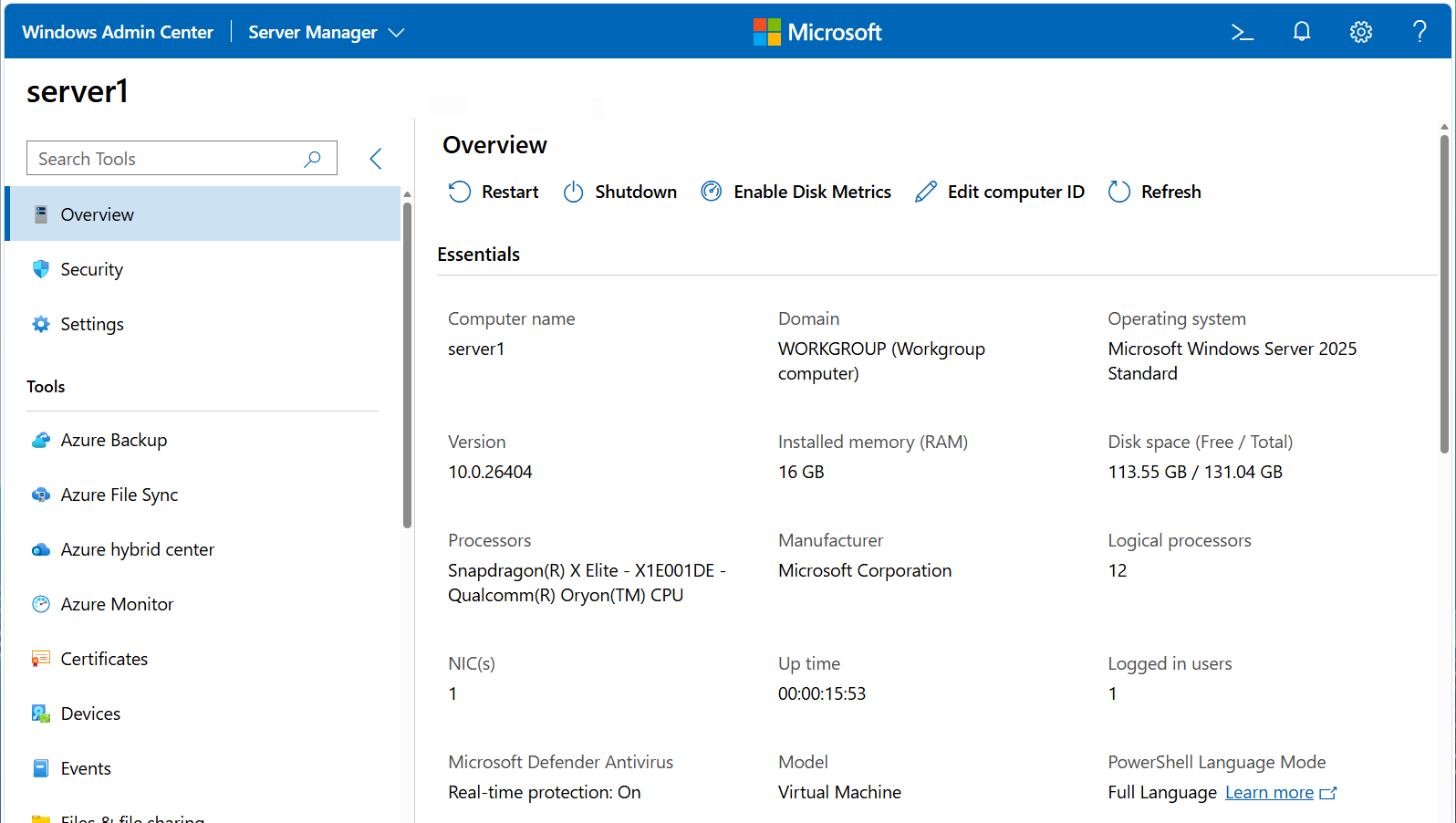
Out of curiosity (and honestly, just for fun), I decided to spin up the same Windows Server 2025 environment in Hyper-V on my Snapdragon X Elite system running Windows 11 on ARM. Microsoft does not provide an official installation ISO image of Windows Server 2025 for ARM on their website, so I used UUP dump to generate one from Microsoft’s update servers and installed the same set of VMs with it.
It was stable, functional, and fully usable as you’d expect… but there was one big difference: Everything felt much, much faster! Services started more quickly (including Active Directory, which is usually a bit of a slog), management consoles opened faster, and the same hands-on tasks I was writing for my textbook consistently completed in less time.
The Hyper-V VMs are configured identically in terms of memory, virtual processors, and installed roles for their native CPU architectures:
- Snapdragon X Elite = ARM64 guest on ARM64 host
- Intel Core i9 = x64 guest on x64 host
At this point, it may look like the architecture is the only real difference, and the major contributor to the performance, but that’s a bit misleading. The systems differ in more than just CPU architecture. Storage, memory, power management, and thermal behavior can all influence results. So rather than claiming “ARM is faster,” it’s better to look at how performance differs holistically.
Any good IT admin will tell you that workload type matters when it comes to performance. Both VMs are running the typical services you’d expect on a Windows Server: Active Directory, DNS, DHCP, IIS, File services (SMB/NFS/DFS), Print Services, Certificate Services, Remote Desktop Services, Routing and Remote Access, NPS, and so on. These services are typically thread-heavy and often have frequent-but-small CPU and I/O (read/write) operations, which means they are sensitive to latency and context switching (where a computer’s CPU stops one task to start another). In other words, they don’t tolerate variability well, and benefit from a system that provides consistent performance all the time.
This partially explains why the Snapdragon seems faster. Like many ARM systems, it doesn’t chase high boost clocks and instead delivers steady, sustained performance (including I/O). In contrast, modern Intel CPUs tend to ramp frequency quickly and throttle dynamically under load. That approach can deliver excellent peak performance, but it also introduces more variability in scheduling and latency under sustained or mixed workloads.
That variability matters even more in a virtualized environment. Hypervisors like Hyper-V are basically hardware schedulers. If the underlying hardware delivers more predictable execution timing, the hypervisor can make more consistent scheduling decisions. That, in turn, benefits the VMs and the services running inside them.
There may also be differences in the Windows Server ARM64 build itself. Various release notes I found online suggest that the ARM64 version of Windows Server avoids some legacy compatibility layers and uses more modern, optimized binaries. In other words, it’s likely a cleaner build than the x64 version. And anyone who has been tasked with refactoring code can tell you that those small efficiencies add up.
Digging deeper with Performance Monitor
To test this, I ran a series of measurements. First, I added the following counters to Performance Monitor on both Windows 11 hosts:
\Processor(_Total)\% Processor Time(overall CPU utilization across all cores)\System\Processor Queue Length(# of threads waiting in the processor queue for CPU time - should be zero if everything is optimal)\Hyper-V Hypervisor Virtual Processor(*)\CPU Wait Time Per Dispatch(average time virtual processors wait to be scheduled on the CPU)
Then, I ran the following within PowerShell on each VM to generate some load, and watched the results in Performance Monitor:
1..8 | ForEach-Object {
    while ($true) { Get-Process | Sort-Object CPU -Descending | Select-Object -First 5 | Out-Null }
}
The Snapdragon had that steady, sustained performance I expected while the Intel had the typical boost/throttle variation. % Processor Time fluctuated far less on the Snapdragon system. Processor Queue Length stayed at zero on Snapdragon, but periodically spiked on Intel. CPU Wait Time Per Dispatch was flat and consistent on Snapdragon, but varied significantly on Intel.
Measuring service responsiveness
In PowerShell on each VM, I also used Measure-Command to test how long common operations took for several of the services running. For example, I ran the following to see how long it took to hit the IIS web server 1000 times:
Measure-Command { 1..1000 | foreach { Invoke-WebRequest http://localhost -UseBasicParsing | Out-Null } }
I repeated this process but replaced the Invoke-WebRequest command to test:
- DNS (
Resolve-DnsName "domainX.com" -Server 127.0.0.1 | Out-Null) - Active Directory lookups (
Get-ADUser -Filter * -ResultSetSize 1 | Out-Null) - Domain authentication latency (
Test-ComputerSecureChannel -Verbose:$false) - And even some file I/O:
$path = "C:\TestFiles"
mkdir $path -ea 0

Measure-Command {
    1..2000 | foreach {
        $file = "$path\file$_.txt"
        Set-Content $file "test"
        Get-Content $file | Out-Null
        Remove-Item $file
    }
}
Across multiple runs of each test, the Snapdragon system produced consistent, repeatable timings nearly every time. On the Intel system, results varied significantly, occasionally beating the Snapdragon, but most of the time falling behind. The Snapdragon was the clear winner on each test overall.
Summary
The common thread across these results is latency consistency. These Windows Server workloads need predictable scheduling and fast response to small, frequent operations… especially under virtualization. If your workloads depend on peak throughput, x64 systems still have clear advantages. But if your environment looks like a typical Windows Server deployment with many small, latency-sensitive operations running under virtualization, then consistency may matter more than raw speed.
And in that context, ARM64 looks very attractive. Plus, it’s already widely used in cloud environments where the performance-to-cost ratio is much better than x64… which begs the question: If Windows Server workloads benefit from this kind of performance, shouldn’t Microsoft be making ARM64 play a larger role in its future? Right now, Microsoft doesn’t fully support Windows Server on ARM64, yet 33% of all new Microsoft Azure VM instances last year were ARM64 (50% for Amazon’s AWS).
Hopefully Microsoft will spend more time in the future on their server product strategy and less on Copilot ;-)
Note: For my Cengage textbook, I’m still standardizing on x64. The reason is simple: nested virtualization is part of the lab setup, and that’s not yet supported on ARM64 in Hyper-V. Students could adapt the labs to work around this, but one of the goals of the book is reproducibility… having everything “just work” step by step. For now, x64 remains the practical choice for teaching.