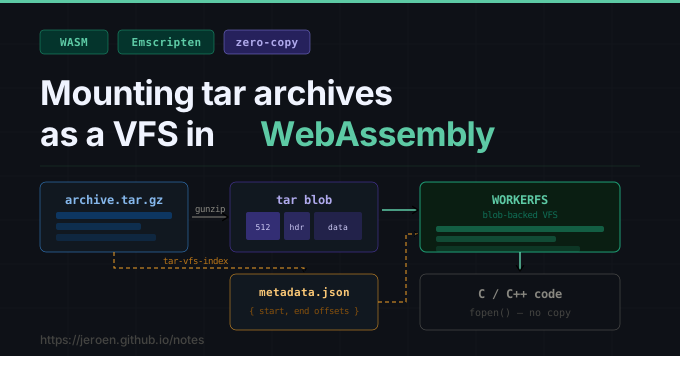

TLDR: instead of extracting a .tar.gz archive, we can generate a small index file which lists the size and offset of each file in the tar, and use this metadata to mount the tar blob directly via Emscripten’s WORKERFS without any copying.
For details see: https://github.com/jeroen/tar-vfs-index
The struggle with tarballs
Lots of data on the internet lives in tarballs, often distributed as gzipped .tar.gz files. To get to this data, we have to download the entire .tar.gz file, decompress it, and then iterate through the blob from beginning to end to make copies of the files we need. This is expensive and painful in memory constrained environments.
A while ago we came up with a cool optimization for WebR (the wasm port of R) that lets us mount contents from a .tar.gz archive without copying by using a metadata file which indexes the size and offset of each file within the tar blob. This works very well and has been a big usability improvement: all R packages for webR are now distributed this way and load much faster, while still being hosted as plain old .tar.gz files on static servers.
The idea of (memory) mapping tarballs is not new, but using a format that we can plug straight into emscripten’s virtual filesystem makes this practical for use in WebAssembly. The metadata files are simple json, which you could either store as static files on your server or generate on demand for any tarball.
In our case we eventually decided it makes sense to append metadata file to the original tarball (tar allows this) and distribute it as a single file (see below for more details).
Emscripten’s virtual filesystem
Emscripten provides a virtual POSIX filesystem (VFS) so that file I/O from C/C++ code works in WebAssembly without modification. This is important for WebR because R interacts a lot with files on disk, in particular for loading R packages.
The VFS has pluggable backends, and WORKERFS is designed to give Web Workers read-only access to Blob objects without copying their data into the Wasm heap. Files appear in the VFS at their declared paths, but reads are served by slicing the backing blob on demand. This is effectively memory-mapping for the browser: file contents live in the JavaScript layer and are accessed only when the C code actually reads them.
Emscripten ships a utility called file_packager to generate such a blob and metadata for an arbitrary set of files. But if your files are already in a tar archive, you do not need to repack them: a tar is already a flat, sequential byte stream where every file’s content sits at a fixed offset. We just need an index.
Generating the index for a tar
A tar archive is structured as a sequence of 512-byte headers each followed by the file’s data, padded to block boundaries. File contents are contiguous and byte-addressable, so the archive itself can serve as the blob; we only need to know where each file starts and ends.
The tar-vfs-index npm package does exactly this: it reads a tar or tar.gz stream and outputs a JSON index in the file_packager metadata format:
npm install tar-vfs-index
npx tar-vfs-index archive.tar.gz
{
  "files": [
    { "filename": "mypackage/DESCRIPTION", "start": 512,  "end": 548  },
    { "filename": "mypackage/R/code.R",    "start": 1536, "end": 1563 }
  ],
  "remote_package_size": 3072
}
Remember that the start and end values are byte offsets within the decompressed tar data, i.e. the range WORKERFS will use to slice the blob when the C code opens a file.
Mounting the archive in VFS
Mounting a tar in WORKERFS requires two things: the decompressed tar Blob and the JSON metadata containing the indexes. If your input file is gzipped (.tar.gz), you should pipe it through the browser’s native DecompressionStream first:
const [metaRes, dataRes] = await Promise.all([
  fetch('archive.tar.gz.json'),
  fetch('archive.tar.gz'),
]);
const metadata = await metaRes.json();

const blob = await new Response(
  dataRes.body.pipeThrough(new DecompressionStream('gzip'))
).blob();

FS.mkdir('/pkg');
FS.mount(WORKERFS, { packages: [{ metadata, blob }] }, '/pkg');
After the mount, every file open from C code in Emscripten is served by slicing the blob at the right range. No files are extracted; the decompressed tar data stays in memory as the backing store.
Adding the index to the tarball itself
Serving the metadata as a separate .json file works well with any existing tar.gz and keeps concerns cleanly separated. An alternative is modify the original tarball and insert the metadata inside the tar archive itself, as an extra entry at the end:
npx tar-vfs-index --append archive.tar.gz
The result is a self-contained .tar.gz that a loader can mount without fetching a separate file, but it needs to do some more work to extract the embedded metadata file before mounting. WebR uses this approach for its binary R packages; see the tar-vfs-index readme for the format details.
Conclusion: why this works
Three properties line up to make this possible:
- Tar’s flat layout: file data is already contiguous and byte-addressable, so the archive naturally doubles as a VFS backend store.
- WORKERFS blob slicing: the filesystem backend was designed to serve reads from blobs without copying, so zero-copy access comes for free once the metadata is in the right shape.
- Browser native gunzip: tar.gz files must be decompressed before the data can be used as a random-access blob. Fortunately browsers do this very efficiently during download as they need it for any HTTP response with
Content-Encoding: gzip.
The end result is that when WebR loads an R package from a tar.gz file into the virtual filesystem, we avoid lot of needless copying and it takes roughly the same time and memory as as it takes to download the and decompress a HTTP request of that size.