 - 5 mins
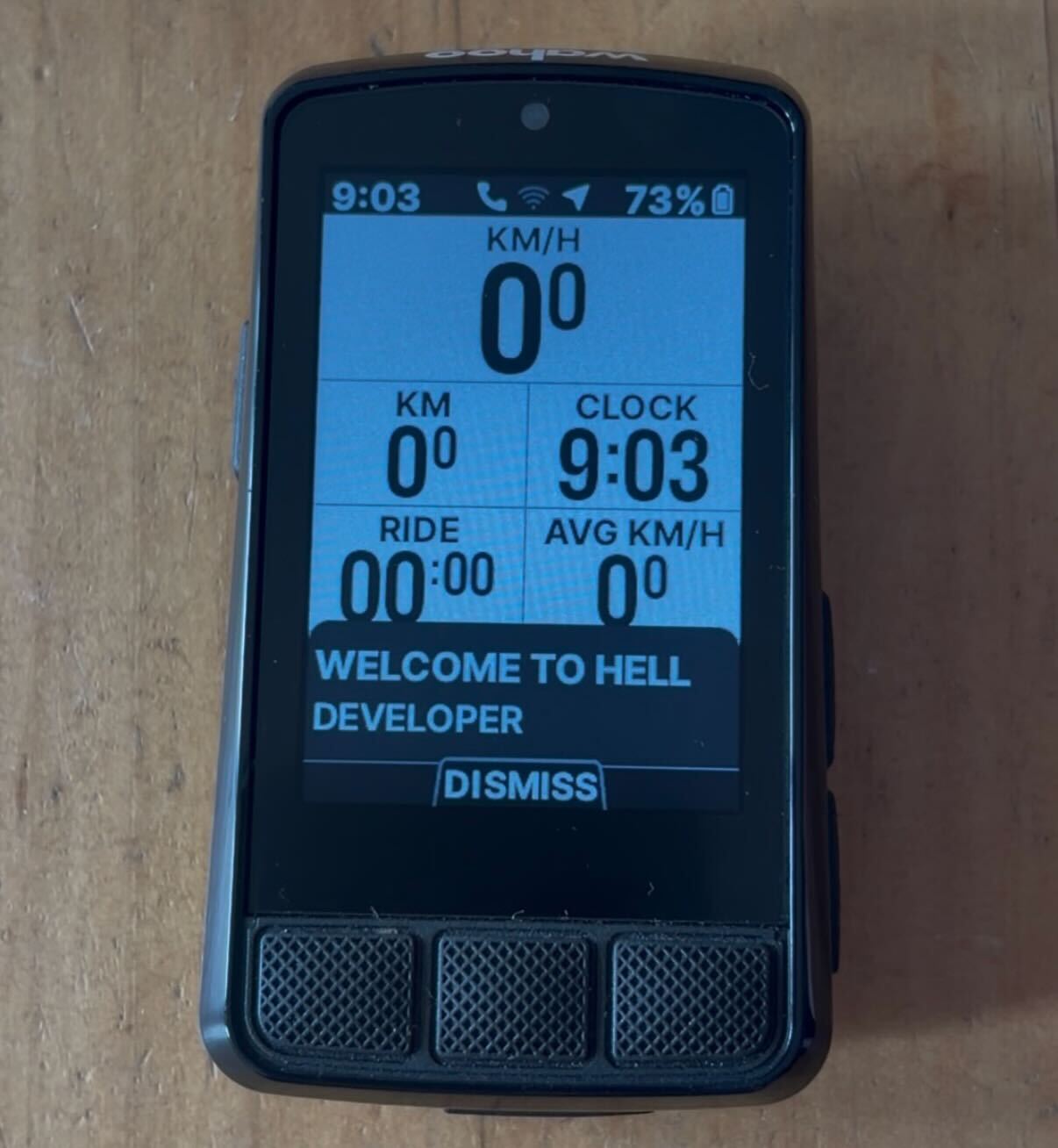
 My bike rides stopped syncing to my phone. That was it. That was the whole reason I ended up reverse engineering Bluetooth packets, decompiling an Android APK, and getting greeted with “WELCOME TO HELL DEVELOPER” on my cycling computer.
The Problem
I ride a Wahoo ELEMNT Bolt v3. It’s a solid GPS cycling computer – maps, sensors, the works. But at some point my rides just stopped syncing to the companion app on my phone. Frustrating, but not the end of the world. I figured maybe there was a debug mode or some hidden diagnostic that could help me figure out what was going wrong.
So I did what any reasonable person would do: I pulled the APK off the device and started poking around.
Pulling the APK
The Bolt v3 runs a custom Android build. You can connect it over USB and it shows up as an MTP device. The main app is com.wahoofitness.bolt – I grabbed the APK and threw it at jadx to decompile it.
What I found was… a lot more interesting than a sync bug fix.
The App Profile System
Buried in the decompiled source, I found a class called CruxAppProfileType. The device has an internal profile system that gates features:
| Value | Name | Debug Menu |
|---|---|---|
| 0 | STD | No |
| 1 | BETA | Yes |
| 2 | ALPHA | Yes |
| 3 | DEV | Yes |
| 4 | FACTORY | No |
Retail devices ship as STD (0). If you could bump that to DEV (3), a whole debug menu unlocks under Settings > Device > Advanced. That sounded like exactly what I needed – a way to poke at the internals and maybe figure out why sync was broken.
The question was: how do you change it?
Down the Rabbit Hole
The profile is stored in SharedPreferences on the device’s internal storage – not accessible over MTP. ADB would let you change it, but ADB access itself is gated behind the ALPHA+ profile. Classic chicken-and-egg.
But then I noticed something in the BLE code. The app has a characteristic called BOLT_CFG that lets the companion app read and write device configuration over Bluetooth. And the protocol has zero application-layer authentication. No HMAC, no nonce, no challenge-response. Security relies entirely on BLE pairing.
Reverse Engineering the BLE Protocol
This is where I teamed up with Claude (Opus 4.6) to work through the decompiled Java and figure out the exact packet format. Here’s what we pieced together:
The BOLT_CFG characteristic uses a simple binary protocol. To write a config value, you send a SEND_PREFS packet:
Offset  Size   Field
------  -----  -----
0       1      Packet type (0x01 = SEND_PREFS)
1       1      Config code
2       N      Value
APP_PROFILE is config code 66 (0x42), encoded as a single byte. DEV is value 3.
So the entire packet to unlock developer mode is three bytes:
0x01  0x42  0x03
 |     |     +-- DEV profile
 |     +-- Config code 66 (APP_PROFILE)
 +-- SEND_PREFS
That’s it. Three bytes over Bluetooth to unlock a hidden developer mode on a retail cycling computer.
Writing the Script
I wrote a Python script using bleak (a cross-platform BLE library) to automate the whole thing. The script scans for Wahoo devices, connects, and sends the packet.
There were a few gotchas we had to work through:
-
Notification subscription is required first. The device silently drops writes unless you’ve subscribed to notifications on the characteristic beforehand. Took a bit to figure that one out – writes would just disappear into the void.
-
Write-without-response only. The characteristic doesn’t support write-with-response, so you have to use
response=False. -
Bonding is required. You need to be paired with the device before it’ll accept writes – so this isn’t something a random passerby can do without the owner’s involvement.
WELCOME TO HELL DEVELOPER
After running the script and rebooting the Bolt, I navigated to Settings > Device > Advanced, and there it was – a brand new Debug Menu option that wasn’t there before. And on screen, a popup:
“WELCOME TO HELL DEVELOPER”
Wahoo’s devs have a sense of humor.
The debug menu gives you access to:
- Config viewer/editor – browse and edit all internal configuration
- GPS NMEA controls – toggle extra satellite data, view GPS status
- Nordic chip controls – software/hardware restart the BLE chip
- Map management – delete regional map data
- UI test fragments – poke at the display
- Log controls – save logs, log NMEA data, insert debug markers
- CrashMe button – literally throws an
AssertionError("CrashMe Button")(love it) - Nuclear Factory Reset – the name says it all
Beyond the debug menu, DEV mode also enables:
- ADB access (with a sentinel file on /sdcard)
- A built-in web server on port 8080 with endpoints for browsing files, viewing the database, editing configs, and even injecting GPS coordinates
- Firmware debug streaming via separate BLE opcodes
The Bigger Picture
What started as a broken sync issue turned into a pretty thorough look at the Bolt’s internals. The config protocol over BLE has no application-layer authentication – once you’re bonded, you can write any config value the app can. There’s no HMAC, no nonce, no challenge-response on top of the BLE layer.
I ended up documenting the full BLE protocol, the file transfer system, and some other findings in separate writeups.
As for my original sync problem? After all of that – decompiling an APK, reverse engineering a binary protocol, writing a BLE exploit script – it turned out the issue was on my phone the whole time. Not the cycling computer. The phone.