Cloud-native GIS platform
GeoLibre is built with Tauri, React, TypeScript, MapLibre GL JS, DuckDB-WASM Spatial, and deck.gl. The same workspace runs across desktop and web environments, adapting responsively to mobile screens, with fast local and cloud-native data work, project files, styling, plugins, and modern geospatial workflows.
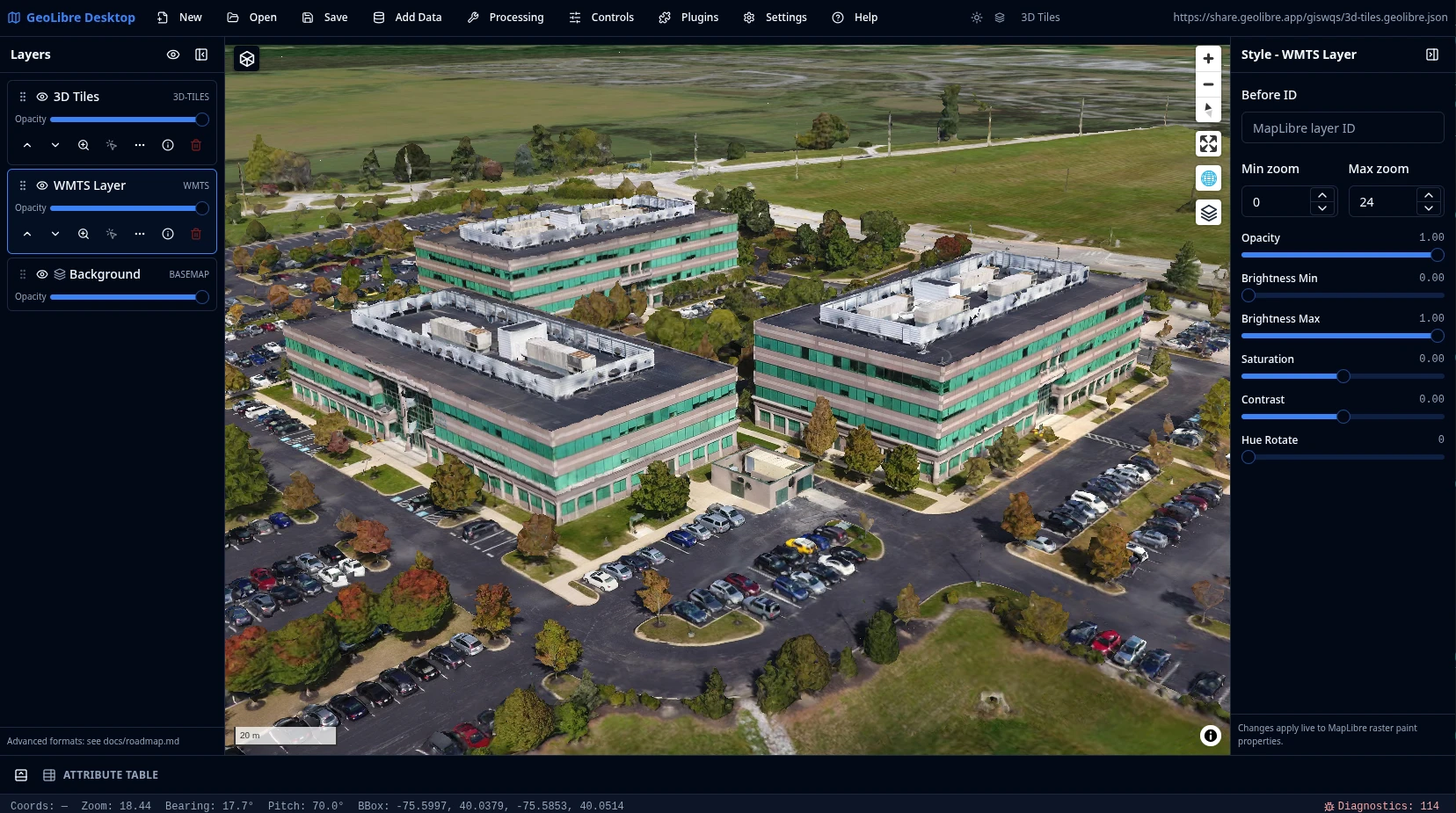
What GeoLibre does today
MapLibre map workspace
Pan, zoom, rotate, and tilt a MapLibre map with OpenFreeMap basemaps or a blank background. Toggle built-in controls for navigation, globe, terrain, geolocation, scale, attribution, and logo, plus on-map tools like Measure, Bookmark, Minimap, and View State.
Local and remote data
Load local and remote vector and raster data, inspect attributes in the table, style layers with data-driven symbology, reorder and refresh layers, and save, reopen, or share .geolibre.json projects.
Plugins and marketplace
Activate built-in plugins for layer control, basemaps, MapLibre components, swipe, street view, time slider, Overture Maps, LiDAR, GeoAgent, and GeoEditor, and install, update, or remove external plugins from the built-in marketplace.
Advanced layer formats
Add Data covers XYZ, WMS, WFS, WMTS, ArcGIS, and STAC services; GeoParquet, FlatGeobuf, PMTiles, and Zarr cloud formats; COG and GeoTIFF rasters and MBTiles; LiDAR, Gaussian splats, and 3D Tiles; and DuckDB and PostgreSQL databases.
Conversion and Whitebox
Convert data to cloud-native GeoParquet, FlatGeobuf, PMTiles, and COG from the Conversion menu, and run batch geoprocessing with the Whitebox toolbox on the optional Python sidecar.
SQL Workspace
Run DuckDB Spatial SQL in the browser against loaded layers, local files, and remote URLs. Auto-wraps bare URLs into the matching reader and streams remote files over HTTP range requests. Includes sample queries, query history, and adding a result (with an optional layer name) to the map or exporting it as CSV or GeoParquet.
Vector tools
Common geometry tools under Processing → Vector: buffer, centroids, convex hull, dissolve, bounding box, simplify, clip, intersection, difference, and union. They run in the browser with Turf.js, with an optional GeoPandas sidecar engine for every tool.
Raster tools
Common raster tools under Processing → Raster: hillshade, slope, aspect, reproject, resample, clip by extent, clip by mask layer, polygonize, and contour. They run on a rasterio Python sidecar with a file path in and a file path out. Drag a GeoTIFF/COG onto the map to add it as a raster layer.
Python and Jupyter
Embed the full GeoLibre app in a Jupyter notebook with the geolibre Python package. A leafmap-style API (add_geojson, add_tile_layer, add_cog) drives the map, and the project syncs both ways so UI edits are readable back from Python.
Learn GeoLibre
New to GeoLibre? Start with the User Guide for a feature-by-feature tour of the workspace, menus, panels, and tools, then follow the Tutorials for hands-on, end-to-end workflows.
- Interface Overview: the toolbar, panels, map, and status bar.
- Adding Data: every file, web service, cloud, 3D, and database source.
- Processing Tools and SQL Workspace: analysis with vector, raster, conversion, Whitebox, and DuckDB Spatial SQL.
- Plugins & Marketplace: activate built-ins and install from the registry.
- Your First Map: add a layer, style it, inspect it, and share it.
Read the User Guide Browse the Tutorials
Try it in the browser
The live demo is the browser-capable version of the GeoLibre desktop UI. It is useful for exploring the map, loading browser-selected vector data supported by DuckDB-WASM Spatial, adding URL-based layers, styling layers, and testing plugins. Desktop-only file dialogs, local MBTiles, local raster reads, and filesystem save/open operations still require the installed Tauri app.
Hosted on GitHub Pages, private by design
The live demo is a static site deployed on GitHub Pages and runs entirely in your browser. It has no analytics and no server account, and the data you load is processed client-side in your browser session. Data leaves your browser only when you choose to add a remote URL or explicitly share a project.
Open a project by passing a public .geolibre.json URL with the url query parameter:
https://viewer.geolibre.app/?url=https://share.geolibre.app/giswqs/3d-tiles.geolibre.json
For narrow embeds, add ?layout=compact to the demo URL to use icon-only toolbar buttons and hide project metadata:
https://viewer.geolibre.app/?url=https://share.geolibre.app/giswqs/3d-tiles.geolibre.json&layout=compact
For map-focused embeds, add &panels=none to hide the Layers, Style, and Attribute table panels:
https://viewer.geolibre.app/?url=https://share.geolibre.app/giswqs/3d-tiles.geolibre.json&layout=compact&panels=none
Use toolbar=icons when you only want icon-only toolbar buttons. panels=hidden, panels=hide, panels=off, and hidePanels=true are accepted aliases for hiding panels.
For a fully chrome-free, map-only embed, add &maponly to hide the toolbar menu, all panels, and the status bar:
https://viewer.geolibre.app/?url=https://share.geolibre.app/giswqs/3d-tiles.geolibre.json&maponly
Other parameters control the toolbar, panels, and theme. See Embedding & Sharing for the full parameter reference and <iframe> examples.
Open the live demo Embedding & Sharing
Project status
GeoLibre 1.0 is a stable prototype. It includes the map workspace, the .geolibre.json project format with Save, Open, and Share, the plugin API, and the plugin marketplace for installing, updating, and removing external plugins. Data support spans browser vector import, DuckDB-WASM Spatial loading, the full Add Data surface (files, web services, cloud formats, 3D layers, and databases), and cloud integrations through the Planetary Computer and Earth Engine panels, the Overture Maps plugin, and the federal Web Services plugins. Processing covers the vector tools (Turf.js with an optional GeoPandas sidecar), the raster tools (rasterio sidecar), the Conversion menu (GeoParquet, FlatGeobuf, PMTiles, COG), the Whitebox toolbox, and the SQL Workspace for DuckDB Spatial SQL. The release also ships the Time Slider plugin, a Controls menu (Measure, Bookmark, Minimap, View State), a Print menu, Layout settings, runtime environment variables, diagnostics, embed-friendly URL parameters including the maponly mode, cross-platform installers, and Docker support for the browser app. See the roadmap for the full release history and what comes next.