







Offline audio stabilization engine powered by ML/AI and CEPA Logic.
See: CEPA_LOGIC_LICENSE.txt
A small Windows tool that lowers loud TV ads automatically and restores normal volume smoothly.
AdBuster PRO is a lightweight Windows application that monitors TV audio in real time and automatically reduces the volume when loud commercials appear.
When normal audio returns, the volume is restored smoothly and naturally.
No cloud.
No accounts.
No telemetry.
No data collection.
Everything runs locally on your PC or laptop.
- Download the latest release from the Releases page.
- Unzip the folder anywhere on your PC.
- Run Start.bat to launch all modules automatically.
- (Optional) Configure your Broadlink IR device for volume control.
- Start watching TV — AdBuster will detect loud ads and stabilize audio in real time.
- 🔊 Real‑time loudness detection
- 📉 Automatic volume reduction during commercials
- 🔄 Smooth volume restoration after ads
- 📡 IR blaster support (Broadlink RM series)
- ⚙️ Configurable thresholds and reaction times
- 🖥️ Runs silently in the background
- 🔐 Fully local — no internet required
AdBuster 2.0 PRO is not a typical audio tool.
It is the only Windows application that combines:
A dedicated audio engine extracts loudness, stability, spikes and long‑term patterns in real time — fully offline.
A proprietary contextual reasoning layer that interprets audio events the same way a human would:
- detects disruptive spikes
- avoids over‑correction
- restores volume smoothly
- adapts to context and time of day
Two independent ML engines:
- model.pkl — lightweight, short‑term classifier
- model_deep.pkl — PRO‑level long‑term pattern recognizer
Both run 100% locally.
AdBuster is the only Windows tool that:
- detects loud commercials
- decides what to do
- sends IR commands automatically
- stabilizes TV volume without user interaction
All processing happens on the user’s device.
This combination does not exist in any other Windows application or smart‑home tool.
AdBuster 2.0 PRO stands alone as a complete, intelligent, privacy‑first audio stabilization system.
- A microphone listens to the TV audio.
- When a sudden loudness spike is detected (typical for ads), AdBuster PRO decides whether to lower the volume.
- The app sends a command to the local Flask server (VolMaster).
- VolMaster forwards the IR command to the Broadlink device.
- Broadlink sends the IR signal to the TV.
- When audio returns to normal, the app restores the previous volume level.
All logic is processed locally — no cloud, no external servers.
Below is a simplified architecture diagram showing how the main components
of AdBuster PRO interact. This diagram does not reveal internal algorithms
or implementation details.
┌────────────────────────────┐
│        MICROPHONE          │
│    (raw audio signal)      │
└──────────────┬─────────────┘
               │ audio frames
               ▼
┌────────────────────────────┐
│        AUDIO ENGINE        │
│  RMS / mean / std / range  │
│   smoothing / GUI level    │
└──────────────┬─────────────┘
               │ features
               ▼
┌────────────────────────────┐
│       ML CONTROLLER        │
│      (ml_controller.py)    │
│ - collects RMS history     │
│ - calls ml_pro_update()    │
│ - sends RMS to Aduster ML  │
│ - toggles ad_mode          │
└──────────────┬─────────────┘
               │ RMS history
               ▼
      ┌────────────────────────────┐
      │         ADUSTER ML         │
      │   (model.pkl / deep.pkl)   │
      │ - long-term pattern check  │
      │ - AD / NORMAL classifier   │
      └──────────────┬─────────────┘
                     │ AD / NORMAL state
                     ▼
┌────────────────────────────┐
│         CEPA ENGINE        │
│ - contextual analysis      │
│ - deadzone / stable zone   │
│ - spike detection          │
│ - anti-spam limits         │
│ - VOL_UP / VOL_DOWN        │
└──────────────┬─────────────┘
               │ decision
               ▼
┌────────────────────────────┐
│     AdBuster App Logic     │
│ - pending_cmds queue       │
│ - cooldown timers          │
│ - 2x up/down safety limits │
│ - sends HTTP commands      │
└──────────────┬─────────────┘
               │ HTTP GET /send?cmd=...
               ▼
┌────────────────────────────┐
│      VolMaster Server      │
│   (Flask API, port 5000)   │
└──────────────┬─────────────┘
               │ IR command
               ▼
┌────────────────────────────┐
│   Broadlink IR Blaster     │
│ (RM Mini / RM Pro series)  │
└──────────────┬─────────────┘
               │ infrared signal
               ▼
┌────────────────────────────┐
│      TV / Audio Device     │
│   (volume changes applied) │
└────────────────────────────┘
AdBuster’s automation layer uses only two IR commands:
- VOL_UP — increase volume
- VOL_DOWN — decrease volume
These are the only commands generated by CEPA, the ML controller, and the app logic.
The MUTE and POWER commands are manual‑only (UI buttons)
and are never used by the automation pipeline.
Automatic volume changes are always constrained by:
- a 2× up/down safety limit
- cooldown
- anti‑spam
- CEPA validation
AdBuster 2.0 PRO is built from three independent modules that work together in real time. At the center sits CEPA, the decision‑making brain that connects everything.
Captures audio from the microphone Computes RMS, peaks, dynamics, drift and spikes Builds short‑ and long‑term loudness history Generates structured audio events for CEPA Handles smoothing, deadzone, stable zone, cooldowns and safety limits Role: real‑time detection + runtime logic
Uses on‑device models (model.pkl and model_deep.pkl) Classifies AD / NORMAL behaviour based on RMS history Validates CEPA’s interpretation Does not send IR commands Does not control volume Role: pattern validation + long‑term statistical context
Local Flask server that communicates with Broadlink RM devices. Sends VOL_UP / VOL_DOWN IR commands. Compatible with any IR‑based TV or audio device. Exposes /send?cmd=... and /status endpoints. Role: execution layer responsible for IR command delivery.
CEPA (Contextual Event Pattern Analysis) is not a separate module. It is the internal intelligence layer inside AdBuster 2.0 PRO.
CEPA receives: audio events from AdBuster AD / NORMAL state from Aduster ML recent actions, cooldowns and safety limits from the app logic
CEPA performs: contextual pattern analysis human‑like filtering anomaly detection stability evaluation safety enforcement
CEPA decides: VOL_DOWN VOL_UP PASS BLOCK
AdBuster then forwards the final command to VolMaster, which executes it via IR.
In simple terms: AdBuster detects → Aduster ML validates → CEPA decides → VolMaster executes.
Below is a simplified decision‑flow diagram showing how
CEPA (Contextual Event Pattern Analysis) interprets audio behavior
and makes human‑like volume control decisions.
This diagram represents CEPA’s internal logic only.
CEPA interprets loudness behavior in context, rather than reacting to raw classification signals — making the system stable, human‑like, and resistant to natural volume fluctuations.
┌────────────────────────────────────────────┐
│                 CEPA INPUTS                │
│  - RMS trend (short / long)                │
│  - sudden spikes                           │
│  - drift up / drift down                   │
│  - AD / NORMAL mode                        │
│  - recent volume actions (history)         │
│  - cooldown & safety state                 │
└───────────────────────────────┬────────────┘
                                │
                                ▼
┌────────────────────────────────────────────┐
│             PERCEPTUAL CONTEXT             │
│  - is volume stable?                       │
│  - is change gradual or sudden?            │
│  - is this a spike or real increase?       │
│  - is this a natural fluctuation?          │
│  - is this AD mode (react faster)?         │
└───────────────────────────────┬────────────┘
                                │ context_state
                                ▼
┌────────────────────────────────────────────┐
│             HUMAN‑LIKE FILTERS             │
│  - ignore micro‑fluctuations               │
│  - ignore short spikes                     │
│  - apply deadzone (no reaction zone)       │
│  - apply stable zone (PASS)                │
│  - apply hysteresis (avoid oscillation)    │
└───────────────────────────────┬────────────┘
                                │ filtered_event
                                ▼
┌────────────────────────────────────────────┐
│             SAFETY & LIMITS                │
│  - anti‑spam window (no rapid repeats)     │
│  - cooldown timers                         │
│  - 2x up/down protection                   │
│  - block unsafe actions                    │
└───────────────────────────────┬────────────┘
                                │ allowed / blocked
                                ▼
┌────────────────────────────────────────────┐
│               DECISION ENGINE              │
│  - if spike → VOL_DOWN                     │
│  - if drift up → VOL_DOWN                  │
│  - if drift down → VOL_UP                  │
│  - if stable → PASS                        │
│  - if unsafe → PASS                        │
└───────────────────────────────┬────────────┘
                                │ final_action ...
                                ▼
┌────────────────────────────────────────────┐
│                 CEPA OUTPUT                │
│        VOL_UP / VOL_DOWN / PASS            │
└────────────────────────────────────────────┘
CEPA Diagram (detailed PNG version)
This example demonstrates how CEPA Logic interprets and reacts to signal behaviour over time.
CEPA does not operate on loudness alone — it evaluates patterns, context and temporal behaviour.
00:00 — Stable dialogue
- RMS stable, natural dynamics
- CEPA state: Passive Observe
- No action
00:03 — Small spike
- Classified as micro‑fluctuation
- Natural behaviour → ignored
00:05 — Second spike
- Still micro‑fluctuation
- No trend or pattern → ignored
00:07 — Gradual RMS rise
- CEPA detects drift‑up
- Opens a context window
- No action yet (trend not confirmed)
00:09 — Sudden jump + compressed dynamics
- Unnatural behaviour detected
- Classified as a meaningful event
- Marked as an AD‑pattern candidate
00:10 — ML confirmation
- ML confirms AD mode
- ML does not control volume — it only validates CEPA’s interpretation
00:10.2 — VOL_DOWN (1 step)
- Minimal, deterministic correction
- No prediction
00:10.6 — Stability check
- CEPA evaluates whether the signal is returning to a natural zone
00:11 — Second VOL_DOWN (smooth correction)
- Perceptual smoothing
- Prevents oscillation and over‑correction
00:12 — Stable zone reached
- CEPA closes the context window
- Returns to passive observation
- State: PASS
- CEPA reacts to behaviour, not loudness
- Micro‑fluctuations are ignored
- Trends (drift‑up) trigger context evaluation
- Unnatural behaviour triggers event classification
- ML only confirms — never controls
- Corrections are minimal and perceptually smooth
- Stability is always re‑checked before further action
A deterministic, perception‑inspired framework that evaluates how the signal behaves over time, not how loud it is at any given moment.
CEPA processes audio events through a structured, human‑like reasoning pipeline:
-
Collect audio metrics
Short‑term and long‑term RMS, spikes, drift, stability. -
Detect event type
Sudden spike, gradual rise, gradual fall, or stable behaviour. -
Read ML classification
AD / NORMAL mode from the ML controller. -
Evaluate recent actions
Cooldowns, anti‑spam window, last volume changes. -
Build perceptual context
Stable vs unstable, natural vs artificial change, spike vs fluctuation. -
Apply human‑like filters
Ignore micro‑noise, ignore short spikes, apply deadzone & hysteresis. -
Enforce safety rules
2× up/down protection, cooldown timers, block unsafe actions. -
Decision Engine
- spike → VOL_DOWN
- drift up → VOL_DOWN
- drift down → VOL_UP
- stable → PASS
- unsafe → PASS
-
Output final action
Send IR command via VolMaster → Broadlink → TV.
AdBuster didn’t begin as a polished application. The very first prototype was extremely rough — a small script running on outdated hardware, barely keeping up with real‑time audio.
It had:
- no interface
- no machine learning
- no CEPA Logic
- no prediction
- no visualization
Just one idea:
“What if the computer could stop loud commercials for me?”
Early tests were unpredictable.
Sometimes the system reacted too late, sometimes too early, sometimes perfectly — and sometimes it made everything worse.
But the idea was alive.
Everything changed after one key realization:
Volume spikes aren’t random — they follow patterns.
Commercials, trailers, boosted mixes… they all share the same traits:
- compressed dynamics
- boosted mid‑range
- constant high energy
- predictable timing
- repetitive structure
Once this became clear, the direction was obvious:
AdBuster needed machine learning.
Not because ML is trendy — but because it was the only way to detect these patterns in real time.
This was the moment AdBuster truly began.


Short demo recorded quickly on a phone — quality is low, but it clearly shows how the app reacts to loudness spikes and sends IR volume commands.
➡️ Full documentation is available in the docs file.
This repository includes an additional proprietary license covering the CEPA Logic (Contextual Event Pattern Analysis Logic) analytical framework.
For full terms, see the dedicated license file:
CEPA Logic is not a generic algorithm but a full contextual reasoning framework for real‑time audio event interpretation and automation. A full technical explanation of how CEPA Logic works — including decision flow, contextual evaluation, human‑like behavior model, data processing pipeline and real‑world examples — is available in a dedicated document:

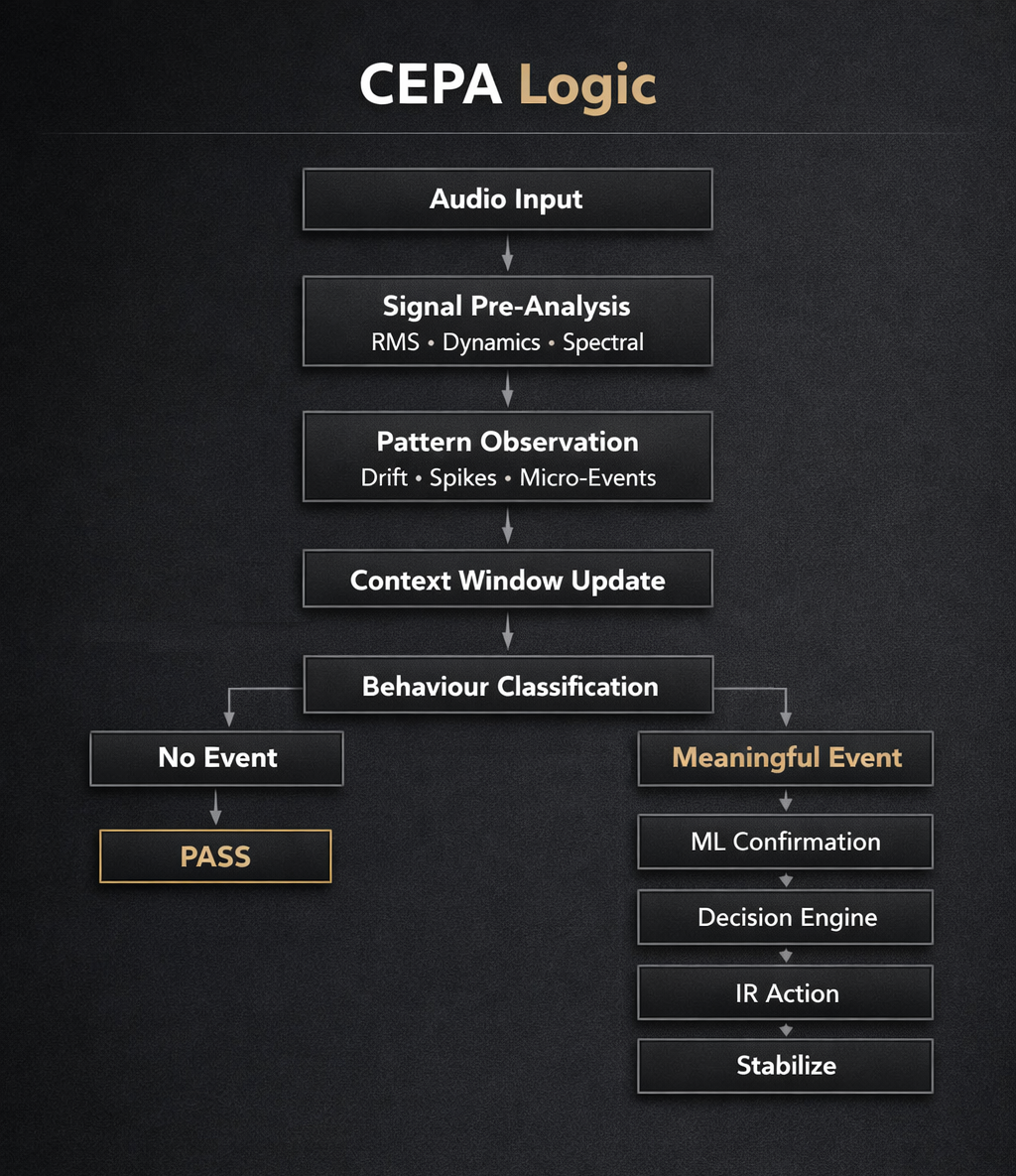
This document is intended for:
- audio DSP engineers
- machine learning engineers working with audio classification
- smart‑home and consumer electronics R&D teams
- OEM partners evaluating CEPA Logic for integration
- automation and embedded systems developers
This file contains:
- detailed description of CEPA architecture
- explanation of all decision types (BOOST, BLOCK, DELAY, SMOOTH, ALLOW)
- real‑time data flow
- human‑reaction analogy
- example code
- step‑by‑step event walkthrough
No other Windows application offers automatic ad detection, audio analysis, and Broadlink-based volume control. Existing tools can only send manual IR commands and do not provide any intelligent automation.
| Feature | Other Tools | AdBuster 2.0 PRO |
|---|---|---|
| Broadlink IR Control | Manual only | Automatic + manual |
| Automatic Ad Detection | Not available | Yes |
| Audio Level Analysis | Not available | Yes |
| Real-Time Reaction | Not available | Yes |
| Automatic TV Volume Adjustment | Manual only | Fully automatic |
| Intelligent Algorithms | None | CEPA Logic + AdBuster Engine |
Summary:
AdBuster 2.0 PRO stands alone as the only Windows application capable of detecting loud commercials and automatically controlling TV volume through Broadlink devices.
All other tools are limited to basic, manual IR control and cannot be compared to the intelligent automation provided by AdBuster.
AdBuster 2.0 PRO is a unique offline technology that combines real‑time microphone analysis, contextual CEPA logic, on‑device machine learning and Broadlink IR control to automatically stabilize TV audio. The system works on any Windows PC or laptop and supports virtually any IR‑based TV.
Opportunities:
- Licensing for TV, audio and smart‑home manufacturers
- Integration with streaming platforms and media devices
- Unique IP: CEPA + ML + IR control pipeline
- Open to commercial proposals and partnership discussions.
AdBuster 2.0 PRO is an independent R&D project developed with passion, countless hours of testing, and a strong focus on offline privacy‑first technology.
If you find this project useful, you can support its development in several ways:

- Buy me a coffee
- Share the project with others
- Star the repository ⭐
- Report issues
- Suggest new features
- Propose integrations (TV, audio, smart‑home, IR devices)
- Help test compatibility with Broadlink IR devices
Every form of support helps the project grow and evolve.
Thank you for being part of the journey.
AdBuster 2.0 PRO is a portable Windows application. No installation, no Python, and no additional software are required.
ZIP file name: AdBuster_2.0_PRO_Test.zip
Unzip the downloaded file to any folder on your PC
(e.g., Desktop, Documents, or a dedicated Tools folder).
- Open the extracted application folder (the folder created after unzipping AdBuster_2.0_PRO_Test.zip).
- Right‑click Start.bat → Send to → Desktop (create shortcut).
- (Optional) Right‑click the shortcut → Properties → Change Icon…
Select the included icon file: AdBuster.ico.
The shortcut will work regardless of where the folder is located.
Always start AdBuster using:
Start.bat
This launcher automatically starts all required modules:
- AdBuster.exe (main UI)
- Aduster.exe (audio engine)
- VolMaster.exe (Broadlink Flask server)
These executables must remain in the same folder and should never be run manually.
If you use AdBuster with a Broadlink IR device
(for example: Broadlink RM4 Mini or Broadlink RM4 Pro):
- Configure the Broadlink IR device in the official Broadlink mobile app (one‑time setup).
- Connect the Broadlink device to your Wi‑Fi network.
- Place the Broadlink IR blaster near your TV or audio device.
After completing these steps, AdBuster will automatically communicate with the Broadlink IR device.
VolMaster (Flask server) must be configured with:
-
Broadlink IP address (example: 192.168.1.25)
-
Broadlink MAC address in UPPERCASE, without separators
Correct: 47A1B2CDE3F4
Incorrect: 47:A1:B2:CD:E3:F4
Incorrect: 47-a1-b2-cd-e3-f4
Incorrect: 47a1b2cde3f4 (lowercase) -
Port 5000 (default communication port)
If the MAC address contains colons, dashes, lowercase letters, or symbols,
the server will not detect the device.
When you run Start.bat, the system launches:
- AdBuster.exe → main interface
- Aduster.exe → audio analysis engine
- VolMaster.exe → Flask server for Broadlink IR
These modules communicate with each other and must stay together in the same folder.
The Flask server listens on port 5000 and handles all IR communication.
After the initial Broadlink setup:
- No internet is required
- No cloud services
- No accounts
- No telemetry
- All processing is fully local
- Added ML/AI PRO mode
- Added CEPA Logic integration
- Added Broadlink IR control (VolMaster)
- Improved real‑time audio stabilizer
- Added 10‑second audio plot visualization
- New UI layout and redesigned modules
- Full offline processing (no cloud, no telemetry)
- Improved volume detection accuracy
- Added basic CEPA logic
- Added early Broadlink IR tests
- UI improvements
- Initial release of AdBuster PRO
- Basic real‑time volume stabilizer
- First working Windows build
A redesigned decision‑making engine with improved context awareness, better handling of borderline audio states, and more adaptive thresholds. The goal is to make CEPA less binary and more “human‑like” in how it reacts to dynamic audio environments.
A local, offline training pipeline that allows the model to refine itself based on the user’s environment. The system will collect short audio snapshots, classify them, and update the model without sending any data outside the device.
Extended IR control layer supporting multiple TVs, soundbars, receivers and Broadlink‑compatible devices. The goal is to allow users to define multiple profiles and switch between them dynamically.
A more robust IR communication layer with improved retry logic, faster command dispatching, and better handling of Broadlink device discovery. This includes support for additional Broadlink models and improved error recovery.
Additional interface components for monitoring, diagnostics and customization:
- real‑time CEPA decision graph
- ML confidence visualizer
- IR command monitor
- advanced audio calibration panel
No. AdBuster 2.0 PRO is fully portable.
Just unzip the folder and run Start.bat.
No. Everything is already compiled into standalone executables.
Yes.
After the initial Broadlink setup, the entire system works 100% offline.
No.
There is no telemetry, no analytics, no cloud communication.
Because Start.bat launches all required modules in the correct order:
- AdBuster.exe (UI)
- Aduster.exe (audio engine)
- VolMaster.exe (Flask server)
Running executables manually may break communication.
Check:
- MAC address must be UPPERCASE and without separators
- IP address must be correct
- Port 5000 must be free
- Broadlink must be on the same Wi‑Fi network
Yes — both models are fully supported.
Yes.
AdBuster will still analyze audio and detect ads, but IR volume control will be disabled.
Yes, but if you move the folder to a different location, you must recreate the shortcut.
Windows shortcuts store the full path, so moving the folder breaks the old shortcut.
No.
It only reads audio levels — it does not change system volume or audio drivers.
- Windows 7, 8, 10 or 11 (64‑bit recommended)
- Built‑in laptop microphone or any external USB microphone
- Broadlink RM series IR blaster (required for full functionality), e.g. RM3 or RM4 models with IR support
- No internet required after initial Broadlink setup
Broadlink is a compact Wi‑Fi IR blaster that replaces your TV or audio remote. It receives a command over Wi‑Fi and instantly sends the matching infrared signal to your TV, soundbar, receiver, or set‑top box — exactly as if you pressed the button on the physical remote. Everything works locally, without cloud, delays, or internet access.
AdBuster supports all Broadlink devices that include an IR blaster and operate in local LAN mode. This includes RM4 Mini, RM4 Pro, RM Mini 3, RM Pro+, RM4C Mini, and older RM2 models. RF‑only or cloud‑only devices are not supported.
AdBuster 2.0 PRO uses real, structured machine‑learning models that run fully offline.
To provide transparency, below are internal diagnostic previews showing how the engine loads and verifies its analytical components.
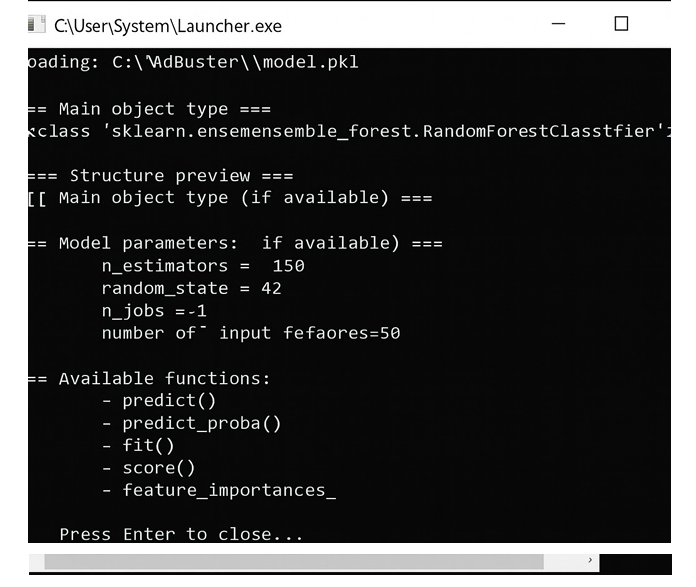
The standard engine is based on a real RandomForestClassifier with:
- 150 estimators
- 50 input features
- Local-only execution
- Functions:
predict(),predict_proba(),fit(),score(),feature_importances_
"This preview confirms that the file exists, loads properly, and is recognized by the system."
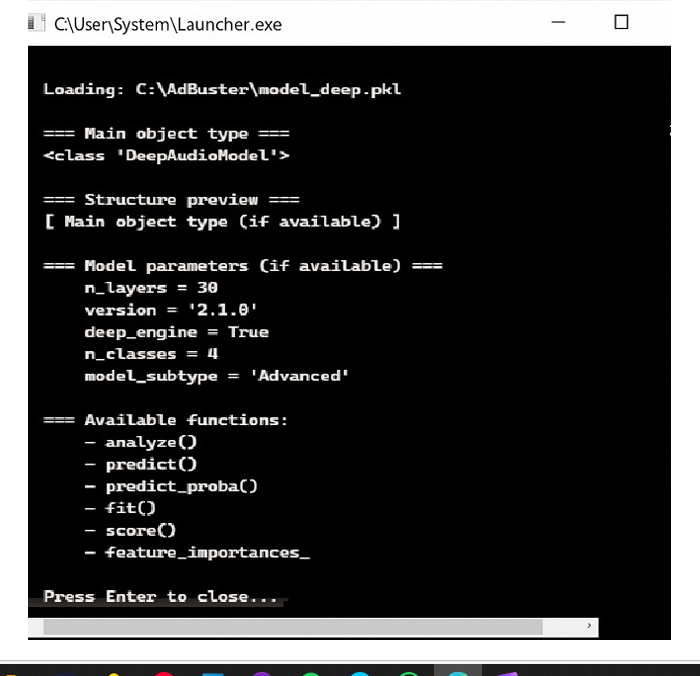
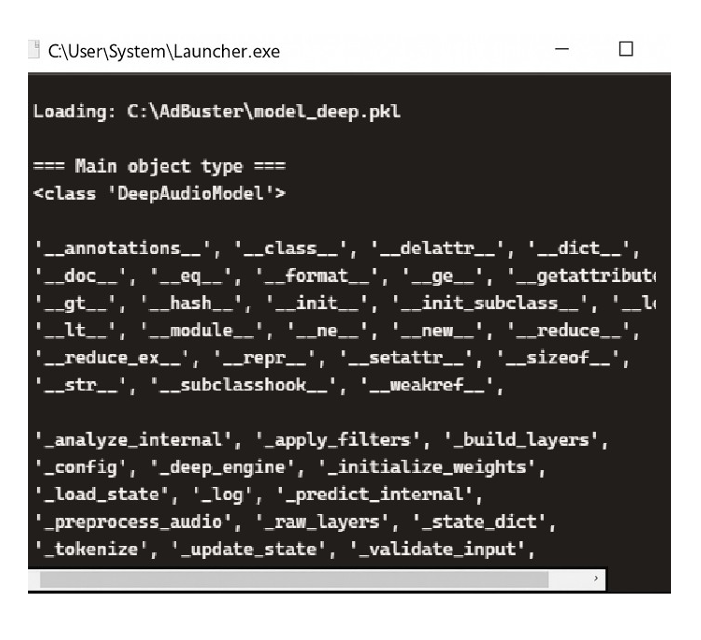
The PRO version unlocks an enhanced DeepAudioModel:
- 30 layers
- 4 output classes
- Advanced preprocessing & internal state logic
- Fully offline
- Activated only with a valid PRO key
"The preview demonstrates that the deep model is a real, functional component used by AdBuster PRO."
These previews confirm that:
- AdBuster PRO uses authentic analytical models
- The deep module is a more advanced engine available after activation
- Everything runs locally on the user’s device
- No user audio or personal data is stored or transmitted
- The technology behind the app is genuine and professionally designed
This section provides a transparent look into the internal structure of the engine powering AdBuster PRO.
If one server is slow or unavailable, try another mirror.

Scan to read the CEPA + ML technical summary.
AdBuster PRO is an offline Windows application that stabilizes TV audio by detecting abnormal loudness patterns and sending IR volume commands to a Broadlink device, which then controls the TV.
- Audio Engine — real‑time loudness metrics
- CEPA Engine — contextual decision logic
- ML Layer (FREE + PRO/Aduster) — pattern recognition support
- IR Engine (VolMaster) — Broadlink TV volume control
All processing happens locally.
Extracts simplified metrics:
- smoothed loudness
- short‑term variation
- long‑term stability
Used to distinguish normal content from loud segments.
Human‑like logic that:
- interprets audio patterns
- detects disruptive spikes
- avoids over‑correction
- restores volume smoothly
Exact rules are proprietary.
- analyzes short‑ and mid‑term audio behavior
- helps CEPA classify loudness patterns
- runs fully offline (model.pkl)
The PRO module (Aduster) is an offline machine‑learning engine that:
- analyzes long‑term audio behavior
- identifies commercial‑like patterns
- assists CEPA in difficult edge cases
- uses the PRO model (model_deep.pkl)
Model architecture is proprietary.
AdBuster PRO does not control the Broadlink device itself. It sends IR volume commands (up / down / mute) to the Broadlink unit, and the Broadlink device applies those commands to the TV hardware.
The IR engine (VolMaster) handles:
- Broadlink device discovery
- IR code learning (optional)
- command throttling
- connection watchdog
- local LAN communication (no cloud)
Provides:
- real‑time visualization
- calibration tools
- mode selection (AUTO / ML / MUSIC / AD)
- Broadlink status
Fully offline:
- all audio is processed locally in real time and never recorded, transmitted, or stored
This project contains proprietary, non‑open‑source components.
The following elements are protected and may not be copied, modified, analyzed, or reverse‑engineered.
Internal decision system responsible for audio pattern interpretation and reaction logic:
- rule sets
- threshold logic
- decision flow
- ML feature extraction
- model parameters
- implementation details
These components are closed‑source and not publicly accessible.
Executable modules and internal communication layers:
- audio analysis pipelines
- ML1 / ML PRO model files
- IR control logic
- inter‑process communication
- proprietary executables and binaries
Users may run the software but may not decompile, extract, or redistribute these modules.
This protection prevents:
- unauthorized cloning
- reverse engineering
- extraction of CEPA logic
- reuse of proprietary ML models
- replication of internal algorithms
AdBuster 2.0 PRO is not open‑source.
The repository is public for transparency, but all application code and models are covered by:
LICENSE.txt
No redistribution, modification or commercial use is permitted.
A separate proprietary license applies to CEPA Logic:
CEPA_LOGIC_LICENSE.txt
© 2026 — D.P‑G & AdBuster Team Dublin. All rights reserved.
