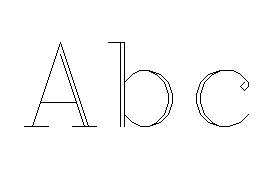
Dr. Allen Vincent Hershey developed some of the first digital typefaces, described by simple sequences of straight line-segments. These were originally published in his 1967 report Calligraphy for Computers.

The hershey module for the Decker ecosystem is concerned with laying out text using these typefaces. Decker’s scripting language, Lil, is of an unusual APL-influenced design. This article will explore Lil in the context of 2-dimensional vector graphics, expanding upon examples also discussed in the interactive documentation linked above.
Foundations
A point is an (x,y) pair of numbers describing rectangular coordinates on a canvas- a drawing surface. Points are represented in Lil as lists with a length of 2:
point:(3,-5)

A stroke is a list of points representing a sequence of lines to draw on the canvas, and thus also a list of lists of numbers. Given a list of four points, the stroke connects the first point to the second, the second point to the third, and the third point to the fourth. If there are N points in a stroke, it describes N-1 connected lines. We might also call a stroke a “polyline”:
stroke:((list 3,-5),(list 2,5),(list 0,3))

A path is a list of strokes, and thus also a list of lists of points, and a list of lists of lists of numbers. A path can represent the strokes that make up a single shape- like the letter “A”- or a sequence of letters representing an entire word or sentence. The strokes within a path are ragged: they may vary in length.
path:(list (list 1,2),(list 3,4)),
     (list (list 5,6),(list 7,8),(list 9,10))

The hershey.textpath[] function assembles a complex path based on a Lil string using the glyphs of a font, each of which is a simpler path:
p:hershey.textpath[hf_futura "ABC"]
Thus constructed, we can draw the text path to a canvas c using either an explicit each loop or the equivalent shorthand @ operator. The Decker canvas widget can draw strokes with the canvas.line[] function, given an appropriate list of lists of numbers:
each stroke in p
 c.line[stroke]
endc.line @ p
Wherever possible, Decker’s scripting APIs are designed to work as collective operations, applying to a large data structure at once. Drawing a single straight line-segment is the simple case for a more general polyline-drawing operation. If canvas.line[] could only draw a single straight line-segment, we would have to explicitly manage the off-by-one relationship between the N points of a path and the N-1 lines they represent. For example,
each stroke in p
 each point i in stroke
  if i>0
   canvas.line[stroke[i-1] point]
  end
 end
end
A small ergonomic flaw like this would be magnified as it appeared throughout a program, obscuring the simplicity of the programmer’s actual intent.
Path-Mangling
Now that we can obtain and render interesting paths, let’s look at manipulating them.
Combining paths is easy: Lil’s , operator concatenates lists. Concatenating a list of strokes and a list of strokes results in a list of strokes.
Scaling paths is more interesting. As discussed previously, many of Lil’s arithmetic operators will implicitly conform over nested listy structures. Multiplying a scalar number by a list of numbers spreads the multiplication to each element of the list, and the same process works recursively for nested lists. We can therefore uniformly scale points, strokes, or paths with simple multiplication:
(11,22,33)*2
# (22,44,66)((list 3,-5),(list 2,5),(list 0,3))*2
# ((6,-10),(4,10),(0,6))
A non-uniform scale runs into trouble. We now want to multiply the x-coordinates of every point nested inside the path with a different value from the y-coordinates. If we multiply our path by a pair of numbers, the * operator doesn’t implicitly know that we want to “push” that conforming process down to the innermost pairs. When * is given lists to the left and to the right with different lengths, it treats the right list as if it were repeated or truncated to match the length of the left list:
(1,2,3,4)*(10,100)
# (10,200,30,400)
If we first enclose the right operand with list, * will repeat the element contained in that length-1 list and pair it up with each element of the left argument:
(1,2,3,4)*list(10,100)
# ((10,100),(20,200),(30,300),(40,400))
For a path, we need to enclose the right operand twice: once to spread the scale to each stroke of the path, and then again to spread the scale to each point of the stroke:
p * list list scalex,scaley

Scaling the x or y axis by a negative number will mirror a path horizontally or vertically, respectively:
p * list list -1,1

Translating a path can use the same trick as scaling, but with + instead of *:
p + list list transx,transy

To shear horizontally, we need to offset the x coordinate of every point in a path proportionally to the y-coordinate. We can use the last primitive to extract the y-coordinates of all the points in a path. The @ operator allows us to “push” last down into the right operand. The last of a path is a stroke. The last of each stroke is a list of points. The last of each of each path is a list of lists of y-coordinates:
p: (list (list 1,2),(list 3,4)),(list (list 5,6),(list 7,8),(list 9,10))last p
# ((5,6),(7,8),(9,10))last @ p
# ((3,4),(9,10))last @ @ p
# ((2,4),(6,8,10))
Let’s call this kind of list of lists of scalars derived from the points in a path a peel.
To turn the y-coordinate peel back into a proper path, we can multiply each scalar by a pair, reusing our nonuniform scaling idiom:
(last @ @ p)*list list(10,0)
# (((20,0),(40,0)),((60,0),(80,0),(100,0)))
Thus, for a complete horizontal shear:
p + (last @ @ p)*list list shearx,0

A vertical shear looks very similar:
p + (first @ @ p)*list list 0,sheary

If you wanted to transpose a path, you could peel out the x and y coordinates separately and blend them back together using the same sort of idiom, but you could also use the rev (reverse) primitive directly to swap the elements of each point:
rev @ @ p

Transpositions aren’t often useful alone, but combining a mirror and a transpose produces a 90 degree rotation.
A more general way to rotate a path is to take advantage of Lil’s heading, mag, and unit primitives.
The mag primitive calculates the vector magnitude of a number or list of numbers. For a single number, this is the absolute value. For a pair of numbers- like a point- it gives the Euclidean distance between that point and the origin. It also has special conforming behavior: it descends recursively through nested lists until it arrives at a number or flat list of numbers. This behavior makes it perfect for producing a peel from a path:
p: (list (list 1,2),(list 3,4)),(list (list 5,6),(list 7,8),(list 9,10))mag p
# ((2.236068,5),(7.81025,10.630146,13.453624))
The heading primitive conforms like mag, but produces a peel of angles (in radians) between the origin and each point:
heading p
# ((1.107149,0.927295),(0.876058,0.851966,0.837981))
Used together, mag and heading decompose a path (in rectangular coordinates) into polar coordinates. The unit primitive converts a peel of angles as obtained from heading and produces a path where every point has unit distance from the origin (mag 1). For any path p,
p ~ (mag p)*unit heading p
A complete path rotation around the origin by angle radians is therefore:
(mag p)*unit angle+heading p

Primitives like unit also offer a loop-free way to construct various strokes like regular polygons, arcs, and ovals. Enclosing the result with list gives us a path:
on ngon sides radius do
 list radius*unit 2*pi*(range sides+1)/sides
end
This completes a set of Lil idioms for affine transformations of paths.
Complex Effects:
What else can we do?
If we start with a path that is centered about its origin, we could scale every point in the path by its own mag, producing a perspective distortion. Given a tween value t that varies between 0 and 1 and a few appropriately-chosen constants,
p*.3+(mag p)*.01*t

If we generate a stroke of random [-1,1] offsets, we could add it to every stroke in a path in order to create a rudimentary line-boil-like effect. The length of our random stroke doesn’t matter, since it will be truncated or extended automatically by +, but having roughly as many points as the maximum stroke in the path will make the results look a bit better. Let’s say 25 points:
p+list 2 window random[3 2*25]-1

Offsetting the points of a path by multiple offset sinusoids produces a different kind of wiggly effect, more like a flag flapping in the wind or the rippling surface of a liquid. To manipulate each axis separately, we’ll use a similar idiom to our shear effect. In this example f is a frame counter that continuously increments, like sys.frame:
px:first @ @ p
((sin(f/4)+.20*px)*list list 1,0)+
((sin(f/5)+.30*px)*list list 0,1)+p

Combine more sinusoids blended into both axes for a more chaotic, subtly richer effect:
px:first @ @ p
py:last  @ @ p
((sin(f/4)+.20*px)*list list 1.5,0.6)+
((sin(f/5)+.30*px)*list list 0.6,0.2)+
((cos(f/7)+.05*py)*list list 0.0,1.2)+
((cos(f/2)+.04*py)*list list 0.1,0.2)+p

These techniques are just scratching the surface of what’s possible in a few lines of Lil!
Why not do some tinkering of your own with the examples in the hershey module’s interactive docs?