We recently built 2draw, a Drawful-style game where players draw on a shared canvas and race to guess each other's drawings, on tldraw, an infinite-canvas SDK for React.
We started wondering what it would take to put an agent in that loop, as an opponent or a rival guesser, and dug into how an agent could read and draw on a tldraw canvas. That research turned into:
Agent draw, a tool that lets an agent draw to the canvas for you while you present.
Here you can see the agent assisting me in my demo presentation of a third grade chemistry class.
You can try it right now, or grab the source:
Agent Draw is an agent that draws while you present
Drag a rectangle on the canvas, say what you want inside it, and by the time you look back it's there, drawn by an AI agent while you kept talking. Drag a few rectangles in a row and they queue up, each drawing in turn. All of this happens on an infinite canvas tool called tldraw.
What is tldraw?
tldraw is an infinite-canvas SDK for React: the same editor API a user drives with a mouse, an agent can drive in code, creating shapes, moving them, drawing arrows between them.
We did not build our agent from scratch. tldraw already publishes an official Agent starter kit that draws and arranges shapes through a chat panel, backed by a Cloudflare Worker. We built Agent Draw on top of that.
How good is an agent at drawing?
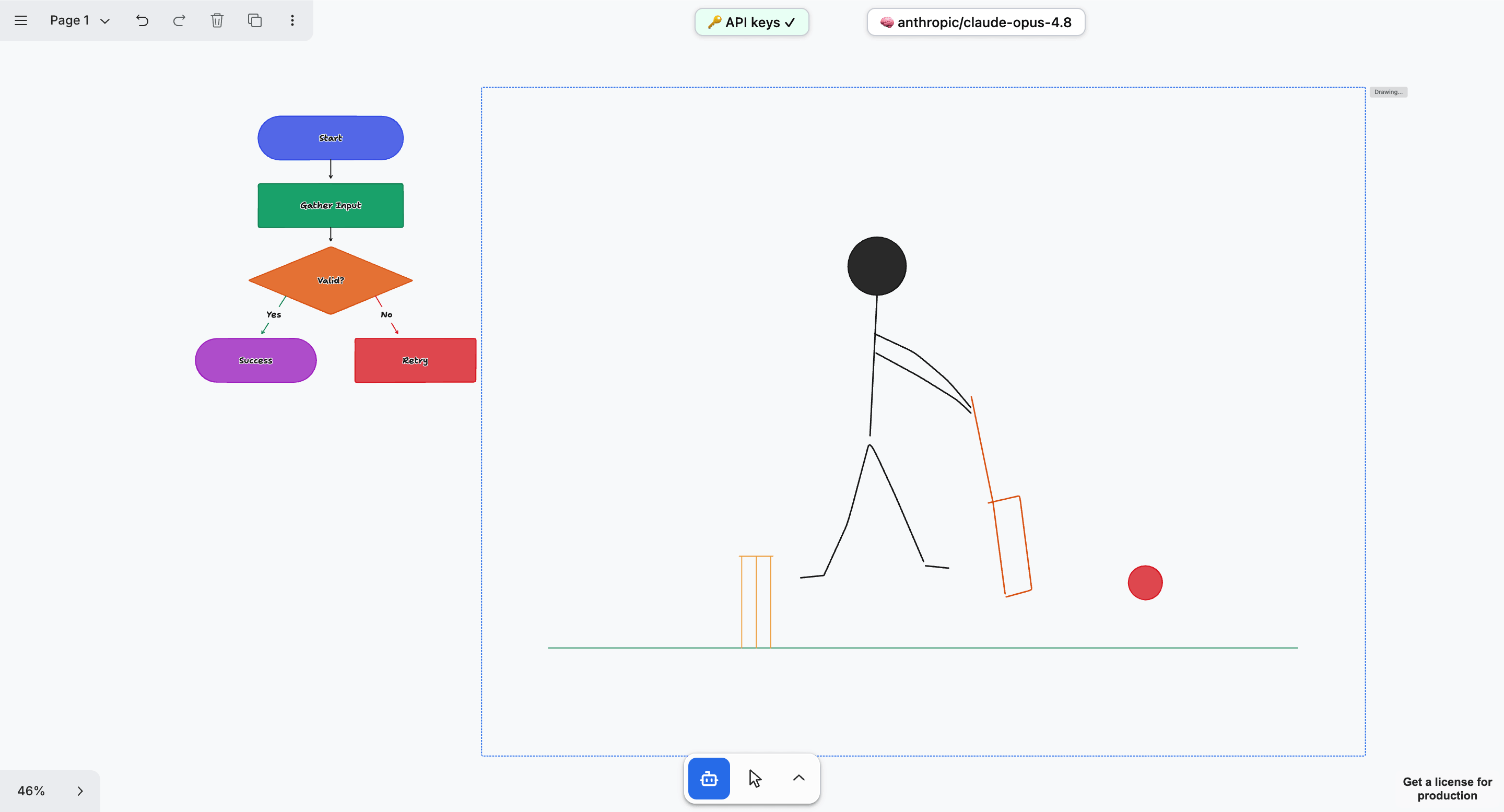
A simple composition built on top of tldraw's primitives, rectangles, diamonds, arrows, is something most models handle well. A more intelligent model tends to get more ambitious with the composition, and is better at placement on the canvas. We tested this by giving each model the same two requests in one session: draw a decision diagram, and draw a person playing cricket.
claude-opus-4.8 handled both well, a clean decision diagram built from primitives, and, more interestingly, a fully realised cricket scene sketched with the pen tool:

Where it struggles
That was claude-opus-4.8, one of the more capable models available. The result looks different with a smaller model behind the same requests.
A smaller model settles for less
Give the same two requests to a smaller model, and the ambition drops off fast. claude-haiku-4.5 matches Opus on the decision diagram, but for the cricket request it stays with primitives instead of reaching for the pen, and settles for a simpler, static composition with a label rather than a dynamic sketch:

A weaker model can give up on the task
Drop down further to google/gemini-2.5-flash-lite, and it seems to give up early on both requests:

How we made agent draw
The whole feature is a new canvas tool, a speech pipeline, a serialized draw queue, and a prompt section, and here is each piece, with the actual code from the repo.
Capturing the region you draw

tldraw tools are state machines. You subclass StateNode and define child states; tldraw routes pointer events to whichever state is active. Our AreaCaptureTool has three states (idle → pointing → dragging) and does its real work on pointer-up, when the dragged rectangle is final:
class AreaCaptureDragging extends StateNode {
  static override id = 'dragging'

  private bounds: BoxModel | undefined = undefined

  override onPointerUp() {
    this.editor.updateInstanceState({ brush: null })
    if (!this.bounds) throw new Error('Bounds not set')

    startCaptureSession(this.bounds)
    this.parent.transition('idle')
  }

  updateBounds() {
    if (!this.initialPagePoint) return
    const currentPagePoint = this.editor.inputs.getCurrentPagePoint()
    const x = Math.min(this.initialPagePoint.x, currentPagePoint.x)
    const y = Math.min(this.initialPagePoint.y, currentPagePoint.y)
    const w = Math.abs(currentPagePoint.x - this.initialPagePoint.x)
    const h = Math.abs(currentPagePoint.y - this.initialPagePoint.y)

    this.editor.updateInstanceState({ brush: { x, y, w, h } })
    this.bounds = { x, y, w, h }
  }
}
We get the live selection-brush rectangle for free by writing to editor.updateInstanceState({ brush }), the same instance state tldraw's own select tool uses. The bounds are in page coordinates, so they stay correct no matter how the user has panned or zoomed.
Listening while you talk
The moment a capture starts, we open the mic. AreaRecorder is a thin wrapper over the browser's MediaRecorder, deliberately with no knowledge of the agent or transcription, just start() and stop():
export class AreaRecorder {
  async start(): Promise<void> {
    this.stream = await navigator.mediaDevices.getUserMedia({ audio: true })
    const recorder = new MediaRecorder(this.stream, { mimeType: this.mimeType })
    this.chunks = []
    recorder.ondataavailable = (event) => {
      if (event.data.size > 0) this.chunks.push(event.data)
    }
    recorder.start()
    this.recorder = recorder
  }

  async stop(): Promise<Blob> {

    return new Blob(this.chunks, { type: this.mimeType || 'audio/webm' })
  }
}
Turning speech into text
The audio blob is posted to a new /transcribe route on the same Cloudflare Worker that already serves the agent. The route just forwards the audio to Mistral's Voxtral transcription model and returns the text, so a server-held key covers every demo visitor by default:
export async function transcribe(request: IRequest, env: Environment) {
  const form = await request.formData()
  const file = form.get('file')


  const mistralKey = request.headers.get('x-mistral-api-key') || env.MISTRAL_API_KEY

  const outForm = new FormData()
  outForm.append('file', file)
  outForm.append('model', 'voxtral-mini-transcribe-2507')

  const mistralResponse = await fetch('https://api.mistral.ai/v1/audio/transcriptions', {
    method: 'POST',
    headers: { Authorization: `Bearer ${mistralKey}` },
    body: outForm,
  })

  const data = (await mistralResponse.json()) as { text?: string }
  return new Response(JSON.stringify({ text: data.text ?? '' }), {
    headers: { 'Content-Type': 'application/json' },
  })
}
Handling more than one drawing at a time

This is the part that makes multiple captures work. You can drag a second rectangle while the first is still drawing, and the captures draw in order rather than fighting over the canvas. The whole thing is a module-level state machine over a tldraw atom: a single active recorder, a FIFO queue, and a single-consumer worker that handles one session at a time.
Starting a new capture auto-stops the one still recording and queues it:
export function startCaptureSession(bounds: BoxModel): string {

  if (recordingId) finalizeRecording(recordingId)

  const id = nextId()
  sessions.set([...sessions.get(), { id, bounds, status: 'recording' }])

  const rec = new AreaRecorder()
  recorder = rec
  recordingId = id
  rec.start().catch()
  return id
}
The consumer drains the queue one session at a time, moving each through transcribing → drawing. Serializing here is the whole point: the agent runs one request at a time, so a newer capture simply waits its turn:
async function processQueue(): Promise<void> {
  if (processing) return
  processing = true
  try {
    while (queue.length > 0) {
      const id = queue.shift() as string
      const session = getSession(id)
      const blob = pendingBlobs.get(id)


      patchSession(id, { status: 'transcribing' })
      const text = await transcribe(blob)


      patchSession(id, { status: 'drawing' })
      await requestDrawInArea(agentRef, text, session.bounds)

      removeSession(id)
    }
  } finally {
    processing = false
  }
}
An earlier version tried to stream the mic live and draw as you talked. It was laggy and the value was fuzzy, so we cut it for this discrete capture-then-speak model, and the queue is what replaced the old "two captures cancel each other" overlap bug.
Making the agent keep drawing until the job is done
Each session's transcript and bounds go to requestDrawInArea. The interesting decision here is that we use the starter kit's full agentic loop, agent.prompt, not the single-turn agent.request. prompt keeps taking turns on its own until the model has nothing left to add, so the model finishes the entire drawing in one call instead of drawing one shape and stopping.
export async function requestDrawInArea(
  agent: TldrawAgent,
  text: string,
  bounds: BoxModel
): Promise<number> {
  const area = { type: 'area' as const, bounds, source: 'user' as const }
  ensureMode(agent, 'working')
  const before = agent.editor.getCurrentPageShapeIds().size
  try {
    await agent.prompt({ message: buildAreaMessage(text), contextItems: [area] })
    return agent.editor.getCurrentPageShapeIds().size - before
  } finally {
    ensureMode(agent, 'idling')
  }
}
An earlier version hand-rolled a continue-loop with extra linter passes to force a complete drawing, because a single-turn request only drew one shape. Once we confirmed agent.prompt finishes the whole drawing on its own, all of that scaffolding got deleted.
Making it faster
The starter kit's working mode ships with a fairly broad action list. For a fixed-region draw two of those actions were costing a full LLM round-trip each without improving the result.
setMyView moves the camera to frame the shapes the agent just drew. For a canvas chat panel that makes sense, but for area capture the viewport is irrelevant, the user wants to see what was drawn, not have the camera jump around. The problem is that setMyView interrupts the current turn and triggers a re-request, adding a round-trip.
review runs the starter kit's lint system: it checks for overlapping shapes, text that overflows its box, and similar issues, then schedules a follow-up turn to fix them. Again, useful in a chat panel, but for a one-shot area draw it just adds another model call at the end.
Removing both from the working mode's action list roughly halved the number of model calls per capture. The change is two lines in AgentModeDefinitions.ts:
actions: [
  ThinkActionUtil.type,
  CreateActionUtil.type,
  PenActionUtil.type,

]
The utilities stay registered so they remain available to the chat panel. They are just not offered to the agent when it is drawing inside a captured area.
Teaching the model to draw, not transcribe

The last piece is a prompt. Left alone, a model handed a sentence of speech tends to write that sentence on the canvas as a wall of text. We wrote a "Drawing inside a captured area" section for the starter kit's system prompt that does two things: it forces the model to assess what visual form actually fits the request, and it forbids dumping the transcript verbatim:
Choose the visual form that best fits the request and immediately emit
create/pen actions — do not ask for clarification, do not stop to think
without drawing:

- A specific named shape ("draw a red circle", "a star"): draw exactly that.
- A single object or illustration: draw it well, not a multi-box diagram.
- A definition or explanation: draw a labelled diagram with keyword labels,
  not the spoken sentence as a block of text.
- A diagram or process: labelled nodes with arrows.
- A chart: for quantitative or comparative content.

If the request is ambiguous, make your best interpretation and draw it anyway.
Never stall — always emit at least one shape.
It also insists the model build the complete result in one turn ("the user does not reply between actions, so anything you defer to a follow-up message will never happen"), which pairs with the agent.prompt decision above.
Adding the tool to the toolbar

Finally, the tool is registered through tldraw's standard override API, so "Agent draw" sits in the toolbar next to the built-in tools with its own icon and keyboard shortcut:
const tools = [AreaCaptureTool, TargetShapeTool, TargetAreaTool]

const overrides: TLUiOverrides = {
  tools: (editor, tools) => ({
    ...tools,
    'area-capture': {
      id: 'area-capture',
      label: 'Agent draw',
      kbd: 'a',
      icon: agentDrawIcon,
      onSelect() { editor.setCurrentTool('area-capture') },
    },

  }),
}

<Tldraw
  licenseKey={import.meta.env.VITE_TLDRAW_LICENSE_KEY}
  tools={tools}
  overrides={overrides}
  components={components}
/>
That is the entire feature: a tool that captures a rectangle, a recorder, a worker route for transcription, a queue, one call into the agent loop, a couple of trimmed actions for speed, and a prompt section. Everything else, the canvas, the agent, the action system, the streaming backend, came from the starter kit.
Note on licensing: our code is MIT, like the starter kit it's built on, so it runs locally for free. The tldraw SDK itself is under a separate, proprietary license, and needs a license key for any public deployment. Non-commercial projects can get a free hobby license from tldraw.