Ruff v0.16.0 is available now! Install it from PyPI, or with your package manager of choice:
uv tool install ruff@latestAs a reminder: Ruff is an extremely fast Python linter and formatter, written in Rust. Ruff can be used to replace Black, Flake8 (plus dozens of plugins), isort, pydocstyle, pyupgrade, and more, all while executing tens or hundreds of times faster than any individual tool.
Migrating to v0.16 #
Ruff v0.16 has a small number of breaking changes, allowing most users to update without significant changes to code or configuration. The main exception is described below.
Better default rule set #
Ruff now enables 413 rules by default, up from 59 in previous versions.
Since Ruff's default rule set was last modified in
v0.1.0, the
number of rules in Ruff has grown from 708 to 968. Many of these rules catch severe issues,
including syntax errors and
immediate runtime errors but were not previously
enabled by default. With the new rule set, Ruff will bring these issues and many others to your
attention without any Ruff configuration. Even if you're already using
select or
extend-select, we hope that this will
draw your attention to helpful rules that you previously hadn't discovered.
The full listing of enabled rules is too long to include here, but you can find it on our new
Default Rules page in the documentation. A few of the
highlights include rules from the popular flake8-bugbear (B) and pyupgrade (UP) linters, as well
as rules from our own RUF category.
If you want to revert to the old default set, you can easily select the old rules with this
configuration:
[lint]
select = ["E4", "E7", "E9", "F"]
We view this work as closely tied to our longstanding goal of rule recategorization, so look forward to upcoming developments in this area.
New features in v0.16 #
Ruff v0.16 also includes several newly stabilized features that are highlighted below.
Markdown code block formatting #
Ruff can now format Python code blocks embedded in Markdown files.
In these files, Ruff v0.16 will format
fenced code blocks with a python, py,
python3, py3, pyi, or pycon info string.
pyi blocks are formatted like stub files, pycon blocks as REPL sessions, and the others use
normal Python file formatting. For example:
# README

Here's an example:

```py
import ruff

ruff_binary = (
    ruff.find_ruff_bin()
)
```
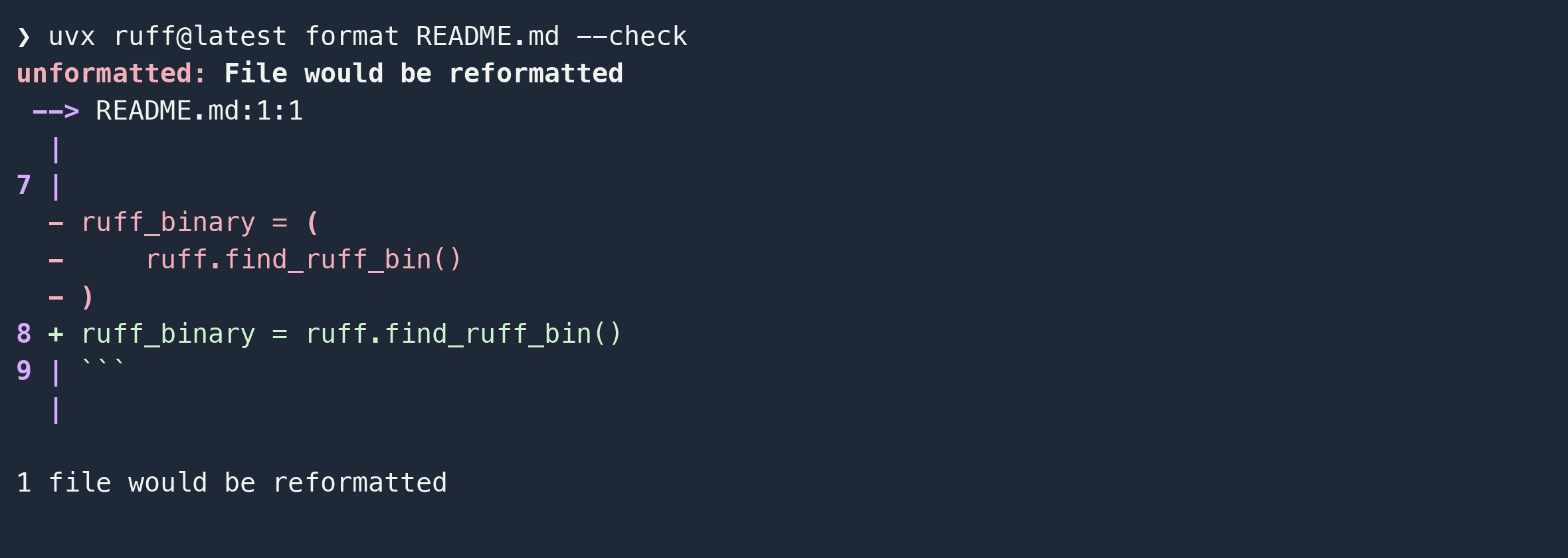
will be reformatted when running ruff format:

This can also be used to format Quarto notebooks because Ruff still
recognizes the language when surrounded by curly braces (e.g. ```{python}). Note that you may
need to configure your extension mapping if
your Quarto files use the .qmd extension.
If you need to suppress formatting, you have several options. If you want the suppression comments
to appear in the code block, you can use normal fmt: off and fmt: on comments within the code
block itself, or you can use similar HTML comments to disable formatting for a whole region of the
document:
# README

<!-- fmt: off -->

```py
x =      "this will be suppressed"
```

<!-- fmt: on -->
To suppress Markdown formatting entirely, you can use the normal
extend-exclude setting to exclude all
Markdown files with a glob like *.md.
See the full documentation for more details.
ruff: ignore comments offer new suppression features #
Ruff now has its own suppression comment format that can be used on its own line.
In v0.15, the Ruff linter gained a range suppression mechanism through paired ruff: disable and
ruff: enable comments, much like the fmt: off and fmt: on pair described above:
# ruff: disable[N803]
def foo(
    legacyArg1,
    legacyArg2,
    legacyArg3,
    legacyArg4,
): ...
# ruff: enable[N803]
Ruff v0.16 builds on this to add two additional ruff suppression comments. ruff: ignore can be
used to suppress a diagnostic on the same line, like noqa, or on the following logical line:
import math  # ruff: ignore[F401]

# ruff: ignore[N803]
def foo(
    legacyArg1,
    legacyArg2,
    legacyArg3,
    legacyArg4,
): ...
In this case, the logical line spans the whole function header (from def to the colon), so the
ruff: ignore suppresses all of the same
N803 diagnostics as the
disable/enable pair above.
ruff: file-ignore comments can be used to suppress diagnostics for the entire file, just like
ruff: noqa comments:
# ruff: file-ignore[F401] Allow unused imports in this file

import foo
import bar
import baz
As this example also shows, each of these comment kinds can have an associated "reason" explaining
why they were added, in this case Allow unused imports in this file.
ruff: ignore comments can be added automatically with the new --add-ignore CLI flag, and in
preview, all of these ruff suppression comments support rule names instead of codes:
❯ echo 'import math' > try.py
❯ uvx ruff@latest check --preview --add-ignore try.py
Added 1 ignore comment.
❯ cat try.py
import math  # ruff: ignore[unused-import]
You can find the full specification for all of these comments in the documentation.
Fixes are now shown in check and format --check output #
Ruff now shows the diff for linter and formatter fixes when rendering diagnostics.
Both the check and format subcommands have long supported the --diff flag for showing the
changes introduced by applying fixes with check --fix or format, but this was separate from the
normal output and suppressed the accompanying explanatory diagnostics. In v0.16, available fixes are
now shown as part of the default full output format, rendered below the help subdiagnostic:

The same is true for format --check. Given the following input:
# example.py

if True:
    pass
elif     False:
    pass
The formatter produces:

format --check also now supports the full selection of output formats supported by the linter. You
can use this to obtain machine-readable JSON output or produce the formats expected by GitHub and
GitLab to render annotations in CI, as just a couple of examples. See the CLI help or
documentation for the full list of supported
formats.
One final note on output formats is that there is a small breaking change to the JSON output in
v0.16. The filename, location, end_location, fix.edits[].location, and
fix.edits[].end_location fields may now be null rather than defaulting to the empty string and
row 1, column 1, respectively. This should affect very few of Ruff's existing diagnostics but better
reflects the internal diagnostic representation and may become more common in future rules.
Rule stabilizations #
The following rules have been stabilized and are no longer in preview:
Other behavior stabilizations #
This release also stabilizes some additional behavior, previously only available in preview mode:
Thank you! #
Thank you to everyone who provided feedback regarding the changes included in Ruff's preview mode and to our contributors. It's an honor building Ruff with you!
View the full changelog on GitHub.
Read more about Astral — the company behind Ruff.
Thanks to Zanie Blue, David Peter, Micha Reiser, and Alex Waygood who contributed to this blog post.