Please look through guide full from the top to the bottom before beginning to do anything.
Beware! This guide is intended for experienced users and not half-baked newbies.
Initially, I planned to stop updating Android at the end of 2026, following the [KeepAndroidOpen]
initiative.
However, once I found out that Android 17 would be released for the Xiaomi 15 Ultra on August 27,
I immediately decided to freeze my installation on Android 16.
Stupid dumb asses > as if HyperOS 3 wasn’t already shitty enough.
In this comprehensive guide, we will maximize what this device can do without rooting.
We are locking the operating system to the final version of Android 16 and skipping Android 17 entirely.
Doin’ so because version 17 brings too many nasty things to the table, and we all want to avoid them.
More telemetry, more rights to them, less to user, more AI slop, more unswitchable services.
Also, i’ll not post many pictures to keep post clean and compact in size.
░▒▓█ FACTORY RESET
Of course you should backup your all data first at the very begging of the procedure.
By the way, i am not taking any responsibility if you brick your phone or render your data to an unusable state.
Information here is strictly mirrors my personal experience. Take the pill only as a reference.
Settings -> My device -> Factory reset -> Erase all data
░▒▓█ INSTALLATION FROM SCRATCH
In this section i’ll guide you through the first kickstart of your device and describe every single setting
related to user privacy, this is the most complete guide on the old interwebs.
During installation decline following settings.
BASIC SETTINGS
Location -> OFF
Emergency location -> OFF
Automatic system updates -> OFF
Send usage and diagnostic data -> OFF
User experience program -> OFF
Child mode -> OFF
Interconnection -> OFF
Browser -> OFF
Caller ID -> OFF
Content Center -> OFF
Duokan -> OFF
Mi video -> OFF
Search -> OFF
Super Mi AI -> OFF
Wallet -> OFF
Xiaomi account -> OFF
Xiaomi home -> OFF
Xiaomi hyper AI engine -> OFF
Xiaomi share -> OFF
Set screen lock -> Skip [we'll set pattern swipe later]
System navigation mode -> Buttons [to keep it oldschool]
We can use [Nova Launcher]
for even more advanced gestures stuff,
way cooler interfact than internal Android 16 implementation can provide
░▒▓█ UPDATE DEVICE FIRMWARE
Update to the latest HyperOS version because it brings important camera application improvements,
like remembering last used resolution any picture format.
Exact version number: 3.0.309.0.WOACNXM.C11. As August 2026 it is the last Android 16 based version of hyperOS.
Settings -> My device -> Tap on Xiaomi hyperos logo -> Install automatically -> NO
Settings -> My device -> Tap on Xiaomi hyperos logo -> ... -> Automatic updates -> OFF
Settings -> My device -> Tap on Xiaomi hyperos logo -> ... -> Download using mobile data -> OFF
Reboot device. Also you should update Bluetooth module and Battery firmware in appropriate sections.
Modern Bluetooth implementation in HyperOS is highly unreliable and renders difficulties when pairing with older Android 11 devices.
Keep in mind that: after each update almost all custom permissions are wiped out, why? because it is a dog turd.
░▒▓█ REMOVE CHINESE BLOATWARE
Important note before we start, if you can’t find certain option, try to search it in the settings search bar.
Tool can help find settings that are not even in GUI! So remember that.
Second, not the main screen, can be uninstalled completely.
Leave in peace only Security with green lightning shield on it.
We’ll deal with it later.
Embedded Browser is a good example on how to deal with bloated applications [blue globe icon].
I prefer to use privacy focused Firefox forks, so we don’t need bloated chrome-based cr#p.
FORCE IT TO STOP.
App info -> Force stop
App info -> Storage -> Clear data -> Clear cache
App info -> Network access -> turn off Mobile data / WLAN / Background data
[Take a note that in some cases it is not possible in user GUI]
App info -> Power - Battery details -> Battery saver -> Restrict background apps
App info -> Permissions -> Autostart -> OFF
App info -> Permissions -> Permissions -> OFF
[Watch out for the nestedness, turn off all settings and even sub settings, take a note that in some cases it is not possible in user GUI]
Here is a complete list of all possible permissions for Android 16 device.
Location
Access camera
Microphone
Photos and videos
Music and audio
Messages
Contacts
Nearby devices
Other permissions
Send MMS messages
Read SMS and MMS
Receive SMS and MMS
Read your contacts
Access items in the clipboard
Save items to clipboard
Access device motion and orientation
Access list of installed apps
Adjust media volume
Home screen shortcuts
Service SMS
Show on Lock screen
Open new windows while running in the background
Display pop-up windows
Dynamic wallpaper services
Manage chain start
Turn off damn notifications!
App info - Permissions - Notifications - OFF
░▒▓█ UPDATE CAMERA MODULE
On the first screen we need only GetApps application to update Camera and then you can restrict it as a Browser we did earlier.
Upon first start untick checkbox Update over WLAN and agree to proceed.
In a couple of time application will push refused suggestion again, so repeat denial.
Right after that there will be another attempt to push loads of shit to your device
[They call it “essential apps”, reject it with a force.
After updating camera application remove ALL possible permissions from GetApps bloatfest abomination,
especially restrict access to the list of installed applications.
░▒▓█ TURN OFF ADS AND USAGE TELEMETRY
Privacy & security -> Security -> Additional settings -> Ad services -> Personalized ad recommendations -> OFF
Privacy & security -> Security -> Additional settings -> Enroll in User experience program -> OFF
Privacy & security -> Security -> Additional settings -> Usage and diagnostics -> OFF
Important: type in settings search Ads and select Manage system ads > Ads in system apps > OFF
Some words about Virtual ID, it is almost placebo “privacy” feature introduced by Xiaomi.
It has little to no use in terms of real privacy, so it is up to you to use or not.
Settings -> Privacy & security -> Privacy -> Virtual ID
You can reset virtual ID, right after you install all needed software.
░▒▓█ TURN OFF FAKE MEMORY EXTENDER
Do this to get rid of stutters and micro freezes.
Settings -> Additional settings -> Memory extension -> OFF
Reboot the device for a refresh.
░▒▓█ SECURITY APPLICATION
Ok back to those green shield (shit). In settings:
Allow to connect to the internet and access location -> OFF
Online services -> OFF
Privacy -> Personalized recommendations -> OFF
Privacy -> Withdrawal of consent -> OFF
Take away all possible permissions and notifications, because it is super annoying thing.
As for me i just “uninstalled” that sucker. But it can’t be fully uninstalled since we don’t have root.
More over this shit will try to restore it in a while, so pay attention.
░▒▓█ TUNING PLAY STORE
Bring on some little tweaks to Play Store as well.
Settings -> General -> Use device location -> OFF
Settings -> General -> App install optimization -> OFF
Settings -> Network preferences -> App download preference -> Ask me every time
Settings -> Family -> Content restrictions -> OFF
Play Protect -> OFF
Play Protect -> Top Gear -> Play Protect settings -> Scan apps with Play Protect -> OFF
Play Protect -> Top Gear -> Play Protect settings -> Improve harmful app detection -> OFF
░▒▓█ DEPLOY F-DROID REPOSITORY
[Install F-Droid] to get the reliable source of free applications.
Get rid of embedded bloated Chinese keyboard and replace it with [Unexpected Keyboard]
.
Make sure to turn off native keyboards Baido IME and Sogou IME, they can be found in.
Settings -> Additional settings -> Languages & input -> Manage keyboards
Before diving into deeper bloatware cleansing process i have to mention that i prefer to use not only third-party repository,
but custom applications too. Application launcher, secure keyboard, weather prediction and so on and so forth. Also i do not use car.
░▒▓█ UNINSTALLING BLOATWARE
List of crap that you don’t need. Limit permissions and notifications, restrict network where possible to the following things.
All hieroglyphic stuff
Ad privacy
AI Call Assistant
AI Service
All hieroglyphic stuff
Baidu IME for Xiaomi
CarWith
Cleaner
Content center
Family guard
Find device
Gallery editor
iFlytek IME for Xiaomi
Mi AI speech engine
Mi Doc Viewer
Mi Drive
MI FIDO
Mi Game AI Service
Mi Wallpaper carousel
MiMacro
MiStore system components
MiWallpaper
Package installer
Screen recorder
Screenshot
Search
Smart cards Web extension
Sogou IME for Xiaomi
System launcher
Talpus
Translate
Updater
XiaoaiRecommendation
Xiaomi account
Xiaomi Cloud
Xiaomi Hyper XiaoAi
Xiaomi HyperAI engine
Xiaomi service framework
Xiaomi Share
Xiaomi SIM Activation Service
You will need XiaomiAccount for enabling USB/Wifi debugging,
after you are done with tuneup you can safely restrict this process and it’s permissions.
Advanced users can find the method to freeze these applications using the ADB shell below!
More automatic stuff to turn off.
Quick apps service framework -> Performance optimization -> Preload pages -> OFF
Quick apps service framework -> Performance optimization -> Update automatically -> OFF
░▒▓█ DEFAULTS FOR EMBEDDED APPLICATIONS
Here you can setup default apps, all in one place
Settings -> Apps -> ... Other settings -> System app settings
As far as i remember correctly there should be some bloat in Messaging application.
GetApps and Search is infested also.
Preload gaming resources when connected to WLAN -> OFF
Privacy -> Personalized services -> OFF
Privacy -> Withdrawal of consent -> Agree
Privacy -> Manage permissions -> Access the list of apps installed on this device -> block ALL
Privacy -> Manage permissions -> Access calendar events -> block ALL
Privacy -> Manage permissions -> Collect device identifier IMSI -> OFF
Privacy -> Manage permissions -> Additional features -> turn down ALL
About -> Update GetApps automatically -> OFF
Notifications -> Turn OFF everything
As for me, it is better to cancel this service at all since we already acquired needed camera update, everything else is unneeded.
Permissions -> Access contacts -> OFF
Security alerts -> OFF
Ad filter -> OFF
About global search -> Withdrawal of consent -> ON
About global search -> Personalized content recommendations -> OFF
Personalized ads -> OFF
░▒▓█ ENABLING AND UPDATING GOOGLE SERVICES
If you need Google services, turn on Basic Google services:
Settings -> Additional settings -> Accounts & sync -> Basic Google Services -> ON
You can install latest Google Play from the [APkpure] if you want to be “UP-TO-DATE”.
░▒▓█ OVERCOME SHIT STORM OF BLOATWARE PISS
In this part we will tune system to our own preferences
and continue to fight with pre-installed bloatware.
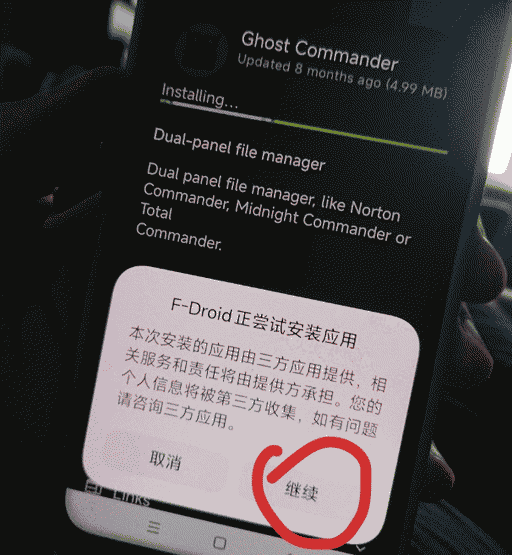
When you try to install any application from [F-Droid] you will be faced this hieroglyphs.

Select right button to proceed. Later we’ll deal with it harshly.
Right after that system spits at you with next vomit like this.
Reject with a force.

System will try to install Security green shield when you enter installed Apps menu.
Reject the action.
Settings -> Apps -> ... -> Show all apps
This is the place for all your apps to handle.

Settings -> Apps -> Autostart
Set to autostart here your Launcher, keyboard and camera application.
Remember that three dots holds Show system apps.
Remove all cr#p like AI and hieroglyphic applications to speed up system boot.

Settings -> Apps -> ... -> Other settings -> Notify about updates -> OFF
Settings -> Apps -> ... -> Other settings -> Recommendations -> OFF
Settings -> Apps -> ... -> Other settings -> Smart app assistant -> Notify about errors -> OFF [We'll blast it later in the guide]

Settings -> Apps -> ... -> Other settings -> Default apps
[Set your defaults for applications]
If you are installing third party launcher make sure to restrict System Launcher as much as possible.
You will be shown a scary red danger sign with red buttons. Third party is way good especially abandoned ones.
Don’t forget to take away Mobile data and Background data permissions from Package installer,
just to minimize network queries, although WiFi traffic can’t be turned of from GUI.
You can lock applications in recent list by swiping from top to the bottom in the recent applications gallery you will see a little lock next to application name if it is protected.
Settings -> Notifications & status bar -> Smart devices control -> None
Last, but surely not least setting where you can setup important permissions,
that is why this setting buried under loads of rhinoceros sh@t.
Settings -> Privacy & security -> Privacy -> Other permissions -> Special permissions
Here is the list of all settings available.
You can spend hours here fine-tuning required or non-needed applications.
- All files access
- Device admin
- Display over other apps
- Modes access
- Media management apps
- Modify system settings
- Notification read, reply & control
- Change media output
- Picture-in-picture
- Premium SMS
- Unrestricted mobile data
- Install unknown apps
- Alarms & reminders
- App usage data
- VR helper services
- WLAN control
- Screen turn-on control
- Full screen notifications
- Write system preferences
- Launch via NFC
Settings -> Accessibility -> General -> Downloaded apps
Disable all available options here including hieroglyphic ones.
Baidu IME for Xiaomi
General authorization
Screenshot
Sogou IME for Xiaomi
Xiaomi HyperAI engine
Settings -> Additional settings -> Additional app features -> Healthy device usage
Disable all available options here.
Backup and restore
CarWith
Device activation
Enterprise mode
Feedback
Healthy device usage
Mi Coins
Mi Protect
Security - Find Device
Wallet
Xiaomi Cloud
Xiaomi HyperAI
Settings -> Apps -> ... -> Other settings -> Default apps -> Assist & voice input -> Digital assistant app -> none
Settings -> Apps -> ... -> Other settings -> Notify about updates -> OFF
Settings -> Apps -> ... -> Other settings -> Recommendations -> OFF

Settings -> Privacy & Security -> Security -> Anti-fraud protection
Calls/Messages/Apps/Casting -> OFF

Settings -> Privacy & Security -> Security -> Alerts for smart home devices -> OFF
Settings -> Privacy & Security -> Security -> Additional settings -> Find Hub -> OFF
When you start Messaging (SMS) for the first time deny Mi message and Smart messaging.
In settings select Privacy policy and untoggle both Withdraw consent options.
░▒▓█ RESTRICTING NETWORK ACCESS
Provided settings not only improve your online privacy, but also will substantially decrease power consumption of the device.
Settings -> Privacy & security -> Privacy -> Location -> Location -> Use location services -> OFF
Settings -> Privacy & security -> Privacy -> Location -> Location -> Location services -> Emergency Location Service -> OFF
Settings -> Privacy & security -> Privacy -> Location -> Location -> Location services -> Improve Location Accuracy -> OFF
Settings -> Privacy & security -> Privacy -> Location -> Location -> Location services -> WLAN scanning -> OFF
Settings -> Privacy & security -> Privacy -> Location -> Location -> Location services -> Bluetooth scanning -> OFF
You may want to leave Improve Location Accuracy turned on for better positioning.
Here you can setup applications which can access your location: compass, map or any other service you want.
Settings -> Privacy & security -> Privacy -> Location -> ...
In some cases where it is hard to find certain option in the marasmic jungle of settings it is easier to use search function.
Type in settings search “network access” and select it.
Security -> Data usage -> Network access -> Mobile data
Security -> Data usage -> Network access -> WLAN
Take a note that at the bottom of the page in Mobile data category there is System apps section.
Moreover there is setting for newly installed applications.
In the Network access menu tap three dots and select New apps default settings.
For new software I prefer to keep Mobile data and WLAN turned off.
In three dots menu also there is Background connection.
You can replicated above mentioned restrictions to this menu too.
Also you have option to unrestricted certain applications in terms of mobile traffic.
Settings -> Privacy & security -> Privacy -> Other permissions -> Special permissions -> Unrestricted mobile access
To see all applications including system ones, tap three dots menu and select Show system.
░▒▓█ CHECKING YOUR APPS FOR PRIVACY TRACKERS
There is an excellent privacy application [Exodus]
.
It check how deeply your applications invade into the system core.
Software which marked by red color request too many permissions.
You should check this category manually and restrict invasive applications with a brute force.
░▒▓█ SIDE-LOADING THIRD PARTY APPLICATIONS
When logging to Xiaomi account [essential for USB/Wifi debugging to sideload needed apps and freeze bloat sh@t]
deny MiCloud integration for your own good and do not update account application.
To be able to install software with minimal restriction you have to turn on Developer mode.
Settings -> My device -> tap multiple times in a row on OS version.
After above mentioned action hidden settings appear at this location.
Settings -> Additional settings -> Developer options
Here we’ll turn off telemetry stuff and improve system performance a bit.
If value do not mentioned here leave it at it’s defaults.
Enable Bluetooth stack log -> Error
Bluetooth HCI snoop log -> Disabled
Automatic system updates -> OFF
Since i constantly mess around with the device debugging options should be enabled.
Turn on wireless debugging only when you try to execute ADB commands in [aShell]
.
Logger buffer size set 8 MB because not all logs can be turned off and bigger buffer give a performance boost in logging operations.
Debugging -> USB debugging -> ON
Debugging -> Wireless debugging -> ON
Debugging -> Install via USB -> ON
Debugging -> USB debugging (security settings) -> ON
Debugging -> Disable ADB authorization timeout -> ON
Debugging -> Verify apps over USB -> OFF
Debugging -> Verify bytecode of debuggable apps -> OFF
Debugging -> Logger buffer sizes -> 8 MB
Debugging -> Select log level -> OFF
Networking related stuff to be tweaked. HD audio can be set to ON only if hardware supports it.
Networking -> Enable Wi-Fi verbose logging -> OFF
Networking -> Wi-Fi scan throttling -> ON
Networking -> Tethering hardware acceleration -> ON
Networking -> Default USB configuration -> File transfer
Networking -> High speed Bluetooth transfers -> ON
Networking -> Enable Bluetooth page scan -> ON
Networking -> Bluetooth AVRCP version -> AVRCP 1.6
Networking -> Bluetooth MAP version -> AVRCP 1.4
Networking -> HD audio -> ON
Networking -> NFC verbose vendor debug log -> OFF
Networking -> NFC NCI unfiltered log -> OFF
Just to see taps visually is more convenient for me.
Input -> Show taps -> ON
To decrease CPU load do this.
Drawing -> Windows animation scale -> 0.5x
Drawing -> Transition animation scale -> 0.5x
Drawing -> Animation duration scale -> 0.5x
First one is important for compatibility with some applications. Second one gives a very little performance gain.
Window management -> Force activities to be resizable -> ON
App cache optimization -> ON
░▒▓█ RESTORING REMOVED PERMISSIONS
Sometimes invasive and annoying HyperOS so-called “protection” removes needed permissions of your third-party apps.
If some application begins to show signs of incorrect working restore it’s permissions.
Settings -> Apps -> Manage permissions -> ... -> Unblock permissions
Ok, the most basic part is done and now to the even more deeper things.
░▒▓█ ADVANCED MANUAL DEBLOATING VIA ADB INTERFACE
In this section we won’t even touch desktop machines, everything will be made directly on the phone.
A bit tedious, although no computer is required.
But will have to do this in any case, since it is a comprehensive guide for God’s sake.
Take a note that there you will only remove unneeded crap, but not tune the system.
- [F-Droid] [open-source app-store, like better alternative to Google store]
- [Shizuku] [giving you ability to run ADB commands without connecting device to the computer, science happens via WiFi]
- [aShell] [console for running ADB commands, which is running on top of the Shizuku]
You have to turn on Wireless debugging in Developer options,
for this you will need active and logged in Xiaomi account.
Settings -> Additional settings -> Developer options -> Wireless debugging -> ON
- start Shizuku
- select Start, application suggests you to proceed to pairing step
- enable Android notifications
Settings -> Notifications & status bar -> Notification style -> Notification shade -> Android
This setting is essential or otherwise you won’t get pairing notifications in pairing process
Sometimes you have to reboot to make thing rollin'.
- again visit Wireless debugging and tap Pair device with pairing code
- enter provided code in the notification area in the top system curtain
- return to Shizuku and confirm that “Shizuku is running” appeared in the main screen of the application
Now you can safely open ADB shell to execute various commands,
for these purposes i am using aShell software,yours may vary.
List of bloatware includes Global & EU services, without going into the extreme,
like removing broadcast services and Qualcomm stuff, so quite safe to use.
pm uninstall -k --user 0 android.autoinstalls.config.Xiaomi.model
pm uninstall -k --user 0 android.qvaoverlay.common
pm uninstall -k --user 0 com.alibaba.aliexpresshd
pm uninstall -k --user 0 com.altice.android.myapps
pm uninstall -k --user 0 com.amazon.appmanager
pm uninstall -k --user 0 com.android.bips
pm uninstall -k --user 0 com.android.bluetoothmidiservice
pm uninstall -k --user 0 com.android.bookmarkprovider
pm uninstall -k --user 0 com.android.calllogbackup
pm uninstall -k --user 0 com.android.chrome
pm uninstall -k --user 0 com.android.cts.ctsshim
pm uninstall -k --user 0 com.android.cts.priv.ctsshim
pm uninstall -k --user 0 com.android.DeviceAsWebcam
pm uninstall -k --user 0 com.android.dreams.basic
pm uninstall -k --user 0 com.android.dreams.phototable
pm uninstall -k --user 0 com.android.egg
pm uninstall -k --user 0 com.android.hotwordenrollment.okgoogle
pm uninstall -k --user 0 com.android.hotwordenrollment.xgoogle
pm uninstall -k --user 0 com.android.inputsettings.overlay.miui
pm uninstall -k --user 0 com.android.managedprovisioning
pm uninstall -k --user 0 com.android.managedprovisioning.overlay
pm uninstall -k --user 0 com.android.microdroid.empty_payload
pm uninstall -k --user 0 com.android.overlay.gmscontactprovider
pm uninstall -k --user 0 com.android.overlay.gmssettingprovider
pm uninstall -k --user 0 com.android.overlay.gmssettings
pm uninstall -k --user 0 com.android.printspooler
pm uninstall -k --user 0 com.android.providers.partnerbookmarks
pm uninstall -k --user 0 com.android.role.notes.enabled
pm uninstall -k --user 0 com.android.sharedstoragebackup
pm uninstall -k --user 0 com.android.simappdialog
pm uninstall -k --user 0 com.android.systemui.accessibility.accessibilitymenu
pm uninstall -k --user 0 com.android.theme.font.notoserifsource
pm uninstall -k --user 0 com.android.traceur
pm uninstall -k --user 0 com.android.virtualmachine.res
pm uninstall -k --user 0 com.android.wallpaper.livepicker
pm uninstall -k --user 0 com.audible.application
pm uninstall -k --user 0 com.aura.oobe.deutsche
pm uninstall -k --user 0 com.aura.oobe.vodafone
pm uninstall -k --user 0 com.bsp.catchlog
pm uninstall -k --user 0 com.dti.bouyguestelecom
pm uninstall -k --user 0 com.dti.telefonica
pm uninstall -k --user 0 com.facebook.appmanager
pm uninstall -k --user 0 com.facebook.services
pm uninstall -k --user 0 com.facebook.system
pm uninstall -k --user 0 com.goodix.fingerprint.producttest
pm uninstall -k --user 0 com.google.ambient.streaming
pm uninstall -k --user 0 com.google.android.accessibility.switchaccess
pm uninstall -k --user 0 com.google.android.adservices.api
pm uninstall -k --user 0 com.google.android.apps.docs
pm uninstall -k --user 0 com.google.android.apps.maps
pm uninstall -k --user 0 com.google.android.apps.restore
pm uninstall -k --user 0 com.google.android.apps.safetyhub
pm uninstall -k --user 0 com.google.android.apps.setupwizard.searchselector
pm uninstall -k --user 0 com.google.android.apps.subscriptions.red
pm uninstall -k --user 0 com.google.android.apps.tachyon
pm uninstall -k --user 0 com.google.android.apps.wellbeing
pm uninstall -k --user 0 com.google.android.apps.youtube.music
pm uninstall -k --user 0 com.google.android.as.oss
pm uninstall -k --user 0 com.google.android.federatedcompute
pm uninstall -k --user 0 com.google.android.feedback
pm uninstall -k --user 0 com.google.android.gms.location.history
pm uninstall -k --user 0 com.google.android.gms.supervision
pm uninstall -k --user 0 com.google.android.health.connect.backuprestore
pm uninstall -k --user 0 com.google.android.healthconnect.controller
pm uninstall -k --user 0 com.google.android.marvin.talkback
pm uninstall -k --user 0 com.google.android.ondevicepersonalization.services
pm uninstall -k --user 0 com.google.android.onetimeinitializer
pm uninstall -k --user 0 com.google.android.overlay.gmsconfig.photos
pm uninstall -k --user 0 com.google.android.overlay.gmsconfig.searchselector
pm uninstall -k --user 0 com.google.android.overlay.modules.captiveportallogin.forframework
pm uninstall -k --user 0 com.google.android.overlay.modules.documentsui
pm uninstall -k --user 0 com.google.android.overlay.modules.healthfitness.forframework
pm uninstall -k --user 0 com.google.android.overlay.modules.permissioncontroller
pm uninstall -k --user 0 com.google.android.printservice.recommendation
pm uninstall -k --user 0 com.google.android.projection.gearhead
pm uninstall -k --user 0 com.google.android.videos
pm uninstall -k --user 0 com.google.android.youtube
pm uninstall -k --user 0 com.google.mainline.adservices
pm uninstall -k --user 0 com.ironsource.appcloud.oobe.hutchison
pm uninstall -k --user 0 com.linkedin.android
pm uninstall -k --user 0 com.mi.appfinder
pm uninstall -k --user 0 com.mi.globalbrowser
pm uninstall -k --user 0 com.microsoft.appmanager
pm uninstall -k --user 0 com.microsoft.deviceintegrationservice
pm uninstall -k --user 0 com.microsoftsdk.crossdeviceservicebroker
pm uninstall -k --user 0 com.milink.service
pm uninstall -k --user 0 com.miui.accessibility
pm uninstall -k --user 0 com.miui.analytics
pm uninstall -k --user 0 com.miui.audiomonitor
pm uninstall -k --user 0 com.miui.backup
pm uninstall -k --user 0 com.miui.bugreport
pm uninstall -k --user 0 com.miui.cit
pm uninstall -k --user 0 com.miui.cleaner
pm uninstall -k --user 0 com.miui.cloudbackup
pm uninstall -k --user 0 com.miui.cloudservice
pm uninstall -k --user 0 com.miui.daemon
pm uninstall -k --user 0 com.miui.micloudsync
pm uninstall -k --user 0 com.miui.miservice
pm uninstall -k --user 0 com.miui.mishare.connectivity
pm uninstall -k --user 0 com.miui.miwallpaper.overlay
pm uninstall -k --user 0 com.miui.miwallpaper.overlay.customize
pm uninstall -k --user 0 com.miui.msa.global
pm uninstall -k --user 0 com.miui.phone.carriers.overlay.h3g
pm uninstall -k --user 0 com.miui.phone.carriers.overlay.vodafone
pm uninstall -k --user 0 com.miui.phrase
pm uninstall -k --user 0 com.miui.player
pm uninstall -k --user 0 com.miui.settings.rro.device.hide.statusbar.overlay
pm uninstall -k --user 0 com.miui.settings.rro.device.type.overlay
pm uninstall -k --user 0 com.miui.thirdappassistant
pm uninstall -k --user 0 com.miui.touchassistant
pm uninstall -k --user 0 com.miui.tsmclient
pm uninstall -k --user 0 com.miui.videoplayer
pm uninstall -k --user 0 com.miui.vsimcore
pm uninstall -k --user 0 com.miui.wallpaper.overlay
pm uninstall -k --user 0 com.miui.wallpaper.overlay.customize
pm uninstall -k --user 0 com.miui.yellowpage
pm uninstall -k --user 0 com.orange.aura.oobe
pm uninstall -k --user 0 com.orange.update
pm uninstall -k --user 0 com.qti.dcf
pm uninstall -k --user 0 com.qti.qcc
pm uninstall -k --user 0 com.qualcomm.qti.biometrics.fingerprint.qfsfactorytest
pm uninstall -k --user 0 com.qualcomm.qti.qms.service.connectionsecurity
pm uninstall -k --user 0 com.qualcomm.qti.qms.service.trustzoneaccess
pm uninstall -k --user 0 com.qualcomm.qti.remoteSimlockAuth
pm uninstall -k --user 0 com.qualcomm.qti.ridemodeaudio
pm uninstall -k --user 0 com.qualcomm.qti.server.qtiwifi
pm uninstall -k --user 0 com.qualcomm.qti.uimGbaApp
pm uninstall -k --user 0 com.qualcomm.qti.xrcb
pm uninstall -k --user 0 com.qualcomm.qti.xrvd.service
pm uninstall -k --user 0 com.qualcomm.wfd.service
pm uninstall -k --user 0 com.sfr.android.sfrjeux
pm uninstall -k --user 0 com.tencent.soter.soterserver
pm uninstall -k --user 0 com.wdstechnology.android.kryten
pm uninstall -k --user 0 com.xiaomi.aon
pm uninstall -k --user 0 com.xiaomi.barrage
pm uninstall -k --user 0 com.xiaomi.cameratools
pm uninstall -k --user 0 com.xiaomi.entitlement.o2
pm uninstall -k --user 0 com.xiaomi.glgm
pm uninstall -k --user 0 com.xiaomi.hypercomm
pm uninstall -k --user 0 com.xiaomi.joyose
pm uninstall -k --user 0 com.xiaomi.mipicks
pm uninstall -k --user 0 com.xiaomi.mirror
pm uninstall -k --user 0 com.xiaomi.mi_connect_service
pm uninstall -k --user 0 com.xiaomi.mtb
pm uninstall -k --user 0 com.xiaomi.payment
pm uninstall -k --user 0 com.xiaomi.simactivate.service
pm uninstall -k --user 0 com.xiaomi.trustservice
pm uninstall -k --user 0 com.xiaomi.xmsfkeeper
pm uninstall -k --user 0 de.telekom.tsc
pm uninstall -k --user 0 org.ifaa.aidl.manager
pm uninstall -k --user 0 vendor.qti.qesdk.sysservice
pm uninstall -k --user 0 com.miui.systemAdSolution
pm uninstall -k --user 0 com.miui.personalassistant
pm uninstall -k --user 0 com.miui.voiceassist
pm uninstall -k --user 0 com.miui.contentcatcher
pm uninstall -k --user 0 com.miui.hybrid
pm uninstall -k --user 0 com.miui.nextpay
pm uninstall -k --user 0 com.android.browser
Wow, that was a ride! Freakin’ 40Kb of text symbols!
I don’t recall such a massive Android related post since [flashing firmware on Sony XZ1 Compact]
.
Fighting to an Android windmill looks quite useless, but doing so just to give them a substantial f#ck and
to improve overall privacy situation a bit. Also you can check out curated list for [neat Android applications]
.
It is not supported anymore, but i should mention it here for anyway.
[Drop me a line or two] if you have any suggestions or ideas related to this guide,
i will gladly add them to the existing stack of the knowledge.