Build a secure Eleventy (11ty) contact form using Cloudflare Pages Functions, reCAPTCHA v3, Resend, and as an alternative Cloudflare Turnstile to reduce spam.
Introduction
I recently wrote a blog post that involved using a Cloudflare Worker to serve Brotli 11 compressed HTML rather than the standard uncompressed HTML file. Off the back of this post, I’ve decided to write one about my Cloudflare Worker setup that I use for my Contact Page. In order to stop the spam, I also integrated reCAPTCHA v3 into the form functionality. The form is pretty simple, it asks a visitor for their full name, email address and the message they with to send to me. The Worker then pulls together this information and sends an email to a custom email address that points to my personal email address. This allows me to easily filter messages that come from the site, which I then have the option to reply to if I so wish.
It’s worth noting that this post was heavily inspired by Sia Karamalegos’s post from 2024 about migrating from Netlify to Cloudflare. I had the absolute please of meeting Sia in Amsterdam when I spoke at Performance.now() 2023, she was MC for my talk and I really appreciated her support when I was (quite frankly) freaking out with nerves before the talk!
So why use a serverless endpoint for the contact form? Well, as I’ve mentioned many times before, this blog is a static site built using 11ty and hosted on the Pro plan of Cloudflare Pages. There simply is no backend to point the POST method too, which is required to send the email.
Previous solutions I’ve used
This isn’t the first time I’ve changed the way the contact form works on this blog. I’ve counted 5 alternatives that I have used over the years! Isn’t Git great for tracking history! I certainly wouldn’t be able to remember them all with my terrible memory! So, if you aren’t on Cloudflare, or you would rather not use a Worker for this, then there’s a list of perfectly viable alternatives below:
Netlify Forms
- URL: Netlify Forms
- Cost: Free+ (depending on the Netlify tier you choose)
Netlify Forms is a built-in form handling service for sites hosted on Netlify. It allows you to collect and manage form submissions from static websites without building or maintaining a backend. Submissions can be viewed in the Netlify dashboard or forwarded via email or webhook. I still think it’s a real shame that Cloudflare doesn't offer a form setup that is as easy to integrate and use as Netlify Forms, although, if it did, I wouldn’t need to be writing this blog post!
Cloudflare Pages Functions + MailChannels
When I initially migrated from Netlify to Cloudflare for hosting I used this setup, that was until MailChannels sunset its free email sending service for Cloudflare Workers users (me), at that point I started looking for other solutions. As you will see below.
Formspree.io
Formspree is a hosted form service that lets you collect form submissions without building your own backend server. You simply point your form at Formspree, and it handles sending submissions to your email address or other API endpoints, it comes with built-in spam protection and integrations for various workflows.
Formspark.io (previously Submit Form)
Formspark is a basic hosted form backend that lets you accept and manage form submissions without the need for your own backend server. You simply submit forms to Formspark, and it stores (or forwards) the data, with options for email notifications, webhooks, and spam filtering.
Botpoison
Botpoison is an invisible anti-spam and bot prevention service for web forms that blocks automated submissions without requiring CAPTCHAs or extra steps from users. It works by analysing form interactions and applying proof-of-work challenges and reputation checks to distinguish human traffic from bots. I started using it when I was still receiving contact form spam from my Formspark.io setup.
Resend
Resend is a developer-focused email delivery service, providing a simple API and Simple Mail Transfer Protocol (SMTP) interface for sending transactional and broadcast emails from your applications or website. It handles features like deliverability, bounce tracking, suppression lists, and email analytics, so a developer doesn't need to manage email infrastructure themselves and can be integrated with many platforms. Resend is currently part of my email workflow, as I will describe later in the post.
Overview of the setup
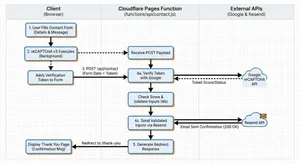
My current setup is: Cloudflare Pages Functions (the Worker) + Google reCAPTCHA v3 + Resend for email.
A high-level view of this workflow is:
- User populates the contact form with their details and message
- reCAPTCHA v3 runs and adds a short-lived verification token
- The form POSTs to
/api/contact(via the Pages Function, that sits infunctions/api/contact.jsin the root of my repository - The Pages Function, then:
- verifies the token with Google
- validates the user inputs
- sends the validated inputs via email using Resend
- Redirects the user to the “Thank You” page, confirming that the message has been sent.

Google reCAPTCHA v3
I have to say, out of all the things written in this post, researching about how exactly Google reCAPTCHA v3 works, was probably the most fascinating! I really love the fact that it is all invisible to the user, and it is based on a complex (but logical) scoring mechanism. There’s no need for a really frustrating visual CAPTCHA’s that don’t prove you are human, “they prove that you are American!” (I can’t take credit for this quote, that I believe goes to Terence Eden, or at least that's who I remember reading it from!)
So how exactly does reCAPTCHA v3 decide if you are a human? Well, it turns out it analyses a user's behavioural and contextual signals rather than setting a user a visual challenge, and based on those signals it creates a risk score. The biggest signal comes from how the user behaves on the page.
Behavioural analysis of a user's session
reCAPTCHA observes a number of patterns and metrics from a user's interaction with the page, these include:
- Mouse movement patterns
- Typing speed and rhythm
- Scroll behaviour
- Click timing and placement
- Focus changes between fields or tabs
Us humans are a little messy when using a computer. Our mouse movements curve and wander slightly, we pause without thinking, and our typing comes with the occasional hesitation or uneven rhythm.
Skynet, on the other hand, tends to be a little too perfect. Its mouse paths are often straight, timing is predictable, and its interactions can happen far faster than any real person would manage. Those overly neat patterns are often a strong indicator that automation is at work.
Browser and device fingerprinting
Now, when I think of Browser fingerprinting I often associate it with advertising and companies tracking users across the internet. In all fairness, this is Google we are talking about, so it's very likely that they actually do this! :sad_face:. Browser and device fingerprinting is the way the reCAPTCHA script also examines the environment and device information of where the request is coming from.
Typical signals include:
- Browser version and capabilities
- Installed fonts and plugins
- Screen resolution and device properties
- WebGL and Canvas fingerprint signals
- Cookie availability
- JavaScript execution behaviour
- Timezone of client
- Language settings
You’d be amazed at how accurate these fingerprints can be. Each piece of information adds a little more entropy, meaning it becomes easier to distinguish one device from another. They are so accurate in fact I know many financial sectors or government departments use them for fraud detection.
You really don’t need to look very far to find libraries like Fingerprint that do this all for you! Look at all the information it captured about you just by clicking this link! And you thought cookie tracking was bad!
Note: There are many other fingerprinting libraries available, I’m not specifically targeting Fingerprint.
So while I disagree with browser and device fingerprinting from a privacy and tracking perspective, it does have its uses when it comes to proving that a “user” is a human and not a bot. In particular, bots often run in headless browsers or minimal environments, which look very different from real user devices.
Network and reputation signals
Due to Google’s global network, it can also delve into global reputation data. It captures:
- IP reputation and history
- Known bot networks or proxy usage
- Data centre IP ranges
- Previous abuse patterns linked to the IP or session
So much traffic flows through Googles network globally, it can detect suspicious network traffic surprisingly easily.
Action Context
Google can also score the predicted actions a user is going to make. With reCAPTCHA v3, developers call the library with an action name such as:
login
checkout
signup
comment
From its countless trillions of observations over the years, Google already knows the typical login behaviour for a human (it takes approximately 3–10 seconds). Whereas, a bot can submit hundreds of logins per minute, which is a huge red flag for the use of automation.
Scoring using Machine learning
So what does Google do with all these various signals it captures?
It feeds them into a machine learning algorithm for scoring, which will decide if whatever is interacting is a human or a bot.
| Score | Meaning |
|---|---|
| 0.9 to 1.0 | Very likely human |
| 0.5 | Uncertain |
| 0.0 to 0.3 | Very likely bot |
At this point, it is then up to your backend to decide what to do with the score it gets back. For example:
0.8+  allow request
0.4–0.8 require MFA
<0.4 block or challenge
In my case, the Cloudflare Worker is my simple serverless backend, and it contains the following code to decide if the form submit is from a human or a bot:
if (typeof verifyJson.score === "number" && verifyJson.score < 0.3) {
	return new Response(
		JSON.stringify({
			error: "CAPTCHA verification failed",
			details: `Score too low: ${verifyJson.score}`,
		}),
		{ status: 400, headers: { "content-type": "application/json" } },
	);
}
The code above is saying to reject any score that returns from Google that is under 0.3 (Very likely bot), You could of course easily change this threshold if you found it was being too aggressive with the filtering.
Technical setup
To use reCAPTCHA v3, you must first register your site in the Google reCAPTCHA admin console to obtain two keys.
The “site key” is used on the client-side and allows the browser to request a reCAPTCHA verification token for when a user performs an action. The “secret key” must remain server-side and is used to verify that token with Google.
This means storing the secret securely as an environment variable, for my setup this is done via the Cloudflare Pages build dashboard. The Cloudflare Worker then reads it from the environment variables during the build process.
Once all configured, you can also use the Google reCAPTCHA admin console to:
- restrict the key to specific hostnames
- configure score thresholds to control how strict the bot detection should be
The HTML used for the form is all pretty standard, just remember to make it as accessible as possible! Semantic markup is the key to achieving this! If you are unsure how to do this, there’s an excellent post called Creating Accessible Forms on the WebAIM.org website. The HTML for my contact form looks like this:
<form id="fs-frm" action="/api/contact" method="POST" aria-labelledby="page-title" novalidate>

    <div id="form-error-summary" class="form-error-summary" role="alert" tabindex="-1" hidden></div>

    <div id="form-status" class="form-status" role="status"></div>

    <div class="abc" aria-hidden="true">
        <input type="checkbox" name="_its-a-trap!" tabindex="-1" autocomplete="off" />
    </div>

    <input type="hidden" name="_redirect" value="/contact/thanks/" />
    <input type="hidden" name="_append" value="false" />
    <input type="hidden" name="_email.subject" value="New Message from Nooshu.com" />
    <fieldset>

        <legend class="visually-hidden">Contact form</legend>
        <div class="form-group">
            <label for="name" class="required">Full Name:</label>
            <input type="text" id="name" name="name" autocomplete="name" required />
            <span id="name-error" class="form-error" hidden></span>
        </div>
        <div class="form-group">
            <label for="email" class="required">Email:</label>
            <input type="email" id="email" name="email" autocomplete="email" placeholder="[email protected]" required />
            <span id="email-error" class="form-error" hidden></span>
        </div>
        <div class="form-group">
            <label for="message" class="required">Message:</label>
            <textarea rows="7" id="message" name="message" required></textarea>
            <span id="message-error" class="form-error" hidden></span>
        </div>
    </fieldset>

    <input type="hidden" name="g-recaptcha-response" value="" />
    <button type="submit">Send Message</button>
</form>
A version with fewer comments is available in this gist on GitHub (opens in new tab).
The contact form I use above has the following features:
Honeypot and reCAPTCHA to block spam
I’ve already detailed how Google reCAPTCHA works, so I won’t cover it again here, but a Honeypot is a simple first layer of protection. The basic theory behind a Honeypot is a simple form field hidden from real users but still present in the page markup. Bots that scan the source code often fill in every field they find, including this hidden one. If that field is completed, it is a strong signal that the submission came from a bot, not a human because it isn’t seen in the User Interface (UI), thus allowing the request to be rejected immediately.
Client and server validation to ensure safe input
Form validation is handled in two layers:
- On the client side, the form uses
novalidatewith custom JavaScript to check required fields and validate the email format for the name, email, and message inputs. - On the server-side, the API performs its own validation by checking that required fields are present, enforcing max length limits for each field (name: 200 characters, email: 320 characters, message: 5000 characters), and confirming that a valid reCAPTCHA token is included with the submission.
Accessible error handling and focus management
Accessibility is built into the form by clearly associating it with the page title using aria-labelledby, providing an error summary and status regions with role=“alert" plus role=“status", also marking individual fields with aria-invalid and aria-describedby so errors are properly announced.
Inline error messages use matching IDs for assistive technologies, required fields are clearly indicated with a *, and a visually hidden legend describes the <fieldset>. When errors occur, the browser focus moves to the summary using tabindex="-1” so it can be announced immediately by the screen reader.
UX updates to keep the user informed during submission
The form includes the autocomplete attribute for the name and email fields, allowing users browser the option to suggest information already stored in the browser and pre-fill it for them. Additionally, there's a simple placeholder for the email input, letting a user know what input format is expected.
When the form is submitted, the submit button is temporarily disabled and its label changes to “Sending…” while a status message informs the user that their message is being sent. After the submission is successful, the user is then redirected to the /contact/thanks/ page, as seen in the _redirect input field, the API then returns a 303 redirect to complete the process.
Secure server side processing
The form submits a POST request to /api/contact, handled by a Cloudflare function. Hidden fields such as _redirect, _append, and _email.subject control what happens on submit.
On the server, the submission is sent as an email in both HTML and plain text formats before redirecting the user on success. The endpoint only accepts form-encoded or multipart content types. It also verifies the reCAPTCHA token using the CF-Connecting-IP header when available, and validates required fields and length limits, it then escapes HTML in the email body to ensure the content is safe.
I’d like to think this form is pretty accessible and simple to use, but if you disagree, please do let me know. How very meta! It’s always fun to learn something new!
Simplified CSP
The great thing about not having to use a third-party form service for sending contact form emails (besides the slight reduction in cost), is that it simplifies my Content-Security-Policy. This is because I’m no longer having to establish a connection to an additional third-party. The Cloudflare Worker runs on my instance of Cloudflare pages, so it is embedded in the build. And thankfully there’s no client-side interaction when using Resend, as this all happens via the Cloudflare Worker, no modifications to the CSP required! This may not seem like a big thing, but the less you can rely on a third parties the better! There are numerous examples from the history of the web, where the failure of a third party has had a massive impact on the web:
An interesting point about the Wikipedia link above is you can see how prominent these outages have become over the decades, and also the fact that the placeholder category pages for the 2030s, 2040s, 2050s, and 2060s are already listed! Oh well, those outages are for my grandkids to worry about! 👴🏼
The Cloudflare Worker (Pages Function)
So let’s get onto the final piece of the puzzle: the Cloudflare Worker code. This file sits in the root of my blog under functions/api/contact.js, this translates to the action="/api/contact” in the form code above.
import { escapeHtml } from "../../_helpers/escape-html.js";


export const onRequestPost = async ({ request, env }) => {
	try {


		const contentType = request.headers.get("content-type") || "";
		if (
			!contentType.includes("application/x-www-form-urlencoded") &&
			!contentType.includes("multipart/form-data")
		) {
			return new Response(
				JSON.stringify({ error: "Unsupported content type" }),
				{
					status: 415,
					headers: { "content-type": "application/json" },
				},
			);
		}


		const form = await request.formData();


		if (form.get("_its-a-trap!")) {


			const hpUrl = new URL("/", request.url);
			return Response.redirect(hpUrl.toString(), 303);
		}


		const name = (form.get("name") || "").toString().trim();
		const email = (form.get("email") || "").toString().trim();
		const message = (form.get("message") || "").toString().trim();
		const redirectUrl = (
			form.get("_redirect") || "/contact/thanks/"
		).toString();


		if (!name || !email || !message) {
			return new Response(
				JSON.stringify({ error: "Missing required fields" }),
				{
					status: 400,
					headers: { "content-type": "application/json" },
				},
			);
		}


		if (name.length > 200 || email.length > 320 || message.length > 5000) {
			return new Response(JSON.stringify({ error: "Invalid field lengths" }), {
				status: 400,
				headers: { "content-type": "application/json" },
			});
		}


		const recaptchaToken =
			form.get("g-recaptcha-response") || form.get("h-captcha-response");
		if (!recaptchaToken) {
			return new Response(
				JSON.stringify({ error: "reCAPTCHA token is required" }),
				{
					status: 400,
					headers: { "content-type": "application/json" },
				},
			);
		}


		const secret = env.RECAPTCHA_SECRET_KEY || env.RECAPTCHA_SECRET;
		if (!secret) {


			return new Response(
				JSON.stringify({
					error:
						"Server not configured for CAPTCHA (missing RECAPTCHA_SECRET_KEY/RECAPTCHA_SECRET)",
				}),
				{ status: 500, headers: { "content-type": "application/json" } },
			);
		}


		const remoteIp =
			request.headers.get("CF-Connecting-IP") ||
			request.cf?.clientAddress ||
			null;


		const verifyParams = new URLSearchParams({
			secret,
			response: recaptchaToken.toString(),
		});
		if (remoteIp) {
			verifyParams.append("remoteip", remoteIp);
		}


		const verifyResp = await fetch(
			"https://www.google.com/recaptcha/api/siteverify",
			{
				method: "POST",
				headers: { "content-type": "application/x-www-form-urlencoded" },
				body: verifyParams,
			},
		);


		if (!verifyResp.ok) {
			return new Response(
				JSON.stringify({ error: "Failed to verify reCAPTCHA" }),
				{
					status: 502,
					headers: { "content-type": "application/json" },
				},
			);
		}


		const verifyJson = await verifyResp.json();


		if (!verifyJson.success) {
			const errorCodes = verifyJson["error-codes"] || [];
			return new Response(
				JSON.stringify({
					error: "CAPTCHA verification failed",
					details:
						errorCodes.length > 0 ? errorCodes.join(", ") : "Unknown error",
				}),
				{ status: 400, headers: { "content-type": "application/json" } },
			);
		}


		if (typeof verifyJson.score === "number" && verifyJson.score < 0.3) {
			return new Response(
				JSON.stringify({
					error: "CAPTCHA verification failed",
					details: `Score too low: ${verifyJson.score}`,
				}),
				{ status: 400, headers: { "content-type": "application/json" } },
			);
		}


		const requestHost = new URL(request.url).hostname;
		if (
			verifyJson.hostname &&
			verifyJson.hostname !== requestHost &&
			!requestHost.endsWith(`.${verifyJson.hostname}`)
		) {


			console.warn(
				`reCAPTCHA hostname mismatch: expected ${requestHost}, got ${verifyJson.hostname}`,
			);
		}


		const fromEmail = "[email protected]";


		const subject =
			form.get("_email.subject")?.toString() || "New Message from Nooshu.com";


		const textBody = `New contact form submission on nooshu.com

Name: ${name}
Email: ${email}

Message:
${message}`;


		const htmlBody = `<h2>New contact form submission on nooshu.com</h2><p><strong>Name:</strong> ${escapeHtml(
			name,
		)}<br/><strong>Email:</strong> ${escapeHtml(email)}</p><p><strong>Message:</strong></p><pre style="white-space:pre-wrap">${escapeHtml(
			message,
		)}</pre>`;


		const apiKey = env.RESEND_API_KEY;
		if (!apiKey) {
			return new Response(
				JSON.stringify({
					error: "Server not configured for email (missing RESEND_API_KEY)",
				}),
				{ status: 500, headers: { "content-type": "application/json" } },
			);
		}


		const resendResp = await fetch("https://api.resend.com/emails", {
			method: "POST",
			headers: {
				"content-type": "application/json",
				Authorization: `Bearer ${apiKey}`,
			},
			body: JSON.stringify({
				from: `Nooshu Contact <${fromEmail}>`,
				to: ["[email protected]"],
				reply_to: email,
				subject,
				text: textBody,
				html: htmlBody,
			}),
		});


		if (!resendResp.ok) {
			const text = await resendResp.text();
			return new Response(
				JSON.stringify({ error: "Email send failed", details: text }),
				{
					status: 502,
					headers: { "content-type": "application/json" },
				},
			);
		}


		const finalRedirect = new URL(redirectUrl, request.url);


		return Response.redirect(finalRedirect.toString(), 303);
	} catch (err) {


		return new Response(
			JSON.stringify({ error: "Server error", details: String(err) }),
			{
				status: 500,
				headers: { "content-type": "application/json" },
			},
		);
	}
};
A version with fewer comments is available in this gist on GitHub (opens in new tab).
Using Cloudflare Turnstile
After I posted the blog post on Bluesky, Mastodon, and LinkedIn, I had a couple of replies back asking me why I hadn't used Cloudflare's CAPTCHA integration rather than Google's ReCAPTCHA v3. In all honesty I didn't realise Cloudflare had a competing product! So, thanks to Ryan Townsend and Paweł Grzybek for letting me know!
I'm not going to be rewriting the whole blog post, but what I will do is share the client-side JavaScript code (turnstile.js), and the contact.js file for the API that I am using to integrate with Cloudflare Turnstile. Also, any additional changes I had to make.
First the Code:
(function () {


  const SITE_KEY = "0x4AAAAAACpYvR2v9J0i1tr_";


  const form = document.getElementById("fs-frm");
  if (!form) return;


  const tokenInputName = "cf-turnstile-response";
  let tokenInput = form.querySelector(`input[name="${tokenInputName}"]`);
  if (!tokenInput) {

    tokenInput = document.createElement("input");
    tokenInput.type = "hidden";
    tokenInput.name = tokenInputName;
    form.appendChild(tokenInput);
  }


  const errorSummary = document.getElementById("form-error-summary");
  const formStatus = document.getElementById("form-status");


  function showFormError(message) {
    if (errorSummary) {
      errorSummary.textContent = message;
      errorSummary.hidden = false;
      errorSummary.focus();
    }
  }


  function clearFormError() {
    if (errorSummary) {
      errorSummary.textContent = "";
      errorSummary.hidden = true;
    }
  }


  function showFieldError(fieldId, message) {
    const field = document.getElementById(fieldId);
    const errorEl = document.getElementById(fieldId + "-error");
    if (field) {
      field.setAttribute("aria-invalid", "true");
      field.setAttribute("aria-describedby", fieldId + "-error");
    }
    if (errorEl) {
      errorEl.textContent = message;
      errorEl.hidden = false;
    }
  }


  function clearFieldError(fieldId) {
    const field = document.getElementById(fieldId);
    const errorEl = document.getElementById(fieldId + "-error");
    if (field) {
      field.removeAttribute("aria-invalid");
      field.removeAttribute("aria-describedby");
    }
    if (errorEl) {
      errorEl.textContent = "";
      errorEl.hidden = true;
    }
  }


  function clearAllErrors() {
    clearFormError();
    ["name", "email", "message"].forEach(clearFieldError);
  }


  function setStatus(message) {
    if (formStatus) {
      formStatus.textContent = message;
    }
  }


  function validateForm() {
    clearAllErrors();
    const errors = [];
    const nameField = form.querySelector("#name");
    const emailField = form.querySelector("#email");
    const messageField = form.querySelector("#message");

    if (!nameField.value.trim()) {
      showFieldError("name", "Please enter your full name.");
      errors.push(nameField);
    }

    if (!emailField.value.trim()) {
      showFieldError("email", "Please enter your email address.");
      errors.push(emailField);
    } else if (!/^[^\s@]+@[^\s@]+\.[^\s@]+$/.test(emailField.value.trim())) {
      showFieldError("email", "Please enter a valid email address.");
      errors.push(emailField);
    }

    if (!messageField.value.trim()) {
      showFieldError("message", "Please enter a message.");
      errors.push(messageField);
    }

    if (errors.length > 0) {
      const summary =
        errors.length === 1
          ? "There is 1 error in the form."
          : "There are " + errors.length + " errors in the form.";
      showFormError(summary);
      errors[0].focus();
      return false;
    }

    return true;
  }


  let widgetId = null;
  let pendingSubmit = false;
  let submitButton = null;


  function onTokenReceived(token) {
    tokenInput.value = token;

    if (pendingSubmit) {
      pendingSubmit = false;
      form.submit();
    }
  }


  function onTokenError(errorCode) {
    tokenInput.value = "";
    pendingSubmit = false;
    setStatus("");
    console.error("Turnstile error:", errorCode);
    showFormError(
      "Verification failed. Please try again. If you use an ad blocker, you may need to allow Cloudflare on this site."
    );
    if (submitButton) {
      submitButton.disabled = false;
      submitButton.textContent = "Send Message";
    }

    if (widgetId !== null && typeof turnstile !== "undefined") {
      turnstile.reset(widgetId);
    }
  }


  function renderTurnstile() {
    const container = document.getElementById("turnstile-container");

    if (!container || widgetId !== null) return;

    if (typeof turnstile !== "undefined") {
      widgetId = turnstile.render(container, {
        sitekey: SITE_KEY,


        size: "invisible",

        execution: "execute",
        callback: onTokenReceived,
        "error-callback": onTokenError,
        "expired-callback": function () {

          tokenInput.value = "";
        },
      });
    }
  }


  function waitForTurnstile() {
    return new Promise((resolve) => {
      if (typeof turnstile !== "undefined") {
        resolve();
        return;
      }
      let attempts = 0;
      const checkInterval = setInterval(() => {
        attempts++;
        if (typeof turnstile !== "undefined") {
          clearInterval(checkInterval);
          resolve();
        } else if (attempts > 100) {


          clearInterval(checkInterval);
          resolve();
        }
      }, 100);
    });
  }


  waitForTurnstile().then(() => {
    renderTurnstile();
  });


  form.addEventListener("submit", async function (e) {

    e.preventDefault();

    if (!validateForm()) return;

    submitButton = form.querySelector('button[type="submit"]');
    if (submitButton) {
      submitButton.disabled = true;
      submitButton.textContent = "Sending…";
    }
    setStatus("Verifying, please wait.");


    await waitForTurnstile();


    if (widgetId === null) {
      renderTurnstile();
      await new Promise((resolve) => setTimeout(resolve, 100));
    }


    if (tokenInput.value) {
      form.submit();
      return;
    }


    if (widgetId !== null && typeof turnstile !== "undefined") {
      pendingSubmit = true;
      turnstile.execute(widgetId);
    } else {

      console.error("Turnstile widget not available");
      onTokenError("widget-not-available");
    }
  });
})();
A version with fewer comments is available in this gist on GitHub (opens in new tab).
Now the updates to the contact.js file that sits in functions/api/ directory.
import { escapeHtml } from '../../_helpers/escape-html.js';


export const onRequestPost = async ({ request, env }) => {
	try {


		const contentType = request.headers.get('content-type') || '';
		if (!contentType.includes('application/x-www-form-urlencoded') && !contentType.includes('multipart/form-data')) {
			return new Response(JSON.stringify({ error: 'Unsupported content type' }), {
				status: 415,
				headers: { 'content-type': 'application/json' },
			});
		}


		const form = await request.formData();


		if (form.get('_its-a-trap!')) {
			const hpUrl = new URL('/', request.url);
			return Response.redirect(hpUrl.toString(), 303);
		}

		const name = (form.get('name') || '').toString().trim();
		const email = (form.get('email') || '').toString().trim();
		const message = (form.get('message') || '').toString().trim();
		const redirectUrl = (form.get('_redirect') || '/contact/thanks/').toString();


		if (!name || !email || !message) {
			return new Response(JSON.stringify({ error: 'Missing required fields' }), {
				status: 400,
				headers: { 'content-type': 'application/json' },
			});
		}


		if (name.length > 200 || email.length > 320 || message.length > 5000) {
			return new Response(JSON.stringify({ error: 'Invalid field lengths' }), {
				status: 400,
				headers: { 'content-type': 'application/json' },
			});
		}


		const turnstileToken = form.get('cf-turnstile-response');
		if (!turnstileToken) {
			return new Response(JSON.stringify({ error: 'Turnstile token is required' }), {
				status: 400,
				headers: { 'content-type': 'application/json' },
			});
		}


		const secret = env.TURNSTILE_SECRET_KEY;
		if (!secret) {
			return new Response(
				JSON.stringify({
					error: 'Server not configured for CAPTCHA (missing TURNSTILE_SECRET_KEY)',
				}),
				{ status: 500, headers: { 'content-type': 'application/json' } }
			);
		}


		const remoteIp = request.headers.get('CF-Connecting-IP') || request.cf?.clientAddress || null;

		const verifyBody = {
			secret,
			response: turnstileToken.toString(),
		};
		if (remoteIp) {
			verifyBody.remoteip = remoteIp;
		}

		const verifyResp = await fetch('https://challenges.cloudflare.com/turnstile/v0/siteverify', {
			method: 'POST',
			headers: { 'content-type': 'application/json' },
			body: JSON.stringify(verifyBody),
		});

		if (!verifyResp.ok) {
			return new Response(JSON.stringify({ error: 'Failed to verify Turnstile' }), {
				status: 502,
				headers: { 'content-type': 'application/json' },
			});
		}

		const verifyJson = await verifyResp.json();


		if (!verifyJson.success) {
			const errorCodes = verifyJson['error-codes'] || [];
			return new Response(
				JSON.stringify({
					error: 'CAPTCHA verification failed',
					details: errorCodes.length > 0 ? errorCodes.join(', ') : 'Unknown error',
				}),
				{ status: 400, headers: { 'content-type': 'application/json' } }
			);
		}


		const requestHost = new URL(request.url).hostname;
		if (
			verifyJson.hostname &&
			verifyJson.hostname !== requestHost &&
			!requestHost.endsWith(`.${verifyJson.hostname}`)
		) {
			console.warn(`Turnstile hostname mismatch: expected ${requestHost}, got ${verifyJson.hostname}`);
		}


		const fromEmail = '[email protected]';
		const subject = form.get('_email.subject')?.toString() || 'New Message from Nooshu.com';

		const textBody = `New contact form submission on nooshu.com\n\nName: ${name}\nEmail: ${email}\n\nMessage:\n${message}`;
		const htmlBody = `<h2>New contact form submission on nooshu.com</h2><p><strong>Name:</strong> ${escapeHtml(name)}<br/><strong>Email:</strong> ${escapeHtml(email)}</p><p><strong>Message:</strong></p><pre style="white-space:pre-wrap">${escapeHtml(message)}</pre>`;


		const apiKey = env.RESEND_API_KEY;
		if (!apiKey) {
			return new Response(
				JSON.stringify({
					error: 'Server not configured for email (missing RESEND_API_KEY)',
				}),
				{ status: 500, headers: { 'content-type': 'application/json' } }
			);
		}


		const resendResp = await fetch('https://api.resend.com/emails', {
			method: 'POST',
			headers: {
				'content-type': 'application/json',
				Authorization: `Bearer ${apiKey}`,
			},
			body: JSON.stringify({
				from: `Nooshu Contact <${fromEmail}>`,
				to: ['[email protected]'],
				reply_to: email,
				subject,
				text: textBody,
				html: htmlBody,
			}),
		});

		if (!resendResp.ok) {
			const text = await resendResp.text();
			return new Response(JSON.stringify({ error: 'Email send failed', details: text }), {
				status: 502,
				headers: { 'content-type': 'application/json' },
			});
		}


		const finalRedirect = new URL(redirectUrl, request.url);
		return Response.redirect(finalRedirect.toString(), 303);
	} catch (err) {
		return new Response(JSON.stringify({ error: 'Server error', details: String(err) }), {
			status: 500,
			headers: { 'content-type': 'application/json' },
		});
	}
};
A version with fewer comments is available in this gist on GitHub (opens in new tab).
Amazingly, that's really the only two major changes!
The minor changes were:
- Footer template: Update my footer with a link to the JavaScript above and the Turnstile JavaScript, e.g.
https://challenges.cloudflare.com/turnstile/v0/api.js. - CSP: Modified my
_headersfile to remove Google from my CSP and add in the challenges URL (https://challenges.cloudflare.com/) to theconnect-src,script-src-elem, andframe-src. - CSS: Slightly modify the CSS to remove Google ReCAPTCHA v3 specific styling (
.grecaptcha-badge) and add Turnstile CSS (.turnstile-widget). - Secret Keys: RECAPTCHA_SECRET_KEY swapped out for the TURNSTILE_SECRET_KEY in the Cloudflare Pages environment variables settings page.
- Contact Form HTML: HTML changes to the contact form added cf-turnstile-response hidden
<input>and #turnstile-container<div>.
Why change?
So I've literally done a 180 from Google ReCAPTCHA v3 to Cloudflare Turnstile in less than a week. So why change and what are the differences? The top of my priority list that I admittedly should have considered when integrating Google ReCAPTCHA v3 is privacy! I would rather not subject any readers of the blog to any additional tracking from Google! But there are other differences too:
| Area | Cloudflare Turnstile advantage over reCAPTCHA v3 | Why it matters |
|---|---|---|
| Privacy | Turnstile is positioned as a privacy preserving alternative, and it does not rely on tracking user data across sites for ad retargeting. It also offers Ephemeral IDs, which are short-lived device identifiers that work without cookies or client-side storage. | Better fit for teams with strong privacy, GDPR, or public sector concerns. |
| Less operational tuning | Turnstile’s server validation is a straightforward success or failure check. By contrast, reCAPTCHA v3 returns a score and Google recommends that you review scores in the admin console and tune thresholds based on your own traffic, starting from 0.5. | Usually simpler to ship and maintain, especially for smaller teams that do not want to spend time calibrating fraud thresholds. |
| No CAPTCHA experience by default | Turnstile works without showing visitors a CAPTCHA and supports invisible, non-interactive, and managed modes. reCAPTCHA v3 is also frictionless, but Turnstile is explicitly built as a CAPTCHA replacement with more presentation modes for the widget itself. | More control over UX and easier to keep forms feeling clean while still validating traffic. |
| Can be used on any site without Cloudflare CDN | Turnstile can be embedded into any website, it does not require your traffic to go through Cloudflare or use Cloudflare’s CDN. | Easier adoption if you want the bot check without changing your hosting or edge setup. |
| Developer-friendly testing | Turnstile provides dummy site keys and secret keys for testing, and Cloudflare documents that these work on localhost and any development domain. Google’s reCAPTCHA FAQ says for v3 you should create a separate key for testing environments, and scores may not be accurate because v3 relies on real traffic. | Usually a smoother local dev and automated test setup. |
| Free plan positioning | Cloudflare documents Turnstile has a Free plan intended for personal sites, SMBs, dev and test, and most production applications. Google’s FAQ notes quota limits for non-Enterprise reCAPTCHA, and if a v3 key exceeds a monthly quota it may fail open with a static score of 0.9 for the remainder of the month. | Attractive when cost certainty matters or when you want fewer surprises as usage grows. |
| Extra integration option with Cloudflare security stack | Turnstile supports pre-clearance, letting it issue clearance cookies that can be used across Cloudflare protected domains. | Helpful if you already use Cloudflare WAF or bot controls and want tighter integration. |
Summary
Well, that brings us to the end of another blog post, I only went off on a tangent a couple of times! So well done for sticking with my ramblings!
In the end, the goal was to keep the architecture simple while still covering the essentials. The site itself remains fully static, with a lightweight Cloudflare Worker handling form submissions. Spam protection is provided through Google reCAPTCHA v3, Cloudflare Turnstile, while validation and accessibility patterns ensure the form behaves reliably for real users. It is a small piece of functionality, but implemented carefully it can be both robust and easy to maintain.
As always, thanks for reading, and I’d love to hear your feedback. You are welcome to contact me either via the contact form (again, very meta! 😏), or via any of the various social channels listed on the site.
Post changelog:
- 09/03/26: Initial post published.
- 13/03/26: Updates to give instructions on how to use Cloudflare Turnstile as an alternative to Google reCAPTCHA v3. Thanks again to Ryan Townsend and Paweł Grzybek.