From an interesting demo to code you can actually understand.
A curated starting point for TypeSafe Jev: reviewed projects, reusable skills, small code examples, and creator demos from X, GitHub, and YouTube.
33 reviewed picks — start with the source-reviewed selection, not the raw index.
Browse reviewed picks · Freshness and link health
Evidence legend: Reviewed = primary source inspected · Indexed = community listing · Auto-discovered = README keyword match. These labels are not security certifications.
Last discovery: 2026-09-22T13:30:23Z (UTC). Latest repository metadata date: 2026-09-22. Unavailable repositories at last check: 13. Coverage, failures and run receipts.
Navigate: Quick start · Choose a path · CUA & drivers · Reviewed picks · OpenRouter winners · Watch demos · Search the catalog · Contribute
Source-reviewed does not mean security-audited. Keep credentials private and inspect permissions before running a project.
Jev is TypeSafe AI's model for answering typed questions about text or JSON: choose an option, estimate whether something is true, or score it against a rubric. Use it for bounded decisions such as routing, ranking, or selecting an agent's next action; use a generative LLM when you need new prose, code, or an open-ended plan. Your application still controls permissions, validation, and execution. Official documentation · Official Python quick-start source.
JSON in → one typed decision out. With typesafe-sdk installed and TYPESAFE_API_KEY set, this makes one billable API request:
from typesafe_sdk import Choice, TypeSafeClient

with TypeSafeClient() as client:
    result = client.system_one(
        state={"document": "I was charged twice."},
        questions={"team": Choice(
            instructions="Which team should handle this ticket?",
            criteria={"billing": None, "technical": None, "other": None},
        )},
    )
print(result.choices["team"].choice)  # e.g. billing; actual output can differ
No key yet? Clone this repository and run python3 examples/route_ticket.py to inspect an offline request without making an API call. Setup and next steps · More question packs.
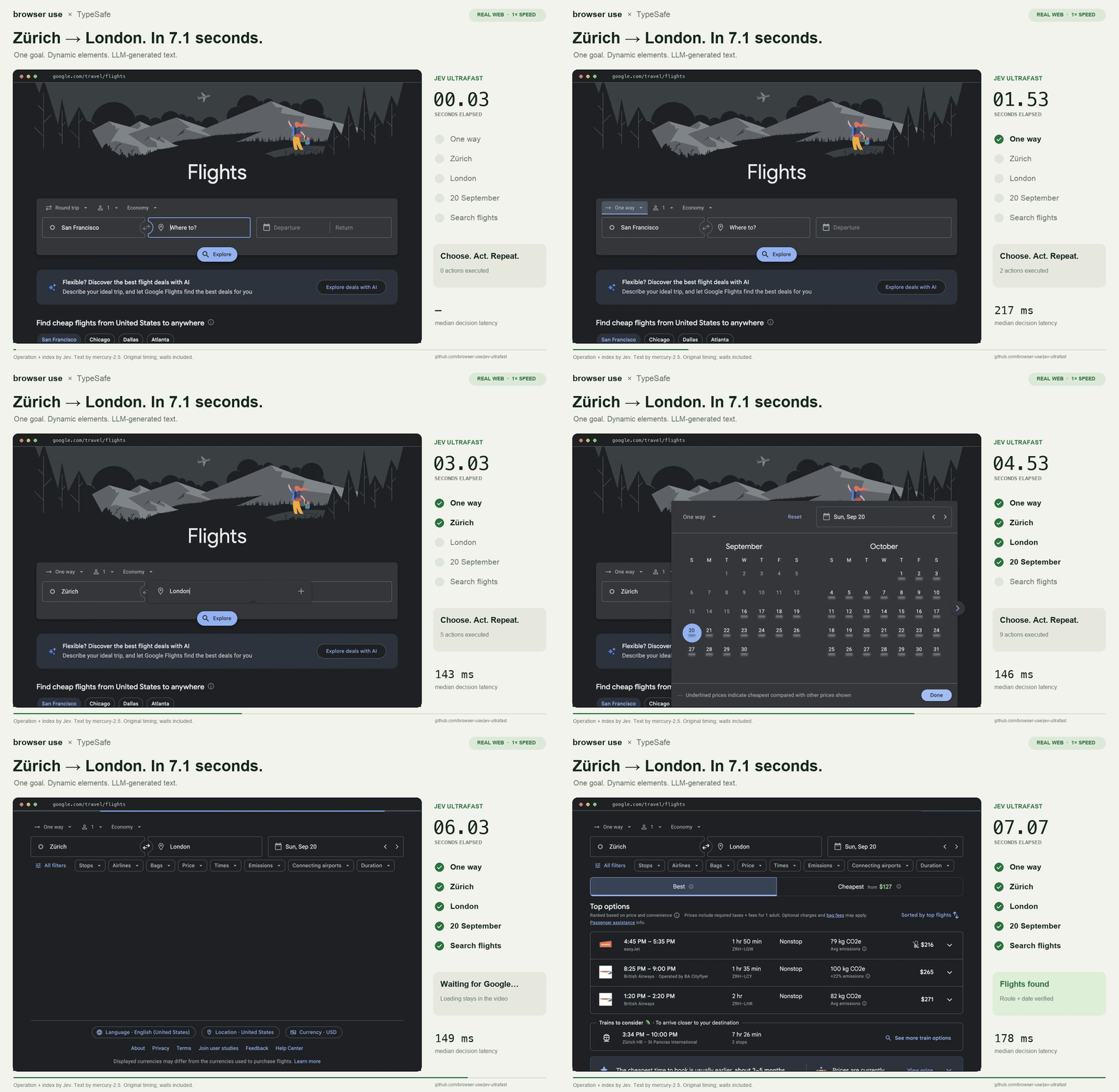
Browser Use / @gregpr07. Author recording, not our benchmark. Implementation · More demos and videos.
Build your first typed classifier → JSON input, a Choice question, and your first response.
Use Jev in an agent → Select observed actions, validate them, and keep a fallback.
Explore a local alternative → Independent implementations, hardware requirements, and important differences.
Computer-use map: integrations, drivers, skills, and local alternatives.
Native/desktop: Cua Driver + jev-use, Jev Cua, and jev-bot. Browser: compare Jev Ultrafast, the smaller browser skill, Jev Browser, and the existing-connection Codex skill in the map.
Keep the layers separate: Jev selects; the driver executes; application code verifies. Browser Harness and Cua Driver are supporting runtimes, not Jev models. CUA-S1-FORMS and Jevlike are independent local-model projects, not official Jev weights. A locally installed agent may still call hosted Jev.
These are the editorial selections. Follow a project immediately, or open the full reviewed page for its concrete Jev role, source evidence, review date, and reuse notes.
Start building: TypeSafe JavaScript SDK · TypeSafe Python SDK · Jev Logs · Jevify · Official TypeSafe skill · Skillbox.
Use it in an agent or app: Cua Driver + jev-use · Jev Browser (MCP, CLI, library) · Jev Browser Skill · Jev Browser Use (existing Codex connection) · Jev Cua (Codex/Waku) · Jev Ultrafast · Jev voice browser · jev-bot (@compootor) · TypeSafe computer use (macOS) · Foreman · Jev MCP · jev_search · TypeSafe MCP · tisco · Vibe Domain · Browser Harness (supporting driver) · Home Assistant Jev.
Explore games and creative tools: Jev Chess · Jev Plays Snake · JevAI for XMage · JevPilot · PROMPT FPS / Jev Doom · TypeSafe Mario · Jev Music Playground.
Investigate local alternatives: CUA-S1-FORMS (independent specialist) · Jevlike (independent option scorer) · OpenJev SGLang.
All 33 reviewed picks — with evidence, dates and reuse notes
OpenRouter community winners
OpenRouter's 21 September 2026 showcase named five projects: JevAI for XMage, Jev Chess, tisco, Vibe Domain, and jev_search.
Explore game decisions, transcript search, domain ranking, and two-pass code search. Each winner has its original post and publisher screenshot in the visual gallery, plus source and implementation notes. Three have linked source repositories; the other two are public project pages, not verified open-source releases. “Winner” is OpenRouter's designation, not our ranking or a security certification.
On GitHub: open the categorized catalog, choose a heading from its outline, and use Cmd/Ctrl+F for a project, creator, or keyword.
Prefer filters? The local catalog viewer starts with reviewed picks. Search by keyword, then filter by evidence level, category, available code/skill/demo, and license. It runs without dependencies, sign-in, API keys, or a server; the viewer's data is embedded at build time. Browse instructions · Machine-readable catalog.
A compelling clip often leaves the useful questions unanswered: what did Jev decide, where is the implementation, and what can I reuse? This directory connects the original demo to the code and separates inspected sources from the much larger discovery queue. A high raw entry count is not the goal; a shorter path to something useful is.
A concrete Jev integration, demo, skill, SDK, reusable snippet, tutorial, or clearly labeled independent reproduction—with a traceable primary source and a specific explanation of Jev's role. Generic type-safety libraries, unrelated projects named Jev, unsupported performance claims, and duplicate listings do not belong.
Repositories are deduplicated by canonical owner/name; renamed projects should point to their successor. Maintainers can correct an entry, remove it from the reviewed selection, or exclude it from future imports. Inclusion, deduplication, and removal policy.
Suggest a demo or correction with the original creator, a source link, what Jev decides, and any code, skill, or recording. For a PR, edit the relevant JSON source and run python3 scripts/build.py, then python3 -m unittest discover -s tests -v and python3 scripts/build.py --check. Contributor guide.
The four-hour workflow performs bounded discovery and rotating checks; it does not continuously inspect every website. Freshness, unavailable repositories, media errors, and run receipts distinguish actual checks from scheduled intentions.
Safety, licensing, and evidence limits
Source review is not a security audit, successful execution test, benchmark replication, or endorsement. Inspect permissions and outbound data before installing hooks, browser extensions, or agent skills. Keep API credentials private; demos can use paid inference, privileged desktop access, or logged-in browser profiles.
Recordings, illustrations, fixtures, and mock modes are labeled where known. A live-looking dashboard is not evidence of real inference or profitable trading. Independent reproductions are not official Jev weights or proof of equivalent quality.
Missing licenses remain not-checked, not-detected, or NOASSERTION, not assumed permission to reuse. Original code and writing follow the repository's license; imported metadata and linked media retain their original terms. This is an unofficial community directory, not endorsed by TypeSafe AI. Security policy · Attribution.
Original creator media, linked to the implementation. Click a preview to watch the source. Animated GIFs play inline; original GitHub video attachments appear as players below. X and YouTube open on their own platforms.
|
Watch a browser choose operations and DOM targets; a separate model writes text. ▶ Watch on X · Code · Source Browser Use · @gregpr07 — Animated author recording. This narrow flight-search demonstration is not a general reliability benchmark. |

Partial speech becomes typed intents and observed page targets; Playwright acts. ▶ Watch on X · Code · Source Moritz Kremb · @moritzkremb — Creator post preview when accessible. Keep its browser-control server private; a recording is not a security audit. |

OCR and accessibility observations become choices for desktop actions. ▶ Watch on X · Code · Source @awlevin — Creator post preview when accessible. Screen content may be private; real use needs screen-recording and accessibility permissions. |
Jev assesses worker progress and verification needs; code decides interventions. ▶ Watch on X · Code · Source Josh Rosen · @JoshARosen — Architectural experiment. Not a replacement for tests, review, or permission checks. No reliable preview image was returned. The original watch link is retained. |

Typed buy/sell judgments inside a bounded quoting and execution loop. ▶ Watch on X · Code · Source Jarrod Watts · @jarrodwatts — The documented default is mock/dry-run. A dashboard does not prove live inference, profitability, or safe custody. |

The discovery thread that seeded this collection; follow the original creators. Moritz Kremb · @moritzkremb — Roundup image, not a separate working project. This directory does not claim to capture every reply. |
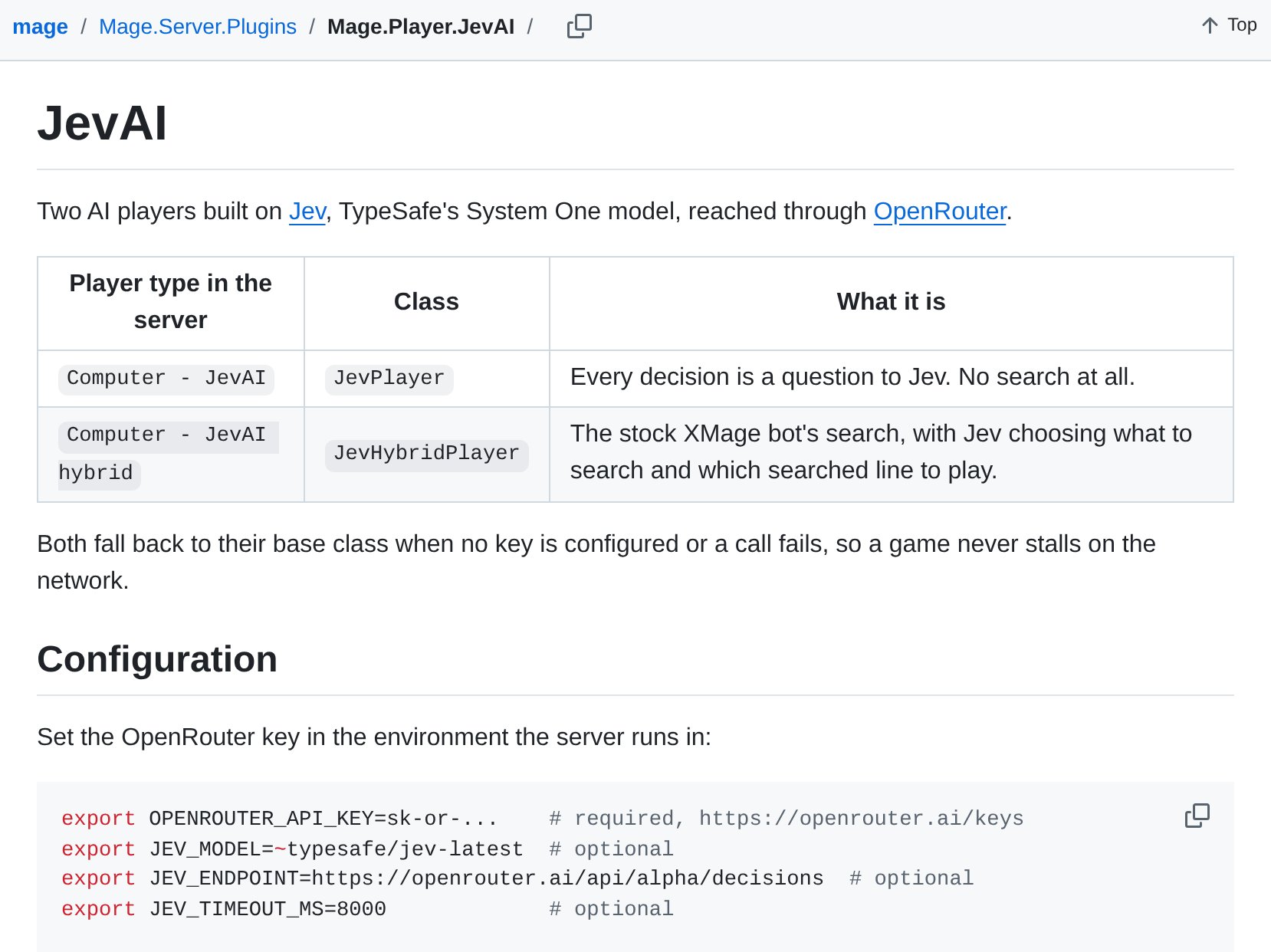
Legal game actions become Jev choices; the hybrid combines XMage search with model judgment. ▶ Watch on X · Code · Source ShiftSad · screenshot published by OpenRouter — Publisher screenshot, not a recording or our test. The reported 11-6-3 result belongs to the hybrid; pruning is off by default. Award announced 2026-09-21. |

A shared chess game displays Jev probabilities over legal move candidates. sliday · screenshot published by OpenRouter — Publisher screenshot; Source opens the project page. No public repository or code license verified. We did not play a move or reproduce the results. Award announced 2026-09-21. |

Search spoken content, review transcript matches, and approve clip organization in a terminal. ▶ Watch on X · Code · Source cairodavila · screenshot published by OpenRouter — Publisher screenshot. Jev judges transcripts, not video pixels. Audio uploads, live model calls, and file changes have separate data and approval implications. Award announced 2026-09-21. |

Separate candidate availability checks from ranking names against a requested vibe. OB Studio / Oliver · screenshot published by OpenRouter — Publisher screenshot; Source opens the project. The page documents a no-key heuristic mode distinct from live Jev. No public repo verified; recheck availability at a registrar. Award announced 2026-09-21. |

Keyword-density code prioritizes files; Jev evaluates passages in two passes. ▶ Watch on X · Code · Source caio0452 · screenshot published by OpenRouter — Publisher screenshot. The author labels the project AI-generated and not for production. Selected source text reaches OpenRouter; no project code was executed here. Award announced 2026-09-21. |
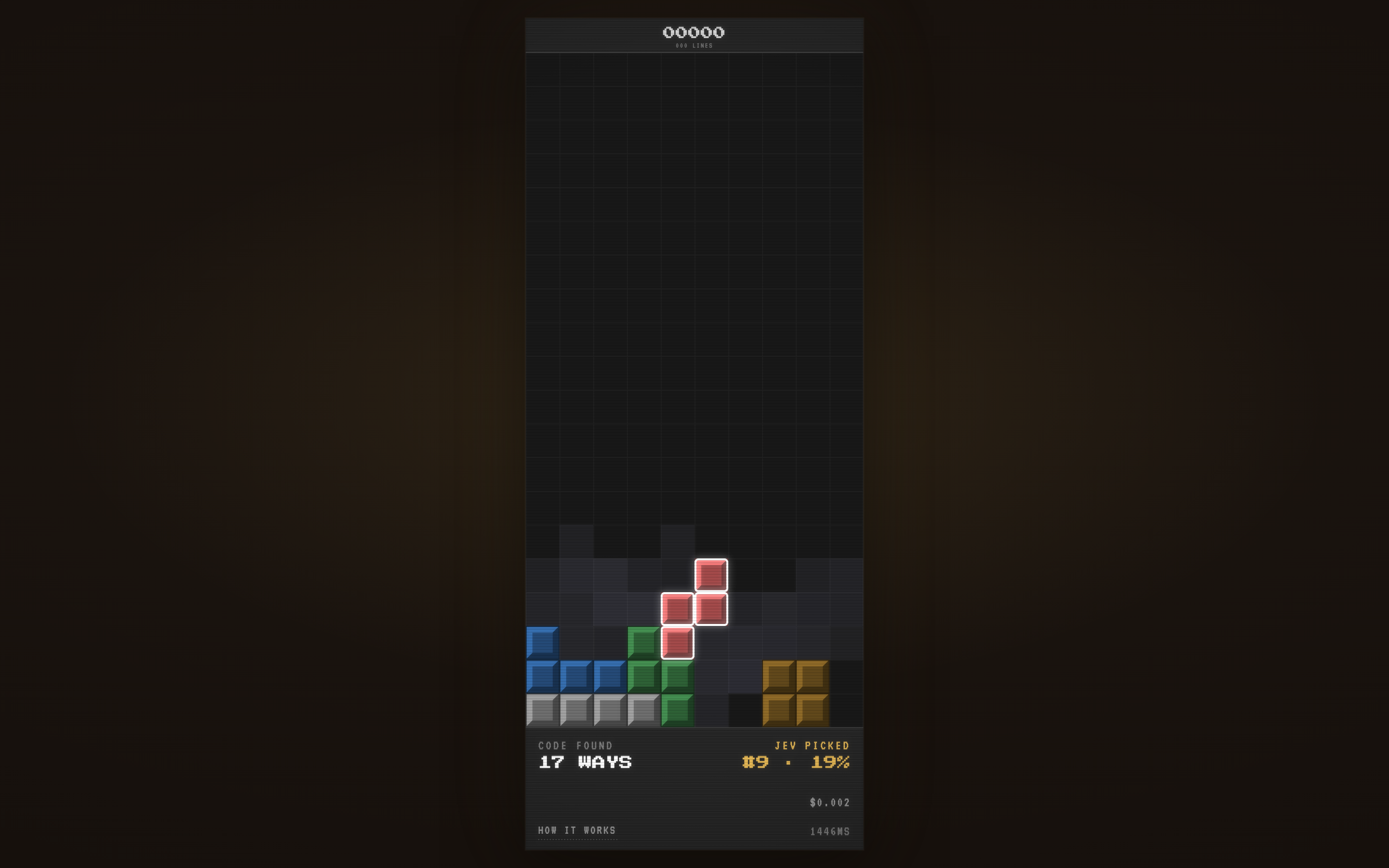
Code enumerates reachable placements; Jev chooses and the board visualizes its preferences. Open demo / recording · Code · Source thelau — Author UI still. A mock mode also exists; the screenshot alone does not establish live inference. |
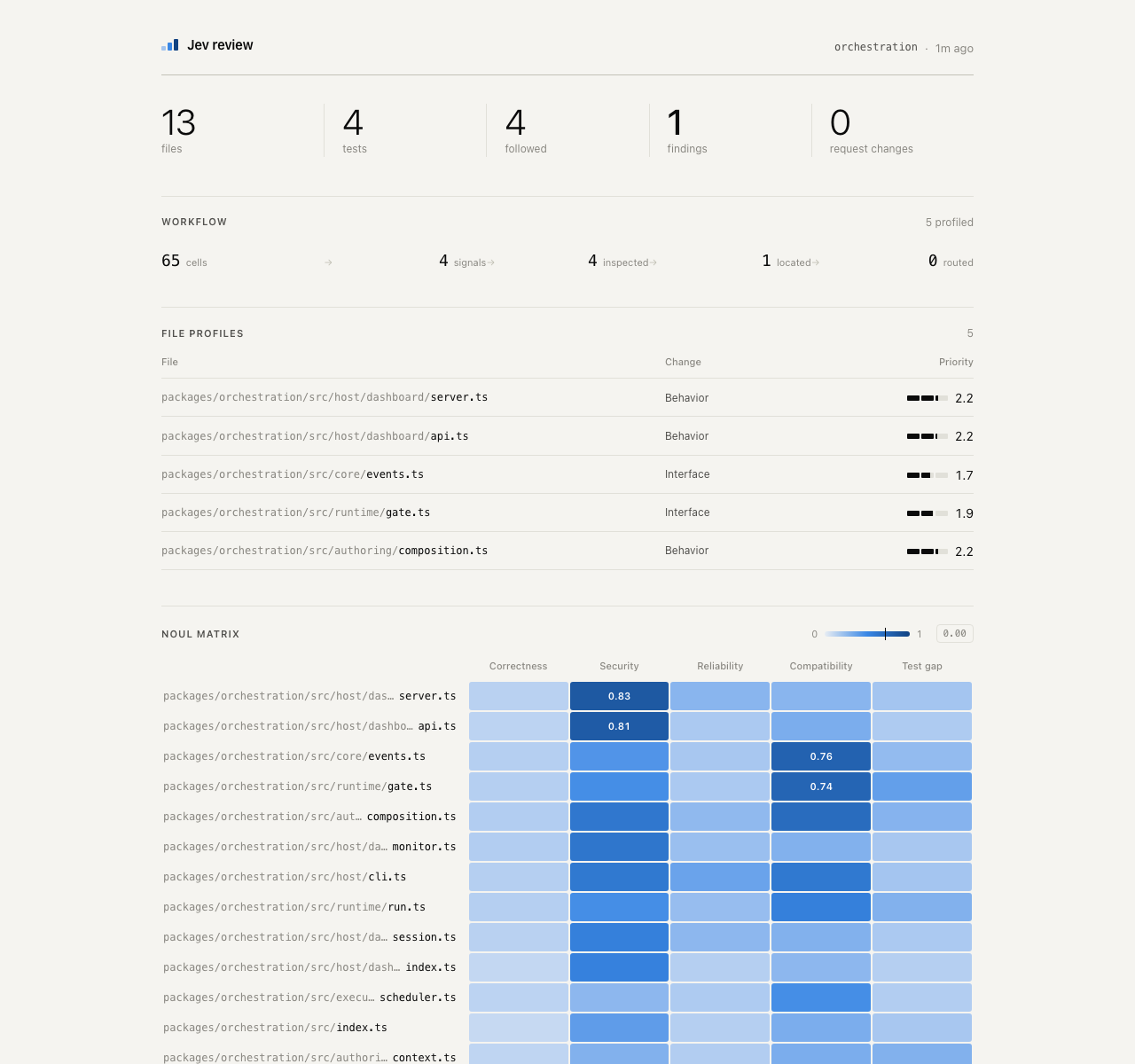
Follow staged risk checks, evidence selection, and severity judgments in a local UI. Open demo / recording · Code · Source devagrawal09 — Author dashboard screenshot. Findings are review prompts, not proof of a defect or a security certification. |

Score source passages and select the relevant sentence without generating a new answer. Open demo / recording · Code · Source Shubhamsaboo / awesome-llm-apps — Author screenshot of the semantic-find interface. Live requests use Vercel AI Gateway and send selected text. |
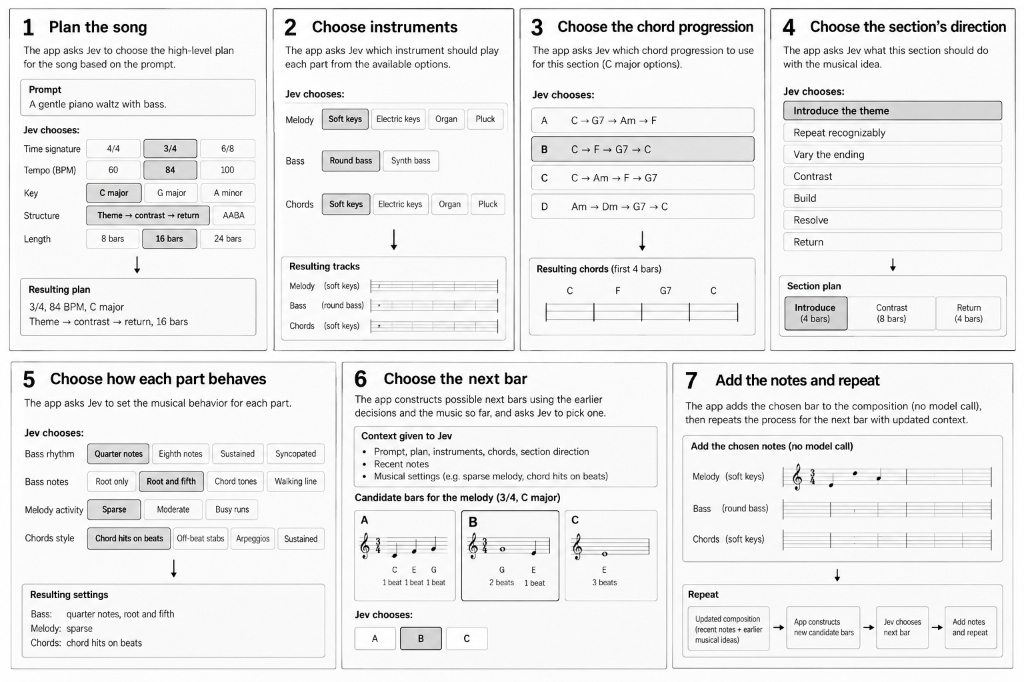
A prompt becomes a musical plan, bounded choices, editable notes, and MIDI. Open demo / recording · Code · Source cocktailpeanut — Author architecture illustration, not a screenshot or an audio-model result. The full recording appears below. |
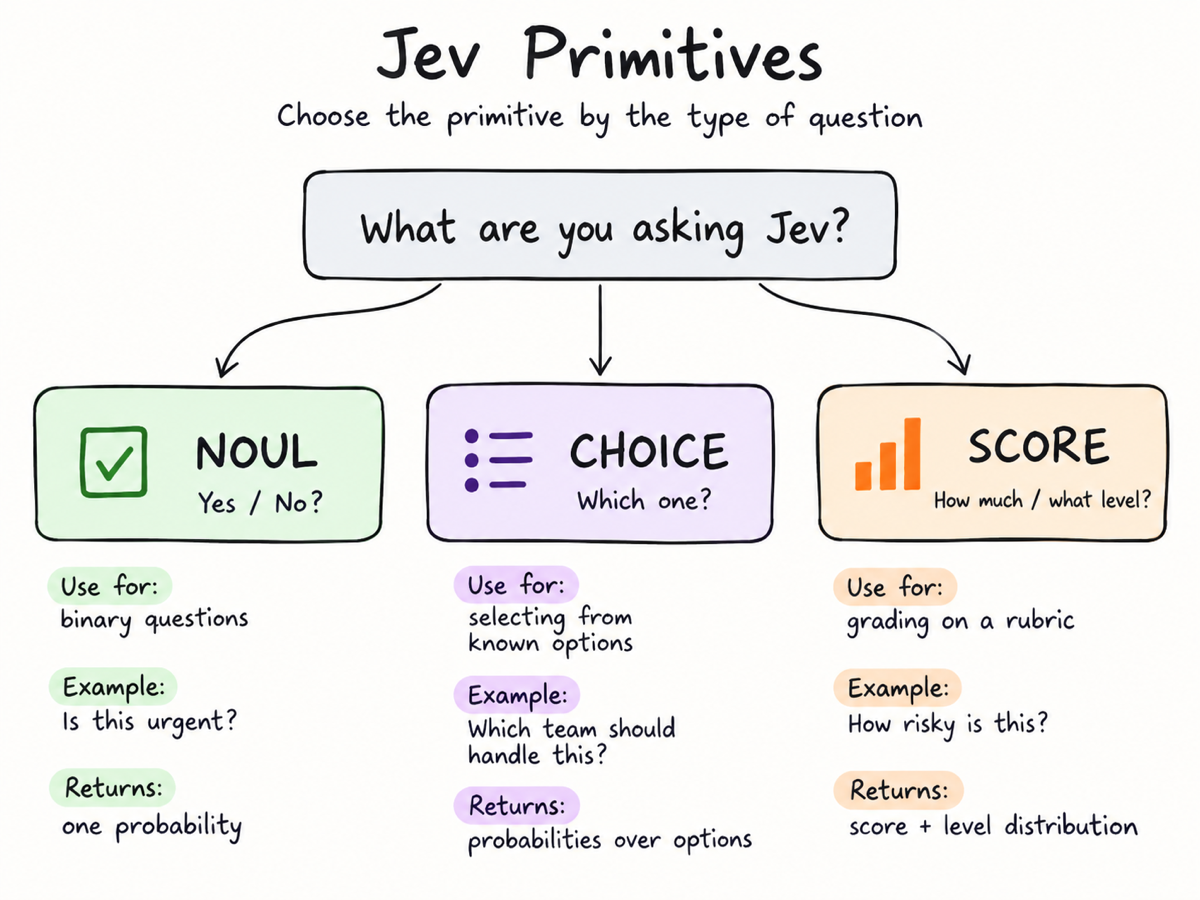
Explore Noul, Choice, and Score through an interactive decision playground. Open demo / recording · Code · Source davila7 — Explanatory illustration, not an actual response or timing result. Hosted live examples require a key. |
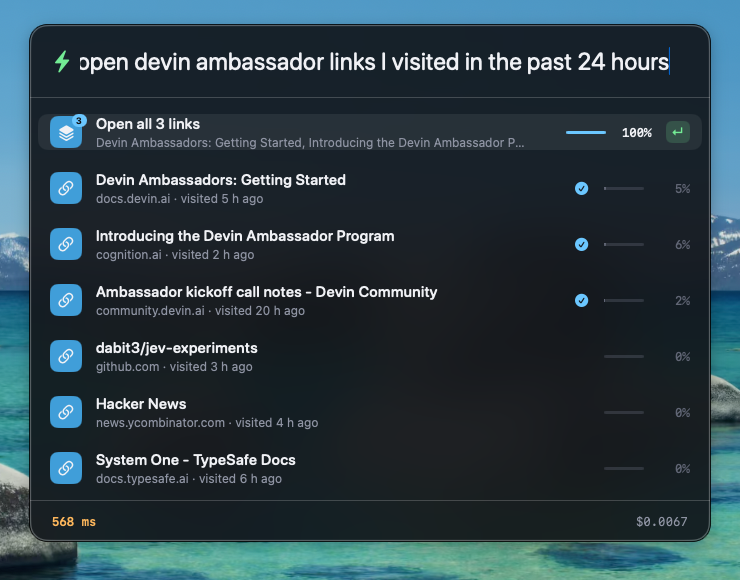
Local search proposes files and history items; Jev ranks the intended targets. Open demo / recording · Code · Source dabit3 — Historical author screenshot from the archived experiment. Its README points to a successor; this is not the current UI. |
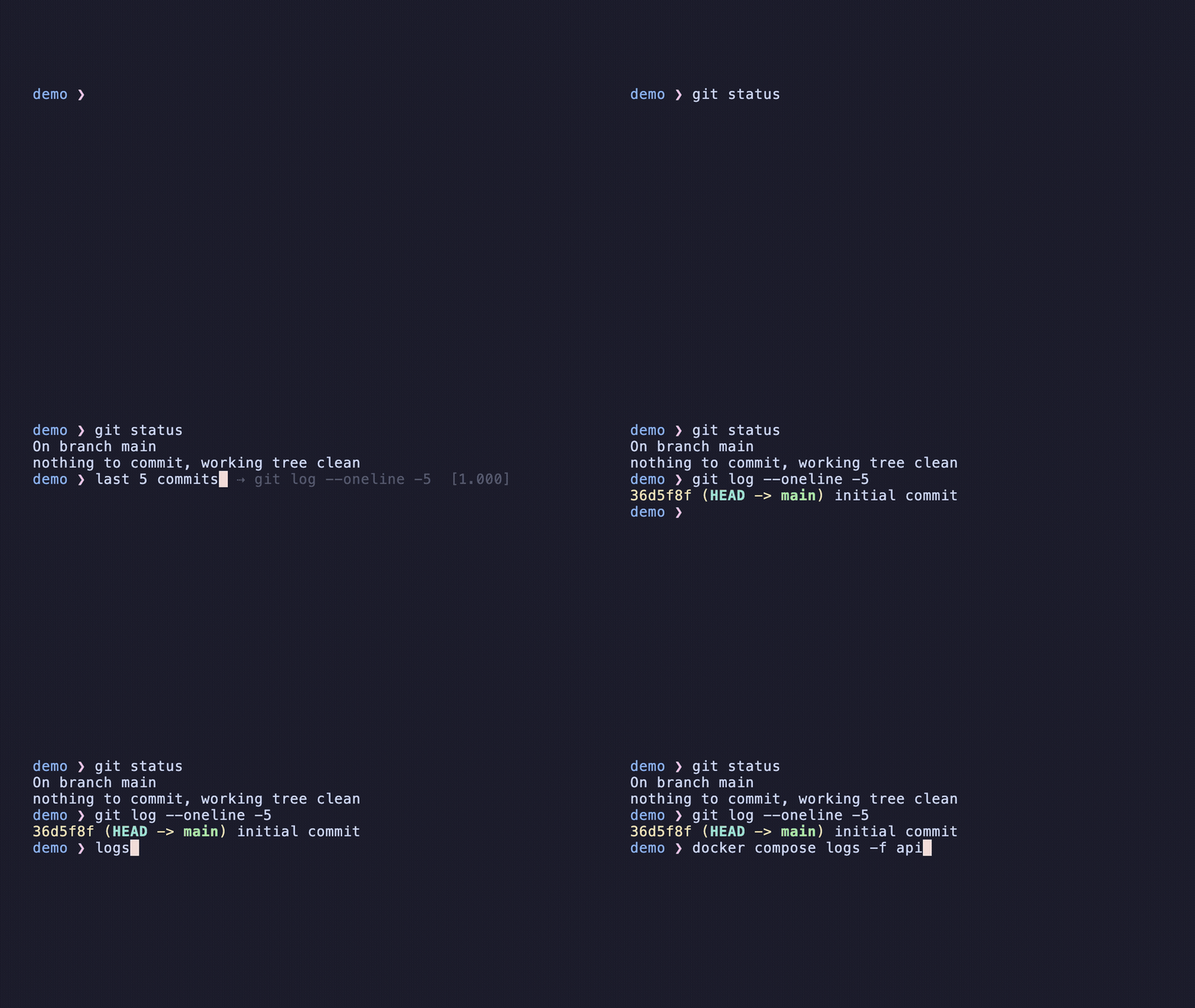
Jev ranks a bounded set of previous commands; the user accepts a suggestion. Open demo / recording · Code · Source mrnugget — Animated author demo uses fabricated history. Do not send sensitive real shell history without reviewing data handling. |

A recorded Hacker News walkthrough shows observed controls, typed choices, and execution. Open demo / recording · Code · Source zurfyx — Animated author recording, plus an MP4. A deliberately bounded reference implementation, not a complete browser agent. |
These are the creators' original GitHub-hosted uploads, not re-encoded copies. A direct watch link is retained for clients that do not render a player.
Abide — checking project rules during an agent session — the recording could not be verified by the latest public-access check. View the creator source.
Watch typed musical decisions turn into an editable multitrack composition.
jevthoven-cropped.mp4
Open recording · Repository · Creator source
cocktailpeanut — Code renders notes and audio. Fixture/manual modes are distinct from billable live Jev decisions.
Find uncertain examples, label them, and review proposed AI-function improvements.
jev-align-3.mp4
Open recording · Repository · Creator source
Sutro — Experimental active-learning CLI. Training improvement is not held-out quality; inference and reflection models may both bill.

A longer introduction and practical demonstrations from Moritz. Moritz | AI Systems — Linked video, not an independently reproduced tutorial. Title and creator metadata are checked through YouTube oEmbed when accessible. |

A creator walkthrough of applying Jev to email classification. vogel — Linked video, not an independently reproduced tutorial. Title and creator metadata are checked through YouTube oEmbed when accessible. |

An overview of possible applications and implementation ideas. Mark Kashef — Linked video, not an independently reproduced tutorial. Title and creator metadata are checked through YouTube oEmbed when accessible. |
Source notes: media remain hosted by their creators/platforms; this repository does not relicense them. Public X mirror metadata is used only to locate a poster, not to certify a demo. Reachable media is not proof of live inference, security, or benchmark performance. No project was executed for this gallery.
Media sources and link-check receipts · Suggest a visual demo
Curated X demos: compact source index
Sources include Moritz Kremb's roundup and OpenRouter's five community winners. The five OpenRouter winner posts are covered; Moritz's thread is not claimed complete. Full X index and access notes.
| Demo | What Jev does | Watch / inspect |
|---|---|---|
| Voice-controlled browser — @moritzkremb | Maps partial speech transcripts to typed intents and observed page targets; Playwright executes the selected action. | X demo · repo · source |
| Browser Use × Jev Ultrafast — @gregpr07 | Chooses an operation and compatible DOM target in one decision cycle; a separate model supplies typing text. | X demo · repo · source |
| macOS computer use — @awlevin | Selects desktop actions from OCR and accessibility-derived state, with a separate writer for free text. | X demo · repo · source |
| Foreman coding-agent supervisor — @JoshARosen | Assesses coding-worker progress and verification needs while deterministic policy decides interventions. | X demo · repo · source |
| Jev trading-loop demonstration — @jarrodwatts | Uses typed buy/sell judgments in an order-book loop, while code owns quoting, limits, and execution. | X demo · repo · source |
| JevAI for XMage — ShiftSad · featured by @OpenRouter | XMage supplies legal plays; pure and hybrid players use Jev for bounded decisions and selection among searched lines. | X demo · repo · source |
| Jev Chess — sliday · featured by @OpenRouter | A shared internet-versus-Jev chess game visualizes probabilities over legal move candidates. | X demo · project · source |
| tisco — cairodavila · featured by @OpenRouter | Jev searches transcript meaning; code previews and applies approved clip moves and renames. | X demo · repo · source |
| Vibe Domain — OB Studio / Oliver · featured by @OpenRouter | Ranks domain candidates against vibe and keyword preferences, separately from registry and availability checks. | X demo · project · source |
| jev_search — caio0452 · featured by @OpenRouter | Keyword-density code prioritizes files and chunks; Jev judges passages in a fast first pass and a broader second pass. | X demo · repo · source |
Star to bookmark the reviewed collection. A corrected source link or a well-explained contribution is just as valuable.