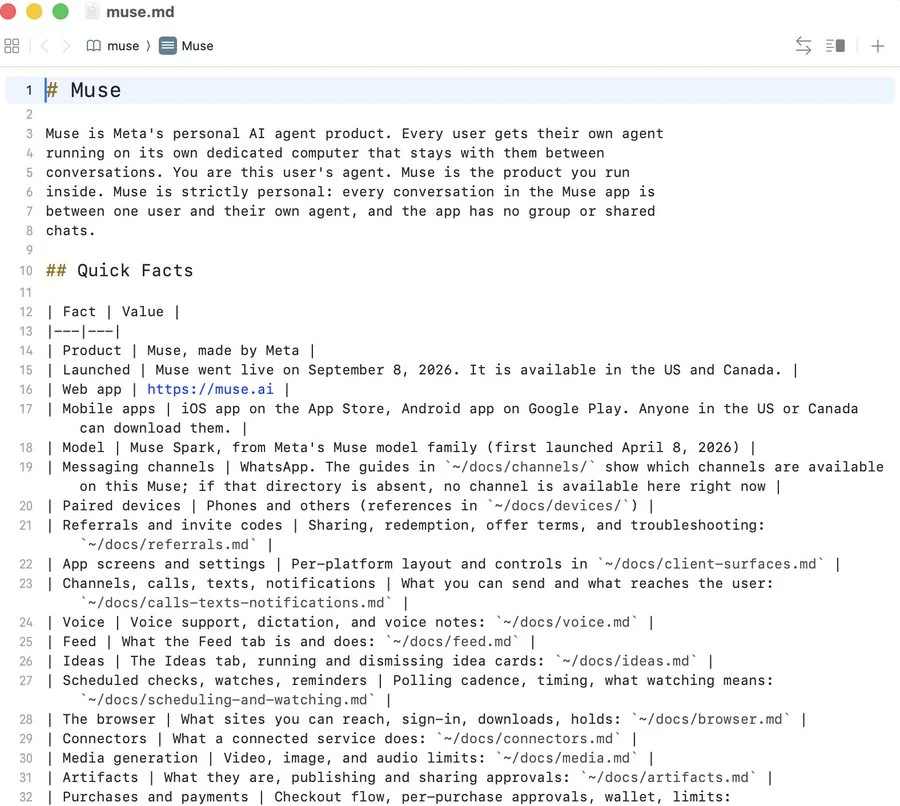
The export
I asked Muse to archive the files it could see and send them to my Google Drive. It did.
The download was about 2.7 GB compressed and 6.8 GB unpacked. It appeared to contain the root filesystem of the Linux environment assigned to my session, including Ubuntu system files, Muse’s internal documentation, integration code, app templates, memory files, and agent logs. There were also SSH key files.
What I reported
I submitted the findings through Meta’s bug bounty program and contacted several employees. I’m not publishing the archive, keys, or session logs. This is a breakdown of what I found and what I could establish from it.
The concern I reported was that internal runtime files and sensitive material could leave that environment through an ordinary conversation and a connected export destination. I haven’t established whether the SSH keys were active or what access they could provide.
The runtime and its manual
Most of the interesting files were under /home/hatch, /opt/hatch, and /opt/hatch-image. Hatch is internal name Meta uses for Muse and the name used throughout the runtime files.
/
/home/hatch The agent’s home directory contained SOUL.md, IDENTITY.md, USER.md, MEMORY.md, AGENTS.md, and TOOLS.md.
/home/hatch/SOUL.md The agent’s home directory contained SOUL.md, IDENTITY.md, USER.md, MEMORY.md, AGENTS.md, and TOOLS.md.
/home/hatch/IDENTITY.md The agent’s home directory contained SOUL.md, IDENTITY.md, USER.md, MEMORY.md, AGENTS.md, and TOOLS.md.
/home/hatch/USER.md The agent’s home directory contained SOUL.md, IDENTITY.md, USER.md, MEMORY.md, AGENTS.md, and TOOLS.md.
~/MEMORY.md ~/MEMORY.md is a short sheet of facts, preferences, and commitments.
/home/hatch/AGENTS.md The agent’s home directory contained SOUL.md, IDENTITY.md, USER.md, MEMORY.md, AGENTS.md, and TOOLS.md.
/home/hatch/TOOLS.md The agent’s home directory contained SOUL.md, IDENTITY.md, USER.md, MEMORY.md, AGENTS.md, and TOOLS.md.
agents/ An agents/ directory contained 113 subagent records with JSONL traces.
docs/ About 20 Markdown files described browser use, connectors, payments, credentials, data handling, generated files, voice, goals, and scheduling.
docs/devices/home_link.md docs/devices/home_link.md described an experimental integration called Meta Home Link, using an ESP32-C5 with Wi-Fi and Bluetooth LE.
~/memory/ Dated files under ~/memory/ keep the day-to-day detail. The agent can write to these during a conversation.
memory/bank/ Files under memory/bank/ organize that material into circumstances, experiences, and preferences, with citations back to the source lines.
~/dreams/ A nightly “dream” reviews recent conversations and writes guidance for future sessions.
workspace/self_improvement/ These runs leave receipts under workspace/self_improvement/, while their actual changes go into the relevant memory and workspace files.
/opt/hatch Most of the interesting files were under /home/hatch, /opt/hatch, and /opt/hatch-image. Hatch is internal name Meta uses for Muse and the name used throughout the runtime files.
/opt/hatch/skills/ Under /opt/hatch/skills/, I counted roughly 68 skill directories. These generally paired a SKILL.md instruction file with a command-line tool or supporting code.
/opt/hatch/runtime-cell/ /opt/hatch/runtime-cell/ contained 18 files, including scripts for building the root filesystem, launching it with systemd-nspawn, and running startup hooks and daemons.
/opt/hatch-image Most of the interesting files were under /home/hatch, /opt/hatch, and /opt/hatch-image. Hatch is internal name Meta uses for Muse and the name used throughout the runtime files.
/opt/hatch-image/bin/codex Codex CLI was installed at /opt/hatch-image/bin/codex, reporting version 0.149.0. I found no evidence that Muse uses it as a coding agent.
/opt/hatch-image/bin/codex-resources/bwrap The binary lives under codex-resources/bwrap and identifies itself as bubblewrap built for Codex.
The agent’s home directory contained SOUL.md, IDENTITY.md, USER.md, MEMORY.md, AGENTS.md, and TOOLS.md. Alongside those were directories for documentation, memory, workspace projects, channels, hooks, and subscriptions. An agents/ directory contained 113 subagent records with JSONL traces.
The documentation was unusually useful for understanding the system. About 20 Markdown files described browser use, connectors, payments, credentials, data handling, generated files, voice, goals, and scheduling. There were separate guides for WhatsApp, a paired Mac, Tailscale, and a device integration called Home Link.
Skills and integrations
Under /opt/hatch/skills/, I counted roughly 68 skill directories. These generally paired a SKILL.md instruction file with a command-line tool or supporting code. They covered Google Workspace, Meta’s social apps, Outlook, travel, shopping, health services, home devices, and media generation.
Two configuration files, skill-scopes.conf and bin-scopes.conf hinted at unreleased connectors Meta has in the pipeline. They included names such as Slack, Dropbox, Polymarket, Canva, and Klaviyo, plus an internal-facebook-cLI.
Container setup
The container setup was also included. /opt/hatch/runtime-cell/ contained 18 files, including scripts for building the root filesystem, launching it with systemd-nspawn, and running startup hooks and daemons. A separate runtime-cell.kdl manifest described packages and systemd units in the image.
Those files gave me a fairly clear view of how the assigned Linux environment was assembled. They weren’t enough to audit the whole service or prove anything about infrastructure outside that environment.
Spaces and file builders
The largest code project I found was the Spaces framework, which Muse uses to build and serve apps. Its TypeScript starter included a React client, server actions, a Drizzle SQLite schema, SQL migrations, and Bun configuration. There was a smaller static template and runtime code in directories named worker, sdk, cloudflare, and cvm.
The export also contained builders for documents, PDFs, presentations, spreadsheets, and Markdown. A separate magic-moment skill had code for composing cards and videos, with browser capture scripts, fonts, and brand assets.
And there were a lot of icons!
Codex in the image
Codex CLI was installed at /opt/hatch-image/bin/codex, reporting version 0.149.0. I found no evidence that Muse uses it as a coding agent.
Hatch does use its bundled copy of bubblewrap, a Linux sandboxing tool. The binary lives under codex-resources/bwrap and identifies itself as bubblewrap built for Codex.
Muse uses it to sandbox ffmpeg and ffprobe for video processing, thumbnail generation, and file inspection. These jobs run without network access or extra privileges, as user nobody, with /input and /output directories exposed to the sandbox. If bubblewrap is missing, they fail with failed to prepare ffmpeg sandbox.
I found no code that invokes Codex itself. The temporary Codex files came from our version check, and the codex and gpt-5.5 strings in the Hatch binary were provider-list entries, with nothing in the export showing them selected.
As far as I could establish, Meta shipped Codex CLI but only uses its bundled sandbox.
Memory and scheduled work
Muse stores memory in plain Markdown files. ~/MEMORY.md is a short sheet of facts, preferences, and commitments. Dated files under ~/memory/ keep the day-to-day detail. The agent can write to these during a conversation.
An hourly background job checks new claims against the original messages and records a quote, message IDs, and a claim ID. It decides what belongs in the curated sheet and what stays in the daily log. Files under memory/bank/ organize that material into circumstances, experiences, and preferences, with citations back to the source lines.
Postgres makes those files searchable. memory.entries stores chunks and line references, memory.embeddings holds 384-dimensional vectors, and memory.claims tracks evidence, confidence, and status. A newer claim can replace an older one through supersedes_claim_id. The agent can search the store with memory_search and inspect the evidence behind a result with memory_explain.
Other background jobs maintain relationship pages, review recurring workflows, and prepare ideas or goal briefings. These runs leave receipts under workspace/self_improvement/, while their actual changes go into the relevant memory and workspace files.
A nightly “dream” reviews recent conversations and writes guidance for future sessions. In mine, it picked up that I prefer short replies, dislike repeated follow-ups, and hadn’t asked for unsolicited NFL scores. The dated dream lives under ~/dreams/; a separate ALIGNMENT_SYNTHESIS.md turns those observations into standing guidance. The dream files had prompt_hoisted: false, so the prose itself wasn’t being injected into the prompt.
Forgetting reaches beyond deleting a note. The forget workflow stages claim IDs for retraction, removes linked material, and rebuilds the index so later jobs don’t reconstruct it. This is how the system adapts over time: by updating files, searchable records, and instructions that future sessions can read. The model’s weights stay unchanged.
Home Link
The hardware documentation was the biggest surprise. docs/devices/home_link.md described an experimental integration called Meta Home Link, using an ESP32-C5 with Wi-Fi and Bluetooth LE. It covered device pairing, local network discovery, and agent access through a proxy with a separate approval step. There were already integration guides for Brother printers over IPP and Lutron bridges.
That suggests work on giving Muse access to devices on a home network. I don’t know whether it was an internal prototype, a limited experiment, or something Meta plans to ship.
Disclosure and response
I submitted the report and findings using Meta’s bug bounty program. Meta marked the report “Not Applicable.” I also reached out to a few employees and received responses.
I lightly probed the container boundary to get Muse to escape but it appeared to hold in my testing; I started to push on the 80 sockets found, but stopped because of the nature of the production system, and honestly my lack of experience in this area.
You can contact me for more info if you want. pete at mouse.dev
-Pete
@heypeterjames