

This project implements a compiler, interpreter and IDE for the Micron programming language as specified here; see also the code examples below.
Micron is a systems programming language with a syntax similar to Oberon+ and the reach of C. The name "Micron" is an abbreviation of "MicroOberon".
Micron is intended as a practical alternative to C for systems programming. It combines the modularization, strictness and simplicity of Oberon with the flexibility of C: the same language serves for boot code, drivers, an operating system kernel and ordinary applications, and it calls C without wrappers. The preprocessor is replaced by language concepts that can largely substitute its features, supplemented by explicit support for generic programming, inlining and procedures that run at compile time. Thereby the focus is always on simplicity and the greatest effect with a practicable effort.
Micron supports language levels: a module declares the level it needs, from level 0 (inlined code for hardware initialization, no stack) over level 1 (stack frames, recursion, extern C procedures), level 3 (heap, pointers, exceptions) and level 4 (type extension and dynamic dispatch) up to level 5 (garbage collection). A module can only import modules of the same or a lower level, so a kernel written at level 1 cannot depend on the heap by accident. Without the attribute, level 3 is assumed.
In addition to the specification, a free textbook is available which shows how each feature of Micron is used and why it is designed the way it is. Part III walks through the Micron System, a port of Wirth and Gutknecht's Project Oberon operating system, which is compiled, linked and booted on an emulated RISC-V machine with a single command.
Since the start of the project in January 2024, numerous benchmarks, virtual machines and operating systems of significant size have been migrated to Micron. The following references comprise about 130 kSLOC of working Micron code.
The examples subdirectory contains:
- a Smalltalk-80 implementation,
- the original 1976 P4 Pascal compiler,
- the Scheme 9 virtual machine,
- the Project Oberon System running on the host,
- and the Micron System described in the textbook, the migrated Project Oberon System natively running on RISC-V.
The Are-we-fast-yet repository includes the same benchmark suite in four different implementations for comparison: procedural, hybrid, interface-based and object-oriented.
The migration of the Oberon System 3 to Micron currently runs on the emulated RISC-V machine; support for the Raspberry Pi Zero 2 is work in progress.
The following precompiled versions are available at this time:
Just download, unpack and run. The command line options are described in the micc manual.
Here is a precompiled version of the Micron System discussed in the book
which you can run on Linux x86_64 by just typing ./rv32vm --elf --ram 4 --disk disk.img system.bin (requires SDL2).
More information is in the Readme.md.
Micron is case sensitive, but each reserved word and predeclared identifier exists in a fully lower-case and a fully upper-case form with identical meaning; the last example is written in the Oberon style, all others in the lower-case style used in the book. Statement separators are optional.
module Bits [level = 1]

var
    a: array 4 of int32
    p: ^int32
    u, u1: uint32

begin
    println(band(0F0FH, 00FFH))    // 15
    println(bor(1, 4))             // 5
    println(bxor(5, 1))            // 4
    println(shl(1, 5))             // 32
    println(shr(0FFH, 4))          // 15, logical
    println(asr(-16, 2))           // -4, arithmetic

    u1 := 0FFFFFFFFH
    println(cast(int32, u1))       // -1, same bits
    u := usig(-1)
    println(u)                     // 4294967295, same bits

    a[0] := 10; a[1] := 20; a[2] := 30
    p := @a[0]
    p := ptroff(p, 1)              // advance by one int32
    println(p^)                    // 20
    inc(p)
    println(p^)                    // 30
end Bits
The file is in the examples subdirectory and compiles/runs with ./micc Bits.mic --run.
module Clib [level = 1]

procedure abs(x: int32): int32; extern C
procedure toupper(c: int32): int32; extern C
procedure write(fd: int32; const buf: ^[]char; n: uint32): int32
    extern C "write"

var s: array 3 of char

begin
    s := "ok"
    if write(1, @s, 2) # 2 then return end
    println(abs(-5))
    println(toupper(sigl(ord('a'))))    // 65
end Clib
module Shapes [level = 2]

type
    Shape = interface                   // a contract, satisfied structurally
                proc area(): integer
                proc print()
            end

    Rect   = record w, h: integer end
    Circle = record radius: integer end

procedure Rect.area(): integer          // type-bound procedure, bound statically
begin
    return self.w * self.h
end Rect.area

procedure Rect.print()
begin
    print("rect "); print(self.w); print("x"); print(self.h)
end Rect.print

procedure Circle.area(): integer
begin
    return 3 * self.radius * self.radius    // coarse
end Circle.area

procedure Circle.print()
begin
    print("circle r="); print(self.radius)
end Circle.print

procedure describe(s: Shape)            // accepts any type with area and print
begin
    s.print(); print(" area="); println(s.area())
end describe

var
    r: Rect
    c: Circle

begin
    r.w := 4; r.h := 3
    c.radius := 5
    describe(@r)                        // rect 4x3 area=12
    describe(@c)                        // circle r=5 area=75
end Shapes
module Stack(T; const CAP: uint32)
var
    a: array CAP of T
    n*: integer

procedure push*(x: T)
begin
    a[n] := x; inc(n)
end push

procedure pop*(): T
begin
    dec(n)
    return a[n]
end pop

begin
    n := 0
end Stack

module UseStack
import si := Stack(integer, 10)
    cs := Stack(char, 4)
begin
    si.push(3); si.push(4)
    cs.push('x')
    println(si.pop() + si.pop())    // 7
    println(cs.pop())               // x
end UseStack
module Comptime

const
    KB      = 1024
    BUFSIZE = getenv(uint32, "BUFSIZE", 16 * KB)   // micc -D BUFSIZE=...
    WORDS   = BUFSIZE div size(integer)
    DEBUG   = getenv(boolean, "DEBUG")             // false unless -D DEBUG

procedure width(n: uint32): uint32 invar   // callable at compile time
begin
    if n < 2 then return 1 else return 1 + width(n div 2) end
end width

const
    INDEXBITS = width(WORDS - 1)           // 12, computed by the compiler

var
    buf: array WORDS of integer
    index: array INDEXBITS of boolean

begin
    println(len(buf))       // 4096
    println(len(index))     // 12
    <* if DEBUG then *>
    println("debug build")
    <* else *>
    println("release build")
    <* end *>
end Comptime
MODULE Sorter;

PROCEDURE Sort*(a: ^[]INTEGER; n: UINT32);
    VAR i, j, t: INTEGER;
BEGIN
    FOR i := 1 TO n-1 DO
        t := a[i]; j := i-1;
        WHILE (j >= 0) & (a[j] > t) DO
            a[j+1] := a[j]; DEC(j)
        END;
        a[j+1] := t
    END
END Sort;

END Sorter.

MODULE Main;
    IMPORT Sorter;
    VAR a: ARRAY 8 OF INTEGER; i: INTEGER;
BEGIN
    a := { 5, 3, 8, 1, 9, 2, 7, 4 };
    Sorter.Sort(@a, LEN(a));
    FOR i := 0 TO LEN(a)-1 DO PRINT(a[i]); PRINT(" ") END;
    PRINTLN("")
END Main.
To make the transition from Pascal easier, Micron supports Pascal operators like <>, and or not (see e.g. the P4 compiler).
The compiler and interpreter are implemented and up-to-date with the specification. Development continues on native backends and the C transpiler (pending pcall, raise, finally), IDE integration, tooling and additional system ports. Also note that the current backends are mostly stack based for simplicity (and expect that there are still bugs). Register based implementations were considered but postponed to keep the first version of the backends simple and easy to verify. The textbook explains why neither Wirth's compilers nor mine so far include any global optimization infrastructure.
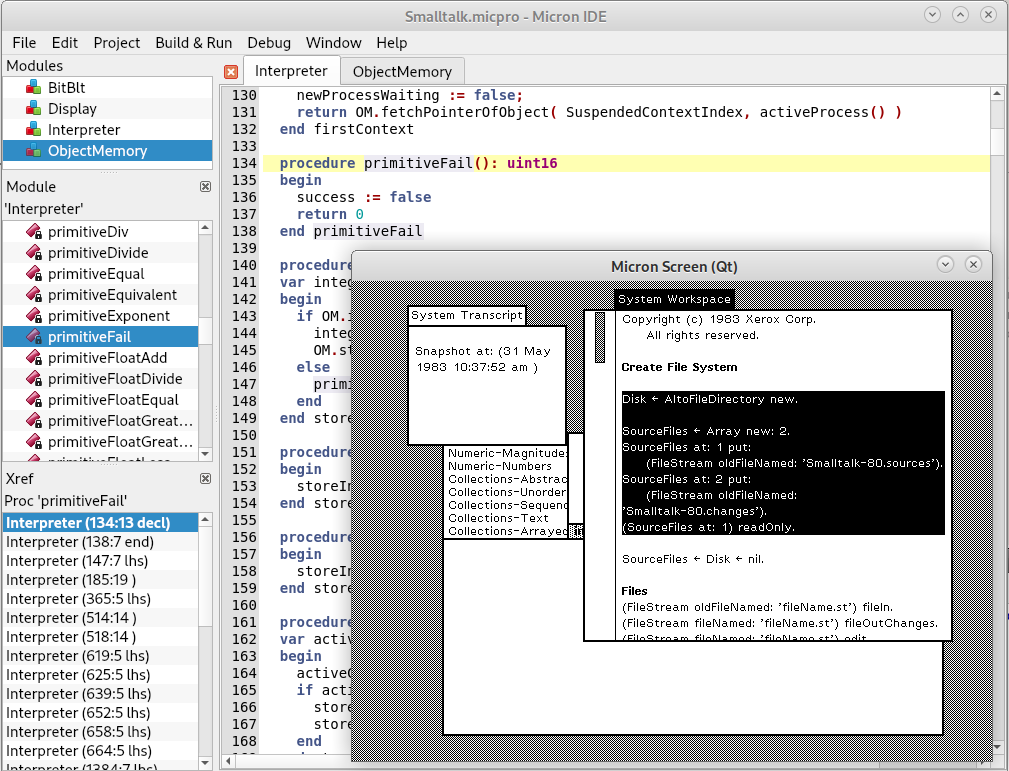
Follow these steps if you want to build the Micron compiler yourself. The build is using LeanQt and the BUSY build system. Note that compiling on Linux requires the build essentials. On Mac and Windows there are no additional requirements than a toolchain.
- Create a new directory; we call it the root directory here
- Download https://github.com/rochus-keller/micron/archive/refs/heads/master.zip and unpack it to the root directory; rename the resulting directory to "Micron".
- Download https://github.com/rochus-keller/LeanQt/archive/refs/heads/master.zip and unpack it to the root directory; rename the resulting directory to "LeanQt".
- Download https://github.com/rochus-keller/BUSY/archive/refs/heads/master.zip and unpack it to the root directory; rename the resulting directory to "build".
- Open a command line in the "build" directory and type
cc *.c -O2 -lm -o luaorcl /O2 /MD /Fe:lua.exe *.cdepending on whether you are on a Unix or Windows machine; wait a few seconds until the Lua executable is built. - Now type
./lua build.lua ../Micron(orlua build.lua ../Micronon Windows); wait until the micc executable is built; you find it in the output subdirectory.
Instead of the command line you can run the build using LeanCreator which uses multiple cores and thus builds faster.
It is still possible to build the compiler using Qt 5 with qmake; use MicMain.pro for this purpose and proceed as usual when building with Qt.
The IDE can be built using MicIde.pro with qmake. BUSY IDE support is pending.
If you need support or would like to post issues or feature requests please use the Github issue list at https://github.com/rochus-keller/micron/issues or send an email to the author.
Micron is available under GPL 2 or 3. The runtime and oakwood libraries in the corresponding subfolders, in addition, are available under MPL or LGPL.