Base64 is a binary-to-text encoding scheme that converts arbitrary binary data (like images, files, or any sequence of bytes) into a safe, printable ASCII string using a 64-character alphabet (A–Z, a–z, 0–9, +, /). Browsers use it in JavaScript to embedding binary data directly in code or HTML or to transmitting binary data as text.
Browsers recently added convenient and safe functions to process base 64 functions Uint8Array.toBase64() and Uint8Array.fromBase64(). Though they are several parameters, it comes down to an encoding and a decoding function.
const b64 = Base64.toBase64(bytes);      // string
const recovered = Base64.fromBase64(b64); // Uint8Array
When encoding, it takes 24 bits from the input. These 24 bits are divided into four 6-bit segments, and each 6-bit value (ranging from 0 to 63) is mapped to a specific character from the Base64 alphabet: the first 26 characters are uppercase letters A-Z, the next 26 are lowercase a-z, then digits 0-9, followed by + and / as the 62nd and 63rd characters. The equals sign = is used as padding when the input length is not a multiple of 3 bytes.
How fast can they be ?
Suppose that you consumed 3 bytes and produced 4 bytes per CPU cycle. At 4.5 GHz, it would be that you would encode to base64 at 13.5 GB/s. We expect lower performance going in the other direction. When encoding, any input is valid: any binary data will do. However, when decoding, we must handle errors and skip spaces.
I wrote an in-browser benchmark. You can try it out in your favorite browser.
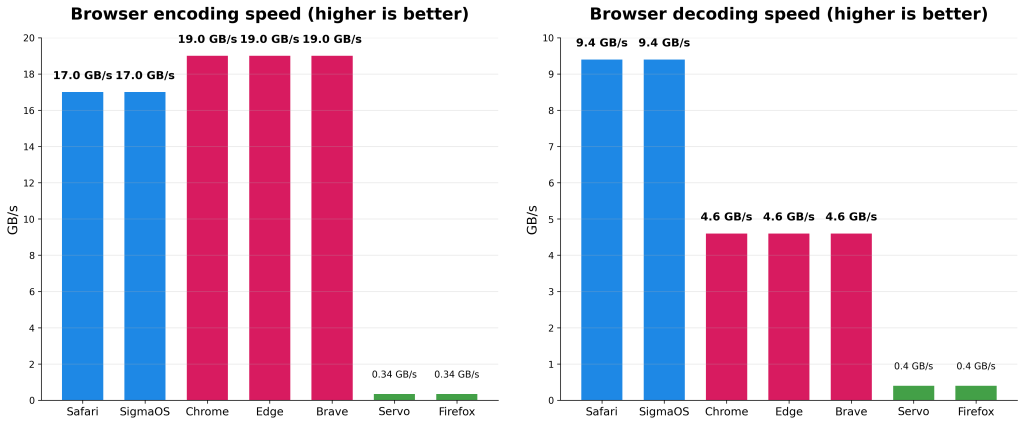
I decided to try it out on my Apple M4 processor, to see how fast the various browsers are. I use blocks of 64 kiB. The speed is measured with respect to the binary data.
| browser | encoding speed | decoding speed |
|---|---|---|
| Safari | 17 GB/s | 9.4 GB/s |
| SigmaOS | 17 GB/s | 9.4 GB/s |
| Chrome | 19 GB/s | 4.6 GB/s |
| Edge | 19 GB/s | 4.6 GB/s |
| Brave | 19 GB/s | 4.6 GB/s |
| Servo | 0.34 GB/s | 0.40 GB/s |
| Firefox | 0.34 GB/s | 0.40 GB/s |

Safari seems to have slightly slower encoding speed than the Chromium browsers (Chome, Edge, Brave), however it is about twice as fast at decoding. Servo and Firefox have similarly poor performance with the unexpected result of having faster decoding speed than encoding speed. I could have tried other browsers but most seem to be derivatives of Chromium or WebKit.
For context, the disk of a good laptop can sustain over 3 GB/s of read or write speed. Some high-end laptops have disks that are faster than 5 GB/s. In theory, your wifi connections might get close to 5 GB/s with Wifi 7. Some Internet providers might get close to providing similar network speeds although your Internet connection is likely several times slower.
The speeds on most browsers are faster than you might naively guess. They are faster than networks or disks.
Note. The slower decoding speed on Chromium-based browsers appears to depend on the v8 JavaScript engine which decodes the string first to a temporary buffer, before finally copying from the temporary buffer to the final destination. (See BUILTIN(Uint8ArrayFromBase64) in v8/src/builtins/builtins-typed-array.cc.)
Note. Denis Palmeiro from Mozzila let me know that upcoming changes in Firefox will speed up performance of the base64 functions. In my tests with Firefox nightly, the performance is up by about 20%.
`; modal.addEventListener('click', function(e) { if (e.target === modal) modal.close(); }); modal.querySelector('#bibtex-copy-btn').addEventListener('click', function() { const text = modal.querySelector('#bibtex-target').textContent; navigator.clipboard.writeText(text).then(() => { const origText = this.innerText; this.innerText = "Copied!"; setTimeout(() => this.innerText = origText, 1500); }); }); document.body.appendChild(modal); const style = document.createElement('style'); style.innerHTML = `dialog::backdrop { background: rgba(0, 0, 0, 0.5); }`; document.head.appendChild(style); } // 1. Extract the URL const fullLinkHtml = el.dataset.fullLink; const tempDiv = document.createElement('div'); tempDiv.innerHTML = fullLinkHtml; const linkElement = tempDiv.querySelector('a'); const rawUrl = linkElement ? linkElement.href : ''; // 2. Compute the current access date const accessedDate = this.getCurrentAccessedDate(); // 3. --- NEW LOGIC: Extract ONLY the year (YYYY) --- // Gets the full date string, e.g., "November 23, 2025" const fullDateString = el.dataset.year; // Use regex to find the four-digit year at the end of the string const match = fullDateString.match(/(\d{4})$/); const publicationYear = match ? match[0] : '????'; // e.g., '2025' // 4. Generate BibTeX Data with the corrected year const safeTitle = el.dataset.title.replace(/[^a-zA-Z0-9]/g, '').substring(0, 15); // Use the clean year for the BibKey const bibKey = (publicationYear + safeTitle); const content = `@misc{${bibKey}, author = {${el.dataset.author}}, title = {${el.dataset.title}}, year = {${publicationYear}}, url = {${rawUrl}}, note = {Accessed: ${accessedDate}} }`; // 5. Show Modal document.getElementById('bibtex-target').textContent = content; modal.showModal(); } }; })();