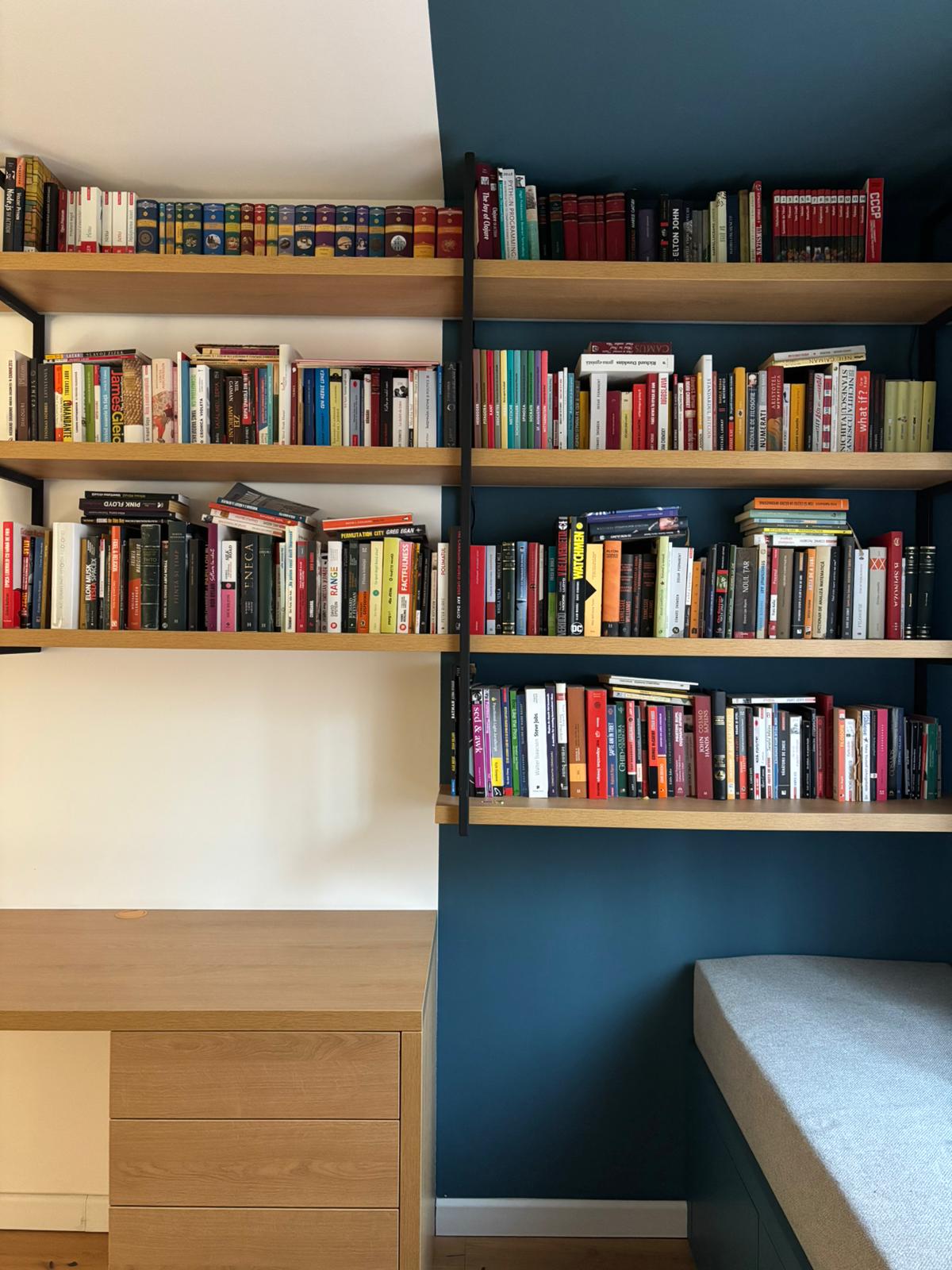
I own more books than I can read. Not in a charming, aspirational way, but in the practical sense that at some point I stopped knowing what I owned. Somewhere around 500 books, memory stopped being a reliable catalog.
For years, I told myself I would fix this. Nothing elaborate, nothing worthy of a startup idea. A spreadsheet would have been enough. I never did it, not because it was hard, but because it was tedious.

The gap between intention and execution was small, but it was enough to keep the project permanently parked in the someday pile.
By the end of 2025, I had been working with AI agents long enough that this kind of project finally felt possible. Not because they made things more impressive, but because they removed the part I always stalled on. Execution.
The bookshelf project is where I clearly understood what my role becomes once execution stops being the bottleneck.
The problem
I tried the obvious tools first. ISBN scanner apps failed on Romanian editions, and Goodreads could not identify obscure publishers or antiquarian finds. Anything even slightly nonstandard came back incomplete or wrong. Partial data felt worse than no data at all, so every attempt ended the same way: a few entries filled in, followed by abandonment.
What I needed was not a better app, but a way to tolerate imperfection without the whole system falling apart.
The data
Every project starts with bad data, and this one started with worse data. One afternoon, I photographed every book I own: spines, covers, duplicates, and the occasional blurry thumb. Four hundred and seventy photos in total. Once the images were on my laptop, I opened Claude.

The first steps were mechanical. Renaming files. Converting HEIC to JPG. Then
I asked for something real: a script that sends each image to OpenAI's vision
API, extracts author, title, and publisher, normalizes names, resizes images
to avoid wasting tokens, and writes everything to a JSON file.
Claude wrote the script and ran it. It worked. Not perfectly, but well enough to matter.
{
  "id": "ZfEPBCMZDaCKm6k0NVJ8F",
  "title": "Simulacre și simulare",
  "author": "Jean Baudrillard",
  "publisher": "Colectia Panopticon",
  "source": "dataset/83.jpg",
},
Roughly 90 percent of the books came back correct. The failures were predictable: poor lighting, damaged covers, unreadable spines. One novel was confidently identified as a 1987 Soviet agricultural manual.
I fixed the rest by hand. That decision was not technical, it was judgment. Ninety percent accuracy was enough. Chasing the remaining ten percent would have meant days of edge cases for very little additional value. That was the first moment where my role became clear.
Later, when I received a few books for Christmas, we added a second script that runs the same pipeline for new additions. Photo in, metadata and images out.
The covers
With metadata sorted, covers were still missing. My photos showed spines, not artwork, and I wanted a clean visual representation. Claude suggested using Open Library's API to fetch covers, which mostly worked. Half the covers were low quality or incorrect, and Romanian editions barely existed in the database.
We iterated. Claude wrote a second pass, another model call that scored cover quality and flagged bad matches. For flagged books, it fell back to Google Images via SerpAPI. That handled most cases. A few remained: antiquarian finds and obscure Soviet boxing manuals that no database was ever going to have clean assets for.
I opened Photoshop and fixed ten covers by hand. For a collection of 460 books, ten manual edits felt like a win.
The shelf
Once the data and covers were in place, the UI came next. The obvious solution was a grid of covers. It was correct, and it was lifeless. I kept looking at my physical bookshelf instead. What makes it interesting is not the covers, but the spines. Different widths, uneven pressure, colors blending into a single texture.

That was the thing I wanted to recreate.
Claude did not invent that idea. It executed it. It wrote a script to extract dominant colors from each cover using color quantization, then computed contrasting text colors for readability. The result was better, but still wrong. Every book had the same width, and real books are not like that.
Open Library had page counts. We mapped page count to spine width and added slight variation to break the uniformity. At that point, it finally looked like a bookshelf.
{
  "id": "ZfEPBCMZDaCKm6k0NVJ8F",
  "title": "Simulacre si simulare",
  "author": "Jean Baudrillard",
  "backgroundColor": "#f0f0ff",
  "color": "#1f1f2e",
  "paddingLeft": 13,
  "paddingRight": 13,
  "height": 384,
  "cover": "/images/bookshelf/[email protected]",
  "source": "dataset/83.jpg"
},
The animation
Visually, the shelf worked, but it felt static. A real shelf responds to touch. When you run your finger along the spines, they tilt slightly. I asked Claude for an animation, and it came back with a scroll based tilt using Framer Motion.
It was close, but wrong. The movement snapped instead of flowing. I did not know why, I just knew it felt off. That was enough.
Claude explained the issue immediately. We were updating React state on every scroll event, causing unnecessary re renders. The fix was to use motion values and springs that animate outside React's render cycle. Two minutes later, it was fixed. I spent the next few minutes scrolling back and forth, just watching it move. This was the moment my caution dropped, not because the tool was always right, but because the cost of trying ideas had collapsed.
Killing good code
That confidence had a downside. I started asking for things I did not need. Infinite scroll seemed sensible. Why render 460 books at once? Claude implemented it, and technically it worked. Memory stayed flat, and the DOM updated correctly.
But scrolling broke. The container height desynced, the last books were unreachable, and every attempted fix introduced new jank. The feature worked, but the experience did not. So we removed it. Not because it was broken, but because it was unnecessary. Four hundred and sixty books is not a scale problem. Knowing when to delete working code is not something an AI can decide for you.
The stack view
The shelf looked great on desktop, but on mobile, horizontal scrolling felt cramped. I wanted an alternative layout: books lying flat, stacked vertically, readable without tilting your head. I pointed Claude at the shelf implementation and asked for a stack view.

It read the code, inferred the patterns, and reused them: animation timing, color extraction, scroll based opacity, the same data shape. It built the new component and wired up a toggle between layouts. It worked without explanation. That surprised me more than anything else.
What I actually did
Claude wrote all the code. So what did I do?
- I decided that 90 percent accuracy was enough.
- I fixed the ten covers no API could find.
- I rejected a grid because I wanted spines.
- I deleted infinite scroll because I did not need it.
- I kept scrolling the animation until it felt right.
Claude handled implementation. I handled taste.
After years of false starts, my bookshelf finally exists. Four hundred and sixty books, cataloged and displayed at bookshelf. I almost dismissed Claude Code as hype. Now, the times when I wrote everything by hand feel distant, almost strange.
Execution keeps getting cheaper. Taste still does not.