How to Build Ultra-low-latency Voice Agents With NVIDIA Cache-aware Streaming ASR
This post accompanies the launch of NVIDIA Nemotron Speech ASR on Hugging Face. Read the full model announcement here.
In this post, we’ll build a voice agent using three NVIDIA open models:
This voice agent leverages the new streaming ASR model, Pipecat’s low-latency voice agent building blocks, and some fun code experiments to optimize all three models for very fast response times.
All the code for the post is here in this GitHub repository.
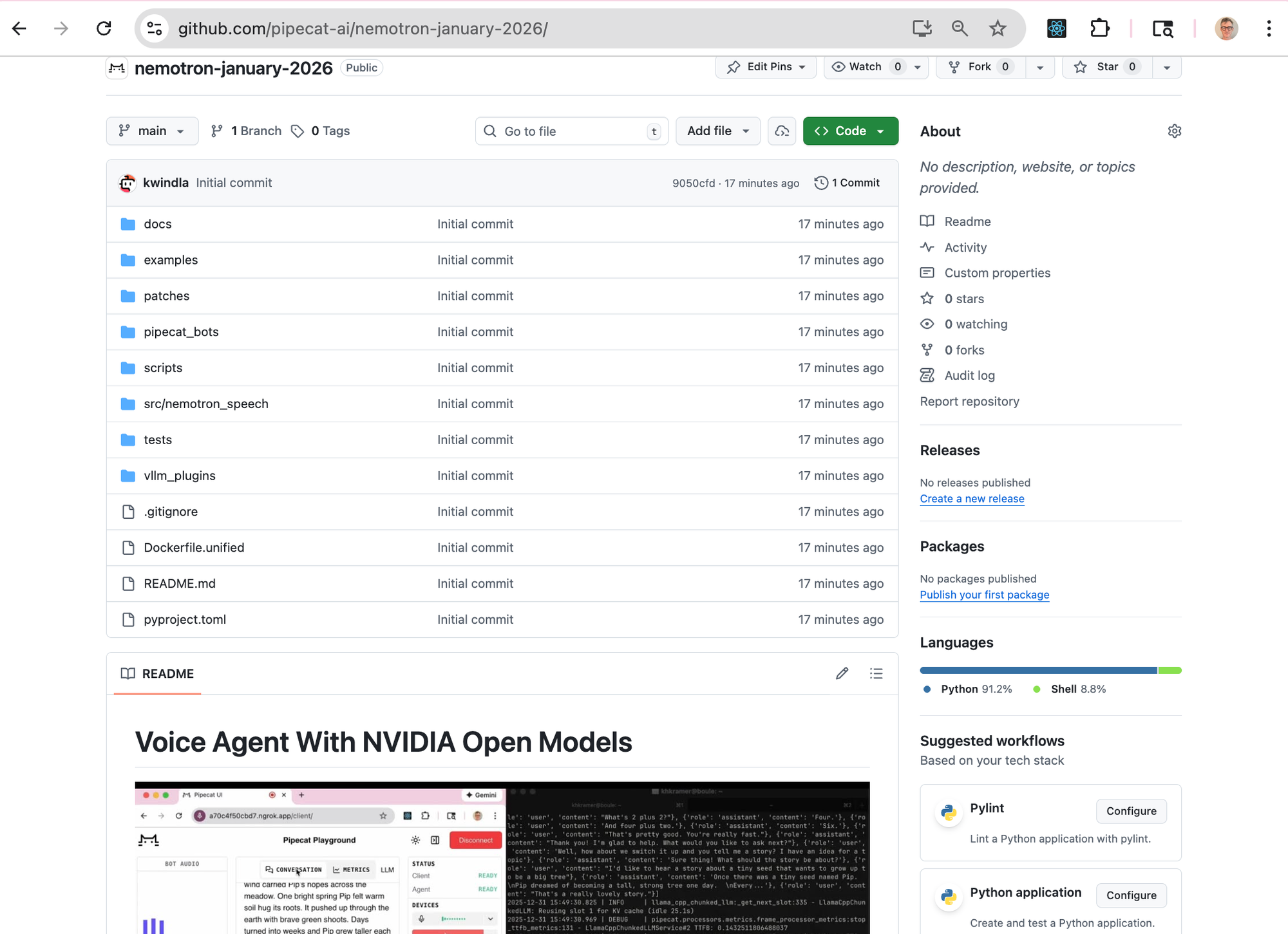
You can clone the repo and run this voice agent:
- Scalably for multi-user workloads on the Modal cloud platform.
- On an NVIDIA DGX Spark or RTX 5090 for single-user, local development and experimentation.
Feel free to just jump over to the code. Or read on for technical notes about building fast voice agents and the NVIDIA open models.
Voice agent deployments are growing by leaps and bounds across a wide range of use cases. For example, we’re seeing voice agents used at scale today in:
- Customer support
- Answering the phone for small businesses (for example, restaurants)
- User research
- Outbound phone calls to prepare patients for healthcare appointments
- Validation workflows for loan applications
- And many, many other scenarios
Both startups and large, established companies are building voice agents that are successful in real-world deployments. The best voice agents today achieve very high “task completed” success metrics and customer satisfaction scores.
Voice AI architecture
As is the case with everything in AI, voice agent technology is evolving rapidly. Today, there are two ways to build voice agents.
- Most production voice agents use specialized models together in a pipeline – a speech-to-text model, a text-mode LLM, and a text-to-speech model.
- Voice agent developers are beginning to experiment with new speech-to-speech models that take voice input directly and output audio instead of text.
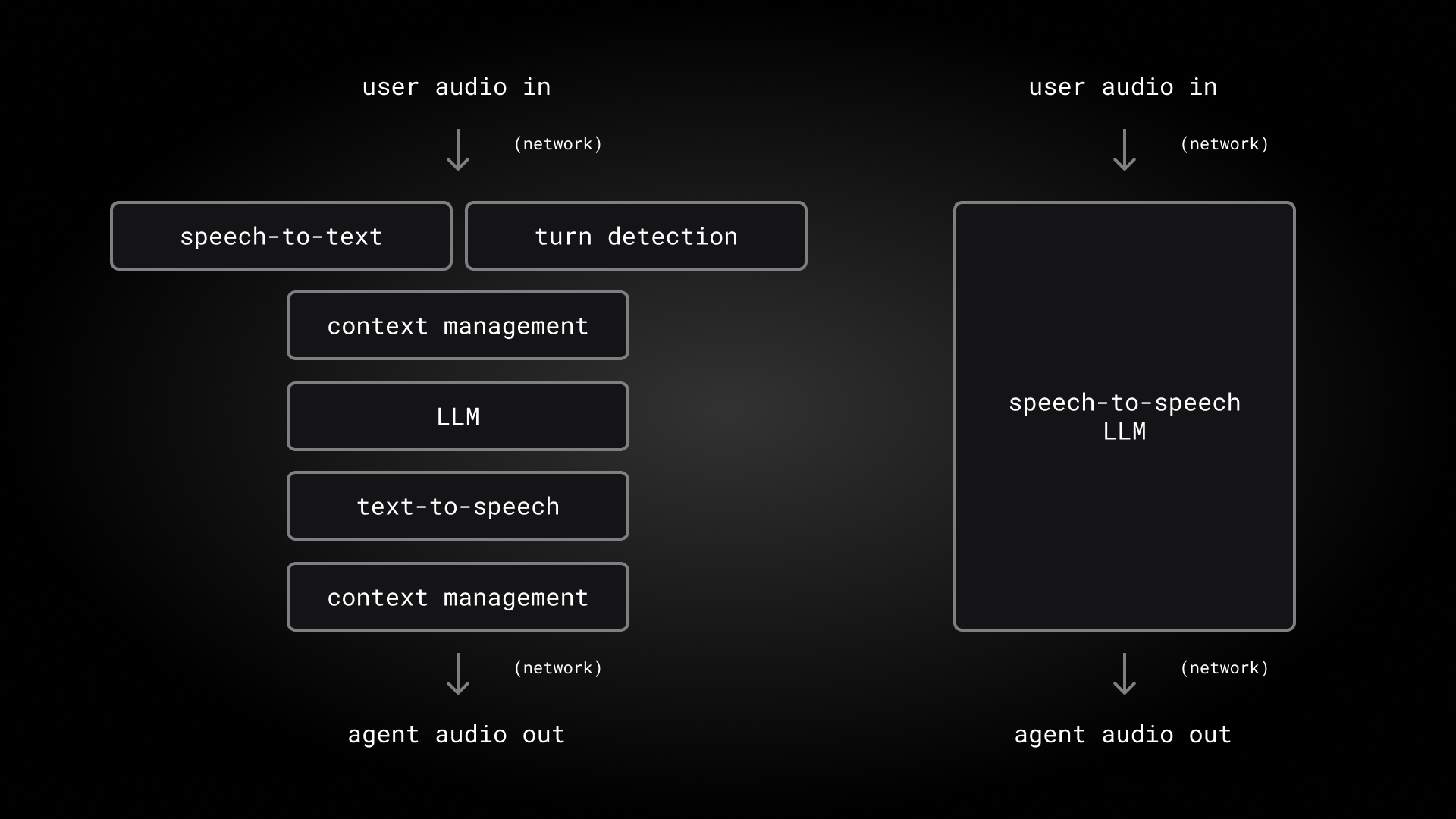
Using three specialized models is currently the best approach for enterprise use cases that require the highest degree of model intelligence and flexibility. But speech-to-speech models are an exciting development and will be a big part of the future of voice AI.
Whether we use a pipeline or a unified speech-to-speech model, voice agents are doing more and more sophisticated tasks. This means that, increasingly, production voice agents are actually multi-agent systems. Inside an agent, sub-agents handle asynchronous tasks, manage the conversation context, and allow code re-use between text and voice agents.
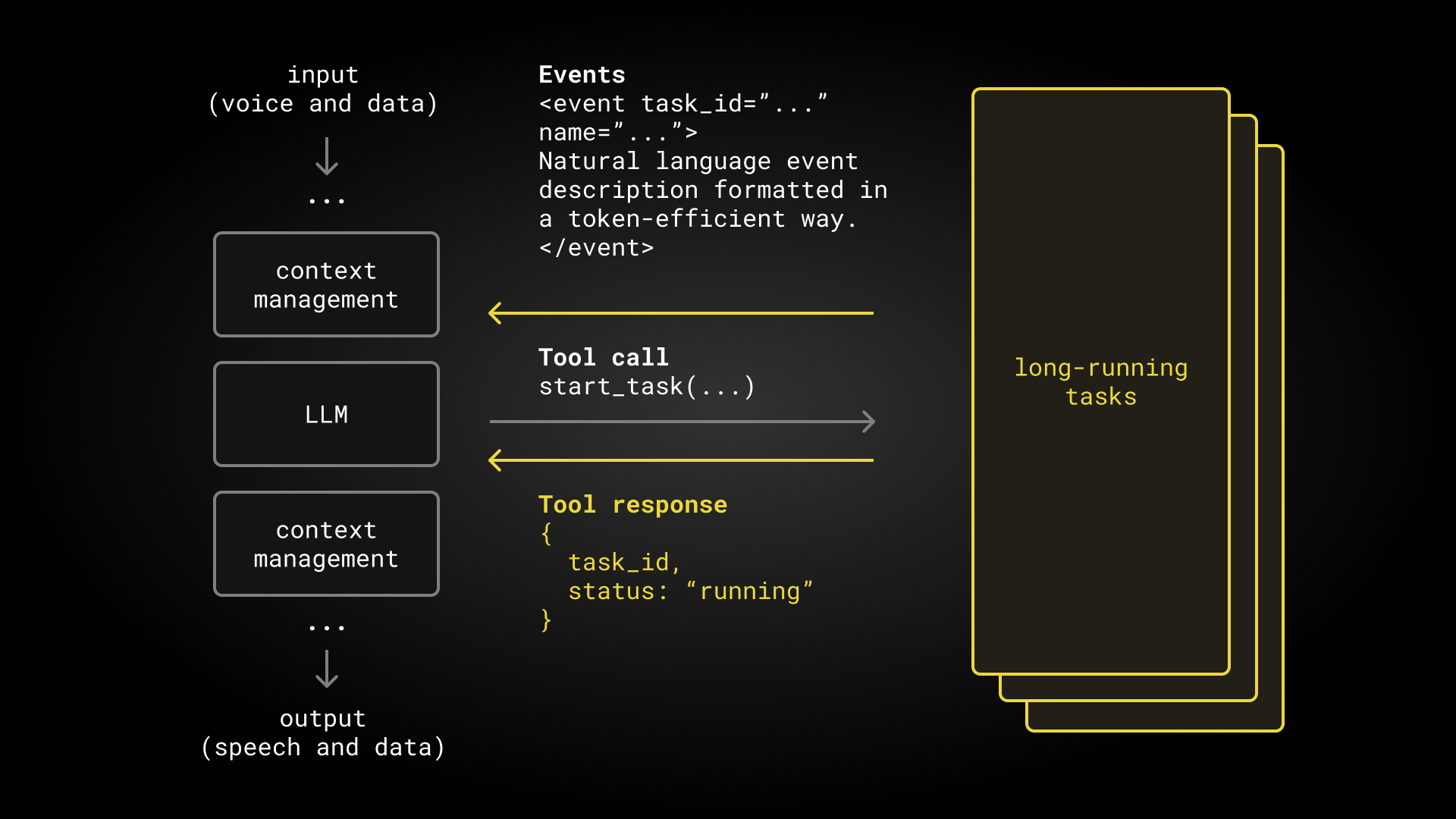
For a deep dive into voice agent architectures, models, and infrastructure, see the Voice AI & Voice Agents Illustrated Primer.
Open source models
Open models have not been widely used for production voice agents.
Voice agents are among the most demanding AI use cases. Voice agents perform long conversations. They must operate on noisy input audio and respond very quickly. Enterprise voice agent use cases require highly accurate instruction following and function calling. People interacting with voice agents have very high expectations for naturalness and “human-like” qualities of voice audio. In all of these areas, proprietary AI models have performed better than open models.
However, this is changing. Nemotron Speech ASR is both fast and accurate. On our benchmarks it performs comparably with or better than commercial speech-to-text models used today in production voice agents. Nemotron 3 Nano is the best-performing LLM in its class on our long-context, multi-turn conversation benchmarks.
Using open models allows us to configure and customize our models and inference stacks for the specific needs of our voice agents in ways that we can’t do with proprietary models. We can optimize for latency, fine-tune on our own data, host inference within our VPCs to satisfy data privacy and regulatory requirements, and implement observability that allows us to deliver the highest levels of reliability, scalability, and consistency.
We expect open models to be used in a larger and larger proportion of voice agent deployments over time. There are various flavors of “open” model licenses. NVIDIA has made the Nemotron Speech ASR and Nemotron 3 Nano available under the NVIDIA Permissive Open-Model License, which allows for unrestricted commercial use and the creation of derivative works.
Fast, streaming transcription
The Nemotron Speech ASR model is designed specifically for use cases that demand very low latency transcription, such as voice agents.
The headline number here is that Nemotron Speech ASR consistently delivers final transcripts in under 24ms!
ASR (Automatic Speech Recognition) is the general term for machine learning models that process speech input, then output text and other information about that speech. Previous generations of ASR models were generally designed for batch processing rather than realtime transcription. For example, the latency of the Whisper model is 600-800ms, and most commercial speech-to-text models today have latencies in the 200-400ms range.
| Model | Openness | Deployment |
|---|---|---|
| Parakeet | open weights, open training data, open source inference | local in-cluster |
| Widely used commercial ASR | proprietary | cloud |
| Whisper Large V3 | open weights, open source inference | local in-cluster |
For more about the cache-aware architecture that enables this impressively low latency, see the NVIDIA post announcing the new model.
The model is also very accurate. The industry standard for measuring ASR model accuracy is word error rate. Nemotron Speech ASR has a word error rate on all of our benchmarks roughly equivalent to the best commercial ASR models, and substantially better than previous generation open models like Whisper.
To integrate Nemotron Speech ASR into Pipecat, we created a WebSocket server that performs the transcription inference and a client-side Pipecat service that can be used in any Pipecat agent.
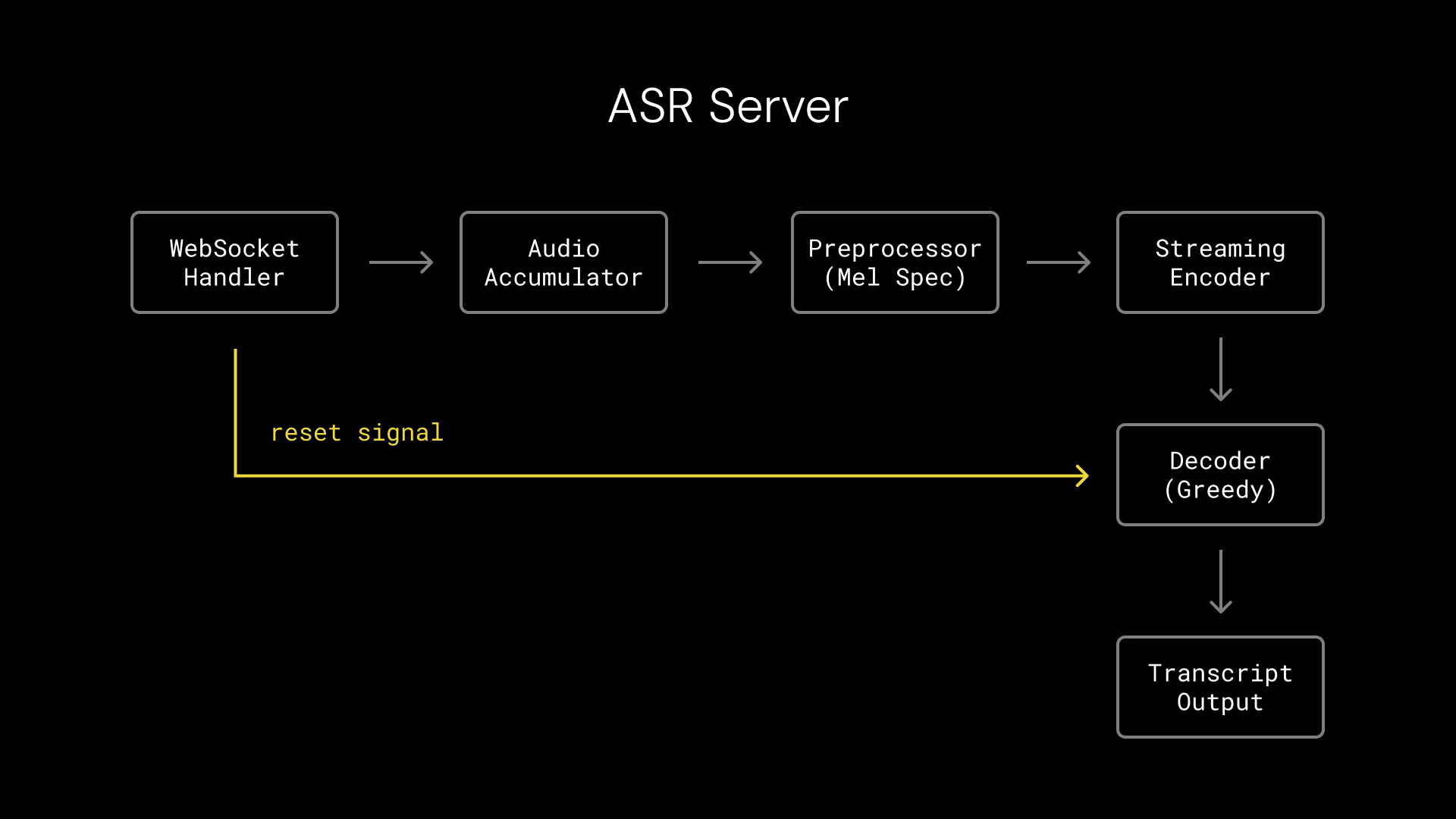
Running turn detection in parallel with transcription
The Nemotron Speech ASR model can be configured with four different context sizes, each of which have different latency/accuracy trade-offs. The context sizes are 80ms, 160ms, 560ms, and 1.2s. We use the 160ms context size, because this aligns with how we perform turn detection.
Turn detection means determining when the user has stopped speaking and the voice agent should respond. Accurate turn detection is critical to natural conversation. We’re using the open source Pipecat Smart Turn model in this voice agent. The Smart Turn model operates on input audio and runs in parallel with the Nemotron Speech ASR transcription.
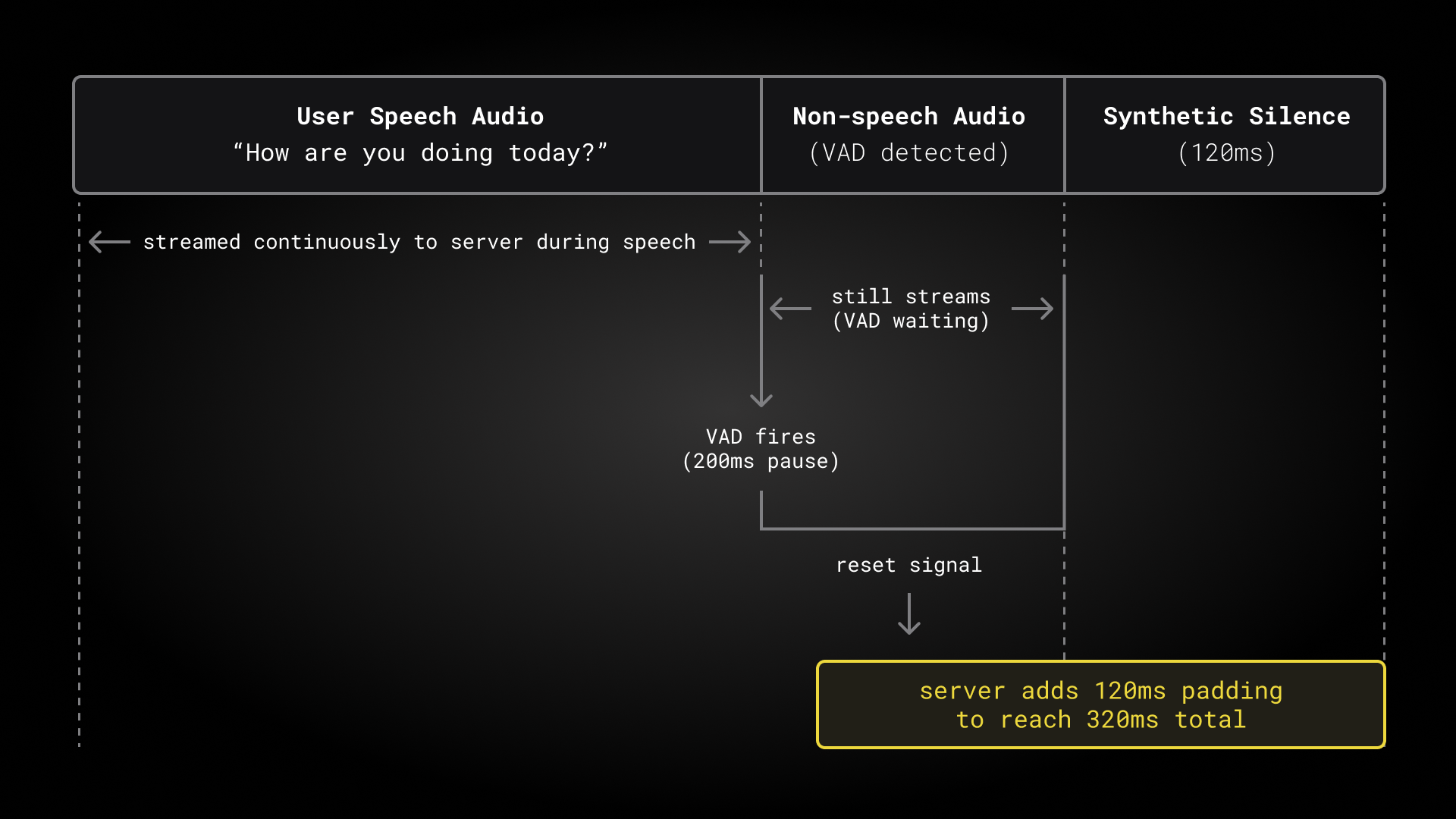
We trigger both turn detection and transcript finalization any time we see a 200ms pause in the user’s speech. This gives us 200ms of “non-speech” trailing context after the user’s speech has finished. The Nemotron Speech ASR model actually needs a bit more trailing silence than this, to properly finalize the last words in the user speech. The padding calculation is:
nemotron_final_padding = (right_context + 1) * shift_frames * hop_samples
    = (1 + 1) * 16 * 160
    = 5120 samples = 320ms
Our WebSocket transcription server receives 200ms of “non-speech” trailing audio data from the Pipecat service, and adds 120ms of synthetic silence to enable immediate finalization of the transcript. This works nicely.
Nemotron 3 Nano
Nemotron 3 Nano is a new 30 billion parameter open source LLM from NVIDIA. Nemotron 3 Nano is the best performing model in its size class on our multi-turn conversation benchmarks.
| Model | Tool Use | Instruction | KB Ground | Pass Rate | Median Rate | TTFB Med | TTFB P95 | TTFB Max |
|---|---|---|---|---|---|---|---|---|
| gpt-5.1 | 300/300 | 300/300 | 300/300 | 100.0% | 100.0% | 916ms | 2011ms | 5216ms |
| gemini-3-flash-preview | 300/300 | 300/300 | 300/300 | 100.0% | 100.0% | 1193ms | 1635ms | 6653ms |
| claude-sonnet-4-5 | 300/300 | 300/300 | 300/300 | 100.0% | 100.0% | 2234ms | 3062ms | 5438ms |
| gpt-4.1 | 283/300 | 273/300 | 298/300 | 94.9% | 97.8% | 683ms | 1052ms | 3860ms |
| gemini-2.5-flash | 275/300 | 268/300 | 300/300 | 93.7% | 94.4% | 594ms | 1349ms | 2104ms |
| gpt-5-mini | 271/300 | 272/300 | 289/300 | 92.4% | 95.6% | 6339ms | 17845ms | 27028ms |
| gpt-4o-mini | 271/300 | 262/300 | 293/300 | 91.8% | 92.2% | 760ms | 1322ms | 3256ms |
| nemotron-3-nano-30b-a3b* | 287/304 | 286/304 | 298/304 | 91.4% | 93.3% | 171ms | 199ms | 255ms |
| gpt-4o | 278/300 | 249/300 | 294/300 | 91.2% | 95.6% | 625ms | 1222ms | 13378ms |
| gpt-oss-120b (groq) | 272/300 | 270/300 | 298/300 | 89.3% | 90.0% | 98ms | 226ms | 2117ms |
| gpt-5.2 | 224/300 | 228/300 | 250/300 | 78.0% | 92.2% | 819ms | 1483ms | 1825ms |
| claude-haiku-4-5 | 221/300 | 172/300 | 299/300 | 76.9% | 75.6% | 732ms | 1334ms | 4654ms |
Like Nemotron Speech ASR, Nemotron 3 Nano is part of a new generation of open models that are designed specifically for speed and inference efficiency. See this resource from NVIDIA research for an overview of the Nemotron 3 hybrid Mamba-Transformer MoE architecture and links to technical papers.
A 30B parameter model is small enough to run very fast on high-end hardware, and can be quantized to run well on GPUs that many developers have at home!
| Model variant | Deployment | Resident memory |
|---|---|---|
| Nemotron-3-Nano BF16 | full weights, Modal Cloud or DGX Spark | 72GB |
| Nemotron-3-Nano Q8 | 8-bit quantization, faster operation on DGX Spark | 32GB |
| Nemotron-3-Nano Q4 | 4-bit quantization, RTX 5090 | 24GB |
One note on which LLMs are generally used today for production voice agents: in general, voice agents for applications like customer support need the most “intelligent” models we have available. Voice agent use cases are demanding. A customer support AI agent must do highly accurate instruction following and function calling tasks throughout a long, open-ended, unpredictable human conversation. A 30B parameter model – even one as good as Nemotron 3 Nano – is generally best suited for specialized voice tasks like a home assistant or software voice UI interface.
NVIDIA has announced that two larger Nemotron 3 models are coming soon. If the performance of these larger models relative to their size is similar to Nemotron 3 Nano’s performance, we expect these models to be terrific intelligence engines for voice agents.
In the meantime, Nemotron 3 Nano is the best-performing LLM that I can run on hardware I have at home. I’ve been using this model for a wide variety of “local” voice agent tasks and development experiments on both an NVIDIA DGX Spark and on my desktop computer with an RTX 5090.
You can use Nemotron 3 in reasoning or non-reasoning mode. We usually turn off reasoning for the fast-response core voice agent loop.
For details on using Nemotron 3 Nano in the cloud and building local containers with the latest CUDA, vLLM and llama.cpp support for this new model, see the GitHub repository accompanying this post. There are a couple of inference tooling patches (relating to the reasoning output format in vLLM and to llama.cpp KV caching) that you might find useful if you’re experimenting with this model.
Magpie streaming server
Magpie is a family of text-to-speech models from NVIDIA. In our voice agent project, we’re using an experimental preview checkpoint of an upcoming open source version of Magpie.
Kudos to NVIDIA for releasing this early look at a Magpie model designed, like Nemotron Speech ASR, for streaming, low-latency use cases! We’ve been having a lot of fun experimenting with this preview, doing things that are only possible with open source weights and inference code.
You can use this Magpie model in batch mode by sending an HTTP request with a chunk of text. This batch mode inference delivers audio for a single sentence in about 600ms on the DGX Spark and 300ms on the RTX 5090. But for voice agents, we like to stream all tokens as much as we can, and because Magpie is open source, we can hack together a hybrid streaming mode that optimizes for initial audio chunk latency! This hybrid streaming approach improves average initial response latency 3x.
TTS TTFB Comparison: Batch → Streaming
| Hardware | P50 Improvement | Mean Improvement | P90 Improvement |
|---|---|---|---|
| RTX 5090 | 90 ms (1.9x) | 204 ms (3.0x) | 430 ms (5.2x) |
| DGX Spark | 236 ms (2.3x) | 415 ms (3.3x) | 836 ms (4.6x) |
Details
RTX 5090
| Mode | Min | Max | P50 | P90 | Mean |
|---|---|---|---|---|---|
| Batch | 106 ms | 630 ms | 191 ms | 533 ms | 305 ms |
| Pipeline | 99 ms | 103 ms | 101 ms | 103 ms | 101 ms |
DGX Spark
| Mode | Min | Max | P50 | P90 | Mean |
|---|---|---|---|---|---|
| Batch | 193 ms | 1440 ms | 422 ms | 1067 ms | 595 ms |
| Pipeline | 15 ms | 276 ms | 186 ms | 231 ms | 180 ms |
There’s definitely a quality trade-off with our simple streaming implementation. Try the agent yourself, or listen carefully to the conversation in the video at the beginning of this blog post. You can usually hear a slight disfluency where we “stitch” together the streaming chunks at the beginning of the model response.
To do better, we’d need to retrain part of the model and use a slightly more sophisticated inference approach. Fortunately, this is on the NVIDIA road map.
We integrated this model into Pipecat by creating a WebSocket server for streaming inference, and a client-side Pipecat service. (This is the same approach we used with Nemotron Speech ASR).
Putting the models together and measuring latency
These Nemotron and upcoming Magpie models are completely open: open weights, open source training data sets, and open source inference tooling. Working with open models in production feels like a super-power. We can do things like:
- Read the inference code to understand the context requirements of the ASR model, so that we can optimize the interactions between our Pipecat pipeline components and text-to-speech audio buffer handling. (See our description of this above, in the section Fast, streaming transcription.
- Fix issues with inference tooling support in new models and on whatever platforms we’re running on. See the code and README.md in the GitHub repo for the small patches we made for vLLM and llama.cpp, and the Docker container build with full MX4FP support for both of those inference servers on DGX Spark and RTX 5090.
- Build a semi-streaming inference server for a preview model checkpoint.
Often when we’re building voice agents, our primary concern is to engineer the agent to respond quickly in a real-world conversation. The difference between good latency and an agent too slow to use in production is often a combination of several optimizations, each one cutting peak latencies by 100 or 200ms. Working with open models gives us control over how we prioritize for latency compared to throughput, how we design streaming and chunking of inference results, how to use models together optimally, and many other small things that add up (or subtract down) to fast response times.
It’s useful to measure voice-to-voice latency – the time between the user’s voice stopping and the bot’s voice response starting – in two places: on the server-side and at the client.
We can easily automate the server-side latency measurement. Our bot outputs a log line with a voice-to-voice latency metric for each turn.
2026-01-01 22:43:26.208 | INFO | v2v_metrics:process_frame:54 - V2VMetrics: ServerVoiceToVoice TTFB: 465ms
We also output log lines with time-to-first-byte for each of our models, and several other log lines that are useful for understanding exactly where we’re “spending our latency budget.” The Pipecat Playground shows graphs of these metrics, which is useful during development and testing. Here’s a test session with our bot running on an RTX 5090.
RTX 5090
| Metric | Min | P50 | P90 | Max |
|---|---|---|---|---|
| ASR | 13ms | 19ms | 23ms | 70ms |
| LLM | 71ms | 171ms | 199ms | 255ms |
| TTS | 99ms | 108ms | 113ms | 146ms |
| V2V | 415ms | 508ms | 544ms | 639ms |
DGX Spark
| Metric | Min | P50 | P90 | Max |
|---|---|---|---|---|
| ASR | 24ms | 27ms | 69ms | 122ms |
| LLM | 343ms | 750ms | 915ms | 1669ms |
| TTS | 158ms | 185ms | 204ms | 1171ms |
| V2V | 759ms | 1180ms | 1359ms | 2981ms |
It’s also critical to measure the voice-to-voice latency as actually perceived by the user. This is harder to do automatically, especially for telephone call voice agents. The best approach to measuring client-side voice-to-voice latency is to record a call, load the audio file into an audio editor, and measure the gap between the end of the user’s speech waveform and the start of the bot speech waveform. You can’t cheat this measurement, or forget to include an important processing component! We do this periodically in both development and testing, as a sanity check. Here I’m measuring latency in the Descript editor of one turn in the conversation we recorded for the video at the top of this post.
You will typically see client-side voice-to-voice latency numbers about 250ms higher than server-side numbers for a WebRTC voice agent. This is time spent in audio processing at the operating system level, encoding and decoding, and network transport. Usually, this delta is a bit worse for telephone call agents: 300-600ms of extra latency in the telephony path that you don’t have much way to optimize. (Though there are some basic things you should do, such as make sure your voice agent is hosted in the same region as your telephony providers servers.) For more on latency, see the Voice AI and Voice Agents Illustrated Guide.
An inference optimization for local voice agents
We have one more trick up our sleeve when we’re running voice agents locally on a single GPU.
When we run voice agents in production in the cloud, we run each AI model on a dedicated GPU. We stream tokens from each model as fast as we can, and send them down the Pipecat pipeline as they arrive.
But when we’re running locally, all the models are sharing one GPU. In this context, we can engineer much faster voice-to-voice responses if we carefully schedule inference. In our voice agent for this project, we’re doing two things:
- We run the Smart Turn model on the CPU so that we can dedicate the GPU to transcription when user speech is arriving. The Smart Turn model runs faster on GPU, but it runs fast enough on CPU, and dividing up the workload this way gives us the best possible performance between the two models.
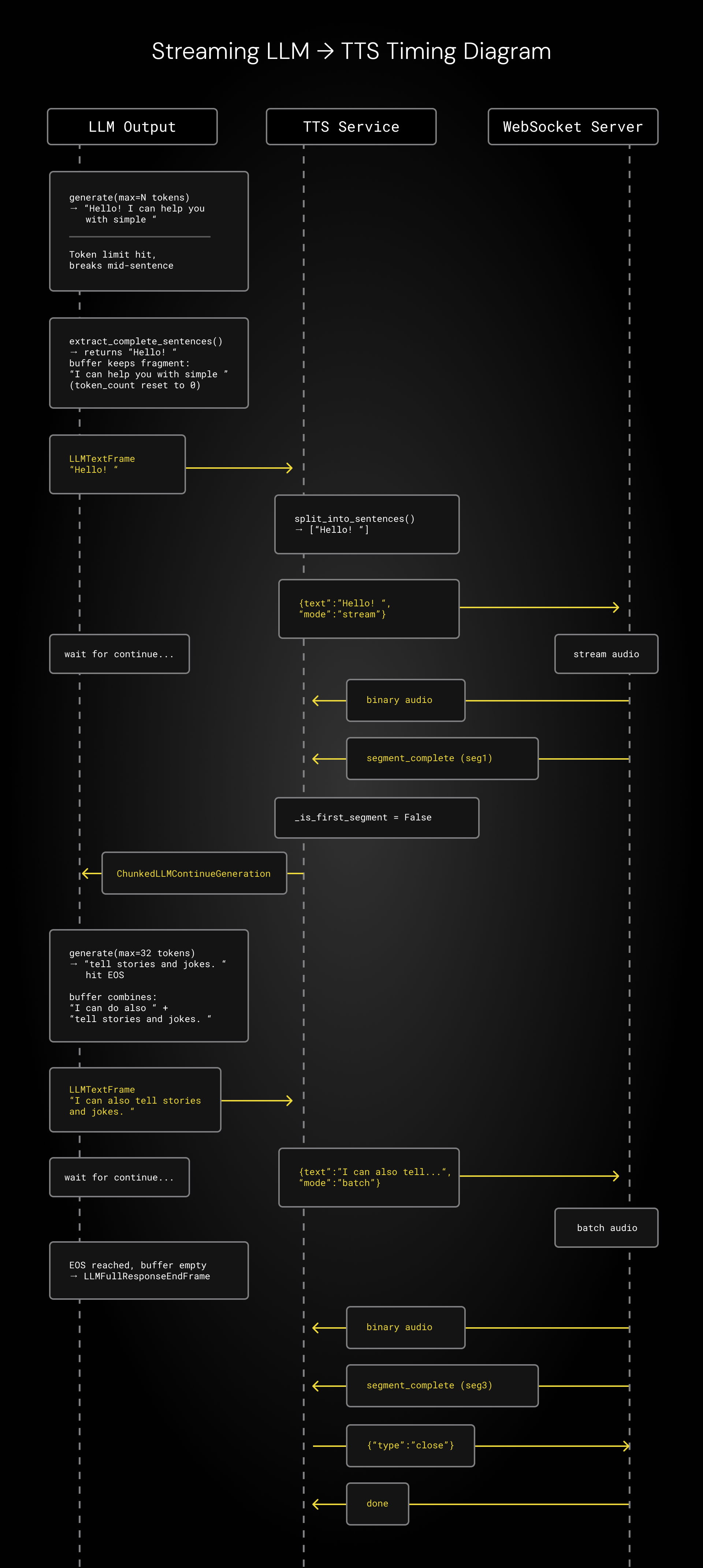
- We interleave small segments of LLM and TTS inference so that GPU resources are dedicated to one model at a time. This significantly reduces time-to-first-token for each model. First we generate a few small chunks of LLM tokens, then TTS audio, then LLM again, then TTS, etc. We generate a smaller segment for the very first response, so we can start audio playout as quickly as possible. We designed this interleaved chunking approach to work in concert with the hybrid Magpie streaming hack described above.
Here’s a sequence diagram showing the interleaved LLM and TTS inference. The three vertical lines in the diagram represent, from left to right:
- Tokens arriving in small batches to the Pipecat LLM service in the agent and being pushed down the pipeline.
- The Pipecat TTS service, managing the frames from the LLM service, dividing the stream on sentence boundaries, and making inference requests to the Magpie WebSocket server running in our local Docker container.
- The Magpie WebSocket server doing inference and sending back audio.
We wrote a custom WebSocket inference server for Magpie, so we control the Pipecat-to-Magpie protocol completely. We’re using llama-server code from the llama.cpp project for LLM inference. Traditional inference stacks aren’t really designed to do this specific kind of chunking, so our code sets a max tokens count (n_predict in llama.cpp), runs repeated small inference chunks, and does some of the buffer management client-side. This could be done more efficiently, using the llama.cpp primitives directly. Writing a perfectly optimized inference server for this interleaved design would be a fun weekend project, and is something that almost anyone with a little bit of programming experience and a willingness to go down some rabbit holes could work together with Claude Code to implement.
For enterprise-scale, production use, deploy this agent to the Modal GPU cloud. There are instructions in the GitHub Readme.md. Modal is a serverless GPU platform that makes it easy to deploy AI models for development or production use.
For local development, the GitHub repo has a Dockerfile for DGX Spark (arm64 + Blackwell GB10 CUDA 13.1) and RTX 5090 (x86_64 + Blackwell CUDA 13.0)
If you’re interested in building voice agents, here are some resources you might be interested in: