Definitions and assumptions
The topic here is link maintenance. By link maintenance, I mean keeping links working: if https://example.com/example exists now, it should always exist. If for some reason it can’t exist any more, don’t just let it go: it should show a useful error.
I’m going to focus on the most frequent failure case: the HTTP status code 404 Not Found; it’s the most obvious failure case. My feeling on the matter is that the fact that the number 404 is well known among non‐technical users shows that we as web developers and maintainers have failed in our duty.
I also start with the assumption that you agree with W3C that cool URIs don’t change. If you don’t, I’m afraid I can’t help you yet; come back when you do.
The problem
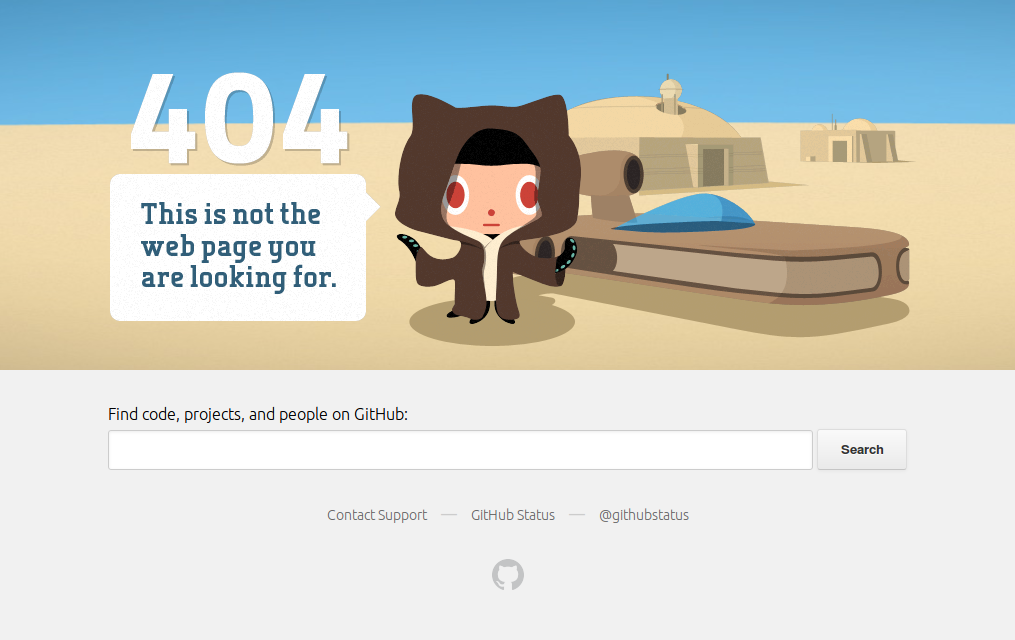
[Microsoft has significantly less excuse for breaking links than GitHub. I think they just break links for the fun of it. With GitHub, it’s partially inherent (user content changes) and partially an artefact of their architectural design, as covered later in this article.] You know GitHub’s 404 Not Found page? If you’ve used GitHub much at all, you’re almost certain to have come across it. My opinion over the past few years is that GitHub has been vying with Microsoft for the “worst maintainer of links on the entire Web” trophy. I’m not sure who’s winning it at present.
You’ve seen this too often.
Linkrot is unfortunate but inevitable. Certainly for a website like GitHub’s they cannot prevent it in all cases. But if you look at that 404 page, you’ll see that it is almost supremely useless. It’s absolutely generic and tells you nothing about what or why the problem is.
What belongs on an error page?
The most important thing is an indication that something is wrong. Few people make a mess of this. GitHub don’t do this particularly badly.
Unfortunately, that’s where most 404 pages stop. There seems to be an assumption that 404 pages must be useless. Well, I’m here to tell you that that’s not the case. You are allowed to make a useful 404 page.
How about we add these elements to the 404 page:
- Where the error actually is;
- What you can do about it—and by this I don’t mean the generic list “go back, return to the start page or search”, but rather “here’s where you went; here’s what the matter is; here’s a list of things you probably meant or might want”.
The GitHub example
How could these apply to GitHub? Let’s start by assuming I’m looking at the URL https://github.com/user/repo/blob/branch/path/file. Uh oh, it’s not working. Now I want to know: what is the actual problem? As it stands, in such a case if I really want to know (and I normally will if I’ve come there, in GitHub’s case—if you’re a different site, you’re much more likely to just luck out and lose me as a visitor), I’ll start going up a directory at a time until I stop getting a 404 page. This is very inefficient for both GitHub and me; the 404 page could do this for me. Here are some of the things that could be wrong with a given path and what could be done about them:
- URL simply doesn’t make sense (e.g. if you changed “blob” to “splug”). Again, why not explain this to me?
- File does not exist, if the file path doesn’t match a file. For bonus marks, check if it ever existed (my guess is that most of the time it will have) and tell me what happened to it and when.
- Reference (typically branch) doesn’t exist. The appropriate solution here is again to keep history of any moves, merges, &c. so that you’ll know what happened and can tell me. Maybe you can offer some suggestions of branches that I might want—do any branches extant contain this file?
- Repository doesn’t exist. Of course, if it moved, just take me there. (This is actually one that GitHub started doing earlier this year, in limited fashion.) But if not, how about you show me a list of repositories with the same name? It may well have been moved, just without using the GitHub interface for moving it.
- User doesn’t exist. Did the user rename his account? Take me there. And again, if I’m looking for a particular repository, offer suggestions.
I’m using the example of GitHub in this article. But remember: this article is not about GitHub. Your 404 page is very unlikely to be without spot or blemish—statistically, it’s as generic as GitHub’s, though perhaps a little more useful; you too can improve your 404 page.
Avoiding 404 Not Found where possible
I’ve covered above some of the ways that GitHub’s 404 pages could be made better, while still being a 404 page. Now let’s take it to an even higher level of usefulness: a lot of GitHub’s 404 pages actually shouldn’t be returning 404 Not Found in the first place. And they have to hand a lot of extra data which they can use to achieve this. This section is more specific to GitHub; for many websites it won’t be feasible—but do think about it.
Things get moved
Suppose you have a link to https://github.com/chris-morgan/rust-http/blob/master/src/libhttp/request.rs. Uh oh—that link is broken. How did that happen? It worked a month ago. The answer is that I moved the file src/libhttp/request.rs to src/libhttp/server/request.rs. Translate the move into HTTP parlance and the answer is that the first‐mentioned URL should probably redirect with 303 See Other (it should be a temporary move, not a permanent one—the original file name may come into existence again) to server/request.rs. I don’t say it should just redirect you and not tell you what it’s done; displaying a message that the file got moved in such‐and‐such a commit would be necessary for sanity, but my key point is this: 404 Not Found is probably the wrong behaviour.
Here’s another demonstration that this is the wrong behaviour: what happens when file A is moved to B and a new file is placed at A?
You see, most of the problem here is that GitHub’s link management scheme is not designed for permanence. The links it gives you by default are to the branch, which may be updated, rather than to the changeset which is (hopefully) permanent, but at least never wrong. There’s a conflict of interests here; consistency demands links to immutable changesets. Convenience and keeping up to date demand links to the branch.
This actually reflects Git’s overall philosophy; permanence is strangely something it’s not particularly interested in. Mercurial, on the other hand (my preferred version control system, though I’m fairly comfortable in Git), is designed for complete durability: once something’s in, it’s in for good.Of course, this isn’t quite true; there are tools to modify and remove history, but they’re not enabled by default. Also Git has this notion that changesets with no reference should be pruned after what is by default a month, whereas Mercurial doesn’t throw away anything.
GitHub’s approach has had the additional unfortunate side‐effect that links to a particular line number or range of a file on a branch are of very limited value; they will rapidly become incorrect, and incorrect pages and references are just as bad, often worse, than returning 404 Not Found—returning the wrong content is still a broken link. (This is a tricky point in HTTP, because the server doesn’t even get sent the hash. I’ll write more about the hash on a later occasion, with a case study of how Stack Exchange got it right.)
This is also reflected in a comparison of GitHub’s and hgweb’s link generation policy:
- GitHub uses the branch name; you can replace it with a changeset ID and it’ll work, but you’ll need to find a changeset ID. [Update: fullsailor on HN pointed out that you can press the y key to get the canonical URL.] This has the advantage of keeping you up to date and the monstrous disadvantage that links (especially hashes, but not just hashes) get out of date very easily. Once you’re viewing the state of a changeset, links will stay being generated for that changeset, which is good.
- hgweb (as used by
hg serve) uses changeset IDs right from the start. Again, you can go to the other by changing the appropriate part in the URL to a branch, bookmark or tag name and it’ll work fine, though further links will head back to being changeset IDs (i.e. permanent). This ensures that you will always get exactly what was intended at whatever time in history you are, though it may not be the latest state of the files. (A suggestion to improve the visibility of that would be to put a message bar near the top indicating that you’re not on the latest changeset, with a link to the newer changeset.)
So, the basic link architecture that GitHub has chosen (and, I presume, will not change) will lead to inevitable and frequent broken links. But there’s still more that can be done to improve the situation for the hapless user.
GitHub has improved their 404 page a little from what it was a few years ago by the inclusion of the search box, but I doubt people actually use it much. No, we need more drastic improvements.
Why would you not make a better 404 page?
I hope I’ve convinced you by now that the humble 404 page can be improved and made useful. If not, I really want to know why—please contact me about it; there is, however, one fairly solid reason which I’m sure is why GitHub don’t have a good 404 page.
Here, you see, is the rub: serving a static 404 page is cheap and easy. Serving a really useful 404 page is probably computationally expensive. It’s also handy to treat them as throw‐away responses which won’t trigger any more work for the server as it’s common for them to be generated and looked at by misbehaving things, and you don’t want to burden your site still more because of the 404 page—you just want to get it out of the way quickly.
GitHub know this, as you’ll notice if you look at the source of their 404 page:
Excerpt from the source of GitHub’s 404 page.<!--
Hello future GitHubber! I bet you're here to remove those nasty inline styles,
DRY up these templates and make 'em nice and re-usable, right?
Please, don't. https://github.com/styleguide/templates/2.0
-->
Looking at the cited style guide indicates that for error pages they do not allow error pages to make any requests. (Not quite true—it makes an AJAX call to check if you’re logged in so it can let you log in to access hidden repositories.) You see, it’s a good idea to make generating error pages cheap as they will often happen quite a bit.
The end result is that 404.html is 221KB and almost entirely self‐contained. This is a pretty large response (considerably larger than I would consider acceptable for myself) but can be served very cheaply as it’s precomputed. Still more, it won’t trigger more than one extra request for the server when rendered.
It’s fairly obvious that checking for would be more expensive. Still, I think simple analysis would expose a variety of easy‐to‐pick cases where it’ll be worth while doing more checking to give a good result to the user.
OK then, where’s the balance?
You want to make really good and useful error pages—even to fix errors where possible—but you also don’t want to waste money on serving 404s.
My own conclusion is that GitHub would do well to pay more attention to their link maintenance scheme. The way in which they allow links to break with utter abandon distresses me.
As I noted earlier, GitHub added repository redirects earlier this year; that’s a start, but there’s still a lot more that needs to be done. Also, the way that they treat some of this as a “special bonus” is not the attitude I want to see on the web: I want keeping links alive to be the norm rather than the exception. (Yes, I’m idealistic.)
As a counter‐point to the “serving a static 404 page is easy” I mentioned above, I will declare that the benefits of serving a single 404 page are overrated. Remember, any URL resulting in 404 Not Found has already had to check in the database to find that fact out; the server already knows whether the problem was that the repository didn’t exist or that the file didn’t exist. Providing even a slightly more helpful 404 page is unlikely to be a great burden there. Caching of results and common redirects would further reduce the burden of that issue to what I think might actually be almost zero.
Then again, on the matter of a 404 page not being permitted to make further requests: this I feel to be misguided. I have no statistics which could indicate how frequently they serve error pages, but I think there would be various heuristics which could be fairly simply applied to determine whether making a more useful 404 page is worth the effort. As it stands, broken links are likely to make people either keep loading more pages and get mildly miffed, or to get understandably upset.
Conclusion
Link maintenance is hard; the web doesn’t just automatically stay intact; it requires effort on your part. Some types of breakages are unavoidable, but you can make more useful error pages (not just 404) to mitigate the harmful effects. Better still: prevent links from breaking in the first place by monitoring the site. (If you don’t have the time to spare to do a good job of checking your links to prevent breakages, I’m working on something for you—see below.)
This is the end of the matter; all has been heard. Check your logs and take a look at your 404 page. See if you can make common patterns of errors more useful. Better still, prevent links from breaking in the first place.
Incidentally, if you work for GitHub, you might like to share this with your developers mailing list. I’d love to hear thoughts from you in particular.