Context
Kafka is a distributed message system that excels in high throughput architectures with many listeners. However, Kafka is also often used as job queue solution and, in this context, its head-of-line blocking characteristics can lead to increased latency. Let’s build an experiment to explore it in practice.
Kafka Architecture
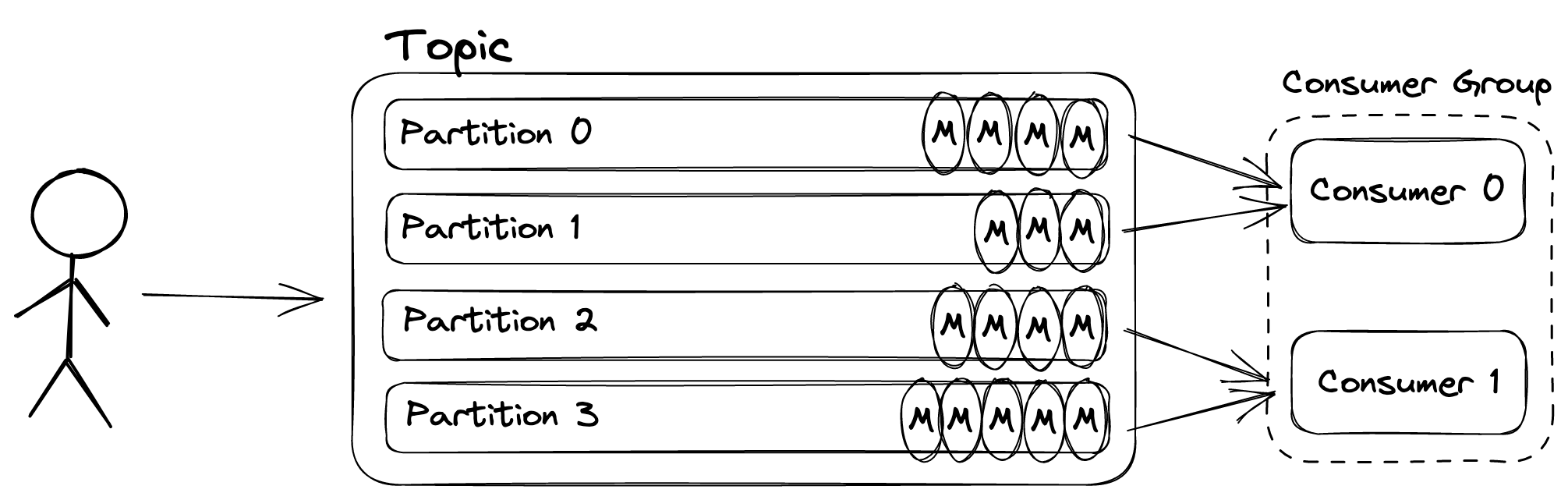
Messages are sent to topics in Kafka which are hashed and assigned to partitions - one topic has one or more partitions. Multiple consumers can read from a topic by forming a Consumer Group, with each one being automatically assigned a subset of the partitions for a given topic.

No two consumers from the same Consumer Group can read from the same partition. Therefore, to avoid idle consumers, a topic must have at least as many partitions as there are consumers.
At this point, head-of-line blocking might be starting to make sense. If Consumer 0 takes a long time to perform the work associated with a message (either because the work is expensive or because it is under resource pressure), all other pending messages in the partitions it is responsible for will remain pending.
Side note: where Kafka message streaming capabilities really shine is when you have many subscribers. A new consumer group can be formed and process the same messages as the original group, on its own pace. At this point, it is no longer a worker queue in the traditional sense.

Beanstalkd Architecture
This is in contrast to other solutions like RabbitMQ or beanstalkd where, regardless of the number of consumers, pending jobs will be served to the first consumer that asks for one on a given queue.
Let’s take a look at beanstalkd, which I have introduced in a previous blog post:

With beanstalkd, jobs are sent to tubes. Consumers simply connect to the server and reserve jobs from a given tube. For a given beanstalkd server, jobs are given out in the same order they were enqueued.
Here, head-of-line blocking is no longer a concern, as jobs will continue to be served from the queue to available consumers even if a particular consumer is slow. Contrary to Kafka with multiple consumer groups, a job in a tube cannot be served to two consumers in the happy path. When reservations times out, beanstalkd will requeue that job. These are traditional work queue primitives.
Experiment
In this experiment, each job represents a unit of work: a synchronous sleep. The sleep duration is determined by the producer that creates 100 jobs in total. Every job has a sleep value of 0, except for 4 of them which have a sleep value of 10s.
beanstalkd_tube = beanstalkd.tubes[BEANSTALKD_MAIN_TUBE]
100.times do |i|
  msg = (i % 25).zero? ? 10 : 0

  beanstalkd_tube.put(msg.to_s)

  kafka_producer.produce(
    topic: KAFKA_MAIN_TOPIC,
    payload: msg.to_s,
    key: "key-#{i}"
  )
end
If we only had a single consumer, the total time to complete all jobs would be at least 40s, as that consumer would sleep for 10s four times. If we had an unlimited number of consumers, the minimum total time would be 10s, as at least four consumers would have to sleep for 10s in parallel.
Back to the experiment, both Kafka and beanstalkd are set up, each with five consumers. The Kafka topic is configured with 10 partitions, therefore, each Kafka consumer is responsible for two partitions, in a single consumer group configuration. Below are the implementations for each consumer type:
consumer.subscribe(KAFKA_MAIN_TOPIC)
consumer.each do |msg|
  duration = msg.payload.to_i
  log.info 'Going to sleep' if duration.positive?
  sleep(msg.payload.to_i)
  producer.produce(
    topic: KAFKA_COUNTER_TOPIC,
    payload: 'dummy'
  )
end
main_tube = beanstalkd.tubes[BEANSTALKD_MAIN_TUBE]
counter_tube = beanstalkd.tubes[BEANSTALKD_COUNTER_TUBE]
loop do
  job = main_tube.reserve
  duration = job.body.to_i
  log.info 'Going to sleep' if duration.positive?
  sleep(duration)
  counter_tube.put('dummy')
  job.delete
end
After sleeping, consumers produce a dummy message to a different topic/tube, which is used by an out of bound watcher process that keeps track of global progress. Each watcher process starts the clock when the first dummy message is received and stops i when the 100th message is received.
To kickstart the experiment, we start both Kafka and beanstalkd, five consumers for each and the two watcher processes:
$ docker-compose up
queue-beanstalkd-watcher-1   | I, [2023-03-19T22:03:59] Started beanstalkd watcher
queue-beanstalkd-consumer-1  | I, [2023-03-19T22:04:00] Connected to beanstalkd
queue-beanstalkd-consumer-3  | I, [2023-03-19T22:04:01] Connected to beanstalkd
queue-beanstalkd-consumer-4  | I, [2023-03-19T22:04:01] Connected to beanstalkd
queue-beanstalkd-consumer-5  | I, [2023-03-19T22:04:02] Connected to beanstalkd
queue-beanstalkd-consumer-2  | I, [2023-03-19T22:04:02] Connected to beanstalkd
queue-kafka-define-topic-1   | I, [2023-03-19T22:04:11] Topics created!
queue-kafka-define-topic-1 exited with code 0
queue-kafka-watcher-1        | I, [2023-03-19T22:04:12] Started Kafka watcher
queue-kafka-consumer-2       | I, [2023-03-19T22:04:13] Subscribed to kafka topic
queue-kafka-consumer-1       | I, [2023-03-19T22:04:14] Subscribed to kafka topic
queue-kafka-consumer-4       | I, [2023-03-19T22:04:14] Subscribed to kafka topic
queue-kafka-consumer-5       | I, [2023-03-19T22:04:14] Subscribed to kafka topic
queue-kafka-consumer-3       | I, [2023-03-19T22:04:15] Subscribed to kafka topic
At this point, without no messages having been produced, we can inspect the topology of Kafka partitions and consumers:
$ kafka-consumer-groups.sh --describe --group main-group --bootstrap-server localhost:9092
GROUP           TOPIC           PARTITION  CURRENT-OFFSET  LOG-END-OFFSET  LAG             CONSUMER-ID                                  HOST            CLIENT-ID
main-group      main            8          -               0               -               rdkafka-c12c408c-3da7-48b8-922e-17053059b828 /172.19.0.12    rdkafka
main-group      main            9          -               0               -               rdkafka-c12c408c-3da7-48b8-922e-17053059b828 /172.19.0.12    rdkafka
main-group      main            0          -               0               -               rdkafka-57fb04b5-4c10-4403-894c-587bb95a285e /172.19.0.15    rdkafka
main-group      main            1          -               0               -               rdkafka-57fb04b5-4c10-4403-894c-587bb95a285e /172.19.0.15    rdkafka
main-group      main            2          -               0               -               rdkafka-686169bc-eef9-498b-a7ca-a243c401f4bd /172.19.0.13    rdkafka
main-group      main            3          -               0               -               rdkafka-686169bc-eef9-498b-a7ca-a243c401f4bd /172.19.0.13    rdkafka
main-group      main            6          -               0               -               rdkafka-98349f3c-f097-450c-a1a1-82c3adef1fd3 /172.19.0.14    rdkafka
main-group      main            7          -               0               -               rdkafka-98349f3c-f097-450c-a1a1-82c3adef1fd3 /172.19.0.14    rdkafka
main-group      main            4          -               0               -               rdkafka-87de172e-6759-46d5-b788-e27e5fb52e02 /172.19.0.11    rdkafka
main-group      main            5          -               0               -               rdkafka-87de172e-6759-46d5-b788-e27e5fb52e02 /172.19.0.11    rdkafka
main-group      counter         0          -               0               -               rdkafka-b6c8a89e-cb22-4872-85c5-57cf5da68756 /172.19.0.10    rdkafka
As seen above, each consumer has been assigned two partitions, and all 10 are empty. Time to produce the 100 messages:
And wait for the results:
queue-beanstalkd-consumer-1  | I, [2023-03-19T22:04:28] Going to sleep
queue-beanstalkd-watcher-1   | I, [2023-03-19T22:04:28] Started beanstalkd clock!
queue-beanstalkd-consumer-3  | I, [2023-03-19T22:04:28] Going to sleep
queue-kafka-consumer-1       | I, [2023-03-19T22:04:28] Going to sleep
queue-beanstalkd-consumer-5  | I, [2023-03-19T22:04:28] Going to sleep
queue-beanstalkd-consumer-4  | I, [2023-03-19T22:04:28] Going to sleep
queue-kafka-consumer-2       | I, [2023-03-19T22:04:28] Going to sleep
queue-kafka-consumer-5       | I, [2023-03-19T22:04:28] Going to sleep
queue-kafka-watcher-1        | I, [2023-03-19T22:04:28] Started Kafka clock!
queue-beanstalkd-watcher-1   | I, [2023-03-19T22:04:38] beanstalkd took 10s to complete!
queue-kafka-consumer-2       | I, [2023-03-19T22:04:38] Going to sleep
queue-kafka-watcher-1        | I, [2023-03-19T22:04:48] Kafka took 20s to complete!
The full experiment is available on github.com/arturhoo/kafka-experiment.
Results
From the watcher times above, we can clearly see a difference between the two setups: Kafka’s took double the amount of time to process all 100 messages. The head-of-line blocking behavior, however, has further implications. By capturing the timestamp where each nth job is completed (as measured by the watcher), we can plot the global process for both setups:

As seen above, the beanstalkd setup was able to process 96 out of the 100 messages in less than one second. The Kafka setup, however, had two long 10s periods of time where no messages was processed - that is because there was at one consumer (queue-kafka-consumer-2) who was assigned two messages with a sleep duration of 10s.
This is in contrast with the beanstalkd setup, where four consumers slept in parallel while the fifth consumer (beanstalkd-consumer-2) was able to empty the queue, effectively working more than its peers.
–
Thanks @javierhonduco for reviewing this post.