> What’s New ? <
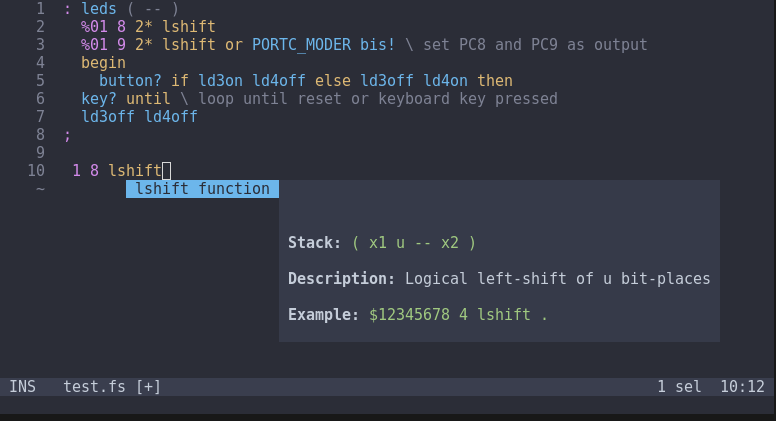
Everyone knows what these things are by now, they’re a autocomplete for your source code, in this case the LSP knows all the default Mecrisp-Stellaris Dictionary Words and even provides an example of the correct usage for most of them.
In my case I designed and used it on the Helix Editor which is my current favorite tho I also use VIM, GVIM and NVIM at times.
Helix Configuration
~/.config/helix/config.toml
[[language]]
name = "forth"
scope = "source.forth"
injection-regex = "forth"
file-types = ["fs"]
comment-token = "\\"
language-servers = ["mecrisp-lsp"]

[language-server.mecrisp-lsp]
command = "/usr/local/bin/python3.11"
# CHANGE TO SUIT YOUR CORRECT PATH !
args = ["/home/tp/fossil/mecrisp-stellaris-lsp/src/mecrisp.lsp.py"]
Helix Screenshots using the LSP while editing a Mecrisp-Stellaris project Forth file
Example while Coding

2-foldable function

12-bitencoding function

um* function

How do you use it ?
Once the LSP is installed, in Helix it’s as easy as hitting the insert key (to edit your *.fs code file) and entering the first three letters of a Mecrisp-Stellaris command like “emi” for “emit” and the LSP list of completion choices will pop up.
Use the up and down arrow key to select your choice and then use the right arrow key to select it and the pop-up will vanish.
The command you selected is now inserted in your text and you can continue coding.
How to See a List of All Dictionary Words ?
In insert mode, press “/” and you can scroll thru the entire Dictionary as listed in mecrisp_stellaris.db. This is a Sqlite database, so the content is easy to view.
Requirements
pygls>=0.6.0
lsprotocol>=1.4.0