Modern PC motherboards' firmware follow
UEFIspecification since 2010. In 2013, a new technology called Secure Boot appeared, intended to prevent
bootkitsfrom being installed and run. Secure Boot prevents the execution of unsigned or untrusted program code (.efi programs and operating system boot loaders, additional hardware firmware like video card and network adapter OPROMs).
Secure Boot can be disabled on any retail motherboard, but a mandatory requirement for changing its state is physical presence of the user at the computer. It is necessary to enter UEFI settings when the computer boots, and only then it's possible to change Secure Boot settings.
Most motherboards include only Microsoft keys as trusted, which forces bootable software vendors to ask Microsoft to sign their bootloaders. This process include code audit procedure and justification for the need to sign their file with globally trusted key if they want the disk or USB flash to work in Secure Boot mode without adding their key on each computer manually.
Linux distributions, hypervisors, antivirus boot disks, computer recovery software authors all have to sign their bootloaders in Microsoft.
I wanted to make a bootable USB flash drive with various computer recovery software that would boot without disabling Secure Boot. Let's see how this can be achieved.
Signed bootloaders of bootloaders
So, to boot Linux with Secure Boot enabled, you need a signed bootloader. Microsoft forbid to sign software licensed under GPLv3 because of
tivoizationrestriction license rule, therefore
GRUB cannot be signed.
To address this issue, Linux Foundation released
PreLoaderand Matthew Garrett made
shim—small bootloaders that verify the signature or hash of a single file and execute it. PreLoader and shim do not use
UEFI dbcertificate store, but contain a database of allowed hashes (PreLoader) or certificates (shim) inside the executable file.
Both programs, in addition to automatically executing trusted files, allow you to run any previously untrusted programs in Secure Boot mode, but require the physical presence of the user. When executed for the first time, you need to select a certificate to be added or the file to be hashed in the graphical interface, after which the data is added into a special NVRAM variable on the motherboard which is not accessible from the loaded operating system. Files become trusted only for these pre-loaders, not for Secure Boot in general, and still couldn't be loaded without PreLoader or shim.
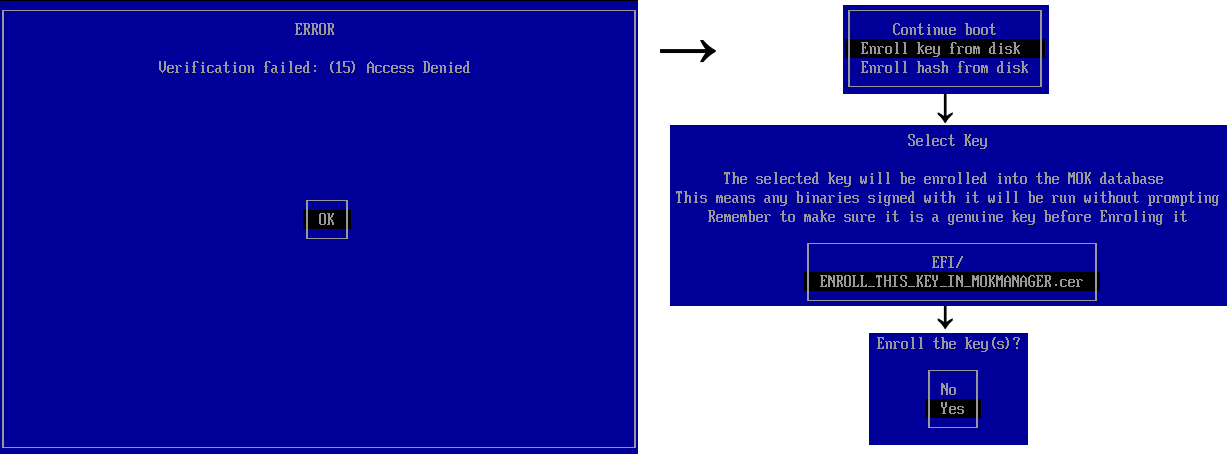
Untrusted software first boot with shim.
All modern popular Linux distributions use shim due to certificate support, which makes it easy to provide updates for the main bootloader without the need for user interaction. In general, shim is used to run GRUB2 — the most popular bootloader in Linux.
GRUB2
To prevent signed bootloader abuse with malicious intentions, Red Hat created patches for GRUB2 that block «dangerous» functions when Secure Boot is enabled: insmod/rmmod, appleloader, linux (replaced by linuxefi), multiboot, xnu, memrw, iorw. The chainloader module, which loads arbitrary .efi-files, introduced its own custom internal .efi (PE) loader without using the UEFI LoadImage/StartImage functions, as well as the validation code of the loaded files via shim, in order to preserve the ability to load files trusted by shim but not trusted in terms of UEFI. It's not exactly clear why this method is preferable—UEFI allows one to redefine (hook) UEFI verification functions, this is how PreLoader works, and indeed the very
shim feature is presentbut disabled by default.
Anyway, using the signed GRUB from some Linux distribution does not suit our needs. There are two ways to create a universal bootable flash drive that would not require adding the keys of each executable file to the trusted files:
- Use modded GRUB with internal EFI loader, without digital signature vertification or module restrictions;
- Use custom pre-loader (the second one) which hook UEFI file vertification functions (EFI_SECURITY_ARCH_PROTOCOL.FileAuthenticationState, EFI_SECURITY2_ARCH_PROTOCOL.FileAuthentication)
The second method is preferable as executed software can load and start another software, for example, UEFI shell can execute any program. The first method does not provide this, allowing only GRUB to execute arbitrary files. Let's
modify PreLoaderby removing all unnecessary features and patch verification code to allow everything.
Disk architecture is as follows:
   ______            ______                ______
  ╱│     │          ╱│     │              ╱│     │
 /_│     │    →    /_│     │      →      /_│     │
 │       │    →    │       │      →      │       │
 │  EFI  │    →    │  EFI  │      →      │  EFI  │
 │_______│         │_______│             │_______│

BOOTX64.efi        grubx64.efi        grubx64_real.efi

  (shim)      (FileAuthentication         (GRUB2)
                override)

    ↓↓↓                ↑
                       ↑
   ______              ↑
  ╱│     │             ║
 /_│     │             ║
 │       │  ═══════════╝
 │  EFI  │
 │_______│

MokManager.efi

(Key enrolling
 tool)
This is how Super UEFIinSecureBoot Disk has been made.
Super UEFIinSecureBoot Disk is a bootable image with GRUB2 bootloader designed to be used as a base for recovery USB flash drives.Key feature: disk is fully functional with UEFI Secure Boot mode activated. It can launch any operating system or .efi file, even with untrusted, invalid or missing signature.
The disk could be used to run various Live Linux distributions, WinPE environment, network boot, without disabling Secure Boot mode in UEFI settings, which could be convenient for performing maintenance of someone else's PC and corporate laptops, for example, with UEFI settings locked with a password.
The image contains 3 components: shim pre-loader from Fedora (signed with Microsoft key which is pre-installed in most motherboards and laptops), modified Linux Foundation PreLoader (disables digital signature verification of executed files), and modified GRUB2 loader.
On the first boot it's necessary to select the certificate using MokManager (starts automatically), after that everything will work just as with Secure Boot disabled—GRUB loads any unsigned .efi file or Linux kernel, executed EFI programs can load any other untrusted executables or drivers.
To demonstrate disk functions, the image contains Super Grub Disk (a set of scripts to search and execute OS even if the bootloader is broken), GRUB Live ISO Multiboot (a set of scripts to load Linux Live distros directly from ISO file), One File Linux (the kernel and initrd in a single file, for system recovery) and several UEFI utilities.
The disk is also compatible with UEFI without Secure Boot and with older PCs with BIOS.
Signed bootloaders
I was wondering is it possible to bypass first boot key enrollment through shim. Could there be some signed bootloader that allow you to do more than the authors expected?
As it turned out—there are such loaders. One of them is used in
Kaspersky Rescue Disk 18—antivirus software boot disk. GRUB from the disk allows you to load modules (the insmod command), and module in GRUB is just an executable code. The pre-loader on the disk is a custom one.
Of course, you can't just use GRUB from the disk to load untrusted code. It is necessary to modify the chainloader module so that GRUB does not use the UEFI LoadImage/StartImage functions, but instead self-loads the .efi file into memory, performs relocation, finds the entry point and jumps to it. Fortunately, almost all the necessary code is present in Red Hat GRUB Secure Boot repository, the only problem—PE header parser is missing. GRUB gets parsed header from shim, in a response to a function call via a special protocol. This could be easily fixed by porting the appropriate code from the shim or PreLoader to GRUB.
This is how Silent UEFIinSecureBoot Disk has been made. The final disk architecture looks as follows:
   ______            ______                ______
  ╱│     │          ╱│     │              ╱│     │
 /_│     │         /_│     │      →      /_│     │
 │       │         │       │      →      │       │
 │  EFI  │         │  EFI  │      →      │  EFI  │
 │_______│         │_______│             │_______│

BOOTX64.efi        grubx64.efi        grubx64_real.efi

(Kaspersky     (FileAuthentication         (GRUB2)
  Loader)        override)

    ↓↓↓                ↑
                       ↑
   ______              ↑
  ╱│     │             ║
 /_│     │             ║
 │       │  ═══════════╝
 │  EFI  │
 │_______│

 fde_ld.efi + custom chain.mod

(Kaspersky GRUB2)
The end
In this article we proved the existence of not enough reliable bootloaders signed by Microsoft key, which allows booting untrusted code in Secure Boot mode.
Using signed Kaspersky Rescue Disk files, we achieved a silent boot of any untrusted .efi files with Secure Boot enabled, without the need to add a certificate to UEFI db or shim MOK.
These files can be used both for good deeds (for booting from USB flash drives) and for evil ones (for installing bootkits without computer owner consent).
I assume that Kaspersky bootloader signature certificate will not live long, and it will be added to
global UEFI certificate revocation list, which will be installed on computers running Windows 10 via Windows Update, breaking Kaspersky Rescue Disk 18 and Silent UEFIinSecureBoot Disk. Let's see how soon this would happen.
Super UEFIinSecureBoot Disk download: https://github.com/ValdikSS/Super-UEFIinSecureBoot-Disk
Silent UEFIinSecureBoot Disk download (ZeroNet Git Center network): http://127.0.0.1:43110/1KVD7PxZVke1iq4DKb4LNwuiHS4UzEAdAv/
ZeroNet is a very powerful system for decentralized distributed dynamic web sites and services. The user starts downloading and seeding website data upon visiting it, following BitTorrent principle. But unlike other similar systems, ZeroNet allows creating full-fledged blogs with comments, forums, video hostings, wiki sites, chats, email and git.
ZeroNet splits website data from website code: the data is stored in .json files and combined into sqlite databases with defined scheme, which allows to implement mind-bending features: local search in all opened websites in a meaning of milliseconds, all-site real-time RSS-like update stream.
ZeroNet provides standardized authentication system similar to OAuth, NAT and Tor support.
The system works really fast, is user-friendly, has modern user interface with small but convenient features like global night/day theme switch for all sites.
I believe that ZeroNet is underrated and intentionally uploaded silent version of the disk only to ZeroNet Git, to attract new users.