by The Prosody Team
On 11th February, Let’s Encrypt will be rolling out a change to the certificates they issue to servers by default. Although there is generally nothing that Prosody operators need to do, servers using the new certificates may experience problems connecting to some other XMPP servers on the network.
Certificate basics
First, a tiny bit of background on certificates. Certificate Authorities (CAs) such as Let’s Encrypt work by verifying that you own or control a domain, and then they issue you with a certificate that you can present to others as proof of this verification. Obtaining a certificate can be done using the ‘certbot’ tool or any one of the large number of tools compatible with the ACME protocol.
When an XMPP client connects to a server, it will expect the server to present a certificate which is valid for the domain the client is logging in to.
Likewise, certificates are also used when servers connect to other servers (server-to-server connections are often called “s2s” or generally “federation”). This prevents various attacks, including spoofing - because when your server receives a message claiming to be from “[email protected]”, it can ensure that the server it came from presented a valid certificate for “example.com” and has been verified.
Certificates can specify usage
Most people know that certificates contain the domain name that has been verified. However they contain other data too, including the details of the CA that signed and issued the certificate, validity period, and various metadata.
Another part of the certificate can specify limitations on what the certificate can be used for. For example, a CA’s own certificate will specify that they are allowed to use their certificate to sign other certificates. Similar restrictions can be used to permit whether it can be used for signing and/or encryption.
One such extension, called “Extended Key Usage” can be used to restrict whether the certificate is used for “server authentication” or “client authentication”.
What’s changing?
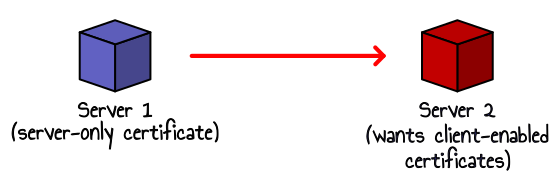
Let’s Encrypt currently issue certificates which specify they may be used for both “server authentication” and “client authentication”. However they have announced that they will be issuing certificates for only “server authentication” by default from 11th February 2026. In the rest of this post we’ll refer to these as “server-only” certificates.
Traditional interpretation of the relevant specifications would forbid use of those certificates by a client which is connecting to a server. Unfortunately, XMPP makes heavy use of connections between servers, and in the context of such server-to-server connections the TLS specifications actually consider the server that initiated the connection to be a “client” (not an XMPP client, but a TLS client).
Common TLS libraries and APIs such as OpenSSL will automatically verify the certificate’s key usage fields, and fail certificate validation if an incoming connection is received that uses a certificate without the “client authentication” purpose. This has the potential to break server-to-server connection authentication in XMPP (and also other protocols that make connections between servers).

Does this affect Prosody?
Not directly. Let’s Encrypt is not the first CA to issue server-only certificates. Many years ago, we incorporated changes into Prosody which allow server-only certificates to be used for server-to-server connections, regardless of which server started the connection. We believe that this is the correct approach for XMPP.
This means that Prosody will accept connections from servers that are using the new server-only certificates from Let’s Encrypt.
Unfortunately this behaviour is not standardized, partly due to controversy outside the XMPP community about this approach. The current CA ecosystem is heavily driven by web browser vendors (i.e. Google, Apple, Microsoft and Mozilla), and they are increasingly hostile towards non-browser applications using certificates from CAs that they say only provide certificates for consumption by web browsers.
An attempt at updating the specifications to clarify the expected roles of servers and clients failed to gain consensus at the IETF.
Does this affect the XMPP network?
Although Prosody will accept server-only certificates, some other server implementations do not have the alternative certificate usage validation that Prosody has, or they added it only recently.
Compatible servers:
- ejabberd (requires 25.08 or later)
- Openfire
Operators of incompatible server versions should upgrade to a version that is compatible with server-only certificates as soon as possible to prevent problems with federation.
Server software not listed above has not been tested, and may not accept connections from servers using server-only certificates.
What will happen with other servers?
If a server does not use the alternative validation (because the software doesn’t implement it, or it has not been updated) then it will treat the certificates of all other servers as invalid for initiating s2s connections.
Many servers still have the dialback protocol enabled, which will act as a fallback authentication mechanism (using DNS), and in this case the connections may still succeed.
However if dialback is disabled on either server, or if the target server strictly requires valid certificates, server-to-server connections will always fail entirely.
You may see errors in your Prosody log file such as:
Server-to-server connection failed: Could not authenticate to remote server
In such a case, the remote server operator usually needs to update their software.
How can I test my server?
Send an XMPP ping (XEP-0199) to le-tlsserver.badxmpp.eu - if you get a
successful iq response, this means your server accepts server-only
certificates. If you don’t get a response, check your server’s log file for
any incoming s2s failures.