We have a challenge with ssh. Every VM has a standard URL that we use for both HTTPS and SSH, e.g. undefined-behavior.exe.xyz. Just as you can type the domain into a web browser (and have TLS and auth taken care of for you), you can run:
ssh undefined-behavior.exe.xyz
To get a shell in your VM.
This is very straightforward to implement if you give each machine its own IP address, but exe.dev gives you many VMs on a flat rate subscription.
We cannot issue an IPv4 address to each machine without blowing out the cost of the subscription. We cannot use IPv6-only as that means some of the internet cannot reach the VM over the web. That means we have to share IPv4 addresses between VMs.
For the web, this is a long-solved problem. Many sites can and do have the same IP address. Web browsers send the domain they used to reach the server in the HTTP request as the Host header. The exe.dev proxy switches on this header and send requests to the appropriate VM.
SSH, on the other hand, has no equivalent of a Host header. If we reuse IPv4 addresses between VMs, we have no way to send SSH connections to the right VM.
Instead of using one IP address for all VMs, we have a pool of public IPv4 addresses. Each VM is assigned a unique address relative to its owner.
So instead of an A record, you will find
$ dig undefined-behavior.exe.xyz

; <<>> DiG 9.10.6 <<>> undefined-behavior.exe.xyz
...
;; ANSWER SECTION:
undefined-behavior.exe.xyz. 230 IN      CNAME   s003.exe.xyz.
s003.exe.xyz.           230     IN      A       16.145.102.7
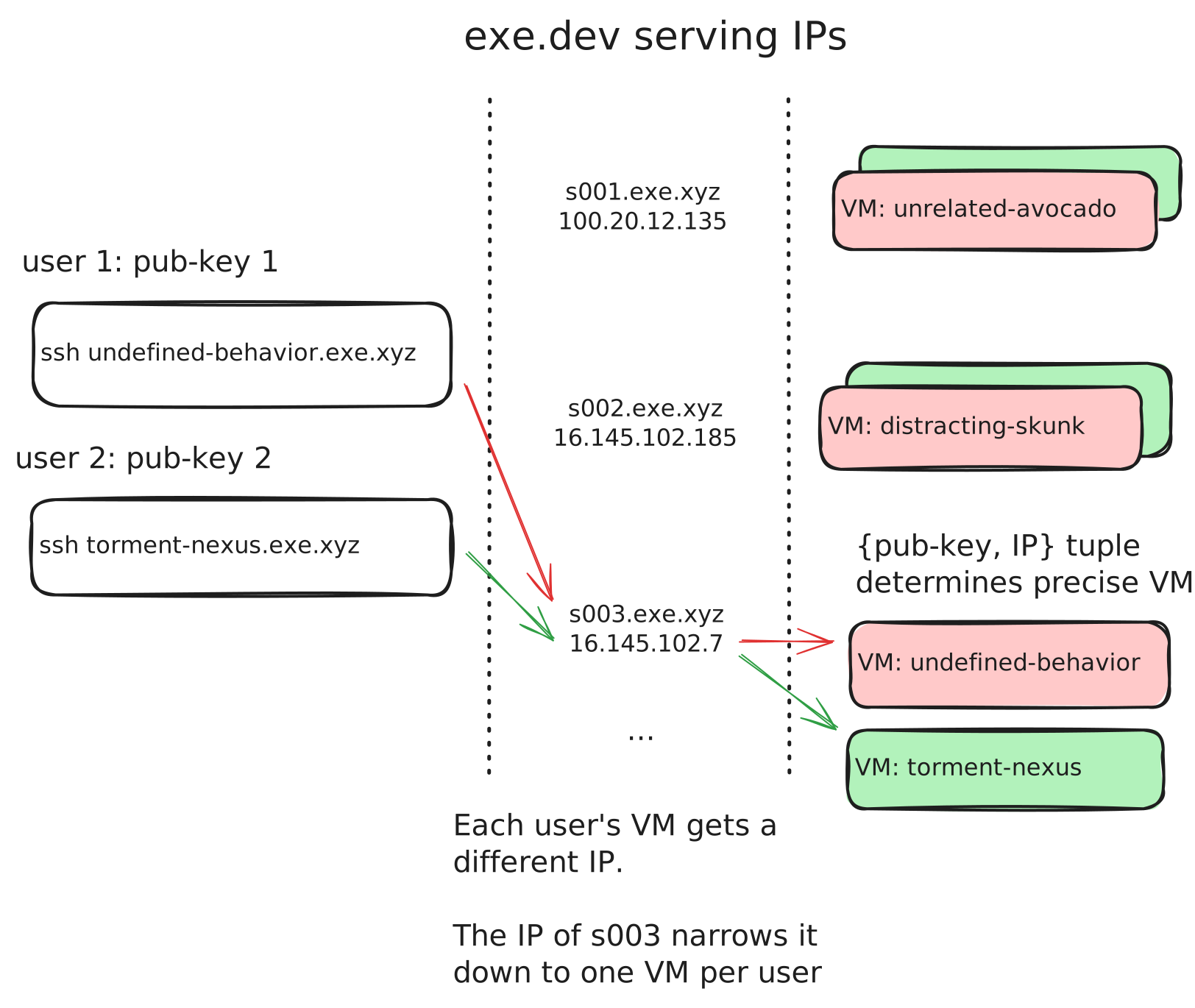
Relative to its owner means that while the IP represented by s003 is used by many VMs, it is only used by one VM owned by this user.
This is all the extra information we need to route SSH connections. When SSH connects, it presents a public key and comes in via a particular IP address. The public key tells us the user, and the {user, IP} tuple uniquely identifies the VM they are connecting to. In diagram form:

Building a proxy that does this requires some cross-system communication: when we create a VM we have to allocate it an IP carefully based on the user (or in the near future: team) that owns it. Our ssh proxy has to be able to determine the local IP a request came in on, which is easy on bare metal, harder in a cloud environment where public IPs are NATed on to private VPC addresses. All of this requires bespoke management software, so we cannot recommend it as a general solution to people who want to multiplex VM SSH access onto an IP. But uniform, predictable domain name behavior is important to us, so we took the time to build this for exe.dev.