Hi there! Today, I come with a very unusual post, based on a true history that was happening to me before. If you are reading this, chances are that this is happening to you too, or just you are a curious person whose mind exploded when you read the title of this post.
I was suffering from an annoying issue for a few days. I work from home, and I use a MacBook pro attached to an external 4K monitor. along with an Ikea Markus chair. For whatever reason I’m not figured out yet, it’s generating a lot of static electricity every time I move a little, or every time I stand up. (Yes, it probably is related with the clothes or shoes I’m using, but tested different ones for a few days and didn’t notice any difference).
The problem with that static electricity is not only the annoying electrical “shocks” I receive every time I took a conductive surface (like my metallic MacBook), but also that the external monitor plugged to my MacBook goes black, blinks, or directly turns off. Sometimes, it even won’t reconnect at all or recognize it, and I need to unplug and plug-in again the video cable.
But even more. Sometimes, when I stand up without touching anything else (like the table or the MacBook) I get the same issue, so it couldn’t be only the static electricity. As a curious person (and a bit nerd one, to be honest), I started to investigate what was happening. I found out that some gas lift office chairs (like the one I’m using) can generate an EMI spike when people stand or sit on it, which is picked up on the video cables, and generates this issue.
“An EMI spike? I don’t believe you”, you said. And you know what? You don’t have to. There is a lot of people with the same issues out there in the internet. To provide some authority references, the official support page of DisplayLink talks about this issue, and there is even a White Paper about it. It seems that this issue is specially notorious with Display Port (DP) video cables, and also when some adapters (USB-C to DP, DP to HDMI, etc.) are used. In my personal case, I had this problem with two different cables I used: one DP to USB-C cable (without adapter), a USB-C to USB-C thunderbolt 3 cable (my monitor allows using it as an input and it will also charge the MacBook while in use).
Still don’t believe me? They say that a image worths a thousand words, so here is a video I found in YouTube that shows the issue, even using a oscilloscope to capture the EMI.
If what I already told sounds familiar to you, it’s highly probable. In fact, it’s happening to other people too. In that link, you can check a person asking the same question in SuperUser, but the answers there provided were not satisfactory for me, either because they were too generic, cause I found them impractical/annoying, or because they didn’t work for me.
For me, we have two different problems:
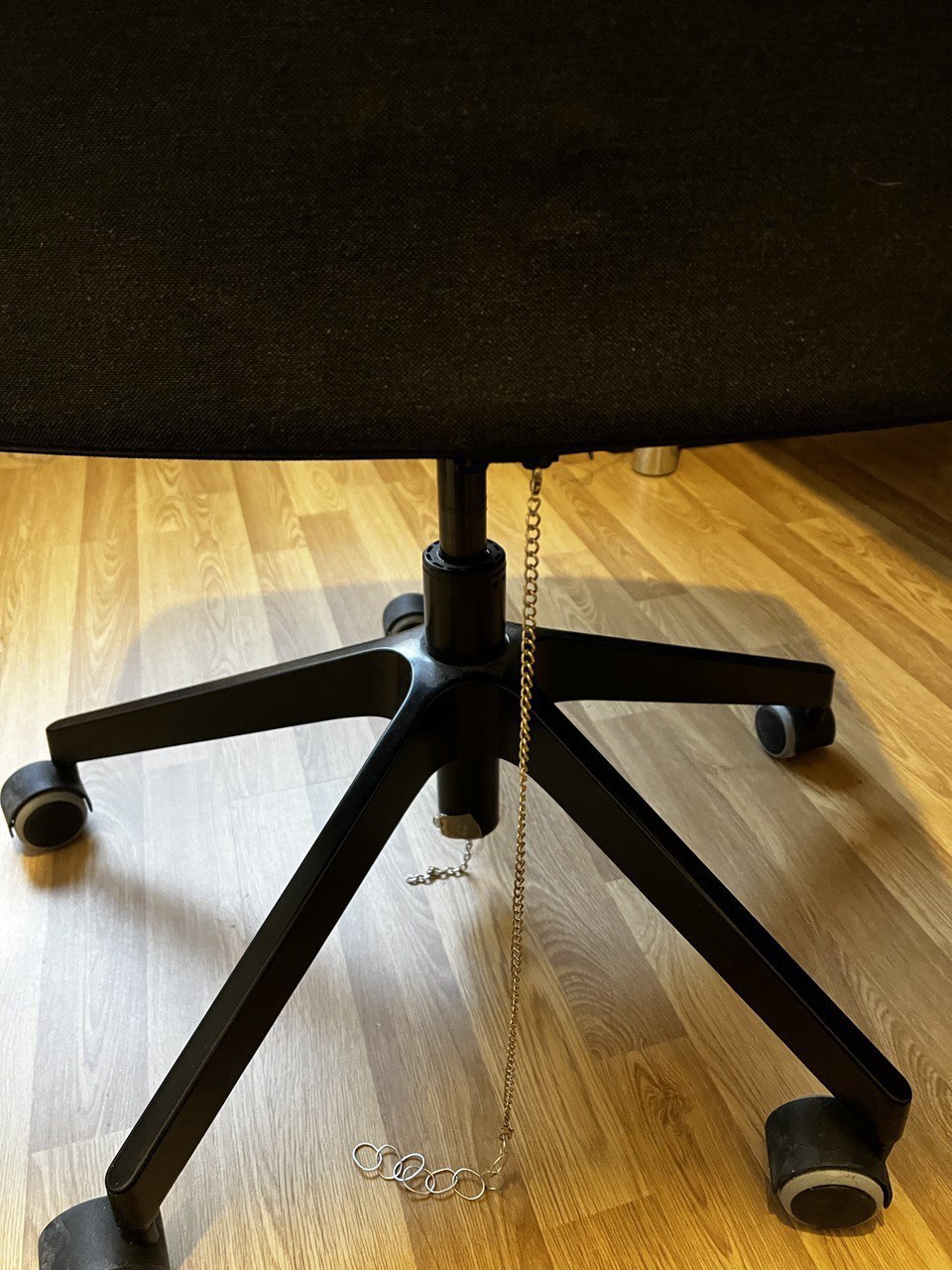
The first one is the static electricity. This is due to the chair not being able to discharge itself. In my particular case, my chair wheels are made out of plastic (non-conductive), so my solution was to “ground” my chair by adding a metallic chain from the chair to my room floor. I got the idea from reddit. I have a wooden floor and it’s working pretty well. Electrical shocks have been reduced by a lot (from +20 per day to just one every few days). This is my chair now:

Click on image to enlarge
The other problem are the EMI spikes. We cannot avoid the chair generating them, but we can reduce their effect by using ferrite ring around our video cables, as suggested in the previous mentioned Display Link support page. Another user came to the same solution also in reddit. I bought a pack of 10 ferrite rings in Amazon Spain (afiliate link), and I’m using them in my video cables.

Click on image to enlarge
I have to say that the monitor stills goes black when I stand up quickly or in a fast way, but it’s not as often as before. If I stand up slowly, it doesn’t happen at all. I think that the ferrite rings are reducing the effect of the EMI spikes, but they are not completely eliminating them.
And that’s my story. I hope it helps you if you are suffering from the same issue. If you have any other solution, please let me know. You can contact me from my social media accounts in the footer of this page, or by email (my email is public under my GitHub profile to logged GitHub users).