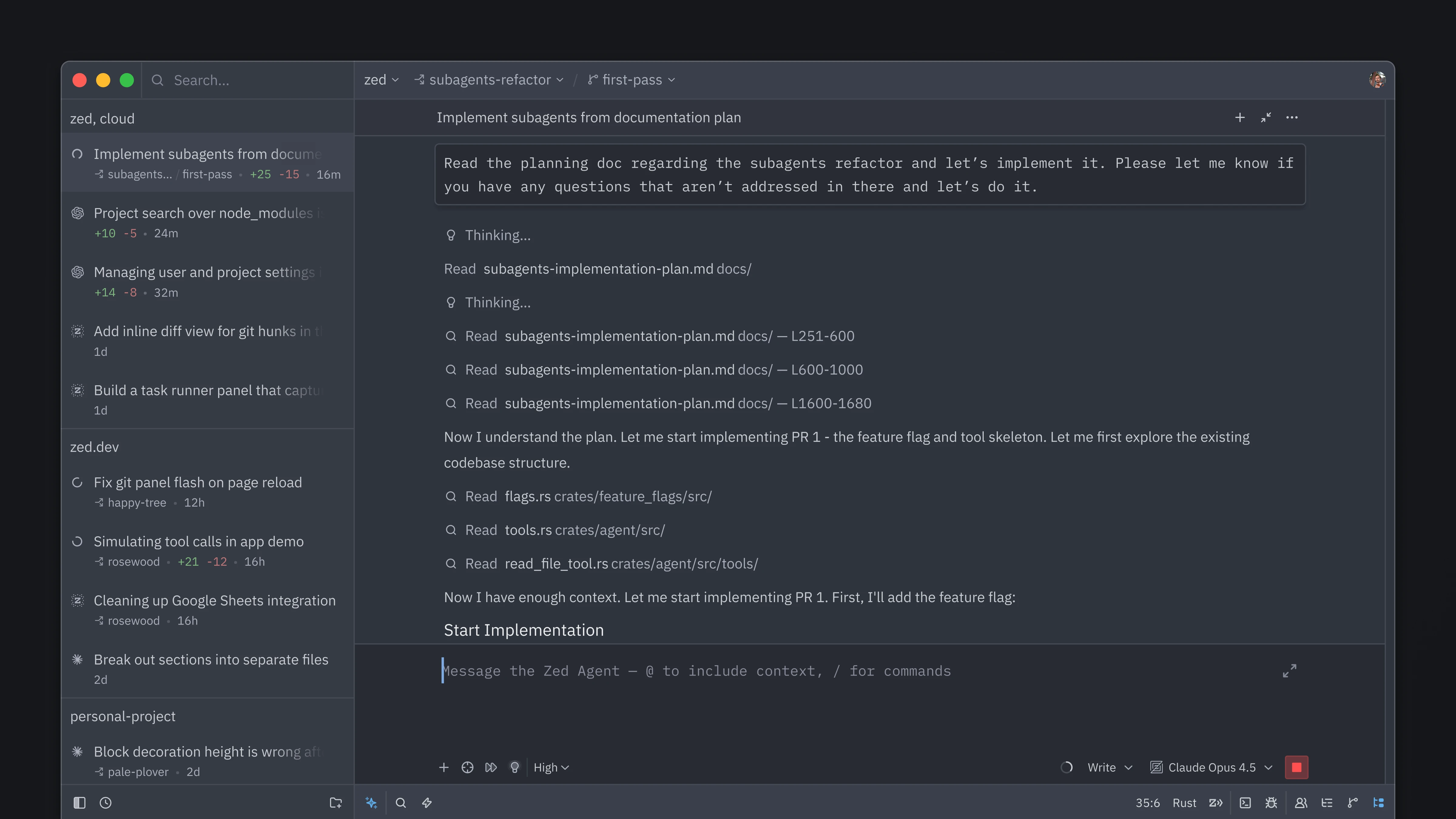
Zed now lets you orchestrate multiple agents, each running in parallel in the same window. The new Threads Sidebar lets you control exactly which folders and repositories agents can access, and lets you monitor threads as they run.
All of this runs at Zed's famously buttery-smooth 120 fps, with whichever agents you like, and it's all open-source.
The Threads Sidebar offers an overview of all your threads at a glance, grouped by project, so you can:
- Mix and match agents on a per-thread basis, since Zed lets you choose your agent.
- Work across projects, with one agent thread reading and writing across repos.
- Isolate worktrees, when you want to, and decide per thread.
The Sidebar gives you instant access to common operations like stopping threads, archiving them, and kicking off new ones. Even as your workflow grows in complexity, with several projects running multiple agents at once, the Sidebar makes it easy to stay organized as your agents work.
As the Threads Sidebar became our primary way of navigating a project, we reconsidered which panels should sit where. Threads now dock on the left by default, next to the Agent Panel, with the Project Panel and Git Panel on the right.
We think this layout works better for agentic work, keeping agent threads front and center as you move between them. If you prefer a different arrangement, right-click any panel icon in the bottom bar to change its docking position, or adjust it in the Settings Editor. For existing users, the new layout is opt-in.
If you were used to the old layout, we encourage you to give this one a try before switching back. It feels more natural once you've spent a little time with it.
Ask ten different programmers how they use AI, and you can get ten different answers. At one extreme, there's fully giving into the vibes, and at the other extreme, there's disabling all AI features. What we've found works best for crafting high-quality software is somewhere in between: using AI, and also engaging directly with code.
As our co-founder and CEO Nathan Sobo wrote in 2025, "As software engineers, we should measure our contribution not in lines of code generated, but in reliable, well-designed systems that are easy to change and a pleasure to use." That post introduced the term agentic engineering to describe the art of "combining human craftsmanship with AI tools to build better software," and we've recently seen the term grow in popularity.
Parallel agents in Zed are built around that principle. Multi-agent orchestration isn't new, but we believe we've built a great experience for working with agents at scale. We spent days loading the system with hundreds of threads, refining rough edges and polishing corners that developers may never see. We went through several UX iterations and had countless hours of internal discussions. It took us longer, and we won't lie, it drove us a little crazy. But the result feels better for it, and it lets developers do more challenging things with agents, without sacrificing their craft.
Parallel Agents is available in the latest Zed release. You can download Zed, or update to the latest version to get it.
You can open the Threads Sidebar from the icon in the bottom left, or via the keybinding option-cmd-j on macOS and ctrl-option-j on Linux and Windows.
We hope you enjoy this new level of control!
Related Posts
Check out similar blogs from the Zed team.
Looking for a better editor?
You can try Zed today on macOS, Windows, or Linux. Download now!
We are hiring!
If you're passionate about the topics we cover on our blog, please consider joining our team to help us ship the future of software development.