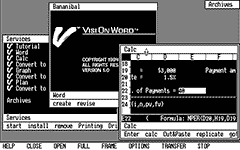

Screen capture: Turbo XT Clone — Visi On 1.0
This screenshot has been line-doubled to correct its aspect ratio, so it appears here as it does on the system monitor.

Screen capture: Sun 2/120 — SunOS 1.1

Screen capture: Sun 2/120 — SunOS 1.1

Screen capture: HP Integral PC — HP-UX 5.0/RO, with additional tools and applications running from attached 7946A.

Screen capture: Sun 2/50 — SunOS 2.0

Screen capture: IBM PC video game ('Alleycat')

Screen capture: GEM Desktop 1.2 in 16-color EGA mode.
This version of GEM for the IBM PC was the last to be released before Apple prevailed against DRI in its seminal "look and feel" lawsuit.

Screen capture: GEM Draw 1.0 in 16-color EGA mode, with sample drawing loaded.
Along with GEM Write and GEM Paint, GEM Draw was among the first applications available at the premiere of GEM Desktop on the IBM PC.

Screen capture: Acorn Archimedes A310 — Arthur 0.30 Desktop, with sample desk accessories running.
The red window frame doesn't indicate the active window, but rather that there is unsaved data in the Note-Pad desk accessory.

Screen capture: Acorn Archimedes A440 — Arthur 1.20 Desktop, with sample desk accessories running.
Arthur 0.30 lasted barely more than three months before being replaced by Arthur 1.20. The system is still very rudimentary, but if you squint, you can see some maturity just beginning to happen.

Screen capture: Amiga 2000 running NewTek Digi-Paint with sample image loaded.
Digi-Paint was one of the first paint programs to make use of the Amiga's 4096-color HAM display modes. This demo image included with the program was probably digitized using NewTek's earlier product, Digi-View. On the surface it seems a somewhat odd choice, as HAM provides no benefit to a grayscale image.
Digi-Paint also takes full advantage of the Amiga's ability to define multiple logical screens, which may be displayed on the monitor simultaneously. The individual screens are as follows, and have each been modified as described so the composited image depicts how the program actually appears on the system monitor:
- Canvas — 320 × 400 pixel, 4096 color HAM6.
- capture has been line-doubled in the horizontal dimension.
- Menu — 640 × 200 pixel, 4 color.
- capture has been line-doubled in the vertical dimension.
- Tool palette — 320 × 200 pixel, 4096 color HAM6.
- capture has been doubled in both dimensions.

VAX Workstation Software (VWS)
Screen capture: DEC VAXstation 2000 with 8-plane GPX graphics, running DEC VWS 3.3 (UIS) under MicroVMS 4.6, with configuration menu, help, and VT200 emulator windows open.
In the early days of the VAX workstation, VWS (also known as UIS) was the graphical interface available to VMS users. There is a VT200 emulator (with and without support for ReGIS graphics), a Tektronix 4014 emulator, and not much else besides. The default background on color displays is 50% gray (I fiddled with it to make it purple).

GEM – Xerox Ventura Publisher 1.1
Screen capture: Xerox Ventura Publisher 1.1 on Renaissance GRX Rendition-I display adapter, with sample document loaded.
Ventura Publisher was one of a few early PC software packages intended to demonstrate that the burgeoning desktop publishing industry wasn't to be the exclusive demesne of the Macintosh. It was a serious enough contender to have inspired development and driven adoption of an early round of first-generation high resolution display systems for the PC, of which the Rendition was among the better-rounded.
Eventually, Ventura Publisher would be re-written to run on Microsoft Windows, but it was originally written for DRI's GEM environment, as shown here.

Screen capture: SGI IRIS 3130 — GL2-W3.6 with sample mex tools running.

Screen capture: Sun 3/60 — SunOS 3.5

Screen capture: Sun 3/60 — SunOS 3.5

Screen capture: Acorn Archimedes A440 showing the RISC OS 2.00 desktop with applications running.
The Acorn VIDC has been programmed for a non-standard, 960 × 384 pixel, 16-color display mode using the !NewModes module. This screenshot has been line-doubled to correct its aspect ratio, so it appears here as it does on the system monitor.

Screen capture: GEM Desktop 3.0 in 16-color VGA mode.
This is what happened to GEM after Apple prevailed against DRI in its seminal "look and feel" lawsuit. Icons on the desktop (including a Trash can) and up to four overlapping windows replaced by two fixed, tiled windows, arranged as you see here. Either window can be "maximized" so it occupies the entire display, but neither can be otherwise resized or moved. Lame.

Screen capture: GEM Paint 2.01 in 16-color VGA mode, with sample drawing loaded.

Screen capture: OS/2 1.1 Extended Edition on 8514/A display, showing control panel and OS/2 command prompt window.

Windows/286 Presentation Manager
Screen capture: Compaq Deskpro 286 & Renaissance GRX Rendition-I — Windows/286 2.1, showing Aldus Pagemaker 3.0 and Corel Draw 1.10 in 64 colors under Presentation Manager.
The aspect ratio of this screenshot has not been corrected. It appears here one-third shorter than it does on the screen (the thumbnail image at left shows the correct aspect ratio).

Screen capture: HP NewWave Office version A.01.00 on 8514/A display adapter — an object-oriented desktop for Windows 2.1

Screen capture: IBM 6150 RT PC with Extended Monochrome Display, showing AIXwm & AIXterm.

Network Extensible Window System
Screen capture: Sun 3/60 — SunOS 3.5, showing unbundled NeWS environment.
Though SunView emulation is provided so the standard SunOS SunView applications will work, the display server is Postscript only. This predates the merged NeWS + X11 display server from the early OpenWindows releases.

Screen capture: Sun 386i/250 — SunOS 4.0.2, showing SunView interface with DOS PC session active.

ULTRIX Worksystem Software (UWS)
Screen capture: DEC VAXstation 2000 with 8-plane GPX graphics, running UWS 1.1 (ULTRIX 2.2-1 plus X10R4), with xclock, xcolors, xmh, and xterms running.
The title bars on xterm are not provided by the window manager; xwm itself does not draw any windows. Window operations are performed by holding down meta keys on the keyboard while clicking the various mouse buttons.

Screen capture: Xerox 6085 with optional PCE board, showing Viewpoint 2.0 desktop and running PC Emulator.

Screen capture: SGI IRIS 3130 — GL2-W3.6, showing the Media Logic Artisan paint program.

Screen capture: Sun 3/60 — SunOS 3.5, showing OPEN LOOK interface on SunView.

Screen capture: Sun 3/60 — SunOS 3.5, showing OPEN LOOK interface on SunView.

Screen capture: Sun 4/110 — SunOS 4.0.3, showing prerelease version of unbundled OpenWindows environment.

Screen capture: IBM PS/2 8580-311 & Image Adapter/A — OS/2 1.2 Extended Edition, showing Aldus Pagemaker under Presentation Manager.

Windows/386 Presentation Manager
Screen capture: Compaq Deskpro 386 & Western Digital Paradise 8514/A+ — Windows/386 2.11, showing Aldus Pagemaker 3.0 and Corel Draw 1.10 in 256 colors under Presentation Manager.
When the display offers more than 16 colors, Windows 2.1 implements its color palette as if it were a direct-color visual. With 256 colors, there is a wrinkle: eight bits of color depth can't be evenly divided between three primary colors and so blue draws the short straw (RRRGGGBB). This causes certain screen elements which should appear in neutral gray to have a brown or violet tint. The effect is quite apparent when comparing against the 64-color (RRGGBB) Rendition-I screenshot above or the 256-color Windows 3.0 and OS/2 2.1 screenshots below (color gradient fills preview as grayscale in Corel Draw 1.x).

Screen capture: NeXT computer showing Workspace Manager, original Column Browser & sample applications.

Screen capture: Compaq Deskpro 386/25 with Orchid ProDesigner Plus VGA and SCO OpenDesktop 1.0.0y, showing the Locus Computing Xhibit 1.0 desktop in 16 colors on the Locus Xsight (X11R3) server with manual page, editor, UNIX shell, and file browser with context-sensitive pop-up menu active.
I had understood that the very earliest versions of OpenDesktop had used an X11 desktop environment other than IXI X.desktop. In fact it does use Locus' Xhibit, but this product is itself a rebranded X.desktop.

Screen capture: DECstation 3100 showing DECwindows on Ultrix 4.0, with DECterm displaying sixel graphics and clock windows open.

Screen capture: IBM 6152 Academic System ("Crossbow") — AOS/4.3, showing X11R4 environment on the 8514/A display adapter
AOS/4.3 was originally released with X11R2, but there were so many serious bugs in X11 on the RT platform that it amounted to little more than an exercise in massive frustration until X11R4, eighteen months later. X11R4 also introduced the twm window manager (replacing uwm) and the XSHAPE extension, demonstrated here by the xeyes and oclock applications.

Screen capture: Macintosh IIci, showing the A/UX Finder and command shell.

Screen capture: Acorn Archimedes A440/1, showing the RISC iX X.desktop in an MIT X11 session.
The 1.2 release of Acorn RISC iX has been substantially enhanced over earlier versions. Unfortunately, the A440/1 (actually an A410/1 with a full complement of RAM fitted) struggles to cope with the enlarged system. The machine is functionally identical to the official R140 model, but with its 8 MHz ARM2, maximum of 4 MB RAM, 32 KB page size, and memory-bandwidth-stealing framebuffer, the performance situation is shocking.
Upon starting X11, the user is invited to select either an MIT or a Motif session. Selecting Motif, however, causes things to go from "dire" to "apocalyptic".

Screen capture: microExplorer for the Macintosh II version 6.09, showing Lisp boot and initial user login.
Notice the status area at the bottom of the screen, which shows information about the state of the Lisp system, and help text pertinent to the immediate user activity—in this case, the syntax of the in-progress LOGIN command.

Screen capture: microExplorer for the Macintosh II version 6.09, showing the Lisp Namespace Editor.
Notice the status area at the bottom of the screen, which shows information about the state of the Lisp system, and help text pertinent to the immediate user activity—in this case, instructions for interacting with the ZMacs Save/Kill Buffers window.

Screen capture: Compaq Deskpro 386 & Western Digital Paradise 8514/A+ — Windows 3.0, showing CorelDRAW! 2.01 in 256 colors.
CorelDRAW! 2 takes full advantage of the Palette Manager to make the best use of all colors available from the hardware (262,144 of them, in the case of VGA and 8514/A). This feature was newly-introduced for Windows 3.0 and replaced the static direct-color–style visual from Windows 2.1. Compare the Windows/386 screenshot above, made using the same hardware and CorelDRAW! data file.

Screen capture: HP NewWave Office version A.03.00 on #9 GXi TC display adapter — an object-oriented desktop for Windows 3.0

Screen capture: HP 9000/380 with CH ("Catseye Hi-Res") 8-plane color framebuffer & HP-UX 7.05, showing HP Windows/9000 desktop environment with multiple terminal sessions, softkeys, and windowed Starbase graphics library demo.

AIXwindows PS/2 Desktop (Motif)
Screen capture: IBM PS/2 8580-311 & Image Adapter/A — AIX PS/2 v1.2.1, showing optional AIXwindows Desktop environment.

Screen capture: Atari TT030 — Atari System V Release 4 version 1.1-06

System V Release 4 Amiga Version 1.1
Screen capture: Amiga 3000UX — X11R3 (Open Look)

Screen capture: Amiga 3000UX — Workbench 2.04 in 16 colors on the A2410 EGS display.

Screen capture: Apollo DN5500 with Matrox PG1281/AP 8-plane color framebuffer & DOMAIN/OS SR10.3.5, showing Aegis shell, node performance statistics, and DPCC IBM PC coprocessor product.

Screen capture: ALR Evolution/IV & ATI Mach32 EISA.

OS-9/68k G-Windows with G-Desktop
Screen capture: Peripheral Technologies PT68K4 with Tseng ET4000 & OS-9/68000 Pro V2.4, showing the G-Windows R2.2 Desktop environment.
The PT68K4 has substantially more horsepower than the original Macintosh but G-Windows still feels much slower to use. Text scrolling in terminal windows lacks any sense of urgency, and window redraws in particular take several seconds to finish. As a user, it falls into that awkward valley of too slow to really want to use all the time but not so hopelessly slow as to be pointless. It wouldn't be nearly such a disappointment if the system didn't feel so much more responsive at the standard command line.

Screen capture: Acorn Archimedes A5000 showing the RISC OS 3.10 desktop with applications running.

Screen capture: Compaq Deskpro 386/25 with Compaq Advanced Graphics 1024 TIGA display adapter and SCO OpenDesktop 1.1.1g, showing the Locus Computing Xhibit 2.0 desktop in 256 colors on the Locus Xsight (X11R3) server with Microsoft Word for UNIX, UNIX shell, and file browser with context-sensitive pop-up menu active.
This is a small upgrade from OpenDesktop 1.0.0y. The main improvement involves added support for new graphics cards, including some accelerated models offering 256 color modes such as the AG1024. Under the covers, UNIX is updated from System V/386 3.2.1 to 3.2v2.0.

Screen capture: VAXstation 3100m76 SPX, showing DECwindows on VMS 5.5-2, with editor and interactive STSC APL*Plus, DCL, and VAX LISP sessions open.
There is a minor unresolved glitch with the APL font installation, causing an incomplete set of APL characters to be available. I have not yet determined how to resolve it.

Screen capture: HP 9000/380 with CH ("Catseye Hi-Res") 8-plane color framebuffer & HP-UX 9.00, showing HP VUE desktop environment.
It's easy to see how much VUE inspired the later Common Desktop Environment (CDE).

SunView Environment (Solbourne)
Screen capture: Solbourne 5e/502 — OS/MP 4.1A.3

VisualWorks 1.00 for SPARCstation
Screen capture: SPARCstation 2 GS running ParcPlace VisualWorks Smalltalk for SPARC SunOS 4 under OpenWindows Version 3.

Perihelion Helios 1.31 for Transputer Workstation
Screen capture: Inmos B008 Transputer System with B419-4 Integrated Graphics TRAM and Perihelion Helios 1.31, showing active Transputer network with Mandelbrot set.

XSoft GlobalView WorksPlus 1.0 for Microsoft Windows
Screen capture: Xerox GlobalView environment running under Windows for Workgroups 3.11, showing example document, contents of Auxiliary Files subfolder, and partial keyboard map.

Screen capture: Macintosh Quadra 650, showing the A/UX Finder, online documentation, command shell, and sample X clients.

NeXTstep 3.1 Prerelease 1 for Intel Processors
Screen capture: ALR BusinessVEISA with NeXTstep 3.1 Prerelease 1, showing the Workspace Manager, intel hardware configuration app, and terminal window.
This may look like a finished product, but it has quite a few sharp edges. The HCL that accompanied the released product was minuscule; the one that accompanied the prerelease is downright microscopic.
The screenshot has been gamma-corrected so it more closely resembles what appears on the system monitor.

NeXTstep 3.1 for Intel Processors
Screen capture: ALR Evolution IV/e with NeXTstep 3.1, showing the Workspace Manager, intel hardware configuration app, and molecular visualization demo.
This is the first commercial release of NeXTstep which was not tied to the Motorola 68000-series NeXT hardware. It has a couple visual quirks; several of the system icons have not yet been modified to show generic beige-box PC hardware.
The screenshot has been gamma-corrected so it more closely resembles what appears on the system monitor.

Screen capture: ALR Evolution IV/e with SCO OpenDesktop 3.0.0, showing the IXI X.desktop, UNIX shell, and DOS Merge session.

Screen capture: Symbolics MacIvory 2 workstation (Macintosh IIfx) with Genera 8.3, showing Lisp boot and initial user login.
Note the contextual help ("forms") provided inline, when typing commands into the Lisp Listener window.

Screen capture: Symbolics MacIvory 2 workstation (Macintosh IIfx) with Genera 8.3, showing the Lisp Namespace Editor.
Note the contextual help ("forms") provided inline, when typing commands into the Namespace Editor command window, and the form-based interface provided for making changes to the loaded object record.

Screen capture: ALR Evolution IV & ATI Mach32 VLB — OS/2 2.1, showing desktop session and 32-bit CorelDRAW! 2.5 in 256 colors.
OS/2 2.1's dithering algorithms aren't especially sophisticated, but even so comparing this screenshot with the Windows 3.0 one above makes clear the appalling job Windows does at producing dithered colors.

Screen capture: Data General AViiON 310CD & DG/UX 5.4R3.00, showing WordPerfect 5.1 with sample document in active X.desktop session.

Screen capture: RS/6000 7012-390 & AIX 3.2.5, showing AIXwindows V2 desktop.

Screen capture: Slackware Linux 1.1.2 (kernel 0.99pl15), showing active fvwm session with the ATI Mach32 accelerated Xfree86 server.
This was my first introduction to linux. I spent weeks downloading and writing images to floppy disk—getting it wrong, doing it again—only to discover my SCSI host adapter wasn't supported. 24 years later, I finally managed to get it installed on something.

Visix Looking Glass Professional v2.2
Screen capture: SunSoft INTERACTIVE UNIX v4.1, showing active Looking Glass session.

Screen capture: Prototype BeBox running the Be Browser graphical interface.
This late Hobbit developer snapshot predates the official naming of BeOS and is contemporaneous with the beginnings of the effort to port the system software to PowerPC.

Screen capture: Prototype BeBox running a sample application making use of the telephony API.
This late Hobbit developer snapshot predates the official naming of BeOS and is contemporaneous with the beginnings of the effort to port the system software to PowerPC.

Macintosh System 7.5 Update 2.0
Screen capture: Macintosh IIci with SuperMac Spectrum/24 IV display adapter & System 7.5.3.

Macintosh System 8.0d9 ("Copland")
Screen capture: Power Macintosh 8100/80.
This is the D9 release of Copland, November 1995. Screen shows KernelView application running, providing some statistics from the Copland kernel.
Irrelevant: I had a Sun Microsystems fleece pullover about this time which had the same color and overall texture as this desktop wallpaper.

Macintosh System 8.0d9 ("Copland")
Screen capture: Power Macintosh 8100/80.
This is the D9 release of Copland, November 1995. Screen shows the "improved" File Open dialog. This part of the OS seems especially unstable, despite the prominence with which Apple touted this part of Copland's design. Just navigating the files and folders in this interface will frequently cause the whole machine to lock up tight.

Screen capture: unmodified IBM PowerPersonal Workstation type 7248, model 132.
Just another unfinished chapter in the epic tragedy of advanced operating systems on PowerPC.
Surprisingly, while there is a working x86 translation layer for MS-DOS and Windows sessions, OS/2 applications must be PowerPC native.

Screen capture: Sony NWS-3860 & NEWS OS 4.2.1R, showing NEWS Desk desktop environment with terminal windows and other applications.

Screen capture: Intergraph InterPro 2730 & CLIX SVR3.1 Vr7.5.17, showing Environ V desktop environment with terminal windows and desk accessory applications.

Screen capture: Intergraph InterPro 2730 & CLIX SVR3.1 Vr7.5.17, showing MicroStation 5 in Environ V, with sample drawing loaded.

Screen capture: RS/6000 7012-390 & AIX 3.2.5, showing VM/ESA 370 Feature V1R1M1 in RS/370 environment with 3215 operator console, two 3278 user sessions, and a signed-off 3278 session showing the standard P/370 login screen.

Screen capture: DECstation 5000/200 showing DECwindows Motif on Ultrix 4.5, with DECterm, file manager, clock, and xv windows open.
It is hilarious to me the painstaking lengths DEC went to to avoid letting on that the workstation has any color capability at all. Without the xv window open, there would be only three colors in evidence: the background color, black, and eight shades of taupe. Xv is not part of the system installation; I had to compile it just so I could liven up the screenshot a bit.

Novell UnixWare Application Server 2.01 (Motif)
Screen capture: ALR Evolution V & UnixWare 2.01, showing X11 desktop with active DOS Merge and MS Windows sessions.

Screen capture: Rev 5 BeBox showing DR5 of the BeOS, with Browser windows open and minimized application ("Magnify").
The 1.1d5 release made it into the hands of only the very earliest developers; it was replaced by 1.1d6 less than a month later. The BeBox icon and window close box still have the same appearance as in the Hobbit system.

Screen capture: Rev 5 BeBox showing DR6 of the BeOS, with Desktop Background and Screen Resolution preferences open.

Screen capture: OPENSTEP for Mach, version 4.0 Prerelease 2.
NEXTSTEP 4 was originally meant to include a new Workspace, with a new visual appearance, codenamed "Mecca". They didn't survive the product transition to OPENSTEP.
Prerelease 2 still contains the new visual appearance, but only for applications which have been converted to OPENSTEP. Most of the old NEXTSTEP apps which are present still have their old look. You can see it most clearly in this screenshot with the Workspace and Console windows, which retain the traditional NEXTSTEP appearance. NEXTIME and Interface Builder have been converted; they show the new gradient menu and titlebars, and the updated window controls. By the time OPENSTEP 4.0 was released, all traces of the new look had been removed.
The screenshot has been gamma-corrected so it more closely resembles what appears on the system monitor.

Screen capture: Rev 5 BeBox showing DR7 of the BeOS, with Screen preferences open and sample applications running.

Macintosh System 8.0 D11E4 ("Copland")
Screen capture: Power Macintosh 6100/66.
This is the D11E4 release of Copland, May 1996. Screen shows the Copland Finder, using the default theme. This release has been significantly changed since D9. There are many new features, support for new hardware... and some notable disappearances. The About This Macintosh dialog is not available, the Appearance control panel has vanished, and if the new-and-improved File Open dialog is present, I can't find any applications that expose it.

Macintosh System 8.0 D11E4 ("Copland")
Screen capture: Power Macintosh 6100/66.
This is the D11E4 release of Copland, May 1996. Screen shows the Copland Finder, using the "Z" theme. Despite many demos showing other themes (such as the dark and shiny "P" theme), as far as I can tell this is the only one they ever included in an actual developer release. Revolting, isn't it?

AIX Common Desktop Environment (CDE) 1.0
Screen capture: Apple Network Server 700/200.
DEC, IBM, HP, and Sun were all offering CDE around this time. They all looked pretty much exactly alike—thus, "common". This one is a bit funny because it's from an Apple system running IBM's AIX 4.1.5... from around the same time they were putting the Finder in clown shoes and trying to make Copland work.

Screen capture: Rev 8 BeBox showing DR8.1 of the BeOS, with TCP/IP preferences open and file copy operation in progress.

Screen capture: Rev 8 BeBox showing the Be Integrated Development Environment at DR8.1 of the BeOS

Microsoft Windows NT Workstation 4.0 for PowerPC
Screen capture: unmodified IBM PowerPersonal Workstation type 7248, model 132

Sun Solaris 2.5.1 Limited Access Release, PowerPC Edition (CDE)
Screen capture: unmodified IBM PowerPersonal Workstation type 7248, model 132

Sun Solaris 2.5.1 x86 (OpenWindows)
Screen capture: i486 EISA clone

Screen capture: Power Macintosh 8600/200MP showing Rhapsody DR1 and Interface Builder.
If you think this looks like a mishmash between OPENSTEP and the classic MacOS... it is. Several of the NextAdmin applications still look exactly the same as they do in NEXTSTEP, even down to the NeXT-style floating menus. As a showcase of just how flexible the OPENSTEP Mach codebase was, however, it's quite impressive.

Screen capture: Rev 8 BeBox showing the AA Preview Release (DR9) of the BeOS and the first appearance of the Teapot demo.

Screen capture: Rev 8 BeBox showing Preview Release 2 (DR9.1) of the BeOS, selecting an application from the Be Menu on the Deskbar.

Screen capture: StrongARM Acorn RiscPC showing RiscOS 3.71 and Xerox GlobalView 2.1 for Windows running on the optional i486 DX4 second processor.

Screen capture: Rev 8 BeBox showing Release 3 of the BeOS and the R3 Welcome page in NetPositive.

Screen capture: Power Macintosh G3/266 showing Rhapsody DR2 and Interface Builder.
DR2 consolidates the more jarring elements from the DR1 user interface into a more unified, classic Mac OS look. It also adds a good deal of basic functionality that was missing from DR1... though its baffling refusal to allow the selection of any color depth other than 8 bits is a clear step backward.

Screen capture: Amiga 3000 — AmigaOS 3.5 in 256 colors on the RetinaZ3 display.

Screen capture: Power Macintosh G3/266 showing Mac OS X Server version 1.0.
Visually, almost nothing has changed from Rhapsody DR2. Under the covers, however, this 1.0 release of OS X Server is finally functional enough that the system could reasonably be used for something.

Screen capture: PowerMac G3 (Blue & White).
This is the last Developer Preview before Aqua made its debut and frankly, there isn't much at this point to distinguish it (visually, at least) from the Classic Mac OS. The system is organized differently, and there are application-related holdovers from the NeXT days, but otherwise... it might as well be the same old Mac OS. I can't help but be ambivalent about that—job well done, but somehow it's a terrible anti-climax. I can understand now why they felt that the Aqua effort was necessary.

Screen capture: PowerMac G3 (Blue & White), with Network Administration tool.
This release is recognizably Aqua, but there are quite a few small but noticeable functional differences from 10.0.
- The Special menu is still present in the Finder; it contains the Eject, Shut Down, and Empty Trash items, just like in Classic Mac OS.
- There is no Apple Menu. The Apple logo in the center of the menu bar is just a decoration.
- Neither the clock nor the volume control (nor indeed any other UI affordance) may be placed at the right-hand side of the menu bar.
- The Dock has found its basic look, but does not offer contextual menus for its icons, and uses the NeXT-style ellipsis to indicate a running application. The clock icon is not animated.
- An extra control appears at the right-hand side of window title bars. Clicking it causes the desktop to enter a mode where only the active window is visible; all others are minimized.

Screen capture: PowerMac G3 (Blue & White), with QuickTime VR model.

Screen capture: PowerMac G3 (Blue & White), with Microsoft Word 5 running in the Classic environment.
This is where the modern GUI began, with its slick visuals and composited effects. Frankly, it looks a bit over-done, but at the time it was all new and Apple badly needed the attention.

Screen capture: Power Macintosh G3 (Blue & White), with iTunes and OmniWeb running.
Mac OS X 10.0 had been four years in the making, but it only survived six months before 10.1 was released. There were much-needed improvements to performance and stability; new bundled apps such as Acrobat, iTunes, and iMovie made the system more generally useful; and there were a number of subtle visual tweaks made to reflect the additional maturity. All in all, 10.1 amounts to what would become "normal" for OS X upgrades.
The system is still somewhere short of "mature", however. Note, for example, iTunes' inability as a Carbon application to handle Unicode. But, it exists. And, it works. Many other applications would follow.

Screen capture: Power Macintosh G4 DP — Multiple system environments in use - Mac OS X, Unix, AIX, CDE, remote 3270.
VM/ESA R/390 restorations in progress.

Video still: IRIS Capture feedback loop

IBM PC Server 320 - OS/2 Warp Connect 3.0

IBM PC Server 320 - Windows NT Workstation 4.0

SGI Indy XL8 - IRIX 6.5.3

IBM PC Server 320 - NEXTSTEP 3.3

Apple Power Macintosh G4 DP - Mac OS X 10.3

Apple Power Macintosh G4 DP - Mac OS X 10.3.9