Vertical reinforcement infill for FDM 3D printing. A fork of OrcaSlicer that injects molten plastic into sealed lattice channels during printing — for continuous solid Z-axis reinforcement, with no hardware modifications.
⚠️ Experimental. The slicer pipeline works end-to-end. Mechanical print results are still being characterized. Do not report bugs to the official OrcaSlicer repo. This is a research release; help is welcome.
What it does
FDM-printed parts are notoriously weak in the Z-axis because layers only bond at their thin interfaces. Magma changes the infill geometry so that the print contains sealed vertical channels, then it injects molten plastic into those channels during the print itself. The injection comes from the printer’s existing extruder — no new hardware required.
The result, when it works: continuous interlocking solid columns running vertically through the part, mechanically locked into the layer-printed walls.
One paired cell pair, vertical cross-section:

   Before injection:        After injection:

     ┌───┬───┐                ┌───┬───┐
     │   │   │                │███│███│
     │   │   │                │███│███│
     │   │   │      →         │███│███│
     │   │   │                │███│███│
     │   │   │                │███│███│
     │       │                │███████│   ← continuous through window
     └───────┘                └───────┘

  Two adjacent triangle      Injection fills both
  cells sharing a wall,      cells in a continuous
  with a "window" gap at     U-shape, mechanically
  the bottom.                interlocking with the
                             surrounding lattice.

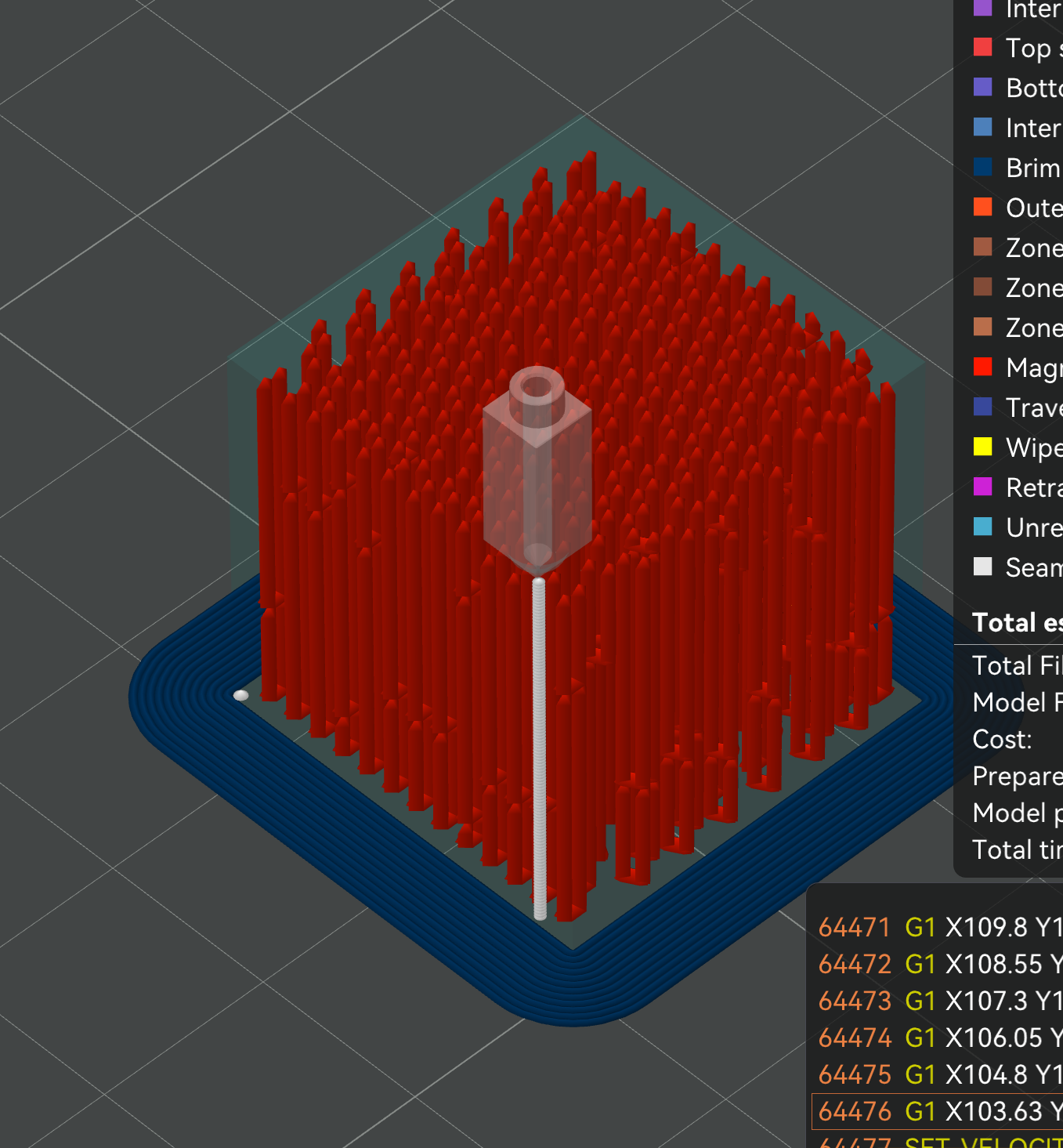
Mid-print injection in GCode preview: the nozzle (white marker) drops into a vertical channel, extrudes a column of molten plastic, lifts, and moves to the next one. Every red column is one of these injection events. They’re what turn an otherwise hollow lattice into solid vertical reinforcement.

The lattice the injections fill: top-down view of a single printed layer. The orange triangular grid is the outer Magma zone — hollow channels at this stage. The hexagonal gaps in the lattice are windows, where pairs of channels are connected so plastic can flow from one tube into its partner during injection.
Status: works in software, not yet in physical print
I want to be upfront about this. The slicer pipeline is fully functional:
- Triangle lattice generation with optional spiral interlock
- Dual-zone infill (Magma outer + configurable inner)
- Two-stage tube assignment solver (greedy + CP-SAT)
- Injection G-code with Z-slam sealing, multi-material support
- Full GCode preview with tube and injection visualization
- 40+ configurable settings exposed in the UI
What’s NOT yet working: the physical print. On my Ender, same-material plastic injected into freshly-printed cells melts the cell walls before they can seal. The math says this should work; the materials science is the open question.
I’m publishing the software now so people with better setups can experiment.
What you can try (please)
I’ve done the first three. They didn’t work for me, but might for you with better hardware:
- Lower-melt injection material — PCL (60°C melt), TPU, sugar/wax for lost-wax style applications
- Dual extruder — print cells in PETG/ABS, inject with PLA
- Higher injection temperatures — way above print temp, fast injection before damage propagates
Things I haven’t tried that might work:
- CHT or Volcano nozzles — much higher flow before pressure drop, faster injection before the cell walls heat-soak
- Redesigned injection nozzles — triangle-shaped with flat sealing faces (a lathe project for someone)
- Silicone gaskets on the nozzle tip for sealing
- PTFE or other non-stick coatings to prevent injected plastic from sticking to the nozzle
- Thermal breaks around the injection nozzle so it doesn’t conduct heat to cell tops
- Slow injection with long dwell — let the heat soak rather than melt-and-go
- Larger nozzle bore — more volume per second at lower pressure
- Post-print annealing — fuse the interfaces after cooling
- Different injection volumetric flow ratios — current default is 0.5; testing across 0.3-0.9 needed
- Different z-slam depths — currently default 0.05mm, testing up to 3.5mm might help sealing
- Variable cell sizes — current default ~5x nozzle diameter; smaller cells would print faster but require finer nozzles
If you find a combination that works, please open an issue or contact me. The community can solve this faster than I can alone.
Multi-material / multi-extruder
I attempted to wire Magma through OrcaSlicer’s multi-material and multi-extruder infrastructure:
magma_injection_filament— pick a dedicated filament/extruder for tube injection (so you can print walls in PETG and inject with PLA, for example)dual_infill_outer_filament— pick a different filament for the outer Magma zone- Tool-ordering, temperature management, and filament switching are all wired through
I have not been able to test any of this — I only have a single-extruder Ender. The code path exists and slices without errors in my testing, but real multi-material printing might surface bugs I can’t see. If you have a dual-extruder or IDEX setup, please try this and report what breaks.
Get the beta
Source: MGunlogson/OrcaSlicer (magma-infill branch)
Pre-built binaries: Releases page
Recommended starting settings
These are my current best guesses. None have produced a successful print yet — they’re a starting point for experimentation.
| Setting | Value |
|---|---|
| Sparse infill pattern | Magma Triangle |
dual_infill_enabled |
on |
dual_infill_outer_width |
5.0 mm |
Inner zone infill (sparse_infill_pattern for the inner region) |
Lightning — strength isn’t the goal here; the inner zone just needs to support the top of the part. Lightning uses the least material. |
magma_tube_height |
6 mm (max ~6mm seems to work in preview) |
magma_nozzle_outer_diameter |
3.5 mm (or 2.5 mm for finer cells) |
magma_injection_z_slam |
0.5–1.0 mm |
magma_injection_speed |
8 mm³/s |
magma_tube_fill_factor |
0.5–0.9 (start higher) |
magma_tube_solver_mode |
Basic — the CP-SAT (Refined) solver is much slower and only really helps on complex geometry |
magma_spiral_interlock |
off — see notes below |
Full configuration reference: RELEASE.md
How it works (high level)
- Slice with Magma Triangle infill. The slicer generates a triangular lattice. Adjacent cells are paired and connected by “windows” (gaps in the shared wall) at the bottom of each tube pair.
- Print normally. The printer prints each layer’s walls, perimeters, and infill — including the cell walls that form sealed tubes.
- Inject during print. At configured points in the print, the printer pauses motion, drops the nozzle to the top of a tube, extrudes molten plastic to fill the tube + its U-tube partner, lifts, and continues.
- Result. As the print finishes, every tube pair is a continuous solid column of injected plastic, mechanically interlocking with the surrounding lattice.

Close-up of the lattice from inside the part, showing the windows — every paired cell has a gap in its shared wall so plastic injected into one tube flows through and fills its U-tube partner.

Cutaway preview after slicing: the red Magma triangle tubes form the outer reinforcement zone, surrounding the solid blue inner zone (yolk). The brown band visible above the inner solid is the zone-boundary shell — perimeter walls between the two zones.

With magma_spiral_interlock on, the entire lattice rotates slightly per layer — the result is helical tube paths rather than straight vertical columns. The intent is mechanical interlock with the surrounding lattice walls (potentially better pullout resistance), but this hasn’t been measured — the actual benefit vs. straight tubes is unknown. There’s a real cost: the spiral arc effectively widens each tube footprint, so fewer full tubes fit, especially in thin sections. Default is off; turn on only if you’re specifically testing this trade-off.

Press J in the preview to toggle the zone-boundary shell overlay — the transparent volumes show the computed inner-zone region (raw vs. smoothed). Useful for diagnosing zone splitting on complex models.
The clever bits are in the solver (figuring out which cells to pair into U-tubes for maximum coverage with weak-plane avoidance), the spiral offset (so tube boundaries don’t form weak Z-planes), and the injection G-code (parking, sealing, multi-material support).
Full design documentation:
Defensive publication
The algorithms, data structures, and techniques in Magma are dedicated to the public domain via a CC0 1.0 Universal defensive publication, dated before public release.
Read it: DEFENSIVE_PUBLICATION.md
This means anyone is free to use, modify, build on, or commercialize any of the techniques. The intent is to prevent third parties from patenting these ideas later.
Why I’m releasing this in this state
I’ve been working on this for months. The software is solid. I don’t have the printer setups, materials, or shop time to characterize all the materials variables, and continuing alone would take another year of trial and error.
The community is much better at materials science than I am. The slicer is the bottleneck — once it exists, anyone with a dual-extruder Voron, a lathe and some brass, or a stash of exotic filaments can experiment in hours.
If this turns into something useful, it should belong to the community. Hence the CC0 dedication.
License
- OrcaSlicer fork: AGPL-3.0 (inherited from upstream)
- Magma algorithms and design (this repo): CC0 1.0 Universal — public domain dedication