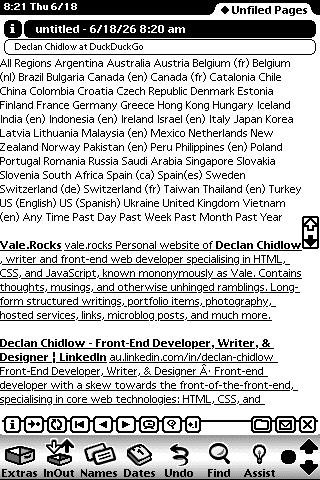
From the moment the technology arrived to allow personal digital assistants (PDAs) a connection to the internet, people started connecting them to the internet, as is the natural order of things. Initially their connections were just for the most fledgeling of information fetching, but as the ’90s progressed and the World Wide Web became a feature of the digital landscape, PDAs received browsers.
Existent from when technology permitted to when society moved on and the smartphone took reign, browsers on PDAs were some of the first and most popular entries to the mobile web but held out only briefly while the incoming technology got settled.
There can be two main ‘types’ of browsers on PDAs considered: Those which could only access i-mode (iモード), Wireless Application Protocol (WAP), and Wireless Markup Language (WML) pages and those which comply with larger web standards and interface with sites written in HTML. This article covers the latter, full web browsers.
Note
Even with web browsers as a subject, the web was in such an infancy during early years of PDA availability that much information either never reached it or has been lost since. I'm sure a wealth of information exists hidden away in archives, but it is isolated such that discovering it is difficult.
Corrections and leads are welcome.
Unfortunately, to cover every PDA released and the browsers available to each is unrealistic, so instead PDA browsers are presented here by operating system. Through the ’90s, PDAs had to make use of computer syncing systems, external modems, and dial-up to facilitate internet access. Towards the very end of the ‘90s, infrared (IR) connections became reasonably popular, where by lining up the IR port on a PDA with the one on a mobile phone, a very slow and unreliable connection could be established. Around the turn of the millennium, some devices started to receive inbuilt antennas, and expansion systems became popular – often bulky additions with Wi-Fi cards or cellular modems. By 2003, high-end PDAs began to release, with Wi-Fi and Bluetooth built-in.
EPOC
Also called SIBO or EPOC16 (in reference to being 16-bit), EPOC was developed by Psion and first released in 1989. Unlike later PDA operating systems, EPOC never developed a broad browser ecosystem.
The earliest browser available for EPOC was PsiMail Internet, which had a web browser simply titled ‘Web’. It roughly complies with HTML2, though shows tables improperly, cell by cell. It supports the display of forms and GIFs, though not JPEGs, and images default to being disabled.
They also bundled STNC HitchHiker, which was built by British start-up STNC. However, in 1999 STNC was acquired by Microsoft, who were launching their own Windows Mobile operating system for PDAs, and subsequent releases of HitchHiker on EPOC ceased.
Following this, Psion made a deal with Opera, who began supporting the EPOC in 2000 with the release of Opera 3.62 touting:
Opera 3.62 for EPOC features Web browser functionality, full colour (256 colours) support, full zooming key mapped to a range of zoom levels, 128-bit encryption, SSL 2 and 3, TLS 1.0, HTML 3.2, Support for Java Applets using EPOC native Java implementation, JavaScript 1.1, and CSS1.
Opera became the default browser on EPOC devices.
Apple Newton
The device for which the name ‘PDA’ was coined, the Apple Newton, released in 1993. With help from the 1996 Newton Internet Enabler, which included an application titled Internet Setup, a TCP/IP stack, and a NewtonScript API, the Newton could get online.
First announced as NewtonWWW before later changing its name, PocketWeb released in late 1994 and received several updates throughout the Newton’s life. Developed by TecO, it could make use of an external proxy in some cases to bypass the Newton’s limitations. Version 2.4 brought the ability to display GIFs, though other images could be loaded via the proxy.
NetHopper, which was developed by AllPen Software and released in late 1996. It has image support (defaulting to disabled), with ability to scale images to fix the screen, as well as the ability to create, edit, and delete bookmarks. A button exists to list the current webpages’ headings so they can be jumped to easily, and the browser has plug-in functionality, though it requires plug-ins for even basic functionality like support for HTTP.
NetHopper versions 3.0 and 3.2 were bundled on some Newton devices and on November 17, 1997, AllPen was acquired by Spyglass. Spyglass later dropped support for NetHopper with the announcement that Apple would be discontinuing the Newton, and were then acquired themselves by OpenTV.
Newt’s Cape, also going by Newtscape, was released by solo developer Steve Weyer in 1999. It supported HTML 2.0 (with some HTML 3.2 features), basic forms, text formatting, and image loading. The browser could also create Newton books from webpages. It was released as freeware in 2018. A tool designed to compliment Newt’s Cape, titled Hemlock, was available and compiled search results from multiple sites together.
LunaSuite Pro released in 1997 or 1998, complete with LunaSuite Web, the Newton’s most capable web browser. It adds three ways to access the web. Via the app Go-To, which lets a user directly input a URL; via Bookmarks, which provides a selection of pre-selected pages (that can also be managed); or via LunaRoamer, which is a complete browser interface. Through LunaRoamer, Go-To and Bookmarks can also be accessed. The browser supports GIF and JPEG images, including animated GIFs; audio in Sun Microsystem’s .au format; some of HTML 3.2, including frames, tables, and forms; and configurable URL filtering. Unfortunately, being the most capable browser, it pushes the Newton a bit too far at times, leading to instability.
Courier is a simple, text-only web browser for Newton OS 2.1 which first released in 2003. Unlike typical browsers, Courier treats webpages like notes in the Newton’s notepad, which itself acts like a normal notepad. There are no ‘bookmarks’ for you can save a page by simply opening a new note, almost like a browser tab. However, these tabs can be filed into folders and renamed arbitrarily, and their individual history is saved. It is a very interesting system.

Palm OS
Later known as Garnet OS, Palm OS was released in 1996 and made available on a wide range of PDAs. Before full-fledged browsers quite made it to Palm OS, web clipping apps (also called Palm Query Applications or PQAs) were popular as a method to scrape websites and display parts of their content in PDA-optimised forms. They persisted even once browsers were available, but browser’s more comprehensive capabilities largely obsoleted them.
Around the turn of the millennium, Softview brought their very rudimentary proxy browser to Palm OS.
Developed by ILINX, Palmscape was a very popular browser released in 1997 for Palm OS devices. Palmscape supports HTML 3.2, including frames and tables, and supported displaying images via a proprietary external proxy. A companion program for Windows called Palmscape Cruiser could download pages and send them to Palm OS devices for offline perusal. Sales of Palmscape ended in 2002.

After Palmscape, ILINX moved focus to Xiino, a successor to Palmscape. It kept Palmscape’s features, but introduced support for JavaScript, SSL, and a few more minor configuration options. Like with Palmscape, a companion program for Windows called Xiino Cruiser was made available.
Qualcomm had entered the Palm OS market in 1998 with their phone/PDA hybrid, the pdQ. A couple of years later in 2000, they launched Eudora Internet Suite (EIS). One part of EIS is the Eudora Web browser, which comes complete with bookmarks and offline reading capabilities. Qualcomm continued to improve their suite, releasing updates in subsequent years.
Released in late 2000, Blazer was an incredibly popular proxy browser for Palm OS 3.1 and higher. It was first developed by Bluelark Systems, who were acquired by Handspring a month after the browser’s launch. It received four major versions. Blazer 2 brought an improved interface, SSL, the ability to use proxies, and better colour display. In September 2005, Blazer 1 and 2 were rendered inoperable due to the proxy service being turned off. Blazer 3 was a complete overhaul, moving from a proxy system to using Access’s NetFront 3.0 engine. Blazer 4 improved the interface, integrated a VPN, allowed saving pages, and added bookmarks. Release 4.3 added a fast mode, which disabled images and/or CSS for quicker page loading. Blazer 4.5 was the last version of the browser to be released, and added video playback support via Kinoma Video Player.
Palm OS 5 received an inbuilt browser when it released in 2002 in the form of Access’ NetFront 3.0 browser. The first ARM-native, proxy-less browser for Palm OS, it supports HTML 4.01, CSS, JavaScript 1.5 and other web standards. Access would later acquire PalmSource, who owned the rights to Palm OS, in 2005, turning it into Garnet OS.
Also in 2002, the company Novarra released WebPro (also written Web Pro) for Palm’s high-end, business-oriented Tungsten line of PDAs. It received at least three major versions. Prior to WebPro, Novarra had a browser titled PocketScape and then Novarra WirelessWeb Enterprise Suite, which included a proxy-based browser. It is unclear if these browsers were built upon each other or the base for WebPro. Nokia acquired Novarra in 2010.
In 2007, a developer by the name of Donald Kirker released the beta of Universe 3. The open-source browser is built upon WAPUniverse, a previously developed browser which only supported Wireless Application Protocol content. Universe 3 is feature-packed, with support for a range of image formats, private browsing functionality, up to three tabs, and an integrated RSS reader. Unfortunately, development fizzled out, and it never left beta.
Symbian OS
Starting its life as the 32-bit version of EPOC, often referred to as EPOC32, it would be renamed Symbian OS in 1998 and first released on devices in 1997. As far as dedicated PDAs were concerned, they mainly continued running EPOC with the same browsers.
When Symbian came into being in 1998 and Symbian Limited was established as a partnership between Psion, Nokia, Ericsson, and Motorola, focus very much shifted to ‘smartphones’, or, as was the nomenclature at the time, ‘communicators’. As such, dedicated PDAs largely moved from Symbian to Palm OS or Windows Mobile.
Windows Mobile
Windows Mobile first released in 2000, based on Windows CE. It first released as the Pocket PC 2000 operating system but was later rebranded and spread to a wide range of PDAs by a variety of manufacturers.
Pocket Internet Explorer was first released in late 1996 for Windows CE 1.0. Despite the name, the only association Pocket Internet Explorer has with the version of Internet Explorer for desktop is the name itself. It was written from scratch to be lightweight and didn’t use Internet Explorer’s Trident layout engine. It followed Microsoft’s naming scheme of just prefixing everything PDA related with ‘Pocket’. Pocket Word, Pocket Excel, Pocket Streets, Pocket MSN, etc.
A minor update, version 1.1, was released, adding support for cookies, HTTPS, and SSL. Version 2, in late 1997, added offline browsing, image resizing, and improved HTML support to include frames and tables. Version 3 from mid-1998 added JScript support and more secure protocols. Version 4 was a major release, introducing support for CSS, ActiveX, and VBScript, as well as improved HTML and HTTPS support. A slightly modified version was released for Pocket PC 2002 with WAP support. Very little information exists about Pocket Internet Explorer 5.

It was later rebranded to Internet Explorer Mobile with version 6. Besides the name change, version 6 integrated Adobe Flash Lite 3.1 (based on Flash 8), Jscript v5.7 from Internet Explorer 8, the ability to wrap text for improved mobile display, better cursor navigation, easy switching between mobile/desktop versions of pages via User Agent manipulation, and multiple zoom levels. It also overhauled the interface to be more touch-friendly and added gesture support. Later, Internet Explorer Mobile and its bespoke lightweight engine would go on to be used on the Windows Phone platform.
Microsoft made brief attempts to release a proxy-only browser which rendered pages server-side to Windows Mobile via their Deepfish experiment. It released in 2007 in an invite-only capacity and never grew beyond a technology preview within Microsoft Live Labs. Desktop versions of content were presented, with users expected to pan around pages to view it. It did not support interactive features, such as ActiveX controls, animations, AJAX, cookies, JavaScript, or HTTP POST.
In 2001, Bitstream Incorporated released ThunderHawk, a proxy browser. Instead of trying to format or alter pages for small PDA screens like some other browsers, ThunderHawk displays the full desktop version of sites. Feature support depended on device especially as it was also ported to Symbian and Java ME, but it had incremental rendering, persistent cookies, history, bookmarks, and other comprehensive browser features at that time usually limited to desktop. To bypass the issues inherent to displaying a page built for desktop on a small screen, the browser has a split-screen mode allowing the full page to be viewed on one part of the screen alongside a zoomed-in version on a lower part of the screen. It received steady updates until 2008, improving page rendering, the interface, and making minor improvements.
Also in 2001, the proxy browser SoftView received a port to Windows Mobile.
A version of Firefox ported to PDAs as Minimo, a portmanteau of ‘mini’ and ‘Mozilla’, became available in 2004. Bits of Firefox were stripped out, and the interface was overhauled so that it would work on such minimal devices. It has support for JavaScript and AJAX, multiple tabs, widgets and extensions, RSS, and secure protocols. Though very capable and compliant to then-modern web standards, due to being built upon full-desktop Gecko rather than an engine designed for embedding and as a result of being crammed onto such low-power devices, its performance is poor. The project was dropped in late-2007, though development had slowed before then.
Opera Mini was available, though not natively on Windows Mobile at first. Users wanting to access the browser instead had to use a Java emulator or wrapper to access the Java Platform, Micro Edition (J2ME) version on their PDAs. This changed in 2010, with the beta release of a native version of Opera Mini 5 for Windows Mobile versions 5 and 6. As with the J2ME version, it has features including tabs, password management, and bookmarks. It came out of beta with Opera Mini 5.1 in September of 2010.
A native, non-proxy version of Opera also became established in the form of Opera Mobile, which released for Pocket PC devices in 2006. It had previously been made available for Windows Mobile-running smartphones. Unlike Opera Mini, Opera Mobile renders pages on-device. Opera Mobile 8.65 brought Macromedia Flash 7 and various interface and usability improvements.
Another proxy-only browser was Skyfire, which released in 2008 and also used a proprietary service provided by Skyfire to render websites with Firefox before displaying them on the user’s device. Alongside the version for Symbian OS, Skyfire retired version 1.0, which was available on Windows Mobile in late 2010.
In 2002, NetFront released a version of its proprietary browser for Windows Mobile devices, supporting HTML 4.01, CSS and some CSS2, JavaScript 1.5, tabbed browsing (up to five), images, bookmarks, cookies, and other such technologies. It had specific considerations for small screens, such as adapting tables to display vertically to avoid horizontal overflow. By v3.3 it had support for Java and Macromedia Flash, as well as RSS/Atom support and machine translation capabilities.
In 2008, Torch Mobile released Iris – a native browser for Windows Mobile using the WebKit engine. It supports tabs, bookmarks, and other browser features, as well as all the web standards expected from WebKit, including SVG, XPath, and XSLT support. The interface is optimised for touch, with large, simple buttons. Slow-performing, but with great support for web technologies, BlackBerry Limited (then known as Research In Motion) acquired Torch Mobile in 2009 and ceased development of the browser.
For Windows Mobile 6, Mozilla made another port of Firefox under the codename ‘Fennec’. There were three public alpha releases. The first laid significant groundwork with a lot of solid features. It has tagged bookmarks, tabbed browsing, Firefox’s ‘Awesome Bar’ (the address bar), support for add-ons, password management, pop-up blocking, a download manager, zoom, and other features. The next release, Alpha 2, polished the experience and added a JavaScript error console. Alpha 3, which was the final publicly released version of the browser, improved the interface and browser performance, added kinetic scrolling and scrolling of frames, improved zooming, and added support for multiple screen sizes. Development of the browser ceased in 2010 after Windows Mobile 7 – a major update targeting Windows Phone – was announced to not support native applications.
Due to the success of smartphones, later browser releases for Windows Mobile could sometimes be installed on non-phone PDAs but were much more oriented towards the incoming technology of smartphones.
Zaurus
In late 1993 Sharp Corporation launched their Zaurus line of PDAs in Japan, initially running a proprietary operating system. During this time, the Zaurus mainly ran a bespoke browser from Sharp itself. Around 2000, Compact NetFront by Access, in partnership with Sharp, released, bringing a much more complete and comprehensive browser experience.
Beginning with the SL series of Zaurus PDAs in 2002, Sharp switched from a completely proprietary OS to a Linux distribution. The SL series was also the first Zaurus device to be sold commercially outside of Japan by Sharp. Following the switch to Linux, more browsers became supported. Both Opera and NetFront were available, with features expected for PDAs of the era.
Picsel Technologies released Picsel Browser for some of these machines. Picsel Browser uses a technology they called ePAGE, which renders not only HTML but also PDFs, Microsoft Office documents, images, Flash files, and text files to a bespoke format so they can be displayed. People were impressed by the browser, though noted that the rendering system made some interactive elements static. The browser features zooming and kinetic scrolling.
As a result of Zaurus’s success, Linux base, and open platform, people created new ROMs and software for the device. Popularly installed were OpenZaurus, Ångström, Cacko, and pdaXrom. This allows running full desktop environments capable of running full desktop browsers, essentially turning Zaurus devices into mini-laptops and bringing the full range of browsers available on Linux to the devices.
Personal digital assistants faded away following smartphones but do still exist in some capacity. Modern variants of the idea exist and are used in-industry, though almost all are extremely limited and specific to the point of lacking a browser, or are more general and run a major operating system onto which a variety of web browsers can be installed.