
When you use your smartphone or laptop, it is easy to forget the sheer absurdity of the physical reality underneath. Behind that seamless experience lies centuries of effort from physicists, chemists, mathematicians, engineers, programmers, and designers. Inside your device is a slice of literal rock, purified to near perfection and carved with microscopic circuits. By just controlling the flow of electrons inside these circuits, we are able to make the rock calculate, remember, and think for us, sparing us the mental effort. A single operation takes less than a nanosecond, allowing your device to perform billions of calculations in the time it takes you to blink. This all works so seamlessly that, as users, we are spared from all the complexity, freeing us to simply focus on the task at hand.

Yet, while we can ignore how it all works underneath, doing so is becoming increasingly difficult as software dominates more of our lives. In fact, the digital world now influences our daily decisions just as much as the physical world. Just as we learn the basics of physics or biology to understand the physical environment, understanding software has become essential to navigate our digital environment. Without this basic literacy, we risk being passively managed or exploited by systems designed to capture our time and attention, preying on the anxieties that stem from not knowing how they work. With this understanding and clarity, we gain the agency to use technology better, make informed decisions about our digital safety, and even build software for our own specific needs.
My aim with this article is to strip away the “magic” in software and computers, showing that understanding how they work is not a privilege locked behind a computer science degree. To do this, I will avoid jargon as much as possible, introducing only the necessary concepts and building them up using first-principles thinking. Under the hood, computing is not a dry list of technical specifications, but a fascinating story of human ingenuity and practical problem-solving, where each new layer builds upon the last. By following this story, you can build clear mental models, gaining better clarity on what happens behind the scenes when you use your device. You’ll understand not just how the technology functions, but also the invisible safeguards built in to protect you. I have kept this article as concise as possible, retaining only the necessary historical context needed to show how these ideas took shape.
Manipulating Physics to Do Our Math
Most of our problem-solving in the world involves mathematical calculations, whether it is predicting the weather, calculating flight paths for planes, or checking the structural integrity of bridges. Originally, “computers” were just rooms full of mathematicians performing these calculations by hand, and some calculations took days. During wartime and the space race, the stakes grew even higher, calculating the trajectories of ballistic missiles and space rockets required solving thousands of complex equations. Since even a minute error could cause a rocket to explode, send a missile off target, or lead to the collapse of a bridge, these calculations had to be verified again and again. This process was very slow, expensive, and error-prone.

There was an urgent need for a machine that could perform calculations reliably and quickly. Scientists searched for physical processes that could simulate counting, and one such early attempt was the mechanical calculator, built from interlocking gears and levers. But it had problems of its own, mechanical parts wear out over time, require constant maintenance, and are fundamentally slow.

The simulator below demonstrates the fundamental building block of the mechanical calculators: a row of numbered wheels, one per decimal place (Hundreds, Tens, and Ones), exactly like the odometer in a car. Adding one turns the Ones wheel forward by one digit. When it rolls over from 9 to 0, a carry pin engages and pushes the Tens wheel forward by one digit. If the Tens wheel was itself at 9, its own carry pin engages too, dragging the Hundreds wheel along in the same motion, every wheel meshed through a carry pin turns together.
Note that the wheels aren’t in constant contact like ordinary gears (that would lock them all to the same rotation speed); the carry pin only reaches in and engages the next wheel for that brief instant once every ten turns. We could support larger numbers by adding more wheels, and you can imagine how we could do other computations by changing the direction of rotation or adding more mechanical parts.
The real leap came when we moved from mechanical parts to electricity, employing electrical switches as our basic building blocks. We aren’t talking about the physical light switches in our homes, but rather switches controlled automatically by applying voltage. An electrical switch has two states: open (no current flows, representing 0 or false) and closed (current flows, representing 1 or true).
By wiring these switches together in different ways, we can make logical decisions. The most fundamental of these configurations are called logic gates:
- AND gate (Series): If we place two switches one after the other, electricity only flows if Switch A AND Switch B are closed.
- OR gate (Parallel): If we place two switches side by side, electricity flows if Switch A OR Switch B is closed.
- NOT gate: A switch designed to be “normally closed” (letting current through by default), which disconnects and cuts off the current only when voltage is applied to it.
We can use a combination of these three gates to build any logical rule, no matter how complex. Think of any logical rule as a table mapping combinations of inputs to an output (either ON or OFF). To recreate this table using hardware, we only need to focus on the rows where the output is ON.
To build a circuit for any ON row, we use an AND gate to detect that exact combination of inputs. If an input is supposed to be OFF in that row, we run it through a NOT gate first. This flips the OFF signal to ON, satisfying the AND gate (which only fires when all of its inputs are ON).
Finally, since the overall output should turn ON if the first target combination OR the second combination is met, we feed all the row detecting AND outputs into a single OR gate.
Because every logical rule can be represented as a table, and any table can be built using this exact method, the trio of AND, OR, and NOT is mathematically complete, capable of representing any logical rule imaginable.
To see this in action, the simulator below builds the XOR (Exclusive OR) rule, which turns the output ON only when the inputs are different. As we will see in the next section, this is the exact logic needed to perform binary addition.
Since switches only have two states, we cannot represent numbers using our usual ten digits (0 to 9). Instead, we use binary (base-2), which relies entirely on 0 and 1 (each digit is called a bit, short for binary digit).
Counting in binary works exactly like the mechanical gear counter, but with only two digits. In our familiar decimal (base-10) system, adding forces a rollover to with a carry of , forming . In binary (base-2), because is the highest digit, adding forces an immediate rollover to and carries . It is written as (which represents the decimal number ).
To see how these switches perform math, let’s look at what happens when we add two single-bit numbers, and :
- (Sum: , Carry: )
- (Sum: , Carry: )
- (Sum: , Carry: )
- (Sum: , Carry: )
Notice the patterns:
- The Sum digit is
1only when one input is on but not both. This is exactly the behavior of an XOR (Exclusive OR) gate. - The Carry digit is
1only when both inputs are on. This is exactly the behavior of an AND gate.
The simulator below wires the XOR circuit you just built, together with an AND gate, into this half-adder: toggle A and B to see the sum and carry bits update together.
By wiring these gates together and feeding the carry output into the next bit’s input, we can add binary numbers of any size. This is called a ripple-carry adder, the carry from bit 0 cascades into bit 1, which may itself produce a carry into bit 2, and so on down the chain before the final sum is stable. Since subtraction is just adding a negative number, and multiplication is repeated addition, every arithmetic operation reduces to combinations of these basic gate circuits.
In early computers, we implemented these switches using vacuum tubes. They resembled sealed glass lightbulbs, containing a heated filament and a metal plate sealed inside a vacuum. Heating the filament gives its electrons enough energy to boil off into the vacuum, a process called thermionic emission, and the positively charged plate pulls them across the gap. A third element, a wire mesh grid, sits between the two. Applying a negative voltage to it repels the electrons back before they can cross, cutting off the current; releasing that voltage lets them flow again. This is a fast switch with no moving parts.

But as engineers tried to build larger, more capable machines, they hit a physical bottleneck. Vacuum tubes were bulky, consumed immense energy, and failed constantly. To innovate further, they couldn’t just optimize the fragile glassware; they had to go back to physical fundamentals and invent a better switch. This led to the invention of the first transistor in 1947, a solid-state electronic switch that was smaller, cooler, and far more reliable than vacuum tubes. That first device proved a solid piece of material could switch current with no vacuum and no hot filament.
The refined design used in virtually every chip today came later, voltage is applied to a gate electrode sitting on a thin insulating layer above the silicon. That voltage generates an electric field that reaches through the insulator and pulls the silicon’s own electrons up to its surface, forming a thin conductive channel between two terminals, the source and drain; removing the voltage collapses the channel and cuts the current, switching current on or off with no moving parts at all.

Over the following decades, as we developed methods to print thousands of these transistors directly onto a silicon wafer, we created the integrated circuit (or chip). The size and spacing of these printed transistors is referred to as the process node (or manufacturing process), measured in nanometers (nm). The smaller the process node, the smaller each transistor, allowing us to squeeze more of them into the same physical space. Today, the smartphones in our hands pack a tremendous amount of computing power and memory while consuming only a fraction of the energy of early supercomputers, which occupied entire rooms and generated massive amounts of heat.
Translating Reality to Bits
We have seen how two-state switches allow us to represent and calculate numbers using the binary system. But we don’t want to restrict ourselves to just numbers and logic; most of our reality doesn’t arrange neatly as numbers. For example, sound is a continuous fluctuation of air pressure. Early telephone lines carried sound by translating the physical vibrations of a speaker’s voice into equivalent fluctuations in electrical voltage (using a microphone diaphragm), and doing the reverse at the listener’s end (using an electromagnet and speaker). But how do we represent this continuous, fluctuating electrical wave using logic gates?
The insight came when scientists at Bell Labs, pioneers of communication technology, hit a bottleneck with telephone lines. They couldn’t send multiple signals simultaneously as they would interfere with each other. They also had to use amplifiers at different points to compensate for the signal weakening over distance. Noise could be introduced by any environmental interference, and amplifiers would boost even the noise. They realized that sending voice as a continuous analog wave was not that reliable, and there had to be a better way.
Claude Shannon, a mathematician at Bell Labs, formalized this transition in his 1948 foundational paper on Information Theory. He popularized the term “bit” (binary digit) and, building on earlier work by Harry Nyquist, established the sampling theorem: if you sample a continuous analog signal at a high enough frequency, taking discrete measurements at regular intervals, you can digitize it and reconstruct it perfectly at the destination. The number of bits used per sample, the bit depth, determines how many discrete quantization levels are available: 1 bit gives 2 levels, 8 bits gives 256. At relay points along the line, an analog amplifier boosts both the weakened signal and any accumulated noise together. A digital regenerator does something better, it reads each incoming pulse, decides which level it represents, and retransmits a clean copy, discarding all noise in the process.
Play with the simulator below, tweaking noise and other parameters to see how sampling and quantization reconstruct analog waves and filter out transmission noise.
Measuring Digital Information
Once we represent information as binary bits, we need units to measure it. A single bit (0 or 1) is too small to be useful on its own, so we group them, and each unit is easiest to remember by what it typically holds:
- Byte: a group of 8 bits, giving possible values — enough to store a single text character (like the letter
A). - Kilobyte (KB): about a thousand bytes (or in binary convention) — a page of plain text.
- Megabyte (MB): about a million bytes — an MP3 song or a high-resolution photo is a few megabytes.
- Gigabyte (GB): about a billion bytes — a high-definition movie or a video game.
- Terabyte (TB): about a trillion bytes — a modern hard drive stores one or two.
Now that we can represent reality as bits and bytes, how do we build a machine to process them?
Building the Universal Computer
In the earliest computers, the hardware was the program. To perform a specific task, such as calculating the trajectory of an artillery shell, engineers had to configure a custom physical circuit. Changing the task meant physically rewiring the connections or flipping heavy switches, a tedious process that required immense time and effort and was highly prone to error.
The breakthrough was the stored-program computer. Before it, machines like the ENIAC (Electronic Numerical Integrator and Computer, 1945) had to be physically rewired between tasks, operators plugged and unplugged cables to reconfigure the circuits for each new problem.

In 1837, Charles Babbage had designed a mechanical general-purpose computer, the Analytical Engine. Its architecture consisted of a mill (a mechanical computation unit that performed addition, subtraction, and so on), a store (stacks of interlocking vertical gear wheels representing digits), and programs on punched cards. But it was never completed. Ada Lovelace, collaborating with Babbage, wrote what is considered the first algorithm intended for the machine and recognized that it could manipulate symbols, not just numbers.
A century later, Alan Turing proved theoretically that a single Universal Turing Machine could simulate any computation by reading instructions from memory. John von Neumann’s 1945 architecture turned this into a concrete design, a CPU (Central Processing Unit, also referred to as a processor) that reads both data and instructions from the same memory over a shared bus. A bus is just a set of wires allowing data transfer between the components of a computer or any external devices. Virtually every computer built since follows this structure.
Instead of hardwiring a specific circuit for a single type of calculation, we build a general-purpose processor with standard logic circuits that can be reused for different operations. We tell the processor what to do by feeding it operation codes (or opcodes).
How does a binary number like 0001 physically activate a circuit? It does so through an instruction decoder, a circuit made of logic gates. For example, a decoder for a 2-bit opcode has gates wired to detect specific combinations, one gate fires only when it sees 00, another only for 01, and so on. When a specific gate fires, it acts as a physical router that sends electrical current to the corresponding part of the CPU, like opening the path to load data from memory or activating the addition circuit.
All the circuits described so far are combinational, their output is a pure function of their current inputs, with no memory of the past. The moment an input changes, the output changes. This raises an obvious question, how does a circuit hold a value over time, remembering its state even after the input signals are removed? Without this ability, a processor cannot execute multi-step instructions, run loops, or store intermediate results.
The solution is feedback. Take two NOR gates (NOT-OR, which output a 1 only when both inputs are 0) and wire each gate’s output into the other gate’s input. The result is an SR latch, named for its two inputs, Set (forces the stored value to 1) and Reset (forces it to 0). Try the two buttons below, turning Set on drives the output to 1, and because that output loops back as an input to the other gate, the 1 keeps re-confirming itself even after you turn Set back off. That self-sustaining loop is the memory. The latch exposes this stored bit as , alongside its opposite, (read “Q-bar”), which is handy elsewhere in the circuit whenever the negated value is needed.
Now try turning both Set and Reset on at once. Both gates get forced to 0, so and stop being opposites, breaking the one guarantee the latch is supposed to provide. Worse, whichever one you turn off last decides the final state, an outcome that depends on tiny, unpredictable timing differences rather than your input. This is the SR latch’s fundamental flaw, Set and Reset must never both be 1.
To close off that flaw, we build a D flip-flop (where D stands for Data) on top of the same latch. Instead of exposing Set and Reset directly, we derive them from a single input , so Set only ever equals and Reset only ever equals its opposite, . Since and can never both be 1, Set and Reset can never both be 1 either, the forbidden state is designed out entirely.
To coordinate when this update happens, we gate it behind a clock signal, a control wire that steadily pulses between 0 and 1 like a heartbeat. The flip-flop only updates on the precise rising edge of a clock tick (the transition from 0 to 1, represented as ) rather than continuously. This is why an SR latch is called level-triggered (its output tracks its inputs the whole time they’re active) while a D flip-flop is edge-triggered (it grabs ‘s value only at that instant and holds it, ignoring any changes to until the next tick).
This is the fundamental single bit storage element. A register is simply a bank of flip-flops, one per bit, used by the CPU to hold the numbers it is actively calculating.
By scaling this storage concept up, wiring millions of these basic memory cells into a massive, addressable grid; we get main memory (commonly known as RAM, or Random Access Memory).
Notice, though, that this memory has a fundamental limitation, the latch’s feedback loop only holds its bit while current flows through the gates. Cut the power, and every bit in RAM vanishes. Memory built this way is called volatile.
For data that must survive a power off, your photos, documents, and the programs themselves; we need storage (also called secondary storage), devices that record bits in a physical state that persists without power. Hard drives do this by magnetizing microscopic regions on a spinning platter; modern SSDs (Solid State Drives) do it by trapping electrons inside insulated flash cells. Storage is vastly larger and cheaper per byte than RAM, but also thousands of times slower to access.
This speed gap creates a division of labor that explains much of what you experience daily, programs and files live in storage, and are copied into RAM to be worked on. Launching an app means loading its instructions from the drive into memory; saving a document means writing it back from memory to the drive. It’s why unsaved work is lost when a program crashes, while saved files survive even a total power failure.
This raises a chicken and egg question, if RAM is empty at power on and programs must be loaded into RAM to run, what loads the very first program? The answer is a small third kind of memory, a ROM (Read-Only Memory) chip whose bits are permanently fixed during manufacturing. The CPU is hardwired to start executing from the ROM’s address the instant power arrives. The small program stored there, called firmware, does just enough work to find the drive and copy the operating system (the core software that coordinates the computer) from storage into RAM, then hands over control. Every boot up you have ever watched is this chain running: ROM, then firmware, then the operating system loading into memory.
With a way to store not just temporary calculation results, but also long lists of instructions, we finally have everything needed to implement the stored-program computer. We no longer need to physically rewire the machine to change its task. Instead, we can change the computer’s behavior simply by loading a new sequence of instructions into memory. This is the leap that created software. (While a specific sequence of instructions designed for a task is called a program, software is the broader term representing these programs and the data that controls the hardware.)
Every processor consists of three core components:
- The control unit: reads instructions from memory and directs the flow of electricity to activate specific circuits.
- The ALU (Arithmetic Logic Unit): a bundle of logic gates that performs calculations.
- The registers: immediate, high-speed storage slots.

These components interact with external memory over a set of shared wires called the bus. The processor executes a continuous loop: fetch an instruction from memory over the bus, decode it, and execute it in the ALU, writing the results to registers. This loop runs billions of times per second.
A tiny crystal oscillator, a slice of quartz that vibrates at a highly precise frequency when electricity is applied (just like in your wristwatch), emits an electrical pulse at a fixed frequency we call the clock speed, measured in gigahertz (GHz). Each pulse marks the boundary of one cycle, and each cycle advances the fetch-decode-execute loop by one step. A 3 GHz CPU completes roughly three billion of these steps per second.
In reality, modern processors are vastly more complex than this simple sequential model. To bypass physical speed limits, they use pipelining (overlapping the fetch, decode, and execute stages of multiple instructions like an assembly line), out-of-order execution (running instructions as soon as their input data is ready, regardless of their order in the code), and branch prediction (guessing which way a conditional jump will go to keep the pipeline full). They also rely on layers of high-speed cache memory because fetching from external RAM takes hundreds of cycles. However, this sequential model remains the fundamental logical abstraction that programmers write for.
To execute instructions sequentially, the CPU uses a special register called the program counter (PC). It holds the memory address of the next instruction to fetch. After each fetch, PC advances to the next address automatically. The fetched instruction is held in an instruction register (IR) while the control unit decodes it and routes electricity to the correct circuit.
To repeat actions or make decisions, we use a jump instruction. Jumps overwrite PC with a target address. For conditional jumps, comparison instructions set a zero flag (Z) in the ALU. When two values are equal, Z becomes 1. A JNE (jump if not equal) instruction checks Z and only takes the jump if Z is 0. With just these mechanisms — sequential advance, comparison, and conditional jump — we can build any loop or branching logic. The simulator below shows a simple countdown timer, writing each value to a memory-mapped output address (where a write to a specific memory address physically triggers a peripheral 7-segment LED display).
On our laptops and smartphones, we have a large grid of tiny, color changing light units called pixels (short for picture elements) instead of a simple 7-segment display. Just like the display in our simulator, a modern screen is controlled using memory-mapped addresses. The computer reserves a region of memory (called a framebuffer) where each address corresponds to a specific pixel coordinate on the screen. Drawing a user interface is simply the CPU writing color values to these addresses fast enough that they appear as a smooth, moving image.
Each pixel’s color is encoded as three separate bytes, red (R), green (G), and blue (B); each ranging from 0 to 255. By mixing these three intensities, the display hardware produces any color. So the framebuffer stores 3 consecutive bytes per pixel, R at one address, G at the next, B at the one after. Each tiny pixel contains three even tinier subpixels, one per channel, whose physical light-emitting elements blend together at normal viewing distance into the single color you see.
So far, information has only flowed outward, from memory to the screen. Input travels the same bus in reverse. When you press a key, the keyboard sends an electrical signal called an interrupt to the CPU. The CPU pauses its fetch-decode-execute loop, jumps to a small handler routine that reads the key’s code from the device (over memory-mapped addresses, just like the display, but reading instead of writing), stores it, and resumes exactly where it left off, all in less than a microsecond. A mouse click, a touch on the screen, or data arriving from the internet reaches your programs the same way. The interruption is invisible to the running program, yet it is how every input you make finds its way in.
This completes the machine, a processor executing instructions, memory holding both program and data, and interrupt-driven pathways for output and input. Before we climb to the next layer, it is worth seeing where the hardware story itself went next. Engineers pushed clock speeds aggressively through the 1990s, but above roughly 4 GHz, the chip dissipates more heat than can be removed. Rather than fighting the heat, the industry moved to multiple cores, several independent processors on one die, each running its own instruction stream. More cores don’t make a single sequential task faster; they allow more tasks to proceed in parallel.
When general-purpose scaling slowed, the industry pivoted again, this time toward specialized silicon. Instead of one processor design that handles everything, modern chips dedicate regions of the die to specific workloads, GPUs (Graphics Processing Units) run thousands of simple calculations in parallel, and neural accelerators are purpose-built for the matrix arithmetic behind AI models. These circuits trade the CPU’s flexibility for raw throughput on one class of problem, and that trade is what made training and running today’s AI models feasible. The pattern from the vacuum tube repeats, hit a physical wall, then change the approach rather than pushing harder against it.
None of this means the transistor is near retirement. Quantum computers, despite the headlines, are not faster general-purpose computers; they are a fundamentally different kind of machine that exploits quantum effects to attack a narrow class of problems, such as simulating molecules or factoring the large numbers behind certain encryption schemes, and they would be useless for running your browser. For everything described in this article, the transistor remains the foundation, and engineers keep advancing it, stacking components vertically, refining transistor geometry, and packaging multiple specialized dies into a single chip.
Writing Software in English
A processor only understands binary. Writing software originally meant manual lookup of binary opcodes. To simplify this, programmers wrote a translation program called the assembler. It maps human-readable mnemonics (like ADD i) directly to their binary equivalent.
Grace Hopper built the first compiler in 1952, the A-0, proving that programs could translate human-readable code into machine instructions automatically, a concept widely doubted at the time.
This created a compounding feedback loop. Early compilers were hand-written in assembly, but once a language became expressive enough, its own compiler could be rewritten in that language, a process called bootstrapping, making the compiler self-hosting. The C compiler is written in C. The Go compiler is written in Go. Software was now being used to build better software.
The same principle extended to hardware. Designing a chip with billions of transistors by hand is not a realistic possibility. Engineers describe circuits using hardware description languages (like Verilog), simulate them in software, and use Electronic Design Automation (EDA) tools to automatically generate the physical layout. The Intel 4004 in 1971 had 2,300 transistors, possible to verify by hand. The Apple M1 has 16 billion. The chip design tools that made that possible are themselves software, running on earlier chips. Without software, we could not design the hardware that runs software.
Because assembly is tied to the physical design of a specific chip, code written in one processor’s assembly will fail to run on another. To solve this, we created high-level languages like C, Fortran, or Python. These languages let us express logic using familiar abstractions, like variables, loops, and functions instead of registers and jumps.
At this level, programming is less about managing hardware and more about designing algorithms, step-by-step logical instructions to solve a specific problem (like sorting a list of names or finding the shortest route on a map). An algorithm is the abstract concept, while a program is the concrete implementation of that algorithm in a specific programming language (the logic implemented in C or Python). By writing code in a language closer to human speech, software becomes far easier to write, read, and maintain.
For example, the abstract algorithm for our countdown from the simulator is simple:
- Start with a number (5).
- If the number is zero, stop.
- Otherwise, subtract 1 and repeat from step 2.
To turn this algorithm into an executable program, we translate these steps into a programming language. In C, we can write it using a simple while loop:
int x = 5;
while (x != 0) {
    x = x - 1;
}
The compiler translates this high-level loop into an equivalent sequence of assembly instructions like the ones we ran in the simulator, handling the registers and jumping details for us. To help you follow along, I have added explanatory comments next to the instructions (in assembly, any text after a semicolon is a comment, notes left by programmers to document the code for others, which the assembler ignores when processing the assembly code).
; Assembly equivalent of the C loop above (with output)
LOAD  #5      ; Set initial value: acc = 5
loop:
STORE result  ; Save value to memory (output)
SUB   #1      ; Subtract 1: acc = acc - 1
CMP   #0      ; Compare accumulator to 0
JNE   loop    ; If not zero, jump to 'loop'
STORE result  ; Display the final 0
Play with the compiler mapping simulator below. Switch between the tabs to see how variables, math, loops, and conditionals in a high-level language are translated into low-level assembly instructions by the compiler.
Consider reading a text file. In C, you must manually request a handle from the operating system to open the file, set aside a temporary block of memory (called a buffer) to hold the characters, read the bytes into it, and close the file when you’re finished.
// Open the file "notes.txt" in read-only mode
FILE* file = fopen("notes.txt", "r");

// Set aside 256 bytes of memory to hold the text
char buffer[256];

// Read up to 256 bytes from the file into the buffer
fread(buffer, 1, 256, file);

// Close the file to free up system resources
fclose(file);To understand what is actually happening, every character stored in a file is mapped to a number using a standard encoding called ASCII (American Standard Code for Information Interchange). The letter H maps to 72, e to 101, and so on. A special byte, the newline (\n, value 10), marks where one line ends and the next begins. Say notes.txt contains the single line Hello. When C reads the file, it loads these raw bytes into the buffer in memory, one after another at sequential addresses.
contents of notes.txt loaded into memory
each cell is one byte — the newline byte (10) marks where the first line ends
Writing these lines of code every single time we want to read a file would quickly become exhausting. To avoid repeating ourselves, high-level languages allow us to package instructions into reusable blocks called functions.
A function is simply a named block of code that performs a specific task. By wrapping a sequence of instructions inside a function, we can run them all at once just by calling its name. For example, we can wrap our C file reading code into a custom function definition.
char* read_file(char* filename) {
    FILE* file = fopen(filename, "r");
    // Allocate 256 bytes of memory dynamically to hold the text
    char* buffer = malloc(256);
    fread(buffer, 1, 256, file);
    fclose(file);
    return buffer;
}
Now, anyone wanting to read a file doesn’t need to know about file handles, buffers, or byte offsets. They can simply call the function and free the memory when finished:
char* text = read_file("notes.txt");
// ... use the text ...
free(text); // Release the memory back to the system
That is what functions do, give a name to a procedure so you can reason at a higher level without holding the implementation details in your head.
Python, as a higher-level language, takes this concept of abstraction way too seriously.
text = open("notes.txt").read()One line compared to a complex, multi-step process in C. Python’s open().read() is still opening a file handle, growing a buffer as it reads until EOF, and releasing it afterward. The CPU is still doing the same work but the language handles the buffer management, resource cleanup, and all the error handling internally. While C is high-level compared to assembly, Python allows us to write programs at an even higher level of abstraction by managing memory and resource cleanup for us. This simplicity is why Python became so popular in academia and research. For instance, most machine learning code is written in Python, while the performance-critical parts underneath are written in C or C++ and called from Python.
To understand why there is such a performance difference between them, and why we still need C or C++ underneath Python for the heavy lifting, we have to look at a fundamental difference in how these languages execute. C is a compiled language. Before you run a C program, a compiler translates the entire source code into native binary machine code for your specific CPU. When you run it, the processor executes it directly at maximum speed.
Python, on the other hand, is an interpreted language. Instead of being translated ahead of time into native machine code, your script is handed to a program called an interpreter, which carries out each step itself. (The standard Python interpreter does first convert your script into a compact internal format called bytecode, but that bytecode is still executed by the interpreter, instruction by instruction, not by the CPU directly.) Think of it this way, with a compiled language like C, your code runs directly on the CPU. With an interpreted language like Python, your code is just input data for another program (the interpreter), and that extra layer of indirection on every single operation introduces performance overhead. That extra work is the price we pay for convenience.
C and Python are just two examples in a massive ecosystem of high-level languages. Today, we choose different languages depending on our needs: JavaScript or TypeScript for interactive web applications, Go for highly concurrent backend systems, and Rust for systems programming where performance and memory safety are both critical.
This choice is heavily guided by the cost of failure. In a typical web application, the stakes are relatively low; we can afford to make mistakes because a bug usually just means a broken page that can be fixed with a quick update. But if a bug occurs in an aircraft, a medical device, or a nuclear reactor, the consequences can be fatal. In safety-critical systems, we choose languages and engineering practices that prioritize strict compile-time verification, memory safety, and deterministic behavior, even if they are harder to write.
Furthermore, programming in the modern world is rarely about writing everything from scratch. In almost any language, we can find pre-written code packages called libraries created by others. These libraries solve common problems for us, from parsing dates and making network requests to rendering complex 3D graphics, allowing us to build powerful software by assembling existing building blocks, freeing us to focus on our unique ideas.
Sharing the Processor and Memory Among Software
Originally, computers ran only one program at a time, you waited for it to complete execution, and then loaded the next program. As hardware became more powerful, this was highly inefficient. The CPU would sit idle for seconds waiting for a human to type or for a slow disk to spin.
To solve this, computer systems in the 1960s introduced time-sharing. At the time, computers were massive, room-sized central machines called mainframes shared by an entire organization. Instead of having their own processor, users worked at separate screens and keyboards called terminals wired directly to the mainframe, sharing its single CPU simultaneously. UNIX, developed at Bell Labs in 1969, built on this concept to create a unified operating system (OS) design, the background coordinator software that sits between applications and the hardware.
However, early personal computers in the 1980s (running systems like MS-DOS) took a step backward. Because early desktop microprocessors were simple, they could still only run one program at a time. If an application crashed, it corrupted the memory of the entire system, forcing a hard reboot (and making turning it off and on again the standard troubleshooting protocol).
To bring UNIX-level stability and multitasking to the personal computer, we needed hardware-enforced boundaries. Modern CPUs solve this by supporting different privilege modes, controlled by a physical state in the processor itself. The core coordinator of the OS, the kernel, runs in a privileged kernel mode (giving it direct, unrestricted access to the physical hardware). Meanwhile, user programs run in a restricted user mode. In user mode, the CPU hardware physically blocks any direct access to hardware or memory; if a program needs to read a file or draw to the screen, it must execute a system call, a special instruction that triggers a hardware interrupt, handing control to the kernel to perform the task safely.
To virtualize physical hardware for these user programs, the kernel relies on three primary abstractions:
- Multitasking (CPU Virtualization): The OS shares a single CPU among multiple programs by rapidly switching between them. To prevent any single program from hogging the processor, a hardware timer regularly interrupts the CPU (the same interrupt mechanism that delivers your keystrokes), handing control back to the kernel. During this context switch, the kernel saves the current program’s registers, loads another program’s saved registers, and swaps execution. This happens so quickly that every program feels like it has sole possession of the CPU.
- Virtual Memory (RAM Isolation): To prevent programs from crashing into each other or reading sensitive data, the kernel isolates memory. Programs operate in a virtual address space. A hardware unit translates these virtual addresses to physical RAM on the fly. A program cannot access memory outside its allocated space.
- The File System (Storage Abstraction): Instead of forcing programs to manage raw blocks or sectors on a physical drive, where file contents are actually stored as scattered blocks of bytes in permanent storage, the OS maintains a lookup table mapping file paths to their exact physical locations, presenting a clean hierarchical tree and handling access control behind the scenes.
By switching between privileged kernel mode and restricted user mode (often called running in user space), the OS ensures a single crashed application cannot take down the entire system.
How we design around these crashes depends entirely on the system’s context. On a smartphone, an app crash is a minor inconvenience. But in safety-critical systems like spacecraft landers, flight control computers, or medical life-support devices, a software crash or memory corruption can be deadly. These environments require different safeguards: redundant hardware backups, formal mathematical verification of the code, and specialized real-time operating systems designed to guarantee that critical processes never fail or stall.
Making Computers Talk to Each Other
The Internet began in 1969 as ARPANET (Advanced Research Projects Agency Network), a US defense research network designed to connect computers across the country. To do this, engineers had to solve a fundamental problem, how should data travel?
Telephone networks of the time used circuit switching, which established a dedicated, continuous physical connection between two points for the duration of a call. But computers only send data intermittently, making a dedicated line highly inefficient. Instead, ARPANET pioneered packet switching. Under this design, data is split into small pieces called packets containing the payload and a destination address. Routers pass these packets hop-by-hop, each packet finding its own path. This made the network incredibly resilient, packets could route around failures, so no single broken link could sever the entire connection. TCP/IP (Transmission Control Protocol / Internet Protocol), adopted as the universal standard in 1983, became the common language that unified these individual networks into one global internet and the rest is history.

To ensure reliable delivery over this best-effort system, we use a stack of protocols:
- IP (Internet Protocol) routes individual packets from machine to machine across the network, but makes no guarantee they arrive.
- TCP (Transmission Control Protocol) sits on top of IP, numbering each packet and requiring acknowledgements so any lost packets are automatically resent, giving applications a reliable byte stream.
- HTTP (HyperText Transfer Protocol and its encrypted form, HTTPS) sits on top of TCP, defining a request-response format for fetching documents and data.
The S in HTTPS stands for secure, and it is worth pausing on, because it is the most important everyday safeguard on the internet. Your packets pass through many machines you don’t control, the cafe’s Wi-Fi router, your internet provider, a dozen routers in between, and any of them could read or alter what passes through. So before sending data, your browser and the server perform an extra handshake to verify the server’s identity and agree on a temporary encryption key; from then on, all traffic between them is mathematically scrambled so that only the two endpoints can unscramble it. The machines in the middle can still see which server you are talking to, but not what you are saying: your passwords, messages, and card numbers travel through hostile territory unreadable. The padlock in your browser’s address bar simply means this machinery is active.
The Web is a separate application built on top of this network, invented by Tim Berners-Lee in 1991. Where the internet moves packets between machines, the Web is a system of linked documents (pages) that any browser can retrieve and render. Each page is written in HTML (HyperText Markup Language), a set of tags that describes a document’s structure and content, which the browser parses to know what to draw. When you type an address, DNS (Domain Name System) translates the human-readable name to an IP address, your browser requests the files over HTTP/TCP, and the browser’s engine paints the pixels. Because web pages run code written by strangers, the browser enforces a sandbox, an isolated runtime that prevents page code from reading your local files or reaching your operating system directly.
The browser also quietly became the most consequential software distribution platform in history. Before it, shipping software meant compiling separate installers for Windows and macOS, and convincing users to download and run executable files. When Google launched Chrome in 2008 with a new JavaScript engine called V8, fast enough to run real applications, it opened up a new wave of webapps. A developer could now write one codebase, deploy it to a server, and reach every device on the planet with a web address. Users get the latest version automatically on every visit with no installation step.
Web standards evolved to keep up. The early web was static text and images; rich multimedia required third-party plugins like Adobe Flash (early YouTube couldn’t stream video without it), until HTML5 brought native, hardware-accelerated video and audio playback into the browser itself.
Today’s browsers are massive, complex software platforms. They bridge the gap between web applications and the system by exposing APIs (Application Programming Interfaces), pre-defined sets of rules, functions, and protocols that allow different software programs to communicate with one another. Just as an operating system exposes APIs to let programs request services from the kernel, a modern browser exposes secure APIs that allow web applications to render real-time 3D graphics, read local files, or fetch data, all while keeping the application safely sandboxed.
Combined with the ability to run compiled languages at near-native speeds via WebAssembly, the browser has become the ultimate abstraction layer. It serves as the primary environment where we spend most of our computing time while the operating system runs silently in the background. Just like a secondary OS, the browser manages CPU scheduling and memory allocation for web apps running in separate tabs, isolating them from one another and restricting access to hardware resources without explicit permission. The web didn’t just connect computers; it evolved into a universal runtime that abstracted both the hardware and the OS underneath.
However, this convenience comes with a steep trade-off. By running inside a secure sandbox, web applications give up direct, low-level access to the underlying hardware and operating system APIs. Additionally, running software inside a browser means executing layers of virtual machines and rendering engines, introducing massive performance and memory overhead compared to native binaries. A browser tab running a simple web-based text editor might consume hundreds of megabytes of RAM to do what a native utility could accomplish in a few kilobytes. We traded raw execution efficiency and low-level control for near-zero distribution friction.
To see this entire multi-layered stack in action, consider what happens when a browser actually loads a page or a web app fetches data. While we write high-level code to trigger these actions, the underlying system must coordinate a complex routine of network protocols. For instance, before any HTTP data can be exchanged, TCP must establish a reliable connection. It does this through a three-way handshake: the browser sends a synchronization request (a SYN packet), the server replies with a synchronization-acknowledgment (SYN-ACK packet), and the browser sends a final acknowledgment back. Only after this handshake is complete can the actual data transfer begin.
This entire sequence, DNS lookup, TCP handshake, HTTP request, and encrypted response is what a single line like requests.get("https://api.example.com/data") triggers in Python. The library handles all the finer details; the programmer sees one call and a result.

When your browser makes a request, it reaches a server, a computer running continuously, waiting to respond to incoming connections. On this computer, web server software (like Nginx or Apache) listens for incoming HTTP traffic, handles encryption, and directs the request to our application code. This server machine is not fundamentally different from your laptop; it runs the same operating system abstractions we covered, just optimized for handling thousands of simultaneous connections rather than a single interactive user.
In practice, modern software rarely runs on one dedicated machine. It runs on cloud infrastructure, warehouse-scale data centers owned by a few large providers, where organizations rent virtual machines (VMs) rather than buying physical hardware. The same virtualization principle from the OS section applies here, a layer called the hypervisor lets many virtual machines share one physical server, each convinced it owns dedicated hardware. This gives smaller teams the ability to scale to millions of users without purchasing a single piece of hardware.
Most server-side software needs to persist and query structured data. This is handled by a database, software built specifically for storing records reliably and retrieving them efficiently. Databases are organized and queried using SQL (Structured Query Language), a language designed specifically to express operations like “find all orders placed by this user in the last 30 days.” Behind every form submission, social media post, or bank transaction is a database write. The disk, the file system, and the kernel are all still underneath; the database is simply a well-engineered abstraction over them.
Today, there are many database engines to choose from. While relational databases like PostgreSQL or MySQL organize data in tables using SQL, non-relational (NoSQL) databases like MongoDB store data as flexible documents. Each is optimized for different workloads. To prevent data loss and handle massive scale, databases can also be configured with replicas, real-time clones of the database running on separate servers that can take over if the main database fails.

You Can Only Control What You Understand
Every layer in this stack is designed to be ignored when things are working as expected. This is the whole point of abstraction, it lets you reason about a problem without holding every layer beneath it in your head, freeing up mental bandwidth for the task at hand. Knowing which layer to think at for a given problem is crucial. You don’t descend unless the problem points you there, and the problem usually tells you where to look. But when it does require going deeper, you need an idea of what is below the abstractions you are currently working with, or it’s a shot in the dark. When debugging poor performance with no obvious issue in our high-level code, we might need to inspect lower-level interactions like system calls, tune database query plans, or identify memory leaks caused by unfreed allocations. Sometimes solving a problem means going all the way down to the foundations, like inventing the transistor when vacuum tubes could no longer scale.
Other times it means branching off to a new path altogether. Go did this for highly concurrent programming. Operating systems let a single program run many tasks at once by splitting it into threads, independent instruction streams that the kernel schedules using the same context-switching we saw earlier, but each thread costs system calls and significant memory. Rather than building on OS threads directly, Go introduced lightweight goroutines that its own runtime multiplexes onto a small number of physical OS threads.
Without an understanding of the underlying system, a software engineer has no real control over making software work the way they expect, whether that means optimizing its performance, guaranteeing its stability, or keeping it secure. They are entirely at the mercy of their chosen abstractions. Every layer in this article was built by someone who had a good understanding of the foundations. The transistor came from physicists who understood quantum mechanics. The compiler came from programmers who understood assembly and wanted a more portable, readable way to express programs. The operating system came from programmers who understood physical processors and memory, and wanted to share those resources securely and efficiently. Each new abstraction was built by people who could see through the one they were working on.
This continuous layering of abstractions illustrates a software-focused version of Jevons’ paradox. As technological progress makes computing resources (like CPU cycles and memory) more efficient and cheaper, we do not consume less of them. Instead, we use the savings to build more ambitious systems. History shows that new innovations rarely reduce our workload; they simply expand our horizons. Early programmers spent hours squeezing maximum performance out of slower processors and kilobytes of memory, and their hard constraints pushed the entire industry to design faster hardware and smarter operating systems. Today, our personal devices are packed with gigabytes of RAM, capacities those early pioneers could not have dreamed of; yet a single Chrome window can easily hog all of it. Rather than enjoying “infinite” resources, we consume massive amounts of memory and compute to run heavier frameworks, render rich user interfaces, and serve millions of concurrent users.
The same paradox is now repeating one level up, with the production of software itself. As AI agents make generating code dramatically cheaper, we won’t write less software; we will write far more of it, more prototypes, more personal tools built for an audience of one, more ambitious systems that were previously too expensive to attempt. And all of that new software still runs on the same stack described in this article, and still needs to be understood, debugged, and secured by someone.
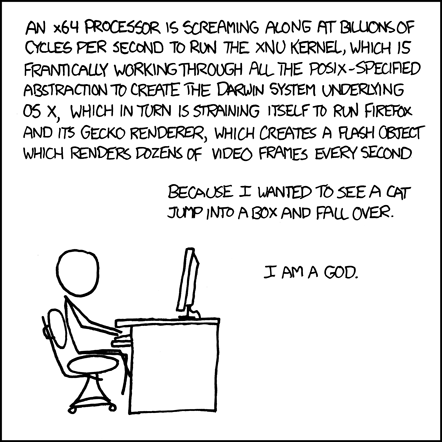
The same principle applies to security. A software vulnerability is rarely a mysterious, separate class of problem; at its core, it is simply a bug, an edge case or unexpected scenario that the developer didn’t account for. When a program receives input or encounters a state it wasn’t designed to handle, it behaves unpredictably. An attacker exploits these gaps by feeding the system specific inputs that trigger these unhandled paths, allowing them to bypass checks or access restricted data. Understanding the limits of your code and how it handles unexpected scenarios is what separates secure systems from others.
A thorough understanding of how software manages memory and interacts with the hardware gives us the confidence that our systems will run predictably, safely, and efficiently, even under tight constraints.
We need this deep understanding more than ever. As AI agents enable everyone to write and ship more code than ever before, the nature of software engineering is shifting. When things break, those without a strong grasp of the foundations will find themselves at the mercy of AI models, guessing in the dark trying to debug problems they cannot articulate. Without a clear mental model of the underlying systems, they won’t know how to communicate the exact issue to the agent or verify whether the proposed solution is correct.
On the other hand, for those who understand these abstractions very well, AI agents are not a threat but a multiplier. They can direct agents with precise, grounded instructions, verify the generated code against a clear mental model of what should be happening underneath, and step in to fix the problem directly when an agent gets stuck. The judgment that once made a single engineer productive now scales across every agent they direct, letting one person build systems that previously required an entire team. I hope this article has given you that foothold.