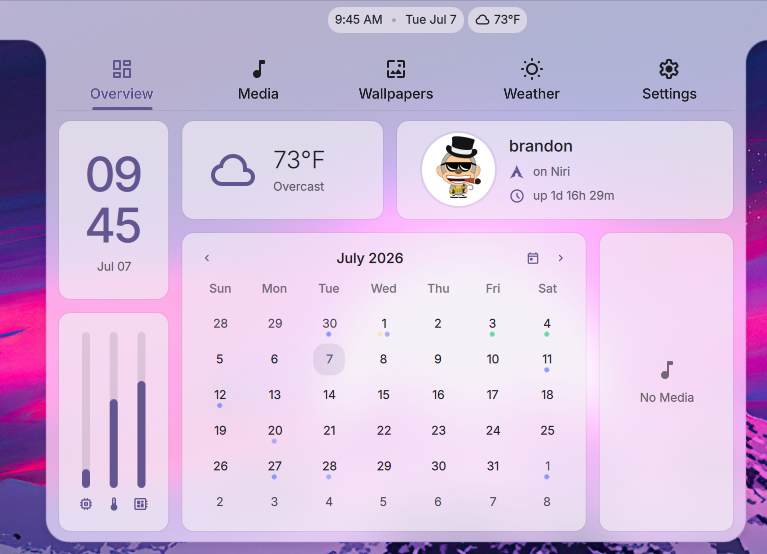
DankMaterialShell (DMS) 1.5 "The Wolverine" is here! This release introduces Frame Mode, a new connected surface that ties the whole shell together, native DankCalendar integration, Hyprland Lua config and enhanced MangoWM support, a reworked Material 3-like shadow system, and hundreds of fixes and improvements across DMS.
4,000+Commits
7k+GitHub Stars
200+Contributors
230+Plugins
Frame Mode + Connected or Standalone Surfaces


DMS 1.5 adds the option to draw the shell surfaces as one connected surface, tying modals (such as the launcher), popouts, and notifications into the bar and frame.
- New Animations: There are new animation options "Directional" and "Depth" in addition to the standard and default "Fade and Scale"
- Hover to Open: Optionally popouts can be opened on hover, without a mouse-click
DankCalendar


DMS 1.5 brings native support for DankCalendar (docs) as a calendar backend over IPC. This is a major new application addition that unifies Local, Google, Microsoft, CalDAV, and iCloud accounts into a single agenda.
When the dcal daemon is active, DMS detects it and establishes a bidirectional IPC connection. That connection enables several shell integrations:
- Full Event CRUD: You can now create, edit, and delete events directly within the shell calendar overview.
- Reminders Routing: Upcoming-event notifications are delivered natively through the DMS notification system.
- Offline Cache: Managed via a local SQLite cache database so agenda views work offline, syncing back as soon as connection is re-established.
- Secure Keyring Storage: OAuth tokens and secrets are stored directly in your system keyring (GNOME Keyring/KWallet) instead of plaintext files.
- Keyboard Navigation: Full arrow-key navigation for managing calendar events.
- Fully On Device: DankCalendar runs entirely on-device, connecting directly to your providers.
The DMS calendar provider is configurable for backwards compatibility with Khal, so users can continue to use the khal backend if desired.
Integrated Task Planner
In addition to task/reminder/VTODO integration from DankCalendar, a local to-do and task planner widget has been added to the calendar overview, contributed by goatnath (PR #2583). It manages your to-do lists and task states from within the shell calendar panel.
Greeter Enhancements


DMS 1.5 adds a settings GUI, multi-user account management, and per-user theme sync to the greeter.
- Settings GUI: Manage dms-greeter and greetd settings without editing config files by hand.
- Improved PAM Support: PAM authentication for fingerprint readers and U2F devices, with timeout recovery and unlock-state sync.
- User Accounts: A Users tab in DMS Settings creates accounts - username, initial password, and optional
wheel/sudoprivileges and greeter-group access - and lists every human user on the system with their UID, GECOS, and group membership. - Behavior Toggles: Remember the last user, remember the last session, and auto-login.
- Greeter Appearance: Per-greeter font family, 24-hour clock, seconds display, hour padding, and date format presets, separate from the lock screen settings.
- Custom Greeter Wallpaper: A login screen background independent of your desktop wallpaper, with the same fill-mode options.
- Sync Pending Indicator: A floating pill appears at the bottom of the tab when there are unsaved changes, so you can apply them without scrolling back to the top.
- Per-User Theme Sync: Each account gets an independent cache slot, so users can sync their own login-screen appearance - theme, wallpaper (light/dark/per-monitor variants), custom theme files, and profile picture - without system-wide sudo.
dms greeter syncpushes the primary user's full theme, wallpaper, and auth config.dms greeter sync --profilesyncs just one greeter-group user's slot, without touching the global config.- A Sync button in Settings handles both modes, falling back to a terminal when sudo isn't available.
Window Rules Manager


DMS 1.5 adds a Window Rules Manager for controlling window behaviors across Hyprland, Niri, and MangoWM.
A dedicated settings page allows viewing, editing, and creating window rules. A new IPC allows creating a window rule for the currently focused window.
Display Profiles


DMS 1.5 adds Display Profiles: saved monitor layouts that DMS can switch between automatically as outputs are connected or disconnected.
- Automatic Switching: DMS matches the connected set of outputs to a saved profile and applies it, so docking, undocking, or plugging in an external display restores the right layout.
- Control Center Widget: A Display Profiles widget switches layouts without opening Settings.
- Fractional Scaling Presets: Hyprland setups gain fractional scaling display presets.
- Disabled Outputs: Profiles can leave specific outputs turned off.
Hyprland Lua Configuration
DMS 1.5 moves all Hyprland default configurations to the new Lua format. When DMS deploys configs for Hyprland (via dms setup or dankinstall), it generates native Lua files instead of the older .conf format. This applies to all DMS-managed configurations such as key binds and monitor/output configurations. See the Hyprland configuration guide for details.
Enhanced MangoWM Support
DMS 1.5 adds better support for the MangoWM compositor across the shell, installer, and UI tools. dms setup now deploys MangoWM configurations and dankinstall supports MangoWM as a compositor option.
Material 3 Shadows & Elevation


To support Frame Mode, the Material 3 elevation and shadow system was reworked so shadows stay consistent across connected, floating, and overlapping surfaces. A global shadow toggle lives in the Themes tab, with light/dark overrides and independent shadow controls per Dank Bar.
Spotlight - Lightweight Launcher


DMS 1.5 introduces Spotlight, a lightweight overlay launcher for minimalist setups. It sits in the center of your screen and searches files, folders, applications, and settings.
- Search Persistence: Spotlight persists your last search query and highlights it on open, contributed by Legend-017 (PR #2726).
- Prefix Queries: Use
/dand/fprefix tags to narrow the search to directories and files when dsearch is installed.
Notepad Rewritten with Standalone Window & Mime-Type Registration


The Notepad utility has been rewritten with the ability to convert it into a standalone window and back to a surface. Additionally mime-type registration has been added so DMS Notepad can be (optionally) used as a default text editor for files.
Native Tailscale Integration


DMS 1.5 adds native Tailscale support inside the Control Center. Instead of custom scripts or command-line wrappers, DMS talks directly to the local Tailscale daemon for full VPN controls.
- Connection Toggle: Connect or disconnect your tailnet from the Control Center.
- Exit Node Selector: A dropdown lists the available exit nodes on your tailnet to route your traffic through.
- LAN Access Toggle: Allow or disallow local network access when connected to an exit node, so you can still reach local devices.
- Node Details: Shows your active Tailscale IP addresses (IPv4 and IPv6) and connection quality indicators.
System Management
DMS 1.5 pulls more of the system into the shell, so you can manage updates, power, autostart, and default apps without leaving your desktop.
- System Updater: Check for and apply system updates from the shell, with multiple package-manager backends and polkit authentication for privileged operations.
- Power Profiles: Switch between power-saver, balanced, and performance profiles from the Control Center or by scrolling the battery widget. A
cycleProfileIPC command is bound toMod+Pby default. - XDG Autostart: A new Autostart tab in Settings manages the applications that launch at login, following the XDG autostart specification.
- Default Apps: A Default Apps page in Settings sets your preferred applications for file types and URL schemes.
- User Session Switching: Switch between local user sessions directly from the shell.
Plugin Ranking, Moderation, and Community Feedback
With 230+ community plugins in the registry, DMS 1.5 introduces a ranking and feedback system so the best plugins rise to the top. Every plugin now has a tracking issue in the dms-plugin-registry that doubles as a forum and voting surface, and the plugins directory displays all of the new metadata affiliated with plugins.
- Upvotes: Anyone with a GitHub account can 👍 a plugin's issue to upvote it. The plugins page ranks by upvotes by default, so popular plugins surface first.
- Sorting & Filtering: Sort by upvotes, last updated, date added, name, or random, with an ascending/descending toggle, plus filters for reviewed-only and first-party-only plugins.
- Status Badges: Plugins can be flagged
reviewed,broken,unmaintained, ordeprecated, surfaced as badges both on the web page and in the in-shell plugin browser. - Moderator & Author Commands: Catalog moderators apply status flags via bot commands on the issue, and a plugin's own author can self-flag their plugin
/unmaintained(seeking a new maintainer) or/deprecated(superseded by another plugin or a built-in DMS feature).
Browse and vote on plugins at plugins.danklinux.com.
Huge thanks to hthienloc for working through the existing plugin registry to review and significantly improve the quality of the plugin ecosystem!
If you wish to contribute as a plugin moderator, refer to this ticket for details.
Other Notable Features
DMS 1.5 also brings a wide array of enhancements and options across other components of the shell:
Launcher & Clipboard
- Plugin Browser Screenshot Previews: The plugin browser now displays inline screenshot previews while browsing, alongside brand new sorting and filtering controls.
- Launcher QOL Improvements: Grid mode now supports
Ctrl+H/Lnavigation (contributed by kanghengliu, PR #2688), toggleable color-picker entries (lambdaclan, PR #2667), and the option to hide package source badges (hthienloc, PR #2676). - Clipboard Type Filtering: The clipboard history popout can now filter between Text, Image, and pinned entries, contributed by dionjoshualobo (PR #2640).
- Launcher History: The launcher keeps a history of recent entries (PR #2086).
- Terminal Multiplexer Launcher: A launcher mode for opening and attaching to terminal multiplexer sessions (PR #1687).
- Clipboard Editor & Search: Edit saved clipboard entries and search or filter clipboard history (PR #2492, PR #2464).
Network & Power
- Secret Service Integration: Auto-retrieves and unlocks WiFi/VPN credentials directly from D-Bus Secret Service backends.
- Saved Wi-Fi & Progress: WiFi connection progress indicators (contributed by NihilDigit, PR #2684) and a dedicated saved-networks editor tab (contributed by jbwfu, PR #2648) are now integrated, alongside a subtab network layout (PR #2633).
- Network Link Rate Reporting: DMS now reports the negotiated link speed when connected, providing accurate bandwidth context rather than theoretical maximums.
- Battery Settings Tab: A new battery management section in settings with toggles for remaining time, percentage display, and critical alerts was designed by hthienloc (PR #2634).
- Battery Refresh Rate: Automatically lower display refresh rates on battery power to conserve energy, contributed by atimofeev (PR #2428).
- Bluetooth Status: Added a visual bar indicator for connected Bluetooth devices, contributed by yechielw (PR #2662).
- Bluetooth Trust/Untrust: Control trusted status of Bluetooth devices directly from the Control Center.
Privacy & Security
- Screen Casting Detection on Niri: The privacy indicator now correctly detects active screen casting sessions on the Niri compositor via PipeWire (PR #2185).
- Night Mode & OSD Restoration: Night mode and OSD surfaces are now correctly restored after system resume from suspend (PR #2254).
Lock Screen
- Lock Screen IME Bypass: Implemented a direct keyboard layout and input method bypass for lock screen password fields, avoiding login failure due to layout mismatches (contributed by awerty-noob, PR #2609).
- Lockout Feedback: Rather than showing generic errors, the lock screen now queries and displays explicit faillock lockout reasons, contributed by Rocho-EL-Locho (PR #2669).
- Fingerprint/U2F Auth: Lock screen fingerprint and U2F authentication has been restored and hardened with timeout recovery and unlock-state sync (PR #2052).
- Video Wallpapers: Support for video files as a screen-saving background when the lock screen activates.
- Declarative NixOS Auto-Login: Added native support for configuring greeter auto-login declaratively within NixOS modules (PR #2734).
Odds & Ends
A handful of smaller fixes and quality-of-life touches, several from the community:
- DankDash Drag-n-Drop: Rearrange dashboard tabs and widget layout, with visibility toggles in Settings.
- System Tray Icon Tinting: Tint overrides keep tray icons consistent with your Material theme (PR #2266).
- Animated GIF Profile Pictures: The user avatar now supports animated GIFs (PR #1804).
- Tilde Expansion in Config Paths:
~now expands in all user-provided file paths (PR #2242). dms randrCommand: Query physical monitor scale factors without opening the display configurator.- Per-Screen Focus: The focused app widget tracks only the focused window on its own screen in multi-monitor setups (PR #2152).
- Do Not Disturb & Idle Inhibitor Indicators: New Control Center button indicators for do-not-disturb and idle-inhibitor state (PR #2513).
- Microphone Volume OSD: An interactive microphone volume OSD with IPC controls (PR #2406).
- Locale Hot-Reload: Change the shell locale and have it apply without a restart (PR #1817).
- Neovim Theme Engine: A rebuilt Neovim theme engine for Matugen color sync (PR #1985).
- GeoClue2 Location: Optional GeoClue2 location as an alternative to IP-based location (PR #1856).
Headless Installation
The dankinstall installer can now run fully unattended - no TUI, scriptable for provisioning, dotfile bootstraps, and CI. Passing --compositor and --term switches it into headless mode:
dankinstall --compositor niri --term ghostty --yes
Choose niri, hyprland, or mango for the compositor and ghostty, kitty, or alacritty for the terminal. Additional flags give you control over the rest of the install: --include-deps / --exclude-deps to tune optional dependencies (like dms-greeter), --replace-configs (or --replace-configs-all) to deploy named configs, and --yes to auto-confirm every prompt. Install logs are written to $DANKINSTALL_LOG (falling back to /var/tmp) and streamed to stdout.
Available Distributions
DMS 1.5 officially adds support for Void Linux and introduces official compatibility with Ubuntu 26.04 LTS.
See the installation guide for setup instructions.
Upgrade Notes
This release contains changes that may require manual intervention.
(Breaking) App ID Change
The DMS app ID is now com.danklinux.dms. If you have compositor window rules targeting the old app ID, you'll need to update them to the new ID.
Quickshell 0.3.0+ Required
DMS 1.5 requires Quickshell 0.3.0 or newer; support for 0.2 has been dropped. If you install via the Dank Linux repositories or dankinstall, this is handled for you - otherwise update Quickshell before upgrading DMS.
Bug Fixes and Improvements
View Details (309 fixes in v1.4.6..v1.5.0)
DMS 1.5, and the hotfix series leading up to it, would not be possible without the contributions of the wider community. A huge thank you to everyone who opened a PR, filed a detailed issue, tested a fix, or helped translate the shell.
Quick Acknowledgements
-
Special thanks to our NixOS Maintainers, LuckShiba and EricDraven, for their numerous contributions to DMS overall and maintaining the NixOS Community!
-
If you were missed we're sorry! It's hard to keep track of everything sometimes, reach out on Discord or Github and we'll make sure to add you to the list.*
Feature Contributors
General Contributions
Resources
Get Started with DMS →
Thank You
To everyone who has supported DMS through feedback, contributions, sponsorships, donations, and packaging.
Zan, Zendegi, Azadi