
Writing code is the #1 usage of LLMs right now. In the future that will likely change to automation (powering agents’ thinking as they work on tasks), but for today, the explosion of vibe coding has had a real effect on Apple.
The App Store is seeing a deluge of vibe coded apps being submitted each day.
For the first time in its history, non-game apps have overtaken games as the #1 revenue source on the App Store. Probably because CRUD apps are easier to turn out than games.
This has almost certainly created immense pressure for the app review team, who in general do a great job of keeping app quality high.
After you submit a new app update for review, the message you get is that you should receive a response in 24 to 48 hours. This is a relic of the bygone era when they didn’t have as much volume to handle.
Even some of the most used apps in the world, like X, are facing delays of a week or more

That’s why when I received my rejection for the newest release of Wiseday, I was (and still am) upset. Because just communicating back and forth has a long delay. In my case, my initial submission managed to get a review in 3 days, but who knows when the next one will be?
It seems like when you get rejected, the reviewers don’t actually write anything. They just pick from a menu of issues, and the reply is automatically drafted for them.
That’s why if you disagree with the rejection, it can feel stifling, like you’re not actually talking to anyone.
I’ve changed and improved Wiseday a lot since the initial release. I consider the present release the actual app, one that I’m happy to promote. The prior one was just for testing the waters.
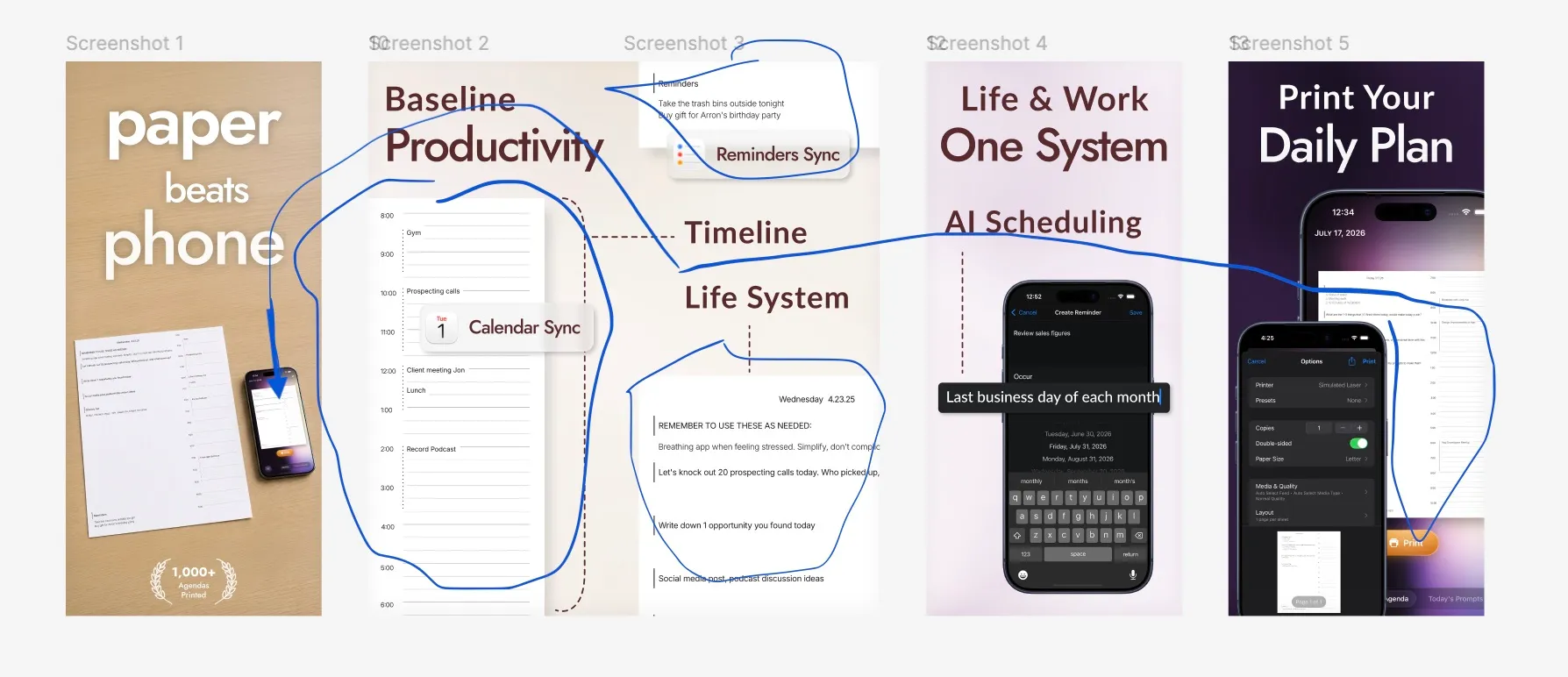
Part of the challenge was communicating the idea of the app through screenshots, namely showing that the daily page is the biggest value proposition.
For some products, it’s easy to know what they do and who they’re for, but Wiseday hasn’t been one of those. Communicating the idea has always been difficult for this app, and I am happy with my latest attempt through the new screenshots I created.
Or at least I was, until they were the reason Apple rejected me:
Issue: The screenshots do not show the actual app in use in the majority of the screenshots. Screenshots should highlight the app’s core concept to help users understand the app’s functionality and value.
Resources:
- Marketing or promotional materials that do not reflect the UI of the app are not appropriate for screenshots.
- The majority of the screenshots should highlight the app’s main features and functionality. Note that splash and login screens are generally not considered to show the app in use.
Communication is one of those things where if it’s done well, you don’t notice it. I had to figure out how I would show that the main value proposition is printing a page that does 3 different things.
Doing this for Wiseday requires that the two sentences of advice the app review team gave me be diametrically opposed
“The screenshots do not show the actual app in use in the majority of the screenshots.”
is not compatible with
“Screenshots should highlight the app’s core concept to help users understand the app’s functionality and value.”
because the core concept is a paper page.
I responded to the rejection by pointing out that technically, the paper in screenshots #2 and #3 are in fact part of the app’s UI, in the page preview component.
I also added another more traditional device-wrapped screenshot to try and handle the “majority screenshots” rule if they don’t accept that argument.

Let’s see how it turns out. I really hope they read developer responses and consider the unique objections to their rules.