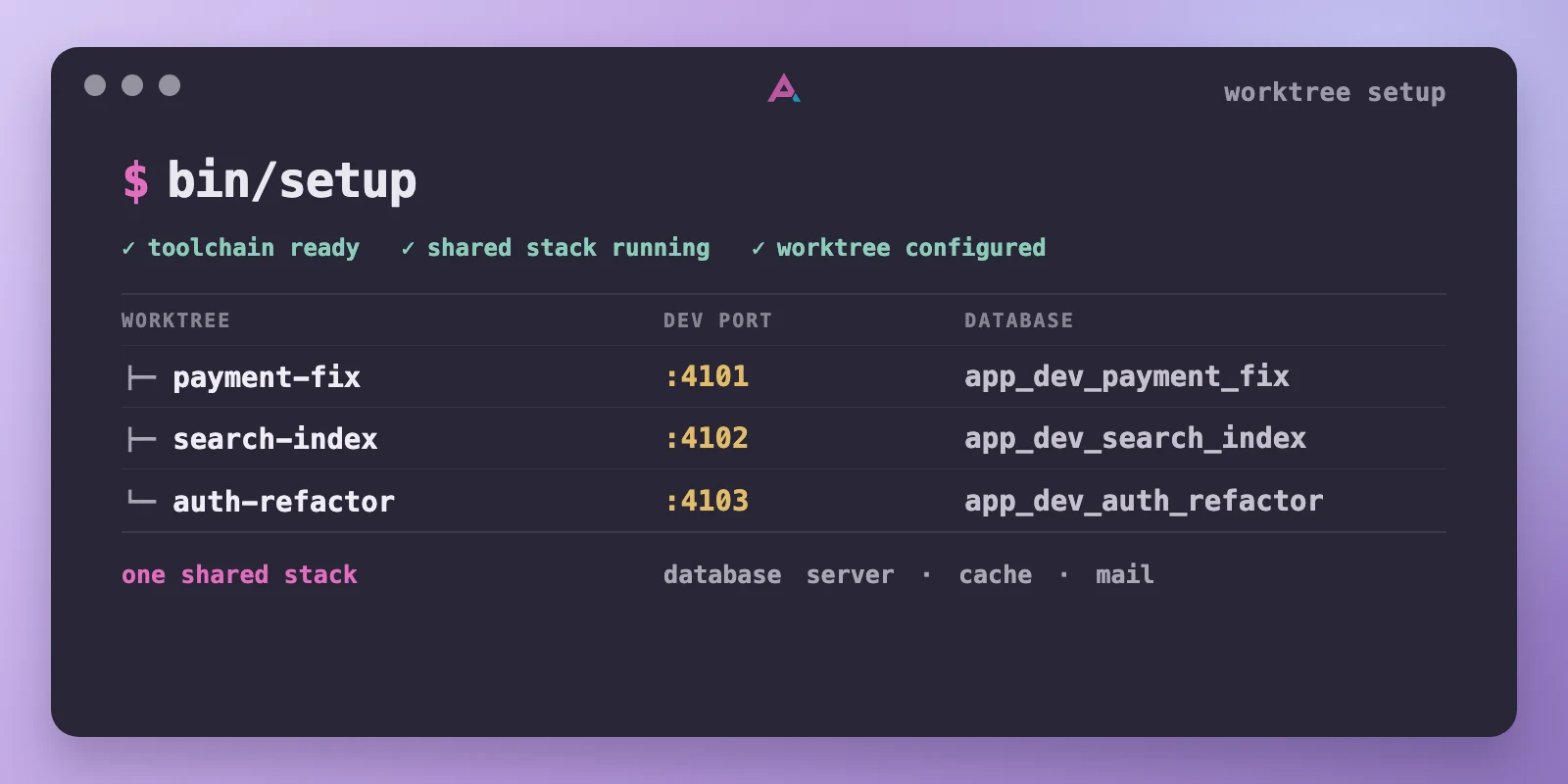
A worktree-aware setup script can diagnose missing tools, share one Docker stack, and isolate ports, databases, and state for safe parallel development.
Ally Piechowski · · 5 min read
On one production app I work on, a fresh Git worktree becomes runnable with one setup script:
Setup prepares the environment and exits, then the normal development command runs. I’ll use bin/dev here as shorthand for whatever command the repository already uses. Setup doesn’t hide the server inside a clever process manager.
bin/setup is a repo-owned executable that turns a checkout into a working development environment. Call it make setup or script/bootstrap if that fits your project. The interface matters more than the name: one command returns either a ready repository or exact repair instructions.
The same command should work from every Git worktree. Parallel coding agents made this important enough to treat as ordinary development infrastructure.
A Second Checkout Is Not a Second Environment
A Git worktree is another checkout with its own working tree, HEAD, and index while sharing the repository’s common Git data. That separation is great for code. Git does not know that both copies of the app want the same port, database, cache keys, callback URL, Terraform state, or container name.
This works until two worktrees need to run:
git worktree add ../app-payment-fix -b payment-fix
cd ../app-payment-fix
bin/setup
bin/dev
A setup script written for one permanent clone can copy the same .env and point every checkout at the same databases. When two worktrees start, their dev servers can fight for host ports. Compose projects can also overlap when they reuse a project name or fixed container, network, or volume names, and published ports still collide. The second worktree either fails to start or quietly shares state.
Worktrees existed long before coding agents. What changed is frequency. Keeping two branches open used to be an occasional convenience. Now several agents can implement and test unrelated changes at once. Their files are isolated by Git; their runtime state has to be isolated by the repository.
Share Services, Isolate Names
Running a complete Docker stack for every worktree is the simplest mental model and often the wrong default. Databases, object storage emulators, mail catchers, and other local services can be expensive compared with an app process. I run one shared stack, then give each worktree its own ports, databases, and resource names.
| Shared once per machine | Isolated per worktree |
|---|---|
| Database and cache servers | Development and test database names, cache namespace |
| Local service containers | Queue names, buckets, callback URLs, infra resource names |
| Package-download and tool caches | App port, environment file, logs, PIDs, local state |
The setup script derives a readable worktree identity, checks it against a small local registry, then writes generated configuration such as:
WORKTREE_ID=<derived-worktree-id>
APP_PORT=<allocated-port>
DATABASE_NAME=app_dev_<worktree-id>
TEST_DATABASE_NAME=app_test_<worktree-id>
Registry allocation needs a lock because agents can start setup together. The lock only serializes setup processes that honor it. A robust allocator should remove stale reservations, pick a candidate port, check for a current listener, then commit the identity atomically.
That listener check is only a snapshot. The dev command must still report a later bind collision clearly. A script can be safe to rerun and still fail under concurrency; idempotence alone is not enough.
What bin/setup Owns
Setup owns every step between git worktree add and the normal development command:
- Bootstrap the repository’s declared toolchain (I use mise).
- Run
bin/doctorto diagnose remaining host requirements, stopping with exact repair steps if needed. - Ensure the shared Docker services are running and healthy.
- Allocate or recover the worktree’s identity and ports.
- Generate local environment and service configuration.
- Create and migrate isolated development and test databases.
- Verify the app can reach its dependencies, then exit.
That bootstrap does not have to be mise. I use mise to pin language runtimes, package managers, and small CLI tools in the repository. Setup can run mise install for missing configured versions. Git, Docker, operating-system libraries, and credentials may still be required.
If a repository uses mise, installing a tool does not activate it for every shell. Setup should run repo commands through mise exec -- ... or explicitly require shell activation, so incidental shell configuration cannot change the result.
This shortens time to first commit, but onboarding is only the first payoff. The same path runs whenever a human or agent opens a worktree.
Make Setup Fail Early
bin/doctor belongs near the start of setup and should also run independently. Before I added it, setup could reach the seed step before discovering ffmpeg was missing. Doctor now catches that before the expensive work begins.
A useful doctor checks every requirement, collects all failures, exits nonzero, and prints repairs a person can paste:
FAIL container engine: daemon not reachable
     Start Docker, then run bin/doctor again.
FAIL tools: configured versions are missing
     Run: mise install
Doctor should report the whole list in one run, with stable exit codes, no prompts, and output that works in a terminal or agent transcript.
The Limits of a Shared Stack
Restarting a shared database interrupts every worktree. Branches that require incompatible service versions cannot use the same stack. Cache keys, mailboxes, queues, and object names still cross-talk unless setup prefixes them with the worktree identity.
Some work needs stronger isolation. Destructive migration work, tests that reset an entire server, or a branch upgrading the database engine may deserve a dedicated stack. The shared stack is the fast default, not a rule.
Reset and teardown commands need the same boundaries. git worktree remove does not invoke app cleanup, so a repo-owned bin/teardown should release the port, drop only that worktree’s databases, and delete only its generated state. A normal bin/reset must never erase a shared volume or another checkout’s resources. Make any machine-wide reset explicit and difficult to run by accident.
The acceptance test should start from a clean worktree with no copied environment file. Run setup twice and concurrently beside another setup, start both dev servers, execute both test suites, then tear one worktree down while the other keeps running. Every manual fix found there belongs in bin/setup or bin/doctor.
A coding agent should be able to create a worktree, prepare it, run the app, and leave without touching its siblings. If the repository cannot enforce that boundary, adding more agents only creates faster local-environment failures.