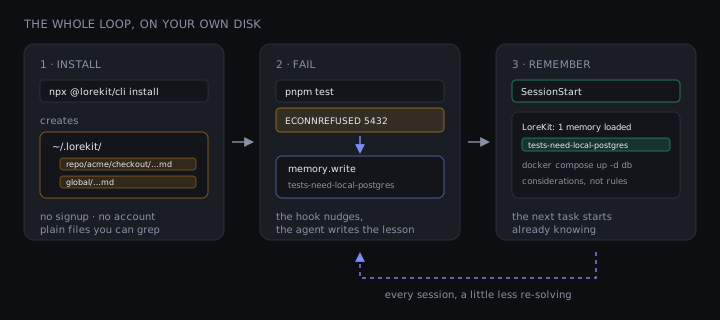
Yesterday your agent worked out that the integration tests need a Postgres container up first. Today it hit ECONNREFUSED 5432, decided the connection pool was misconfigured, and spent nine minutes rewriting a file that was fine. Same wall, same climb, no record that the climb ever happened. Every session it wakes up with amnesia.
The usual pitch here is a platform you adopt. It isn't one. It's one command and a folder you own — plain files on your disk, no account, no network, nothing to sign up for.
And here's the part that makes it more than a starter toy: the same read path runs over a local directory or a hosted Postgres — scaling local→remote is purely additive, not a migration. Your files stay where they are, lorekit list keeps showing both stores side by side, and nothing is ever exported. You start with a folder. You never have to leave it behind.
One command scaffolds the lorekit-memory, lorekit-setup and lorekit-groom skills, an MCP server entry, and the lifecycle hooks into your .claude/ (project) or ~/.claude/ (global):
npx @lorekit/cli installIt asks three things: project or global, a token, and which hooks to wire (all, read-only, or none). Leave the token blank, and take all for the hooks.
Two small files finish the job. First a .lorekit.json at your repo root — safe to commit, it holds no secrets — which pins the store to disk:
{
  "mode": "local"
}
Then point the MCP server at your own machine instead of the hosted one. install merges a lorekit entry into your .mcp.json — leaving any other servers alone — and by default that entry points at the hosted endpoint. Replace that entry only with the CLI's local stdio server:
// .mcp.json → mcpServers — edit this entry, leave your others alone
"lorekit": { "command": "npx", "args": ["-y", "@lorekit/cli", "mcp"] }
That's the whole setup, and npx @lorekit/cli doctor will tell you the resolved mode and which file decided it.
Now trigger a failure. Your agent runs the tests, they blow up, and the PostToolUseFailure hook says one thing. Everything below is real output from a repo I set up while writing this — a genuine pnpm test against a database that wasn't running:
LoreKit: the last Bash call failed. If it's recurring or non-obvious, memory.write to repo::acme/checkout with the fix so the next run avoids it.That's a nudge, not a write. The write is the model calling memory.write — LoreKit never records anything behind your back.
And what it records isn't a row in someone's database. It's a file:
cat ~/.lorekit/repo/acme/checkout/tests-need-local-postgres.md---
scope: "repo::acme/checkout"
key: "tests-need-local-postgres"
created: "2026-08-15T17:00:18.477Z"
updated: "2026-08-15T17:00:18.477Z"
seen_count: 1
---
Integration tests need the local Postgres up first: docker compose up -d db. Without it every test fails with ECONNREFUSED 5432, which reads like a code bug and isn't.(Trimmed — the real frontmatter carries a few more fields, tags and provenance among them.) cat it. grep it. Commit it, or rm it. It's yours.
Then start the next session, and the loop closes:
LoreKit: 1 memory loaded · repo::acme/checkout — considerations, not rules; read any in full with memory.read.
- (repo::acme/checkout) tests-need-local-postgres — Integration tests need the local Postgres up first: docker compose up -d db.…
And if that same failure fires again mid-task, the failure hook now leads with the lesson itself instead of the bare nudge — 1 related memory — you've hit something like this before.
That's it. That's the aha. Fail once, on your own disk, and the next task starts already knowing.

You've probably already built something — a skill, a sub-agent, a review workflow. You don't rebuild it. lorekit-setup wires the read-fail-write loop into the host you already have: it picks the lesson bucket (a tag plus a key namespace), the scopes, and the read-before-you-act / write-on-friction points. Ask your agent to run it and name the host.
Two things people get wrong here.
Lessons are advisory observations, not rules. That's not marketing softness — it's the word the injected block literally uses: considerations, not rules. A lesson is a note your agent left for its future self, and it can be ignored when it's wrong.
Which is exactly why this doesn't compete with your CLAUDE.md. CLAUDE.md is where you put the rules you've decided on — reviewed, deliberate, in version control. Lore is the layer underneath: the accumulating pile of "huh, that bit again" that hasn't earned a rule yet. Some of it eventually should, and promoting it is a human edit. Most of it never will, and that's fine — it's still worth not re-learning.
The gotcha it keeps rediscovering. The Postgres one above is real, and it's the entire solo case. Any recurring environmental fact — a service that must be running, a flag the build needs, a package manager that isn't the one in the README — gets written once and read every task after. seen_count goes up each time the same lesson is re-learned, and recurring lessons rank higher in the block.
Spike lessons that stay on the spike. Scopes are global, project::{name}, repo::{owner}/{repo} and branch::{owner}/{repo}::{branch}, read most-specific first. Write an experiment's findings to the branch scope and they surface on that branch and nowhere else:
memory.write {
  scope: "branch::acme/checkout::feat/new-cache",
  key:   "cache-invalidation-strategy",
  value: "Write-through for the session store; write-behind for aggregates.",
  tags:  ["wip"]
}
If the branch dies, so does the lesson. If it merges, you rewrite the key at repo::acme/checkout and delete the branch copy. main never sees the mess. Run npx @lorekit/cli tree to see which scope wins a duplicated key before a task starts.
Notes with an expiry date. Some facts are true for a week. Pass ttl_days and the entry goes invisible on its own:
memory.write {
  scope:    "repo::acme/checkout",
  key:      "skip-flaky-checkout-test",
  value:    "checkout.spec is flaky on CI — backend ships the fix Friday. Don't chase it.",
  ttl_days: 5
}
No cleanup task, no stale note steering your agent in November.
Nothing above needed an account. When you want the same lore on your laptop, your desktop, and a teammate's machine, you don't move anything — you point the CLI at the hosted store. Three steps.
Create a free account at lorekit.io, open Settings → API keys, and generate a read-write key (lk_rw_…). It's shown once, so copy it. Then hand it to the same installer you already ran:
npx @lorekit/cli install --forcePaste the key when it asks. That's the whole switch. install repoints the lorekit entry in your .mcp.json at the hosted endpoint with your token, and remote is the default mode — so there's nothing else to set. (If you pinned "mode": "local" back in the local setup, delete that one line and the default takes over.)
Your files never move. npx @lorekit/cli list now reads both stores and prints them side by side — an Offline section from your local files, a Remote section from the hosted one — so nothing you wrote before the switch falls off the edge.
That side-by-side view is for you. To put the lessons you already have into the hosted store itself — where a teammate's agent or a CI run will read them — push them up once:
npx @lorekit/cli migrate --from ~/.lorekit --to remote         # preview
npx @lorekit/cli migrate --from ~/.lorekit --to remote --yes   # push it
It's a dry run until you add --yes. It checks your token first (a read-only key is refused, not left half-done), and it's idempotent — run it again whenever you've learned more offline. Creation dates come along, so recency ranking still works. Last-updated and times-seen get re-derived server-side. Anything you'd archived or expired is skipped, not revived.
That's the load-bearing bit, so let me be exact about it: the read path — precedence across scopes, ranking, de-duplication, the character budget — is one piece of code that takes a store as an argument. Point it at a directory of markdown files or at a hosted Postgres and nothing above the store changes. So remote isn't a different product you graduate to. It's the same read, handed a bigger pile.

A key gets the same lore onto your own machines. A team needs one more thing: an organization. In Settings → Organization you create one — you're the owner — and invite teammates by GitHub handle or email, each with a role: viewer reads, member writes, admin manages people, owner runs the place.
Then you pick what's shared, by scope. An admin binds a scope — say repo::myteam/api — under Shared scopes. From then on, every write under it by a write-capable member routes to the org. The deploy checklist one person writes is the checklist every teammate's agent reads during planning. A non-member who writes under a bound scope isn't rejected — their write quietly falls back to their own personal lore. (Prefer to be explicit? Pass org: "my-team" on a single memory.write instead of binding the scope.)
The same lore reaches CI. Drop a read-only lk_ro_ token into your GitHub Actions secrets, make one memory.list call, and the AI step in your pipeline opens with the context your laptop has.
The token prefix tells you what a key can do before you paste it anywhere: lk_rw_ read and write, lk_ro_ read only, lk_wo_ write only. Free up to 5,000 stored memories, at 120 requests per minute.
Honest boundary while you're deciding: there's no semantic search here, and nothing is learning or fine-tuning. Matching is lexical — recurrence, recency, and word overlap. A genuine paraphrase can miss. What you get is a scoped note your agent leaves for its future self, read at the start and written on failure. That's a smaller claim than most memory pitches make, and it's the one that actually holds.
The obvious worry about a store that only grows: it gets worse the more it learns. A folder with six lessons injects six lines. A year-old team store with sixty thousand can't inject sixty thousand.
It doesn't. The read spends a fixed slice of your context window — not a fixed number of lessons — on the highest-signal, de-duplicated ones, and tells you exactly what it left out. Same code, both ends of the range. A follow-up post digs into exactly how that scales.
You don't need an account, a decision, or a team to try this. You need one command and a repo where your agent keeps making the same mistake — and you already have one of those. 🙂
npx @lorekit/cli install