Show HN: Shoehorn – 量化任意模型以便在你的机器上运行
Show HN: Shoehorn – Quantize any model down to run on your machine

原始链接: https://notactuallytreyanastasio.github.io/shoehorn/

**Shoehorn** 是一款旨在通过将语言模型精确适配至特定硬件内存,从而最大化其性能的工具。与通常会浪费容量或导致加载失败的标准预设量化不同,Shoehorn 会在扣除开销后计算出确切的可用内存,并分配逐张量(per-tensor)的混合精度,以利用高达 99.99% 的预算空间。 主要功能包括: * **自定义优化:** 精确到字节,为您特定的 VRAM 或 RAM 计算出质量最高的适配方案。 * **基于浏览器的搜索:** 一个网页工具,可扫描 Hugging Face 上与您的硬件和预期上下文长度(例如 4k 到 32k token)兼容的模型。 * **无缝集成:** 使用 Rust 构建,可生成与 `llama.cpp` 生态系统兼容的标准 GGUF v3 文件。 * **易于使用:** 安装简单,本地网页界面提供预算的“卷尺”可视化效果及一键“聊天”按钮。 Shoehorn 消除了模型量化过程中的猜测,确保您能获得机器实际运行能力范围内最强大的模型。该工具为开源(MIT 许可证),可通过 Homebrew 或 Cargo 获取。

Hacker News 最新 | 过往 | 评论 | 提问 | 展示 | 招聘 | 提交 登录 Show HN: Shoehorn – 将任意模型量化后在你的机器上运行 (notactuallytreyanastasio.github.io) 7 点,由 rhgraysonii 发布于 1 小时前 | 隐藏 | 过往 | 收藏 | 2 条评论 目前已支持 Mac、Linux 和 Windows。我包含了一个简单的图形界面,用于查找新模型并进行构建和设置。对我而言,它在处理几个模型时表现相当不错。GitHub 上的 README 和 DESIGN.md 文件详细介绍了其原理和原因,目前运行效果出奇地好。 https://github.com/notactuallytreyanastasio/shoehorn hmokiguess 15 分钟前 | 下一条 [–] 让我想起了 https://github.com/AlexsJones/llmfit 回复 mbuchel-hn 45 分钟前 | 上一条 [–] 这和 airllm 的工作原理类似吗?我想知道它在 8GB 内存预算下会如何处理像 Kimi k3 这样的量化,还是说这暂时不是你试图解决的问题? 回复 准则 | 常见问题 | 列表 | API | 安全 | 法律 | 申请 YC | 联系 搜索:
相关文章

原文

Make any language model fit the memory you actually have.

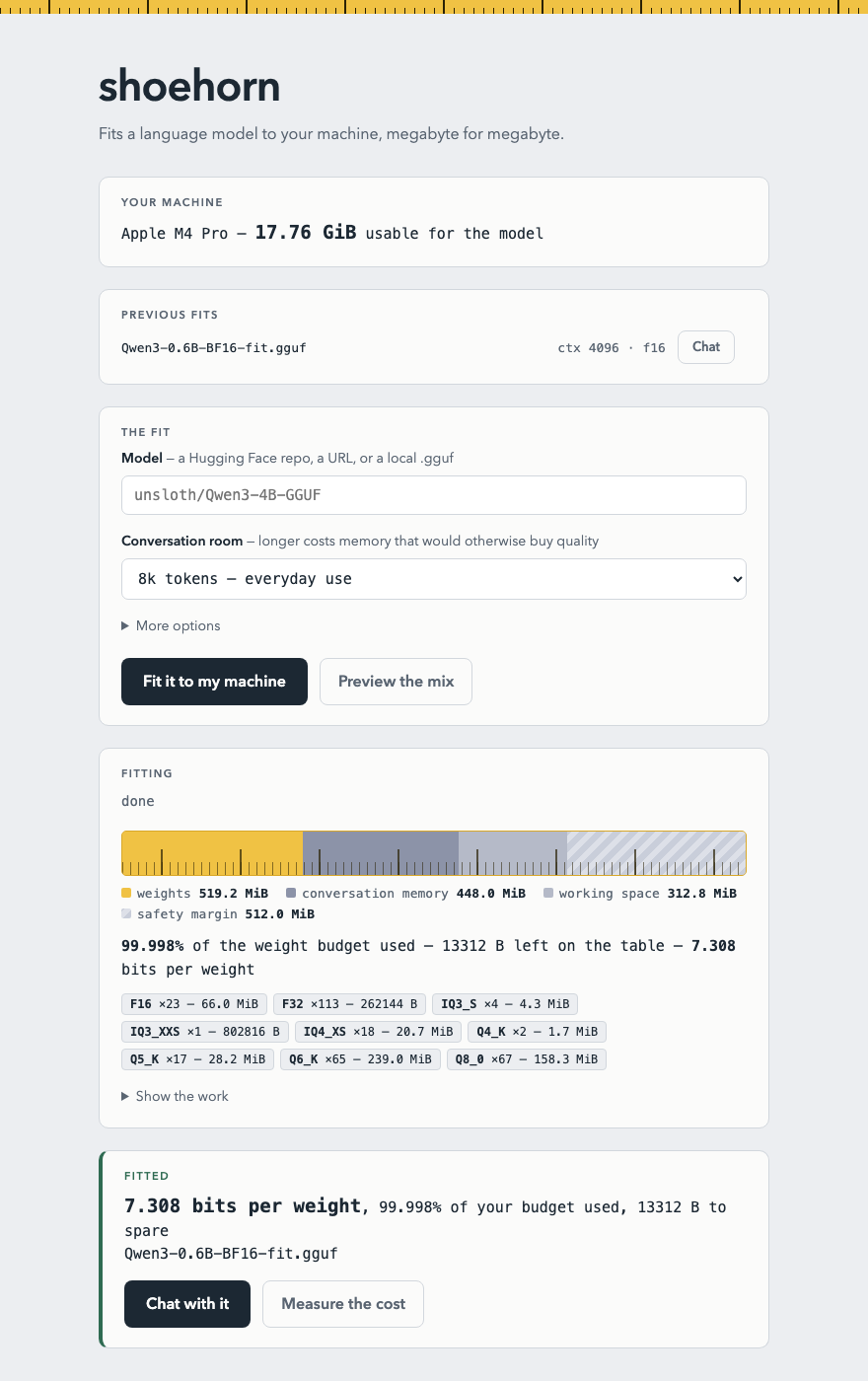
Preset quantizations ignore your hardware: pick one that fits and you either waste hundreds of megabytes of quality headroom or find out at load time it didn't fit after all. shoehorn starts from the memory you actually have, subtracts what inference itself needs, and solves a per-tensor mixed-precision assignment that lands within a rounding error of the remainder — routinely using 99.99% of the budget, sometimes to the byte.

$ shoehorn fit unsloth/Qwen3-4B-GGUF --serve weights: 519.2 MiB of 519.2 MiB budget (99.998% used, 13 KB slack)

Before you download

What fits your machine?

Pick your hardware and this page scans Hugging Face's most-downloaded models for ones shoehorn can fit to your budget — ranked by the quality your memory affords. Runs entirely in your browser.

Get shoehorn

Install

shoehorn needs llama.cpp on your PATH as the inference backend (the Homebrew install pulls it in for you). Then shoehorn ui opens the local app — pick a model, press one button, chat.

brew install notactuallytreyanastasio/shoehorn/shoehorn

Or from source: cargo install --path . after cloning the repo. All releases.

The app

One button, your whole budget

The local web app measures your machine, streams the fit, renders the budget as a tape measure, puts a perplexity number on what the fit cost, and ends at a Chat button.

a finished fit: the tape-measure budget gauge at 99.998% used, the per-type mix, and Chat and Measure buttons the discovery card: models ranked by what your budget affords, each with a Use button
MIT-licensed. The quantizer is implemented from scratch in Rust — no llama.cpp code linked — and the output is standard GGUF v3 that anything downstream of llama.cpp loads. Source · design history · releases
联系我们 contact @ memedata.com