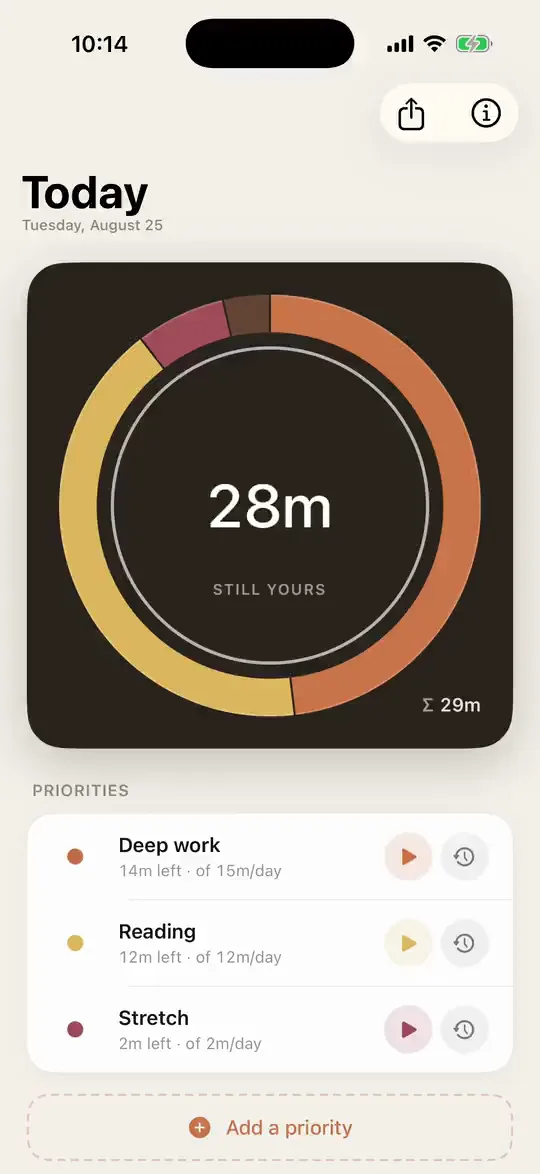
Define a few priorities and give each a daily time budget. Only one clock runs at a time, so starting one pauses the rest. When a budget is spent, an alarm goes off. iPhone, Apple Watch, or both.
The budgets are not much more than a few mutually exclusive countdown timers. You start one when you begin working on something and stop it when you are done, or start the next one and let it pause the first. At midnight, everything resets. Each device works on its own. Phone and watch keep each other in sync when they are paired, and the watch is usually the quicker place to glance, start, and stop.

On your iPhone
On your Apple Watch
What makes it different
- Phone and watch. OwnTime works on the iPhone alone, with alarms, a Live Activity, and widgets. The Apple Watch is the natural surface for anything to do with time, and works alone as well.
- Budgets, not timesheets. Each priority gets a daily budget. What you neglect shows up as a budget that never drains.
- An alarm, not a notification. When a budget is spent, a real alarm goes off, through Focus and silent mode. That is the whole point: it kicks you out of what you are doing when its time is up. A notification is too easy to miss when you are absorbed in something.
- Your data in a plain file. Export the whole history as a SQLite database and evaluate it however you like, with whatever tools you like.
Hands-free with Siri
Every action is also a Siri phrase, on iPhone and Apple Watch, and a Shortcuts action for your automations. On Apple Watch Ultra you can put the toggle on the Action Button.
Name a priority in the phrase, or leave it out and Siri asks. Replace [priority] below with one of yours, like “Deep Work”.
Start a session
- “Start OwnTime”
- “Resume OwnTime”
- “Start [priority] in OwnTime”
- “Start an OwnTime for [priority]”
Stop a session
- “Stop OwnTime”
- “Suspend OwnTime”
- “Stop [priority] in OwnTime”
- “Stop the OwnTime for [priority]”
Start or stop in one phrase
Stops the running session, or starts the last priority if none is running. This is the one for the Action Button.
Log time you already spent
- “Log past time in OwnTime”
- “Log past [priority] time in OwnTime”
- “Log a past OwnTime for [priority]”
Siri asks how many minutes to log.
Private by design
There is no server and no account. Your priorities and sessions stay on your devices. Phone and watch sync directly with each other over Apple's WatchConnectivity, never through us and never through the cloud. The privacy policy has the details.
No Apple Watch required. iPhone alone, Apple Watch alone, or both.
Take it with you
I didn't build any statistics into the app. Instead, one tap exports the whole history as a plain SQLite file, the same store the app runs on. Open it in a notebook, write your own queries, or hand it to whatever tool you like. It is your data, in a format that outlives the app.
Where the export goes is up to you. Once you share it, the file is outside OwnTime and outside the privacy policy. That is the point.
OwnTime is on the App Store. For iPhone and Apple Watch. One-time purchase, no subscription. Requires iOS 26.1 or watchOS 26.
