Our RISC-V emulator PasRISCV
You may already know that our game SEEDS includes a fully emulated Linux system, which runs our in-game tools for the player. For example, if they are accessing the planetary overview and stats through the program selector on the computer in the homebase, these apps are native Linux programs. Even if you’re playing the game on a Windows machine, these ELF binaries are executed on this emulated RISC-V 64-bit system running the Alpine Linux distribution.
I want to take the opportunity to let you peek behind the curtains and tell you a bit about our emulator. It is powered by our in-house PasRISCV project, which is programmed in Object Pascal and accessible to everyone as free open-source software (FOSS). You’re invited to check out its sources and maybe even make use of it. PasRISCV and its frontend companion pasriscvemu are licensed under the permissive zlib license.

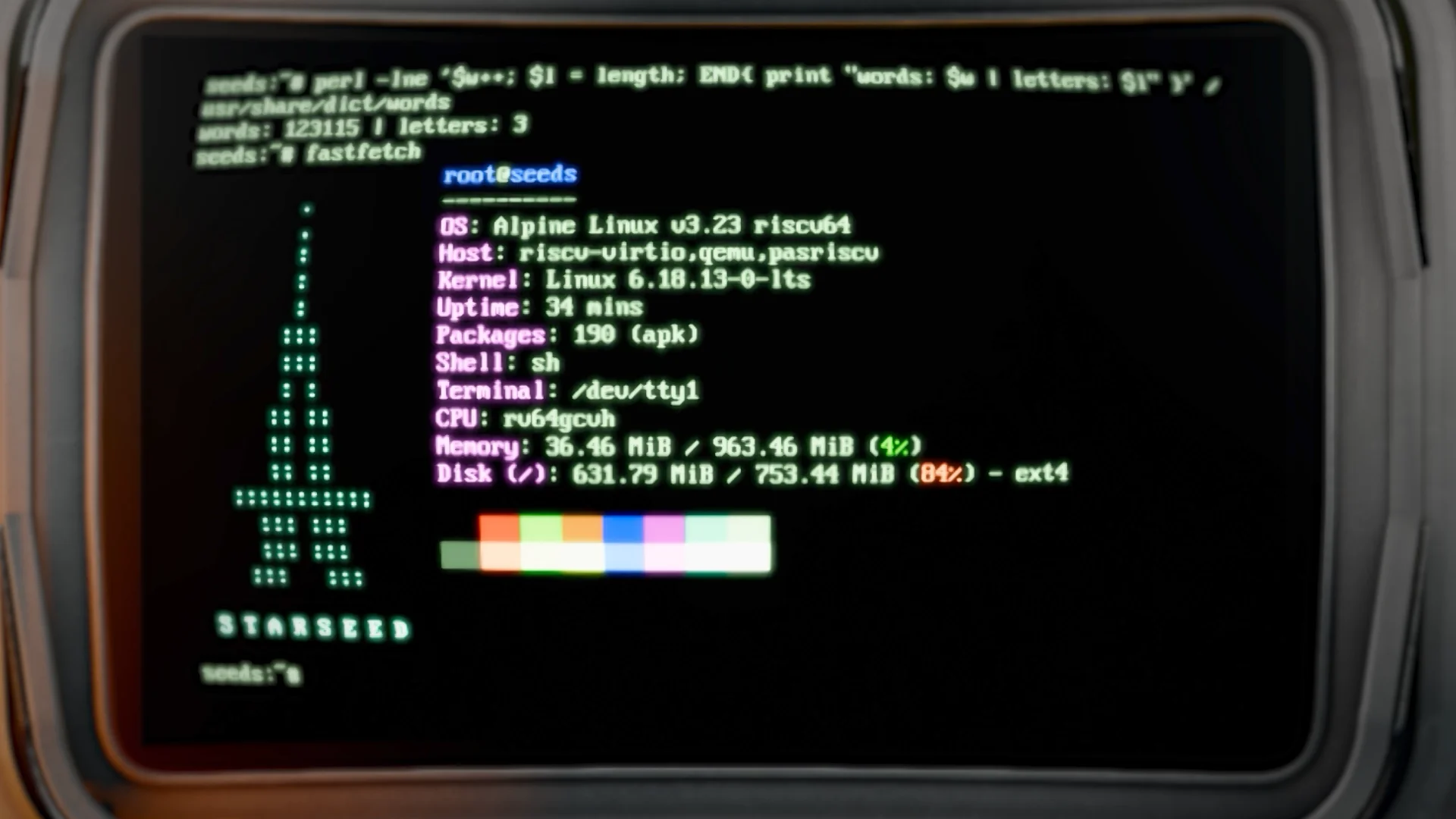
Alpine Linux riscv64 running on PasRISCV
oh, and spot the typo…
Emulation
First, there are two ways we could have done this: emulating only the userspace, or emulating a complete virtual machine. For PasRISCV we chose the latter and emulate a machine including display and storage devices, interrupts, everything down to the last thing, so that for the running kernel it appears as a complete hardware system, even though it’s virtual.
The emulated machine uses the 64-bit RISC-V instruction set architecture (ISA), which, in contrast to most proprietary architectures – like x86 and ARM – is an open standard and completely open and free to use under a permissive license. That means if you’re building a new hardware device based on it, you don’t have to pay any royalties for using the RISC-V ISA itself.
On the technical side, the system provides SMP/MultiHART, RV64GC, and RVA23 support, including the Hypervisor and Vector extensions, together with additional scalar and vector cryptography extensions. Nevertheless, listing and explaining all emulated features is beyond the scope of this introduction, so to get a full overview of the emulation head over to the PasRISCV repository.
CPU and FPU
To emulate the CPU, the emulator uses a hybrid approach: an interpreter combined with a tracing JIT compiler. As of now, the JIT is limited to x86-64 hosts, but about 99% of the instructions we encounter are supported by it.
Floating-point operations, for example, can be handled directly by the host FPU. For cases where stricter behaviour is required, PasRISCV offers an optional mode that combines software floating point with the interpreter. This exists because IEEE 754-2008 specifies some behaviour that can’t be reproduced exactly using the x86 floating-point hardware.

Linux
If you start a new game or load a saved game in SEEDS, the emulator in the background is already booting the system. A normal Linux kernel can be booted in two ways: directly through OpenSBI or through U-Boot. For a direct OpenSBI to kernel boot, all required modules and, more importantly, the disk images currently need to reside in the initramfs. Therefore, we use the more traditional OpenSBI to U-Boot chain, which then loads and executes the kernel. This allows us to have a normal disk image which holds the system.
These images can be attached to the guest system either as VirtIO Block devices or as emulated NVMe hardware over PCIe. Disks can operate normally in read-write mode, but they can also be attached read-only. This is especially useful for our game as we can have a root partition that gets replaced by game updates. In addition, we keep a separate user partition for the player’s own data, like the high score tables of the mini-games, until we have a proper mechanism to hold that state in the game state itself.
Host directories can also be made available inside the guest through VirtIO-9P or VirtIO-FS. This is particularly convenient during development because we can compile tools directly on the host and then access them immediately from inside the emulated machine. Otherwise, we’d have to inject the binaries directly into memory, or use a separate exchange mechanism, or even worse, reboot the emulator on every little change.
Our game uses a slightly modified version of the lean and excellent Alpine Linux v3.23.6 system, which some of us also love to run on our servers, together with our custom kernel build. However, a recent stock Alpine image also runs without problems.
Graphics
For graphics, our virtual game screens currently access their displayed pixels using the emulator framebuffer device. More specifically, we use SimpleFB backed by a custom MMIO display buffer.
PasRISCV provides several other virtual graphics adapters as well. One option is VirtIO GPU, which supports EDID and 2D functionality, along with experimental 3D/VirGL capabilities. Through its PCI emulation, it also provides devices supported by drivers such as Bochs VBE and Cirrus Logic. We even managed to run an X server with the Motif Window Manager in the VM, but it’s a bit too slow to be really usable on most machines.
For our game, however, the simple framebuffer display is quite useful, as it’s fast enough and lets us process its output with custom shaders running in the game. This way we add additional retro effects such as scanlines, phosphor glow, and similar – I’m tempted to say beautiful, but that of course is in the eye of the player – visual degradations of the 80s and 90s.

Audio
The emulator of course also supports audio. We emulate retro sound cards, such as the CMI8738 and FM801, with PCM, OPL2, and OPL3 available on both. Intel HDA and VirtIO sound are supported as well. OPL and OPN are closely related Yamaha FM synthesis families that influenced the sound of the mid and late 80s and early 90s of various consoles and PCs.
Even professional synthesizers such as the Yamaha DX7 were powered by related FM synthesis chips. Newer cards featured PCM playback, often retaining FM synthesis only as a legacy feature, until later cards left it out completely. PCM allowed the playback of samples and quickly – and imho sadly – largely displaced the distinctive OPL chiptune sound. Back then, most people were fascinated by the more realistic-sounding music that used samples, instead of sound chips. So more and more games used the new sample-based sound.
Nowadays, the sound of OPL has a relatively large fan base in retro circles that love computer music. Various websites and archives provide easy access to the vast libraries of 80s and 90s chiptune music. Fitting our somewhat retro-80s theme, our little proof-of-concept space game running on the computer in SEEDS is called Space Prowler. It features a charming retro pixel style and has a dedicated chiptune as its title theme, which combines both OPL3 synthesis and PCM sound samples for the drums.
I actually wrote a small editor named chOPLin to compose this music. This so-called tracker runs entirely in a normal Linux console; it even works from within the game using the computer’s 80×50-character, 640×400-pixel framebuffer console, albeit creating music in that way is a bit cumbersome. I plan to release the tracker as free and open-source software once I have some spare time, as I still have to polish it and make it more user-friendly.
Integration
The link between the emulated machine and the surrounding game uses Linux Virtual Sockets (vsock) for its communication. Moreover, we use a small binary serialization format. Conceptually, it’s somewhat like a binary version of JSON, highly optimized for fast (de-)serialization. Data can flow in both directions, much like with a normal network protocol. We also have a small priority queue and message-reference system, so we can handle urgent, prioritized messages as well as request-and-response exchanges.
For example, imagine that the in-game computer is displaying the planetary sphere. The client program that sits inside the virtual computer can request updated information about things such as terrain information or the locations of animals, and receive this data from the game running the virtual machine.
We also have most of the wiring ready for players to be able to program, reshape, and populate the whole planet through automation. As it’s a normal Linux system, you’ll be able to use Ruby, Python, or even Rust, C, C++, and Go to change and automate your world.
That said, it’s not our primary concept for the game at the moment, as there’s just as much satisfaction in building things by hand and manually shaping the planet into something beautiful.


Networking
The emulator also has real networking through its own Slirp-like userspace NAT implementation. It doesn’t rely on an external library for this, and it supports both IPv4 and IPv6.
As a result, the emulated Linux system has normal network access. For example, we can run Alpine’s package manager apk update and apk install to install packages directly from inside the virtual machine. Our own tools are also installed as signed Alpine packages.
However, networking is disabled in the game for the foreseeable future: the VM cannot make any outbound connections at all, mainly for security, isolation, and reproducibility.
Debugging
PasRISCV also contains its own custom disassembler and debugger. In addition, it can act as a GDB server. Although it currently is only partially implemented, this means you can use your preferred debugging tools with it, as long as they support GDB’s remote debugging protocol.
Coda
We hope you gained some insight into how SEEDS and PasRISCV function together to provide a fully usable, in-game Linux system to run our (and maybe in the near future your own) programs to create an immersive experience when taking on Naxiah’s journey in space.
And I don’t think I need to mention that Linux is a first-class platform for playing our game.
Fun fact: two-thirds of the creative and development team use Linux as their main OS. ;)