Maybe a better way to track the release history of a Git repo
While I was still at ZipRecruiter, our Git monorepo was developing an annoying problem: it had too many refs.
Whenever there was a deployment of any of the applications in the repo, to staging or to production, the deployment tool would create a tag object with a name like this:
refs/release/stg.www.our-app-2019-09-06T114410.954-0700-treesha-179dab6fd11bee5195f0f8e31cea3edfb86ae23b
The tag contained the name of the target tier of the deployment (stg here, for
“staging”), the app name and class of hosts on which it ran,
www.our-app in this case, the date
and time, and the hash of the tree that was deployed. This made a
complete record of what was deployed, where, and when.
After we had been doing this for a while, there were thousands of
these tag objects. Git is well-designed for handling thousands of
commits, but not for handling thousands of refs. Perhaps this has
changed, but at the time, Git would store refs in a file called
packed-refs, which, for each ref, contained an entry with the ref's
name and the ID of the object to which it referred.
(As with all things Git, the actual situation is somewhat more complicated. These additional ramifications don't affect the following discussion.)
Any operation that required resolving a ref name to its object had to
search through the packed-refs file, which was taking an appreciable
amount of time, far more than was desirable for an operation that
everyone did many times a day. This affected not just local operations
but operations on the Git server as well, and it was clear that it was
only going to get slower as time went on. Also, the outputs of
commands like git fetch and git branch were becoming increasingly
cluttered with the names of tag objects whose only purpose was to
record release history.
It seemed reasonable to me record the deployment history in the repository, but using thousands of tag objects clearly had serious drawbacks. In addition to the performance problems, the metadata itself was purely a convention in the tag name format, not legible to Git itself. There was a tree ID there, but nothing enforcing the rule that the tag should refer to a commit with that tree.
Also, the tag objects themselves seemed poorly-designed for the purpose. One good reason for storing history data in the respoitory is to render it immutable. But tags aren't immutable! They can be deleted and new ones can be inserted at any time, with any names desired.
And more important: consider the most natural sort of question that someone might want answered by the release history:
When did we last deploy the
www.our-appapp to production?
The only way to answer this question was to get the full list of all tags,
filter it for prod.www.our-app, then sort by date and take the last item.
Or similarly: What if the most recent staging deployment had turned out to be bad, and we wanted to immediately revert to the version before that? Again, we (or the reversion process) would have had to filter and sort a list of thousands of tags, then pick out the second-last one.
I proposed this alternative in 2019. It stores the deployment history of each app as a series of unnamed but related Git objects, using Git's own history mechanism, so it's simple, efficient, and meshes well with Git's commands.
I don't think it was ever adopted, and it might turn out to have serious drawbacks I haven't foreseen. But it might be useful to someone in a similar situation.
Currently, each time a new version of an app is deployed, we create a ref:
refs/release/stg.www.our-app-2019-09-06T114410.954-0700-treesha-179dab6fd11bee5195f0f8e31cea3edfb86ae23b
As these refs proliferate, many operations in the Git repo become slower and slower.
We can record this information in a way that is at least as useful and which doesn't clutter up the ref list.
Current practice
At present, the release procedure creates a ref something like this:
- A new release is created at commit H
A new tag object is created, pointing to H, something like
git tag -a refs/release/stg.www.our-app-2019-09-.... H
Every new tag object has a name in the ref database. This adds a name for every release. The structure is something like this:
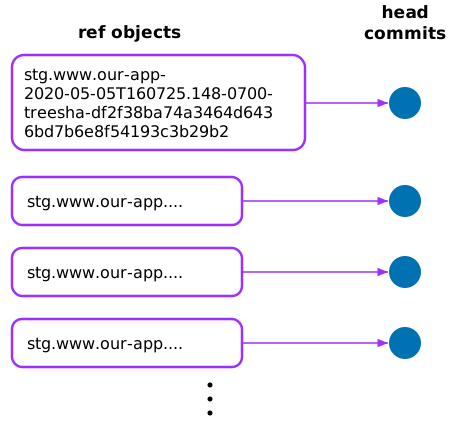 One ref object per release, each pointing to its own head commit
Alternative proposal
- Each (tier, app) pair is represented by a linked list of release commits
- The head of the list is the most recent release
- One ref points to the head of the list
- Older releases can be found by following the links back in time
Main point of this proposal: There is only one ref for each (tier, app) pair, no matter how many releases have been done.
It will look like this:
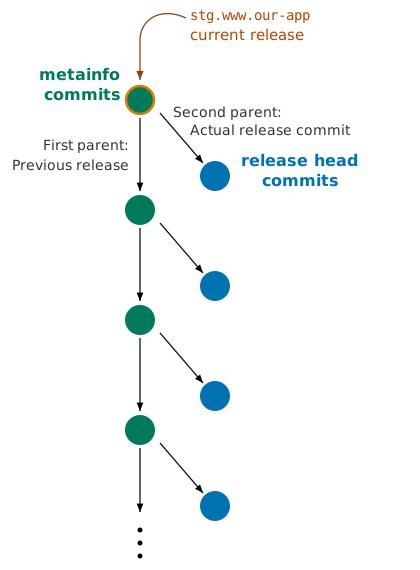 A chain of metainfo commits, each with the previous
metainfo commit as first parent and the actual release commit as
second parent
The one ref (which might or might not be an actual ref object) is
named stg.www.our-app
The
The git log
will produce a listing of
the release history.
Technical details
Creating this sort of two-parent commit is easy. Suppose the ref
stg.www.our-app points to the current
(Write some useful commit message into /tmp/message.$$.)
git commit-tree -p refs/release/stg.www.our-app -p H \
H ^{tree} < /tmp/message.$$
This creates a new -p options. The
first parent is the
The git commit-tree command creates the
git push origin N :refs/release/stg.www.our-app
The
Usage
This will be easier to use than what we have now, because Git's command set was designed to manage a list of commits linked in this way; this is exactly how Git normally expects to represent history. This natural fit with Git's command set shows up in many places.
You can fetch a complete release history for any project with a single fetch:
git fetch origin refs/release/stg.www.our-app :HISTORY
After this, git log HISTORY will list the entire release history in
reverse chronological order. All the usual git-log options make sense
to filter or search this list. For example, if we want to find the
last release before a certain date, we can use:
git log -1 --until=date HISTORY
If we want a forward-chronological list of release commit SHAs with their release dates, we could use something like:
git log --reverse --format="%P %cd" HISTORY
At all times:
- The
current release commit is accessible atHISTORY^2. - The
metainfo commit from n releases ago is atHISTORY~n. - The
release commit from n releases ago is atHISTORY~n^2.
Notice: if M is a metainfo commit that describes a release, M^
is the M^{2} is
the M is M^{2}^{tree}. These notations will work as expected in all
git commands; see git-rev-parse.
Because Git naturally understands this way of organizing history, it
will be easy to locate a particular previous release for
rollback. When we roll back, we can roll back to the exact same commit
as before: the new
We can see the differences between the last two releases, without knowing their exact dates, with something like:
git diff HISTORY~1^2 HISTORY^2
The git-interpret-trailers.
If the built-in commit structure is not big enough for everything we
want to record, the
Performance?
Ploni Almoni asks about the performance issues of tracing out a
linked list of commits. But this is exactly the same mechanism that
Git normally uses to record history. When we do git log, Git is
tracing a linked list of commits in exactly the way suggested here. If
any operation in Git is going to be fast, it will be this one.
Git currently takes a few seconds to trace the 275,000-commit history of our monorepo. Tracing the similarly-structured history of a few hundred release commits is not going to be an issue.
[Other articles in category /prog/git] permanent link