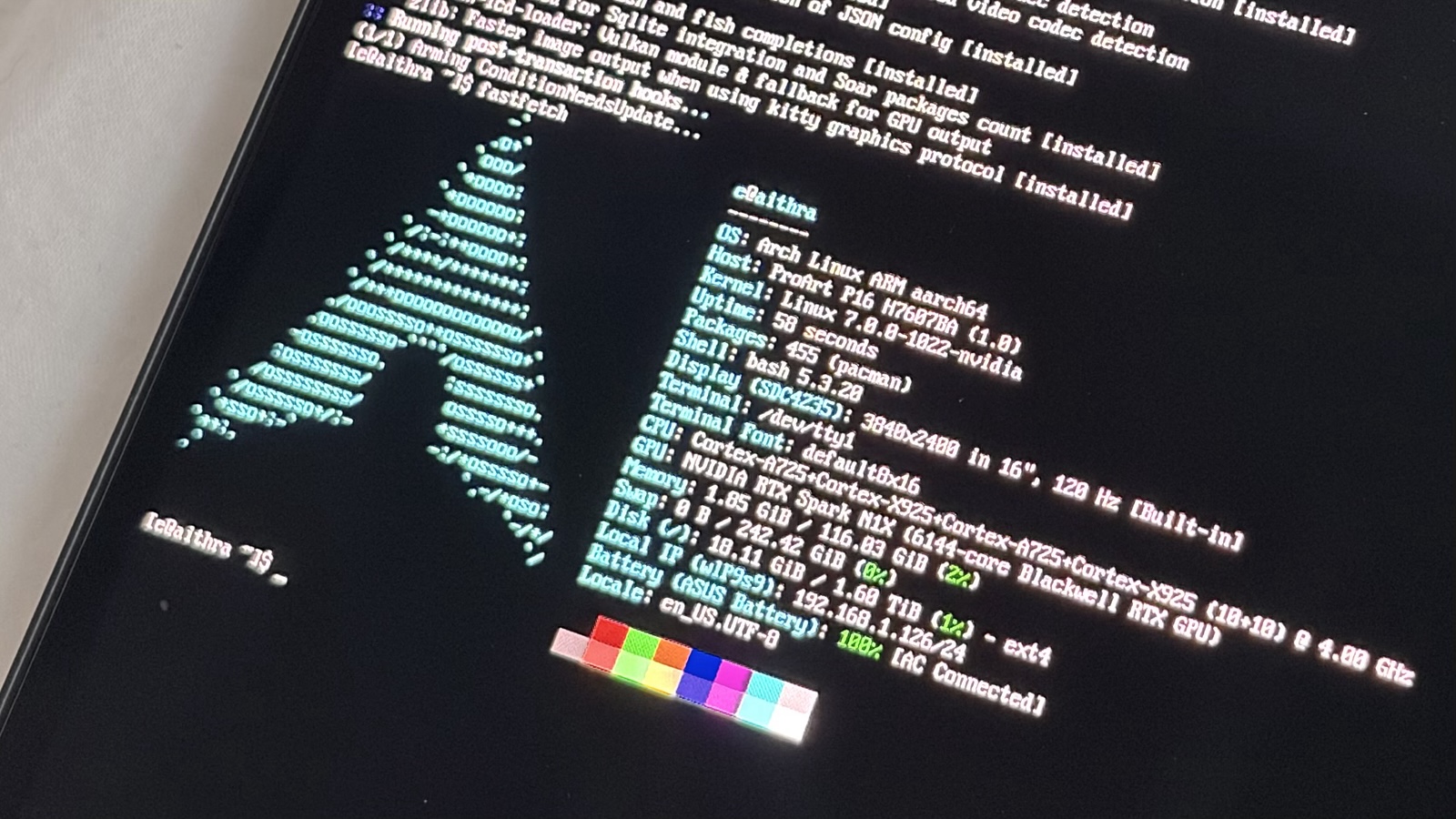
tl;dr - boo hoo microsoft bad. Arch Linux works, keeps up with Windows in 7-Zip, and reports the same 116.0 GiB memory pool to the OS and CUDA. My initial bootable setup and patches are here. This is for the ASUS ProArt P16 H7607BA-SE033W: the 128 GB RAM configuration with 6,144 CUDA cores and a 2 TB SSD.

When rumours started circulating about a laptop with over 100 GiB of RAM the GPU could access, I started thinking about all the things I could build on it and all the optimisations I could spend far too long playing with. I'm very pro open-weight models. Being able to run things locally and mess around with RL, quantisation and fine-tuning on a laptop would be sick. I already publish my own GGUF quants on Hugging Face, with over 160,000 downloads in the past month.
So I was less pleased to find out about the Windows-only official support. There are plenty of reasons to hate Windows. Mine include the privacy concessions during setup, the years spent waiting for Microsoft to let people put the taskbar on the side of the screen again, and the advertising. That last link is a collage of real Windows promotions, courtesy of Pureinfotech. You get it. I can go on forever, so let me stay on topic.

Arch is my preferred distribution, and I'm on the Arch staff as a package maintainer. I already put it on IBM mainframes (my FOSDEM slides), so it was always going to be my starting point here. This build uses Arch Linux ARM, the separate project that ports Arch packages to ARM, with the hardware support added on top.
NVIDIA has been doing kernel work for Ubuntu, which gave me a starting point. I incorporated that, fixed the ACPI override allocation and framebuffer mapping needed to get a console, and worked out the ACPI overrides from the laptop's own tables (thanks astra <3). The NVIDIA driver and ASUS speaker firmware came from official places on the internet (pls don't sue me computer companies). Keyboard support needed a patched hid-asus, and audio needed its own machine driver.
I put this together into a bootable USB and extended upstream Archinstall 4.5 to install the hardware support. The repo has the build scripts and patches, including the steps to dump your own ACPI tables and extract the speaker firmware from ASUS's driver package locally. Mine runs firmware H7607BA.300.
The build inputs are hash pinned. The hardware packages I put together over the weekend are signed with my Arch Linux Package Maintainer key, and the ACPI overrides come from the laptop itself.
The display runs at 3840 × 2400 and 120 Hz, and I use NetworkManager, PipeWire, and rootless Podman with NVIDIA CDI. The installer holds the kernel, NVIDIA, power-management and firmware packages with IgnorePkg, while ordinary packages keep updating from Arch Linux ARM.
CPU performance
I ran the suite on October 19 on native Arch Linux ARM, with kernel 7.0.0-1022-nvidia and NVIDIA driver 615.78.08. The laptop was plugged in with the performance profile selected. For the CPU comparison, I used published Windows results.
The CPU test is native ARM64 7-Zip 26.04 with a fixed 32 MiB dictionary. I ran one warmup and three measured passes at each thread count, then took the medians:
StorageReview tested a 128 GB HP OmniBook Ultra 16 with the same 20-core N1X, running native Windows ARM64 binaries. They report 7-Zip ratings in GIPS, so I divided the MIPS ratings in my raw logs by 1,000 to match. Higher is better.
Single-thread is basically a tie. With all 20 threads, my Linux setup is about 5% ahead on compression and 3% ahead on decompression. The HP review doesn't specify its 7-Zip version or dictionary size, so these percentages compare the two laptop setups.
ComputerBase also tested a ProArt P16 with the 20-core N1X. Converted to GIPS, its Windows 7-Zip score was 155.774; the median total from my three runs was 157.084. Their result sits inside my three-run range of 155.759 to 157.193 GIPS. Their machine was the 64 GB configuration and ran 7-Zip 26.00, and the chart doesn't give the dictionary size.
The memory split
The memory is a bigger flex. My Linux run reports 116.0 GiB as both system RAM and CUDA's total, from the same physical pool. Windows divides the RAM into dedicated GPU, shared, and CPU-only regions. CPU workloads can't use the dedicated GPU region, and GPU allocations can't use the CPU-only region.
The Windows NVIDIA app lets you change the dedicated reservation and reboot; Frandroid's 128 GB ProArt P16 reached 96 GiB. CUDA can go beyond that by allocating from shared RAM, subject to Windows' memory budget.
With a 91 GiB dedicated reservation, Frandroid's Windows setup reported a CUDA total of 109.7 GiB, including shared memory. My Linux setup reported 116.0 GiB, about 6.3 GiB more. What I care about is having the large pool available for CPU work too, without moving the reservation slider and rebooting between workloads.
Running Qwen locally
I ran NVIDIA's Qwen3.8-Flash-Next-FP4-Local checkpoint through vLLM with B12X CUDA kernels in a native ARM64 container, using mixed quantization and FP8 KV cache. I turned off thinking for this run.
Before loading the model, Linux reported 110.9 GiB of available RAM. vLLM logged 68.2 GiB for model loading and allocated another 21.1 GiB to the KV cache. That's nearly 90 GiB allocated to the model and KV cache on a laptop.
Model loading and compilation took about 16 minutes before the first request. The timings below start after warmup. PLE embedding tables are backed by disk and benefit from a warm page cache; other components use CPU offload. CUDA handles inference, with some of the model outside GPU memory.
I gave Qwen two buggy Python helpers to review, a long incident log with one failed operation to find, and a payment note to turn into JSON. Each task ran three times after warmup, with known answers to check against. I wanted to know how long I'd wait and whether it returned the right fields.
The incident task read nearly 10,000 tokens and returned the correct request, cause, and next action in under 6 s. Its answer was only 39 tokens long, which comes to 6.8 tokens/s over the whole request. Most of the wait went into processing the prompt, so for this task the response time tells me more than the tokens/s figure.
For code review, I estimated generation speed as (output tokens − 1) / (response time − time to first token), with both times in seconds. This includes stream overhead. Frandroid ran Qwen3.8-Flash-Next coding tasks on its Windows ProArt:
Both ProArt setups are around 30 tokens/s. For inference, Frandroid used an 85 GiB dedicated reservation and a context limit of 262,144 tokens; my context limit was 32,768 tokens. The prompts, quants, runtimes, and timing methods differ. This compares two working configurations; it doesn't isolate the effect of the OS.
I also sent four code reviews at once. The median batch finished in 5.314 s, producing 86.6 output tokens/s across all four requests combined. That rate includes prompt processing and response overhead. All 12 answers passed over three batches.
Then I left it cycling through the three tasks, one request at a time, for ten minutes. It finished 150 requests, 50 of each, and every answer passed the checks. Median response times were 4.036 s for code review, 5.921 s for the log, and 2.046 s for extraction. Comparing the first ten and last ten repetitions of each task, median response times grew by less than 1.6%.
All 171 measured responses passed the checks. That's three prompts repeated with deterministic decoding; the code-review check verifies the regression outputs. I kept every answer and raw event stream and checked them against the summaries.