about
Antimony is a computer-aided design (CAD) tool from a parallel universe in which CAD software evolved from Lisp machines rather than drafting tables.
demo
foundations
Antimony is built on three mostly-orthogonal axes:
- A framework for tracking information flow through directed acyclic graphs
- A geometry engine for doing CSG
- A standard library of shapes and transforms
Graph engine
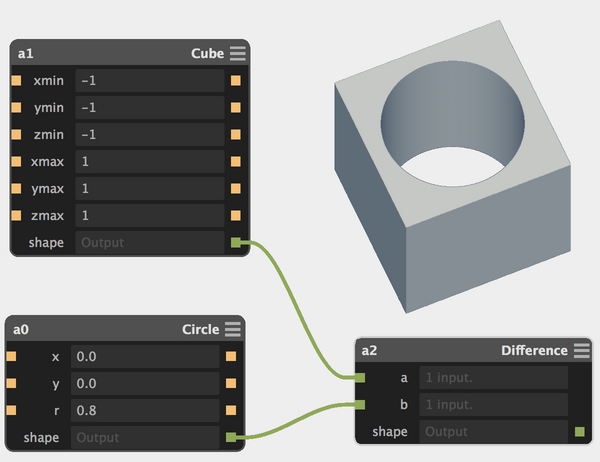
Solid modeling in Antimony is done by connecting nodes in a graph:
Each node is defined by a customizable script. Antimony uses Python 3.x plus a few extra magic keywords.
Here's what the circle node above looks like:
import fab.shapes

# Define a set of input ports
# (and inject variables into the local namespace)
input('x', float)
input('y', float)
input('r', float)

# Call the 'circle' function in the standard shapes library
# using the variables that came in from the input ports
c = fab.shapes.circle(x, y, r)

# Create an output port that produces the circle shape
output('shape', c)
Nodes usually represent a primitive shape or transform. Links are tracked and changes are automatically propagated downstream.

The graph engine scales up to complex multi-part assembles.


Geometry engine
Antimony's geometry engine uses functional representations for solid modeling. This representation is particularly suitable for modeling with boolean operations (union / intersection / difference).

In the application, the geometry engine renders shapes as shaded bitmaps. They're then blitted to a 3D viewport.

Antimony can export heightmaps for 2.5D processes and .stl files
for 3D manufacturing. The .stl export includes feature detection
to keep corners and edges sharp.

Standard library
Antimony's standard library defines many shapes and transforms, from basic (rotate, scale, boolean operations) to unusual (attract, repel, bend).
These shapes are used in node definitions, which typically add input and output ports and can optionally define UI features.
Here's an example of a node that defines UI features:
import fab

title('Rectangle')

input('xmin', float)
input('ymin', float)
input('xmax', float, 1)
input('ymax', float, 1)

output('shape', fab.shapes.rectangle(xmin, xmax, ymin, ymax))

# UI
sb.ui.wireframe([(xmin, ymin, 0), (xmax, ymin, 0),
                 (xmax, ymax, 0), (xmin, ymax, 0)], close=True)
sb.ui.point(xmin, ymin, 0)
sb.ui.point(xmax, ymax, 0)
In the 3D viewport, the UI features defined at the bottom of the script are drawn over the rendering of the rectangle.
These UI features are hooked back into the graph: dragging the points at the rectangle's corners pushes changes to the graph node.

As an aside: most users will be satisfied with the built-in shapes, but it's also possible to define custom shapes.
Shapes are represented with a prefix string syntax that's easy to parse but a bit cryptic to decipher. Here's the definition for the circle shape used above:
def circle(x0, y0, r):
    return Shape(
            '-r+q-Xf%gq-Yf%gf%g' % (x0, y0, r), # math string
            x0 - r, y0 - r, x0 + r, y0 + r)     # bounds
Unpacking and hierarchically indenting the prefix string gives
-
  r
    +
      q
        -
          X
          f%g
      q
        -
          Y
          f%g
  f%g
% (x, y, r)
This encodes a distance field representation of a 2D circle:
f(x,y) = sqrt(pow(x - x0, 2) + pow(y - y0, 2)) - r
where x0, y0, and r are the circle's center and radius
(specified when circle is called).
The exact mapping from prefix strings to infix functions is left as an exercise for the reader (or can be looked up in Appendix A of my thesis).
download
A prebuilt Mac application can be downloaded from the Github releases page.
Antimony's source is available on Github, along with instructions for building it on Mac and Linux.
development
Antimony is a long-running project under active development.

It's at a beta level of stability: solid, but not recommended for mission-critical use.
If you're interested in contributing, there's a pretty low bar for entry. Given basic Python knowledge, you can get started making custom nodes (like this HSB color node contributed by RobotGrrl or the plethora of nodes contributed by Neil).
For more ambitious folks with C++ experience, there are a whole host of improvements that could be made, from speeding up rendering to cleaning up the UI and optimizing graph evaluation. Send me a note if this piques your interest.
history
Antimony grew out of my work on powerful personal-scale CAD/CAM workflows at the MIT Center for Bits and Atoms.
It's the latest tool in a line of software that included cad_ui and kokopelli, and draws inspiration from fabserver.
For a historical perspective, there are a set of earlier Antimony writeups:
- Early 2014 (developed as a demo for the World Economic Forum)
- Fall 2014 (updated for use in How to Make Almost Anything)
This update coincides with the 2015 edition of Fab Academy; use this search query to see how people are using it.