Hello friends! In October, we moved style and layout off the main thread, built a JavaScript JIT, replaced our WebAssembly engine, redesigned the browser UI, and passed Safari Technology Preview on Web Platform Tests. :^)
Ladybird is entirely funded by companies and individuals who believe in the open web. You can see everyone supporting the project on our sponsors page, and we’re grateful to all of them. If you’re interested in sponsoring, please contact us.
Style and layout no longer wait for JavaScript
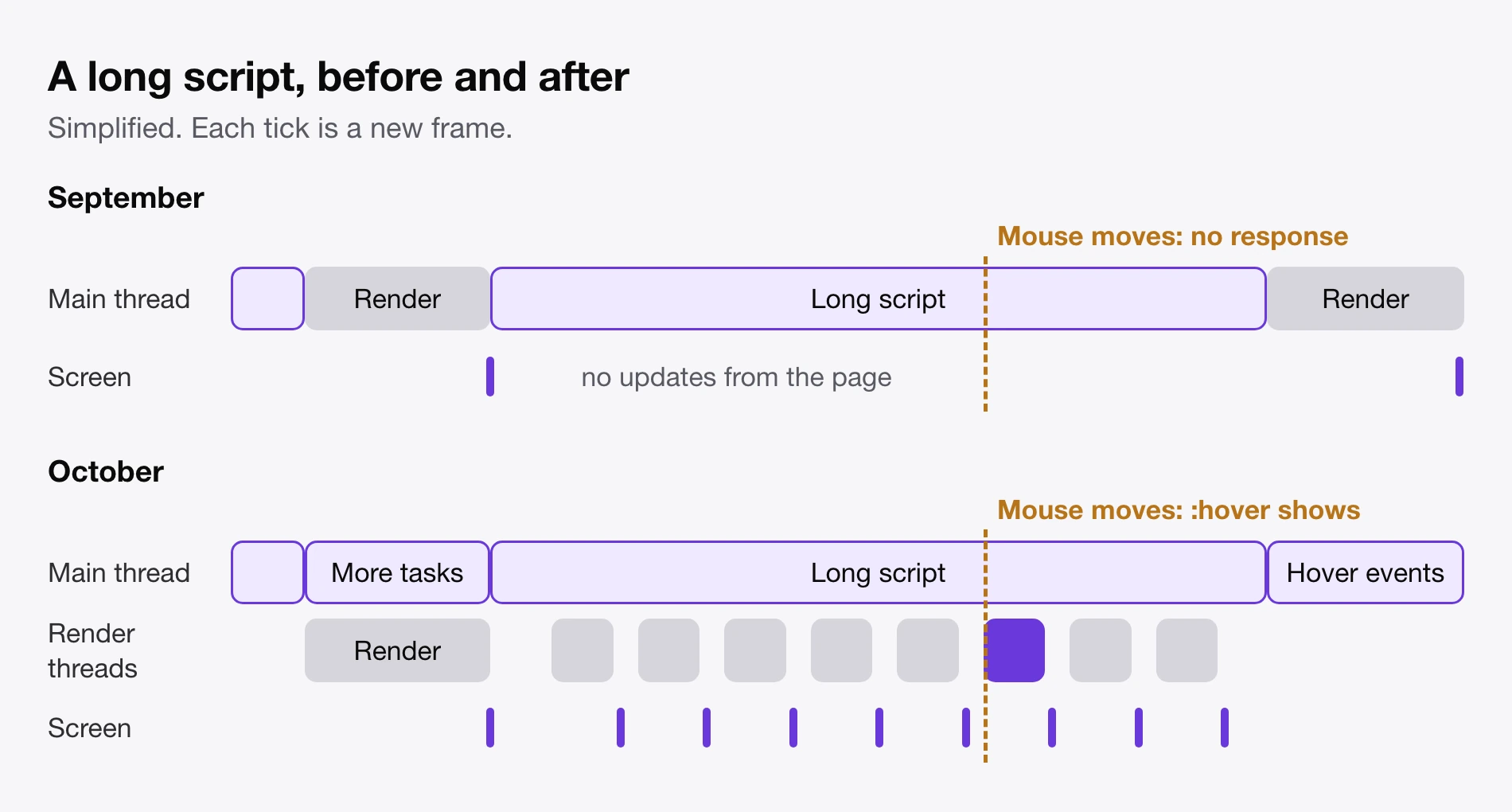
Browsers normally run JavaScript, style, and layout on one main thread, one at a time. While a script runs, the page can’t update. A few simple animations can keep going on the compositor, but everything else has to wait.
We moved style and layout to their own thread, and paint recording to another (#12377, #12400). They now run at the same time as JavaScript (#12396, #12432, #12460). If a script asks for layout information, like an element’s size, it waits until pending layout work is finished, so it never gets stale data.


So two things now work during a long script:
- CSS animations keep running while JavaScript is busy. This includes animations that change layout, like
widthandfont-size(#12433, #12447, #12451). -
:hoverkeeps working while JavaScript is busy. The render thread finds the element under the mouse, applies its hover styles, starts any transitions, updates the cursor, and draws a new frame. When the script ends, the main thread catches up and fires the hover events (#12530).
As far as we know, no other browser can do this today. Here’s a text animation while JavaScript blocks the main thread in 1.5 second bursts, with Ladybird in the top left:
And here’s :hover on a page running JavaScript for 250ms at a time, with Ladybird on the left and Chrome on the right:
You can also try it yourself. The button blocks the main thread for three seconds. Most browsers keep the square spinning, but freeze the bar and the hover target.
Idle
A JavaScript JIT
On Linux and macOS, LibJS now compiles hot JavaScript to machine code, on both x86-64 and AArch64 (#12613).
We decided against a JIT in the past, and did what we could to push and tune the interpreter instead. It’s already competitive, so making it twice as fast would be a huge effort, and that would only turn a 300ms hang into a 150ms hang, which you’d still notice. So we needed an optimizing JIT.
The design is deliberately boring: speculative optimization based on runtime type profiling, like other JavaScript engines. For now, we just want to go reasonably fast.


While code warms up, we record things like which types and object shapes it sees (#12588). The compiled code uses those recordings to make guesses, like “this value is always an integer”, and inlines small functions (#12595, #12598).
To find bugs during development, we used a fuzzer that ran the same code in the JIT and the interpreter and compared the results (#12601).
A new WebAssembly engine
We replaced our C++ Wasm engine and Cranelift with a new engine that has its own interpreter and JIT (#12963). It supports newer parts of WebAssembly that the old engine didn’t, like exception handling and GC. On the JetStream 3 Wasm workloads both engines can run, it scores about 7x higher.


In July, we built flap, a small language and compiler for writing LibJS’s interpreter. The Wasm interpreter is written in flap too, so one source builds it for x86-64, AArch64, and Windows x64. Hot functions move from there to the JIT, even in the middle of a running loop.
We’re making great progress on performance. JSLinux, an x86 PC emulator, now boots Alpine Linux to a shell in 1.8 seconds, while Chrome takes 1.5.
Benchmarks


Web Platform Tests (WPT)
On October 26, we passed Safari Technology Preview on WPT. :^) We ended the month at 2,184,722 subtests, a gain of 75,650.


Most of that gain came in five days, from about 2.12 million on October 22 to about 2.18 million on October 27. We pointed AI coding agents at WPT and asked them to fill in missing functionality. They made lots of small fixes, and those added up. Our biggest gains for the month were about 30,000 in /css and 10,000 in /editing.
A new browser UI


Until now, our UI had grown organically, with tinkering here and there. This was the first time we sat down and mapped out a complete design. We kept it modest and quiet, so the attention stays on the page.
It covers tabs, toolbars, menus, and our own about: pages on macOS and Linux, in light, dark, and a violet dark theme for private windows (#13271, #13169, #12815).


- Tabs: you can pin tabs, search all open tabs, and restore your windows on launch (#12757, #13271).
- Form controls got a new look, and date and time inputs got a picker (#13554).
- Scrolling: smooth mouse wheel scrolling (#12593), elastic overscroll on macOS (#12624), touchpad momentum on other platforms (#12345), and scrollbars that hide until used (#12997).
Sites that work better
- Google Slides: presentations open instead of showing an error (#12497).
- GitHub: Mermaid diagrams render (#12383).
- ChatGPT: the text box grows as you type (#13050).
- nytimes.com and reuters.com get past their bot checks (#12718, #12188).
- Instagram: videos show their first frame instead of staying blank (#12898).
- Gmail: reloading no longer keeps the old page in memory (#12689, #12660).
- x86CSS , an x86 emulator made of CSS, is now usable (#12911).
New browser features
- Screen readers: we’ve added first support for VoiceOver on macOS and Orca on Linux (#9156). There’s still a lot of work to do here.
- Spell checking in text fields on macOS (#12638).
- Picture-in-Picture (#12542).
- Links to text: links can scroll to a piece of text and highlight it, and you can create them from the context menu (#11121, #12744).
- Permissions: sites can now ask for your location and microphone (#13336, #12604).
- DevTools: Inspect Element (#13348), console autocomplete (#13355), and expandable objects in the console (#13360).
- Smaller additions: Find in page can highlight all matches (#12434), ad blocking can be turned off per site from the toolbar (#12695), and we added Reload Without Cache (#13056).
More of the web platform
We rendered this page in Ladybird, using features that landed in October:


From the top left, that’s multi-column (#13026), display: grid-lanes for masonry (#13236), MathML (#13062, #13141), corner-shape (#12942), CSS Motion Path (#13027), much more of anchor positioning (#13021, #13079, #13166), and text-wrap: balance (#13461).
We also added:
- CSS:
calc-size(), which lets heights animate to and fromauto(#13006), plus vertical writing modes (#13103),zoom(#13237), thestretchsizing keyword (#13006),shape()andborder-shape(#12942),field-sizing(#13050), view progress timelines andanimation-range(#12943), and the start of SVG animation (#12823, #13498). - Web APIs and more: the HTML Sanitizer API (#13185), Touch Events (#13249),
Cross-Origin-Opener-Policy(#12296), Paint Timing, Event Timing, Largest Contentful Paint (#13110), WebVTT cues (#12895), wide-gamut canvases (#13097), WebDriver BiDi (#13167), JavaScript’susingandawait using(#13102), and manyexecCommandandcontenteditablefixes (#13186, #13038).
Security and process isolation
Web pages run in sandboxed renderer processes, so a malicious page that takes over its renderer should be stuck there.
We kept fixing security issues from many sources, including ways around that sandbox. For example, a compromised renderer could ask the browser process to open any file on your computer. Now only a renderer showing local files can read them (#12582, #12590). Renderers could also fake a user click to open popups or read the clipboard. The browser process no longer trusts them on this (#12597).
We also split the browser into more processes, so a compromised one can reach less:


- Cross-site iframes get their own renderer by default (#12647), and so do cross-site popups (#12296).
- Each top-level site gets its own network process, and the HTTP cache and third-party cookies are kept separate per site (#13144, #12424).
- Each renderer has its own audio process (#12604) and image decoder (#12437).
Media and Windows
On Windows, video now plays and YouTube works (#12646, #13195). Hardware video decoding moved to its own process and now works on Linux through Vulkan (#12868). We also read MP4 files ourselves now instead of using FFmpeg, which fixes problems with seeking and buffering (#12641).
More C++ moved to Rust
LibJS’s runtime moved from C++ to Rust just before the JIT landed, so our JavaScript engine is now all Rust, apart from its flap interpreter and the garbage collector (#12492). The new Wasm engine is Rust as well. WebGL, 2D canvas, IndexedDB, Streams, and URL also moved over (#12699, #12935, #13287, #13083, #12998). We also deleted the C++ style computation, so style is now computed entirely in Rust (#12346).
Getting ready for alpha
Our first alpha is planned for later this year. This month we added:
- Release builds: macOS archives, Linux tarballs,
.deband.rpmpackages, and Flatpak bundles (#13176, #13313, #13340). - Crash reports: after a crash, you can review a report and choose to send it to us (#12298, #12342).
- A welcome page to pick your tab layout, search engine, and ad blocking (#12333).
- Reporting broken sites from inside the browser (#12880).
That’s it for October. Thanks for reading, and we’ll see you next month!