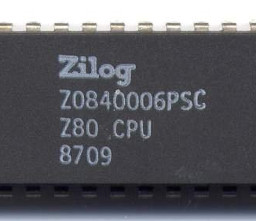
 This article is about using the
z80pack
Z80 emulator to run CP/M on Linux, and then using the CP/M implementation
to run Zork 1. I've chosen Zork 1 for this example because it's a
non-trivial program that, nonetheless, uses only plain text input and
output. Running something like WordStar might be more illustrative, but
it raises terminal-related problems that I don't want to get into in this
simple example. However, I will discuss this subject at the end of the
article.
Note:
There is absolutely no practical reason to play Zork using a CP/M emulator. There are many better ways to play Zork -- should you want to -- on a modern computer. A reason -- probably the only reason -- for using a CP/M emulator is to become familiar with CP/M in general, with a view to building your own Z80-based retro computer.
Zork is an early example of what these days is called "interactive fiction", but was know as a "text adventure" back in the days when all computing was text-based. Zork accepts simple instructions like "take axe" and "look at box" as input to what is essentially a puzzle-solving exercise. CP/M is an early operating system, originally for microcomputers with floppy drives, but eventually for early hard drives. Almost nobody under the age of 50 remembers using CP/M when it was the latest and greatest, but its legacy lives on in MS-DOS, which it inspired.
CP/M was originally developed for 8080 microprocessors, but was more widely used with the Z80. To run CP/M on Linux, probably the easiest approach is to use a Z80 emulator.
In this article I'll outline how to obtain and build z80pack and some CP/M tools for Linux, how to set up virtual disks to store the Zork files, and how to run the program from the CP/M command prompt.
I'm assuming that you're familiar with Linux, and willing to work with command-line tools. I also assume you have at least an inkling what CP/M is.
Installing z80pack
I don't think that z80pack is routinely available in standard Linux repositories -- if it is, it might not be up-to-date. You'll need to Download the source and build it.
Unpack the source into any convenient directory. I'm
using $HOME/lib/z80pack-1.37.
Compile the core:
$ cd ~/lib/z80pack-1.37/cpmsim/srcsim
$ make -f Makefile.linux
Compile the supporting tools:
$ cd ~/lib/z80pack-1.37/cpmsim/srctools
$ make -f Makefile.linux
Test that the installation is basically functional, by starting CP/M 3:
$ cd ~/lib/z80pack-1.37/cpmsim
$ ./cpm3
Note that cpm3 is just a script, that runs ./cpmsim after copying
relevant disks from the disk image library (more on this below).
Build and install cpmtools
cpmtools is a set of utilities for managing CP/M disk images. It can list disk image contents, and copy files to and from them. We'll need this for copying program files and data from the host system to CP/M.
cpmtools is available in various Linux repositories, but I found that the repository version for my (Fedora 31) system did not work reliably. It's easy to build from source, however.
Download the source.
Unpack the archive, run ./configure, then make,
the sudo make install.
The default installation is in /usr/local/bin which may,
or may not,
be in your $PATH.
How z80pack handles disks
z80pack uses files (images) to represent physical disks, as most virtualisation software does. The files have a structure that is in some senses a representation of a physical disk, so the tools that manipulate them (that is, the utilities from the cpmtools package) need to know about physical disk structure. The cpmtools utilities assume, by default, a 720kB, 8-inch floppy disk -- this is fine for many purposes. It will be fine for running Zork 1, in fact, but I'll explain how to create a hard disk image anyway, because it's likely that you'll need to at some point.
cpmsim looks for disk images in the "./disks" directory by
default. That is, it looks in a directory relative to the current
working directory. It supports,
essentially, six disk devices: floppy drives A: to D:, and hard disks
I: and P:. It expects to find images for these disks as files
drivea.dsk, driveb.dsk, etc. If these image
files are not all present, cpmsim will still start -- it will just respond
as if there's no medium in the drive.
The minimum needed to boot CP/M 3 is the image
disks/library/cpm3-1.dsk
as drive A: However, there are some useful utilities on the second
disk of the CP/M set, destined for drive B: So:
$ cp disks/library/cpm3-1.dsk disks/drivea.dsk
$ cp disks/library/cpm3-2.dsk disks/driveb.dsk
You should now be able to run ./cpmsim, and you'll find
that only drives
A: and B: are available.
Let's create a 4Mb hard disk to serve as drive I: (CP/M-3 actually supports up to 500Mb, but 4Mb is more than enough for this example).
$ /usr/local/bin/mkfs.cpm -fz80pack-hd disks/drivei.dsk
In this command, z80pack-hd refers to a set of physical disk
parameters that are stored in the file /usr/local/share/diskdefs.
Omitting this parameter will result in the creation of a 720kB floppy disk
image.
Obtaining and installing the Zork 1 program files
Like all the original Infocom games, the Zork series exists in a kind of legal limbo, and probably will continue to do so for at least another ten years. It isn't clear who now owns the intellectual property, and what redistribution terms, if any, exist. Consequently, although it's easy to get hold of the CP/M version of Zork 1, there is no "official" source, and I'm not going to be hosting it myself. I got my copy from here.
The CP/M version of Zork 1 consists of two files: the binary
ZORK1.COM and the data file ZORK1.DAT. The data
file is actually a z-machine program, and can be played using various
alternative z-machine emulators, like frotz. These two files need to be placed
into the same disk image, like this:
$ /usr/local/bin/cpmcp -fz80pack-hd disks/drivei.dsk ZORK1.COM 0:
$ /usr/local/bin/cpmcp -fz80pack-hd disks/drivei.dsk ZORK1.DAT 0:
Note:
CP/M disks do not support subdirectories. Instead, they have numbered "user areas" which can be selected at the command prompt. In the commands above, we're copying to the default user area, area zero.
Playing Zork 1
There is a slight complication related to the use of the "backspace" key
in cpmsim. In general, Linux terminals and terminal emulators
generate the DEL code (ASCII 127) when you hit the backspace key.
The CP/M command prompt will respond to
DEL and erase a character, but Zork 1 requires the more traditional "ctrl-h"
(ASCII 8). You could still type "ctrl-h" explicitly to delete a character,
but it's more elegant to
set the terminal so that the backspace key actually generates a ctrl-h.
With Gnome terminal,
the relevant setting is in the "Compatibility" tab of the profile settings
page. Other terminals and terminal emulators will have other ways to
change this setting.
Having made this change, you'll probably have to tell the Linux terminal infrastructure about the new key mapping, or the backspace key won't work anywhere except in Zork. To do that:
$ stty erase ^H
The Linux shell should still work as normal, but the backspace key will be generating a different code. Now it should be very straightforward to run Zork 1:
$ ./cpmsim
...
...
A> i:
I> zork1
ZORK I: The Great Underground Empire
Copyright 1982 by Infocom, Inc.
All rights reserved.
ZORK is a trademark of Infocom, Inc.
Release 25 / Serial number 000000

West of House
You are standing in an open field west of a white house, with
a boarded front door.
There is a small mailbox here.

>open mailbox
Opening the mailbox reveals a leaflet.

>read leaflet
(Taken)
WELCOME TO ZORK
     ZORK is a game of adventure, danger, and low cunning. In
it you will explore some of the most amazing territory ever
seen by mortals.

    No computer should be without one!

    Copyright 1982 by Infocom, Inc.
          All rights reserved.
  ZORK is a trademark of Infocom, Inc.
... and away we go.
Further adventures with CP/M
CP/M was a hugely popular operating system in its day, and there is a massive amount of software available for it. Much of it is in a legally-uncertain position, as the Zork games are. However, the software is easy to obtain and, as "abandonware", using it for private and educational purposes is unlikely to upset anybody.
The "killer app" for CP/M was WordStar, and this rudimentary word processor is still available, and surprisingly widely used. Another honourable mention goes to Borland's Turbo Pascal -- an astonishingly good compiler, which used various tricks to get around the limited RAM (64k) that the Z80 could address.
All these applications are screen-based, rather than line-based; running them raises complications related to terminal handling. There was no universal way of doing terminal output in a CP/M application -- each application made its own provision. z80pack does not provide a terminal -- it just passes the output from the CP/M program to the terminal that is hosting it. Most Linux terminal emulators are broadly VT100-like, and if you configure CP/M software to use a VT100 or VT52 terminal, you'll probably get reasonable results.
Have you posted something in response to this page?
Feel free to send a webmention
to notify me, giving the URL of the blog or page that refers to
this one.