"One thing about which fish know exactly nothing is water." — Marshall McLuhan
SSH is a tool so ubiquitous that we've forgotten what it actually is: a multiplexed, encrypted byte stream accessible on a cross-platform rendering engine that ships on every laptop, server, and phone on earth. A number of terminal protocols have slowly added graphics, clipboard sharing (including images), notifications, mouse support, and more on top of SSH.
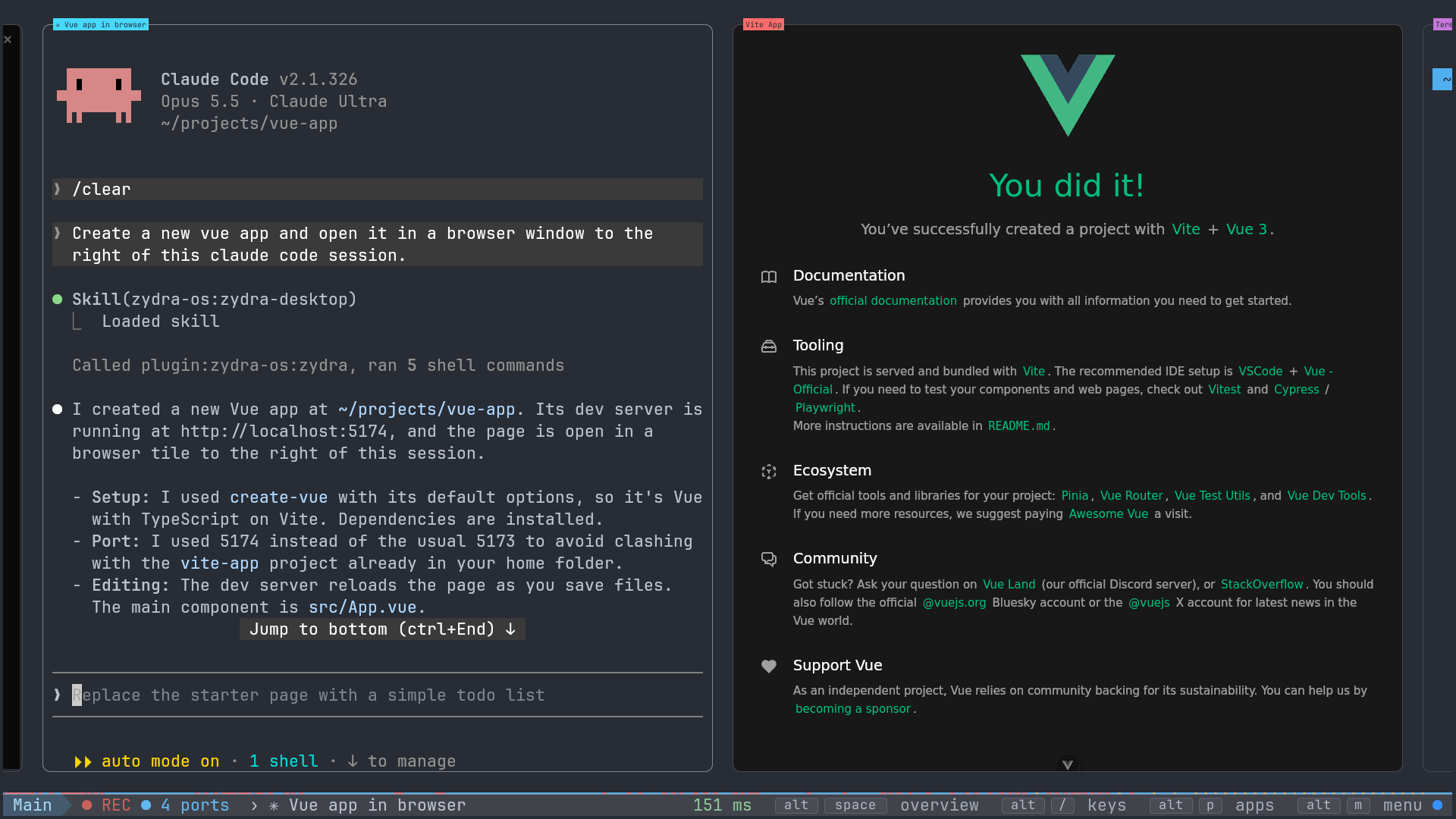
To see just how far you can push it, I've made a microVM with a desktop environment designed from the ground up to render natively over SSH. You can try it right now (no sign-up):
ssh zydra.sh
ssh -p 443 zydra.sh   # if on an office network
ssh -t zydra.sh dino # SSH port of the Chromium T-Rex game, for fun. 
Terminal Protocols (and matching terminal support)
All terminal protocols work on data that can be passed through SSH, so typically, any terminal protocol will extend to SSH.
Perhaps the most ubiquitous new terminal protocol is the Kitty Graphics Protocol, which superseded the older Sixel and iTerm2 graphics protocols. It allows for compression, client-side graphical state (via VRAM), and even animations entirely on the terminal.
Graphics alone don't make a complete GUI, though. SSH has protocols that cover all other angles:
Notifications:
OSC 99"Rich Notifications" allow image, text, and body.OSC 777(our first fallback) allows only text and body, andOSC 9(our last fallback) allows only a title.We end up using a similar fallback for many things.
- Clipboard sharing:
OSC 52handles bidirectional clipboard sharing, and Kitty'sOSC 5522adds image and arbitrary MIME-type transfers on top of that. - Mouse support:
CSI ? 1000-1006help track the mouse and give us its precise coordinates. - Synchronized Output (Batched Rendering):
CSI ? 2026allows atomic rendering, preventing visual tearing and flickering. - File upload (Kitty): The Kitty terminal uniquely supports a file upload feature, which
zydra.shuses to allow the upload of projects and related files to personal VMs.
SSH-native compositing: How I made it fast
A few tricks make compositing over SSH fast. Firstly, where possible, especially when streaming terminals, we simply stream them as text rather than unnecessarily streaming it via graphics. The compositor's UI framework itself cleverly overlays traditional text over carefully aligned graphics, saving bandwidth. In the case of zydra.sh, this allows us to efficiently stream the entire cloud computer's desktop UI over SSH.
Next, we optimize graphics by sending a sort of "grid" of pixels. Each cell has its own updates, where the previous frame is compared to the current frame to catch and send updates, avoiding having to constantly stream the full screen. Kitty also offers both RGB and RGBA, and so by removing transparency where it's not needed, we save another 25% in bandwidth. We also track ping and other factors to determine how well the client handles the stream: lowering the resolution in select cells, especially when scrolling, to relieve pressure. We also use Kitty's client-side state to hold graphics ahead-of-time before they're displayed on screen, as well as holding repeated UI components.
Backwards Compatibility
Not all terminals support all the latest terminal protocols, so the compositor must also fallback to older graphics protocols Sixel and iTerm2, and when necessary, fall back to pure textual streaming, using ASCII to replicate some UI. In the case of notifications and other protocols, multiple protocols similarly exist, which we also gracefully fallback to when needed.
Parsing terminal versions and querying capabilities allows us to get an idea of what the client supports. We also continually verify that features work as expected on the client as the session boots. The Kitty terminal itself I've found to have very reliable support for all graphics protocols zydra.sh relies on.
SSH often beats webapps and VNC at their own job
VNC is limited to sending pictures of the screen and diffing frames to find what changed. With zydra.sh's approach, apps directly tell the compositor what changed, and terminal text is sent as text you can select and copy natively. The browser is a WebKit build that delivers frames to the compositor as DMA-BUFs without a readback, which can be driven agentically via Playwright.
While webapps have advantages, especially in client-side state, WASM, and WebGPU, they don't really capture the universality and ease-of-use of an SSH session. SSH keys double as authentication, and -A allows you to SSH into servers from within a remote microVM itself. Webapps also can't be accessed from a pure TTY.
SSH also has sshfs, so you can mount your VM's filesystem locally:
sshfs zydra.sh: ~/zydraWhere SSH still struggles and what I'm doing about it
On Android, SSH is technically "available" through Termux, although it can be finicky. I've made a webapp version of the zydra.sh compositor that's more responsive and accessible in mobile for this use case.
SSH also still poses limits around audio (as agents are increasingly used with dictation), and despite how much the Kitty graphics protocol helps, it leaves a lot of optimization on the table due to a lack of stronger client-side state and streaming protocols.
My SSH-native compositing system and microVM desktop environment based on it are the backbone of my broader attempt to create an actually pleasant agent sandbox :). A cloud computer without cloud friction if you will. Another article which describes how I added a "timeline" feature to zydra.sh that allows you to rewind the VM as if watching a livestream is available here: Agents need an undo button. You can read more about me and my background on my portfolio, too.